
Testing REDA in a Sandbox
A sandbox is a full copy of your Salesforce org that you can break safely — the right place to rehearse a configuration change, a new leasing rule, or an upgrade before it touches production. Because REDA has no way to switch its automation off during data work, a change that looks small can cascade widely, which is exactly why you try it in a sandbox first. This guide is about the REDA-specific parts of that: the org-local state you must re-check in every fresh or refreshed sandbox, the minimum set of background jobs to schedule so a test actually runs, and the reset and delete-guard realities you'll meet. The platform mechanics of sandboxes — types, refresh cadence, how data copies — are standard Salesforce, so we point you to the official documentation for those.
Access you'll need. Creating and refreshing sandboxes is a Salesforce administrator task. Inside the sandbox, the same REDA permission sets apply — they copy with the org — so the REDA Admin Console still requires REDA - Master Data - Admin.
Why test in a sandbox
Two kinds of change earn a sandbox rehearsal every time:
- Leasing Rule edits. Editing a Leasing Rule re-copies its settings onto every active lease governed by that rule — overwriting manual tweaks in the process. That's a wide, hard-to-undo blast radius, so a sandbox is where you learn which fields move before you touch production.
- Upgrade rehearsal. A new REDA release lands in a sandbox first. Rehearse the upgrade there — confirm your jobs, settings, and integrations still behave — before you upgrade production.
Charge and billing-policy changes (recurring-invoice windows, late-fee and month-to-month parameters) and flow-deactivation experiments belong here too, for the same reason: you get to see the side effects in a place where they don't matter.
REDA state to re-check in every sandbox
A sandbox copies your org, but several pieces of REDA state are per-org — they don't reliably survive a copy or refresh, and a sandbox will happily run with whatever it inherited or lost. Run this checklist against every fresh or refreshed sandbox before you trust a test:
| Check | Where | Why it matters |
|---|---|---|
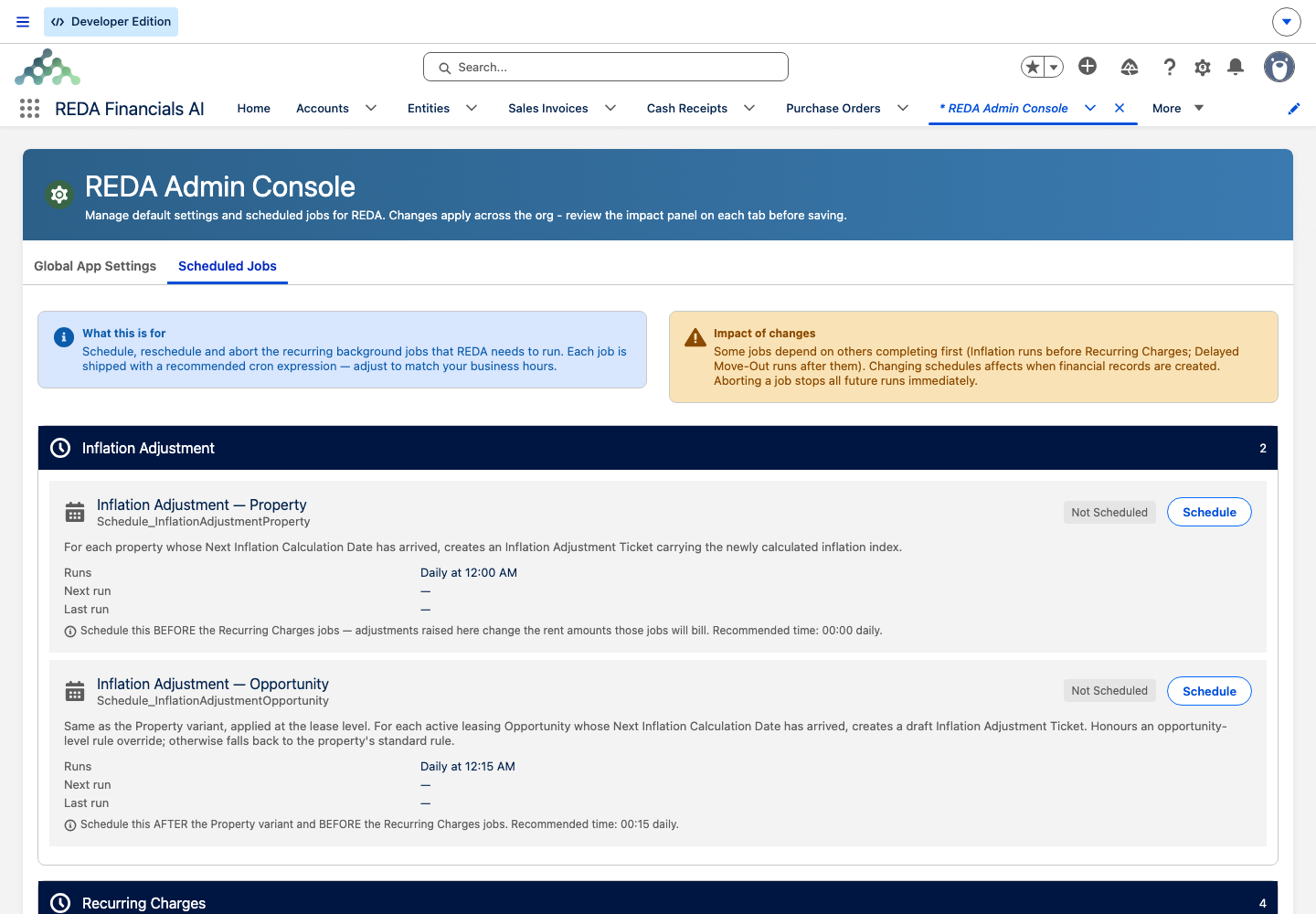
| Scheduled jobs present for what you're testing | REDA Admin Console → Scheduled Jobs | Schedules are per-org admin state — nothing is guaranteed to be present. |
| Accounting extension setting | REDA Admin Console → Global App Settings | An org-local setting; it decides whether invoices sync to REDA Financials during your test. |
| Multi-currency setting | Global App Settings | The master gate for currency-stamping behavior. |
| Data Service disabled or re-keyed | Data Service configuration (admin) | Web-lead keys are org config — live forms must not point at the sandbox, and the sandbox must not receive production traffic. |
| Portal / site base-URL settings | App settings (org-local records) | REDA flows deep-link through these URLs; stale production URLs in a sandbox misdirect test flows. |
| Which suite packages exist | Setup → Installed Packages | A REDA-only sandbox behaves differently from a full-suite one (for example, no invoice-to-Sales-Invoice sync without the Financials extension present). |
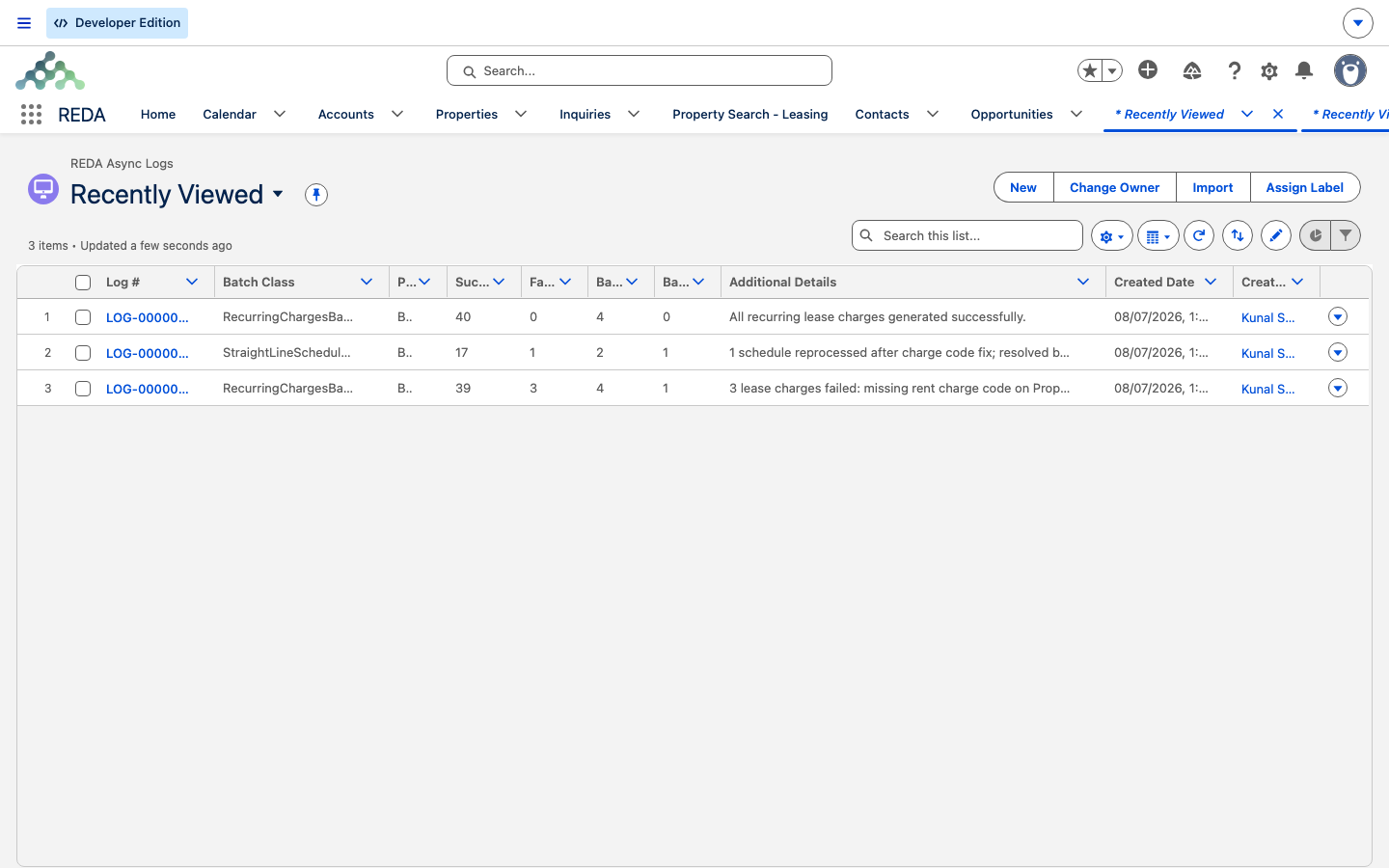
| Async Logs empty baseline | REDA Admin → REDA Async Logs | A clean baseline makes any test failure easy to spot. |
| Email deliverability | Salesforce Setup (standard) | Platform behavior — verify before any test that might send mass email. |
Keeping tests contained
A sandbox is a real, working org — which means it can email real people and reach real endpoints if you let it. Before you run anything that sends or syncs, contain it:
- Email. Confirm email deliverability settings before a test that might notify tenants or owners. This is standard-platform behavior — verify it, don't assume it.
- Web forms and portal links. Never point a live web lead form at a sandbox, and never let a sandbox use production Data Service keys. Re-key or disable Data Service in the sandbox.
- Accounting sync. Check the accounting extension setting so you know whether test invoices will sync to Financials — and whether that's what you want during the test.
Testing billing end-to-end
The most common sandbox surprise is that nothing bills. That's not a broken install — it's that REDA's billing is driven by background jobs, and those jobs are per-org state that a sandbox may not have. An unscheduled sandbox produces zero invoices. To test billing, schedule only the job the scenario needs:
| You're testing… | Schedule in the sandbox | Timing note |
|---|---|---|
| Recurring rent invoicing | Recurring charges (matching the cycle: monthly / daily / weekly) | Matches today's due charges only — align the charge's next-invoice date with the run day. |
| Late-fee policy | Late fees (per-day and/or monthly) | Self-healing — a single run picks up all overdue state. |
| Month-to-month / holdover fees | The month-to-month jobs (per-day and/or monthly) | Self-healing. |
| Inflation / escalation | Both inflation jobs, plus a rule and that month's index entry | Self-healing; a missing index entry raises "Inflation Index not defined for the period." |
| Move-out billing edge cases | The delayed move-out job | Processes yesterday's scheduled move-outs. |
| Straight-line schedules | The straight-line job, or the on-record Calculate action for one lease | The on-record action avoids scheduling for single-lease tests. |
| Recurring inspections | The recurring inspections job | Frequently missed — schedule it explicitly. |
| Occupancy snapshots | The snapshot job, or the Create Reconciliation Snapshot action | The action expects a month: "Invalid input. You must provide value in YYYY-MM format. For example for Jan 2026, provide 2026-01." |
Timing matters for test design. Recurring-charge runs match only what's due today — they don't catch up — so a recurring-rent test needs the run to land on the right processing day. The late-fee, month-to-month, and inflation runs self-heal: a single run processes everything due up to today, so those tests tolerate loose scheduling.
Rehearsing risky changes
Three patterns cover most of what a sandbox is for:
Resetting between test runs
REDA's delete guards apply in a sandbox exactly as in production — you can't delete a partially-paid or batched invoice, a charge under an approved deal, or a posted reconciliation line just to re-run a scenario. Design tests around that: keep test paths unposted and unapproved where you can, or use Reset Lease.
Reset Lease is the sandbox tester's reset button. On a lease that isn't yet occupied, it deletes the lease's charges, tickets, and invoices and returns the stage to the application stage — REDA warns first: "Upon resetting - the Opportunity Charges, Tickets, and Invoices will be deleted and the Opportunity stage will be set to \"Application New\"." An occupied lease can't be reset; it refuses with "Occupied Lease can not be reset. Please contact your System administrator."
Worked example: rehearsing a late-fee change
Meridian's administrator wants to change a late-fee policy. The sandbox rehearsal:
Where to go next
- The Go-Live Checklist — the job list to replicate in your sandbox before production.
- Scheduling Background Jobs — the job catalog you'll schedule for a billing test.
- Leasing Rules — why a rule edit cascades onto active leases, and needs a sandbox first.
- Monitoring Async Logs — where job failures surface during a test.
- Release Notes — rehearse each upgrade in a sandbox before production.
Frequently asked questions
No. Billing is driven by background jobs that are scheduled per org, and a sandbox has whatever schedule state it happened to inherit or lose. Schedule the relevant jobs in the sandbox (see The Go-Live Checklist) and the invoices will generate.
No. REDA has no trigger bypass — data loads and edits fire all the same automation as manual work. Plan loads accordingly, and deactivate a specific process flow only with care.
Deletion guards apply in a sandbox exactly as in production. Use unposted or unapproved test paths, or use Reset Lease on a lease that isn't occupied to clear its charges, tickets, and invoices.
Only one run of a job executes at a time. REDA responds: "A similar job is currently in process. Please wait for the existing job to be complete prior to initiating a new job. Contact your system admin for further assistance." Wait for the first run to finish, then retry.
Yes, if it isn't occupied. Reset Lease deletes the lease's charges, tickets, and invoices and returns it to the application stage. An occupied lease refuses: "Occupied Lease can not be reset. Please contact your System administrator."
Was this article helpful?