
Sale Commissions
Where does the commission on a sale come from, when is it created, and what happens if you recalculate it? This article follows the commission chain from the sales-flow side — the default rule on the property, the copy onto the deal, and the calculation that fires when the sale is won — and flags the one behavior that catches people out: recalculating replaces the commission records rather than editing them. The engine mechanics (rule items, recipients, splits, and the payout formula) live in the Billing section; this article stays at the sales-flow altitude and links across. No prior REDA experience is assumed.
Access you'll need. Viewing a sale's commissions needs a Commission set — REDA - Commission User Read Only views, while REDA - Commission Manager and REDA - Commission User create and edit. Working the sale deal itself needs REDA - Property Sales User. Setting up commission rules needs REDA - Master Data - Admin (or REDA - Commission Manager for create and edit).
The commission chain, in one picture
Commission on a sale isn't entered by hand — it flows down a chain that starts on the property and ends with records REDA builds when the sale closes:
| Step | What happens |
|---|---|
| 1 | An admin sets the Default Commission Rule (Property Sales) on the property (active rules only) |
| 2 | A new sale deal copies that rule onto its Commission Rule while the deal is open |
| 3 | The sale reaches Closed Won with a rule and a calculated base present |
| 4 | REDA flags the deal and builds the commission records — recipients, roles, amounts |
| 5 | Recalculating, or moving the deal out of won, deletes and rebuilds (or removes) those records |
The default commission rule
The chain begins on the property. Each property carries a Default Commission Rule (Property Sales) — a lookup that offers only active commission rules. When a new sale deal is created on that property, REDA copies the rule onto the deal's Commission Rule while the deal is still open. Set the default on the property once, and agents don't have to pick a rule per deal (see Marking a Property Available for Sale).
When commissions calculate
Commissions calculate when the sale is marked Closed Won, provided the deal has both a Commission Rule and a Calculated Commission Base Amount. REDA flags the deal for calculation, and the commission records are built from the rule.
For percentage-based commission, the percentage applies to the deal's Calculated Commission Base Amount — a figure distinct from the Sale / Purchase Price. Where that base comes from is an engine detail covered in the Billing section; on the sales side, treat it as "the base the percentage applies to."
Recalculating is destructive
Two things trigger this behavior. The manual Calculate / Recalculate Commissions action on the deal deletes the existing commissions and creates new ones. And moving the deal out of won deletes the commission records entirely (rebuilt only if you close it again).
What a commission record carries
Each commission record REDA builds names a recipient and the terms of their cut. At the sales-flow level, that's:
| On the commission record | What it holds |
|---|---|
| Recipient Account | Who is paid |
| Role | Marketing Team, Executive Team, Opportunity Owner, or Partner |
| Commission Type | Fixed or Percentage, with a percentage or a fixed amount |
| Commission Split % | The recipient's share |
| Due Date | Derived from the deal's Under Contract Date plus the rule item's due-after days |
| Status | Draft (default), Approved, Cancelled, or Paid |
| Net Commission Amount | The computed payout |
The full payout formula, the difference between fixed and dynamic recipients, and how splits combine are the Billing engine's job — see Commission Calculation and Commission Rules.
How the amount lands — fixed, percentage, and splits
You don't type commission amounts in — REDA computes each record from the rule when the sale closes. Two things decide the number: the Commission Type on the rule, and whether the paid party has a split arrangement behind it. At the sales-flow level, here's what each does.
- Fixed — a flat amount, unaffected by the sale price. A 5,000.00 marketing fee is 5,000.00 whether the villa sells for 800,000.00 or 1,200,000.00.
- Percentage — a rate applied to the deal's Calculated Commission Base Amount (not the Sale / Purchase Price). A 1.5% rate on a base of 1,000,000.00 works out to 15,000.00 before any split.
A split is how one earning party's cut is divided among several accounts. If the party who earns the commission — say a brokerage — has splits set up behind it (a house share and an agent share, for instance), REDA writes one commission record per split instead of one for the whole party. Each split record carries that share's Commission Split %, and the payout is scaled by it. If there's no split, the record simply carries a 100% split and the whole amount goes to the one party.
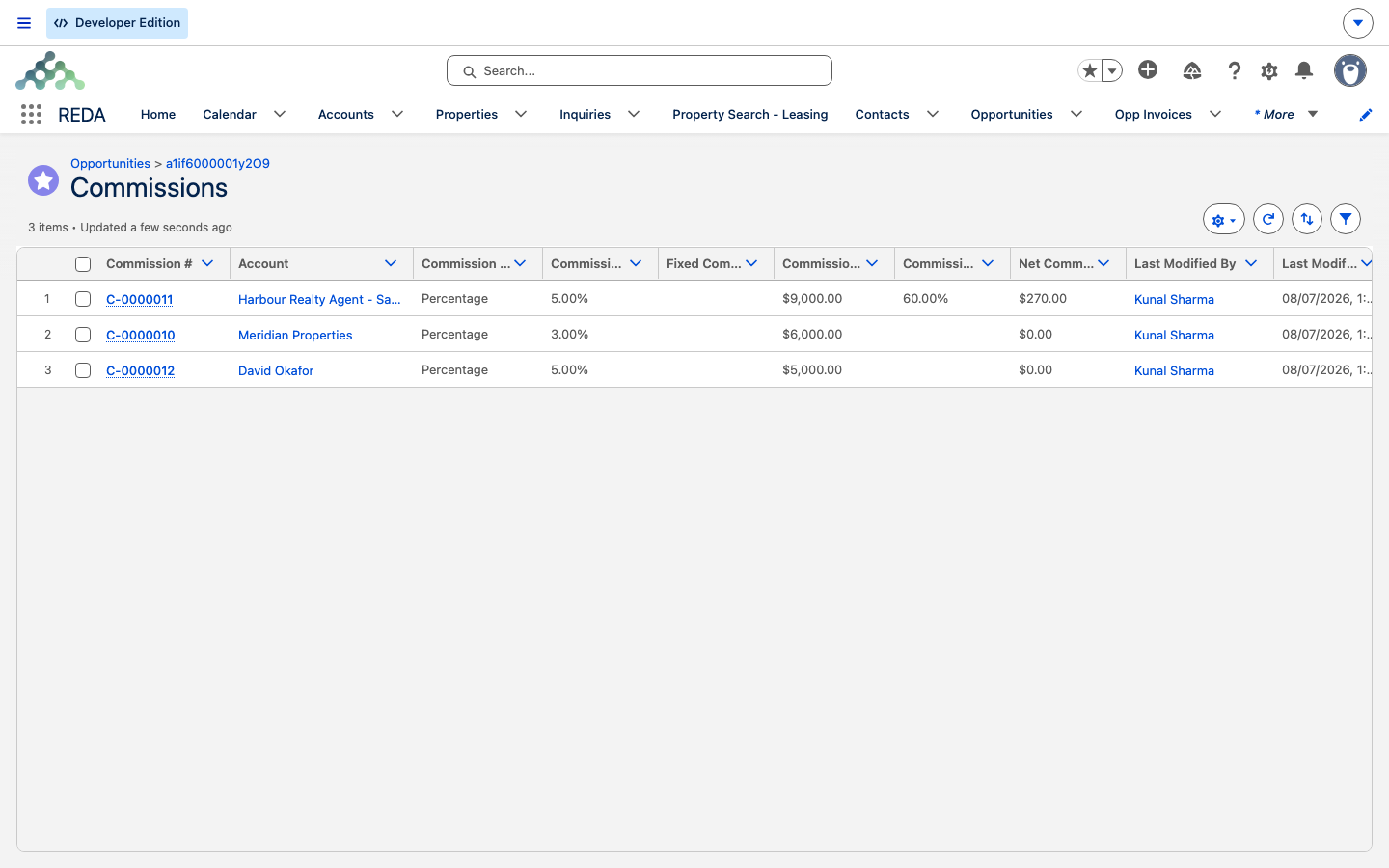
Worked example: commission on Harbour Villa 7
Meridian's Harbour Villa 7 sale to David Okafor closes Won. The property carried a Default Commission Rule (Property Sales) — the brokerage's standard sale rule — which copied onto the deal's Commission Rule when the deal opened.
At Closed Won, with the calculated commission base present, REDA builds the commission records from that rule. Suppose the rule has two lines: a percentage line to the brokerage and a fixed line to the marketing team, and the brokerage cut is split between the house and agent Marcus Bell. With an illustrative base of 1,000,000.00, the records come out like this:
| Recipient | Type | Split % | Net payout |
|---|---|---|---|
| House (brokerage) | Percentage · 1.5% | 40% | 6,000.00 |
| Agent — Marcus Bell | Percentage · 1.5% | 60% | 9,000.00 |
| Marketing Team | Fixed | 100% | 5,000.00 |
Rates, the 40/60 split, and the 5,000.00 fixed fee above are illustrative — your own rule supplies the real ones. Each record also carries a Due Date derived from the deal's Under Contract Date (1 Jul) plus the rule line's due-after days, and opens in Draft status.
If the manager later runs Calculate / Recalculate Commissions, all three records are deleted and rebuilt from scratch — any manual edits are gone. The Billing commission-calculation article walks the same math in full; this article stops at "the rule produced these records."
Reference: calculation triggers
| Trigger | Effect |
|---|---|
| Sale marked Closed Won (rule + calculated base present) | Commission records created |
| Manual Calculate / Recalculate Commissions action | Existing records deleted, then rebuilt |
| Sale moved back out of won | Commission records deleted |
Where to go next
- Commission Calculation — the calc algorithm, recipients, splits, and the Net Commission formula.
- Commission Rules — setting up commission rules and their rule items.
- Closing a Sale (Closed Won) — the moment that flags this calculation.
- Marking a Property Available for Sale — where the default rule is set on the property.
Frequently asked questions
From the deal's Commission Rule, which defaults from the property's Default Commission Rule (Property Sales). Set that on the property so every sale on it inherits the rule.
When the sale is marked Closed Won, provided the deal has a commission rule and a calculated base.
Recalculation is destructive: it deletes existing commission records and rebuilds them. Make corrections on the rule, not on the generated records.
Moving the deal out of won deletes the commission records. They're rebuilt only if the deal is closed again. See Closing a Sale (Closed Won).
On the Commissions tab. The calculation logic — how each amount and split is worked out — is explained in Commission Calculation.
Because the party earning that line has a split behind it. When the paid account has split shares set up, REDA writes one record per share — each scaled by its Commission Split % — instead of a single record for the whole party. A party with no split gets one record at 100%.
Was this article helpful?