
Managing an Active Lease
Once a lease is signed and the tenant has moved in, the day-to-day work changes shape. You are no longer filling in a record — the lease is approved and locked — so every mid-lease change goes through the right ticket or action instead. This is the hub for a moved-in lease: it maps "the tenant wants X" to "do Y," explains what each ticket or action does, and hands off to the deep-dive article for each. The reader is a leasing agent or property manager on an occupied lease asking "what do I do now, and where?" After reading you'll be able to pick the correct tool for any common mid-lease event and understand why direct field edits are the wrong one. No prior REDA experience is assumed.
Access you'll need. Working an active lease — its tickets, charges, invoices, service requests, and visitor logs — requires the REDA - Property Leasing User permission set (or REDA - Master Data - Admin for administrators). A few jobs reach into other areas: work orders may also use a Work Orders permission set, and recording a payment uses REDA's accounting side.
Why tickets, not edits
A ticket in REDA is a short, tracked checklist for one step in a record's life — it has its own status Path and, as you work it, it drives the parent record. Tickets are the mechanism for changing a lease that has moved past approval, and there's a hard reason for that: once the lease (or its parent lease) is approved, its charges lock. Try to add or change a charge directly and REDA stops you:
The lock is deliberate: an approved, occupied lease is a live contract, and changes to it should be auditable rather than quietly typed over. Tickets stay editable until the ticket itself is approved, so they are the safe, tracked way in. The same logic covers the lifecycle: the occupancy stages are written by tickets, so dragging the Stage by hand fights the automation. In short — on an active lease, reach for a ticket or an action, not the edit pencil.
The mid-lease action map
Here is the whole hub in one decision table. Find the tenant's request on the left, and the right column is where the rest of REDA's leasing documentation takes over.
| The tenant or agent wants to… | Use… | Where it lives |
|---|---|---|
| Add a recurring or one-off charge | Add Lease Charge ticket | Tickets tab → New |
| Stop billing an existing charge | Remove Lease Charge ticket | Tickets tab → New |
| Bill or credit a one-off amount now | New Charge/Memo ticket | Tickets tab → New |
| Renew the lease | The Renewal ticket + Renewal Terms & Charges | Tickets tab (auto-armed) |
| Take a move-out notice, terminate, or evict | Move Out / Termination / Eviction tickets | Tickets tab → New |
| Record a tenant payment | The Post Payment action | Lease record (top-right) |
| Log a maintenance request | Service Request → Create Work Order | Service Requests tab |
| Run an inspection | Auto from the Move In / Move Out ticket; else the Inspections tab | Inspections tab |
| Log a visitor or a package | Request Visitor Access / New Package / Parcel | Global create (+) menu |
| Recalculate commissions or straight-line | Calculate / Recalculate Commissions · Calculate Straight-Line Schedule | Lease record (top-right) |
Money changes
Three tickets and one action cover almost every mid-lease money movement. They differ in what they leave behind:
The mechanics of each — including how balances roll up — are covered in Adjusting Lease Charges and Posting Tenant Payments.
Reading the tenant's balance
Every charge, invoice, credit memo, and payment you raise above lands in one place on the lease: the Ledger Summary at the top of the Accounting tab. It's five tiles, and together they answer "does this tenant owe us anything, and have they paid ahead?" without opening a single invoice:
| Tile | What it tells you |
|---|---|
| Total Outstanding | Everything billed and not yet paid — the gross amount owed across the lease's invoices and invoice batches, before any credit is netted off. |
| Unapplied Payments | Money the tenant has paid that hasn't been matched to a specific invoice yet — a payment sitting on account, waiting to be applied. |
| Unapplied Memos | Credit the tenant holds — from a credit memo or an overpayment — that hasn't been used against an invoice yet. |
| Net Outstanding | The true collections number: Total Outstanding after the unapplied payments and credits are netted off. A negative figure means the tenant has paid ahead. This is the headline you watch for arrears. |
| Total Liabilities | What the business is holding on the tenant's behalf — typically the security deposit and any prepaid amounts you'd owe back at move-out. |
Lifecycle changes
The bigger moves — renewing, ending, or forcibly ending a lease — each run through their own ticket, and each writes the lease's Stage as it goes:
Occupied - No Notice. Open it, click Renewal Terms & Charges to set the new dates and rent, and close it to extend the lease — see Renewing a Lease.Expired on close — see Notice, Move-Out & Lease End.Operational requests
Not every mid-lease event is about money. The everyday operations of an occupied unit have their own homes:
| Event | What to do | What REDA does |
|---|---|---|
| A repair is needed | Raise a Service Request, then Create Work Order from it | Logs the request and dispatches the work; each has its own status Path |
| An inspection is due | The move-in and move-out inspections are created for you by the Move In / Move Out tickets when the property is configured for it; run ad-hoc ones from the Inspections tab | Applies the property's checklist template |
| A visitor is expected | Request Visitor Access | Creates a Visitor Log against the lease |
| A package arrives | New Package / Parcel | Logs the incoming package for signature-based handover |
Recalculations and reset
A few actions on the lease record re-run a calculation on demand:
Application - New. It is available only before the tenant has moved in — an occupied lease cannot be reset. So on an active lease, reset is off the table; use the charge and lifecycle tickets to make changes instead.
Worked example: a month in Aisha's lease
Aisha Rahman is occupied at Meridian Court #101, paying 1,200.00 a month. Three things happen mid-lease — and not one is a direct edit of the record:
| What happens | What you do | What REDA does |
|---|---|---|
| Aisha rents a parking space | Raise an Add Lease Charge ticket for a 150.00/month recurring charge, and close it | Adds the parking line; it starts billing on its schedule |
| Aisha pays the month's rent at the desk | Use the Post Payment action for 1,200.00 | Posts a cash receipt, auto-applies it to the open 1,200.00 invoice; Net Outstanding on the Ledger Summary drops by 1,200.00 |
| Three months before term end, the renewal comes up | Open the auto-armed Renewal ticket, set the renewal rent in Renewal Terms & Charges, and close it | Extends the lease and arms the next Renewal ticket |
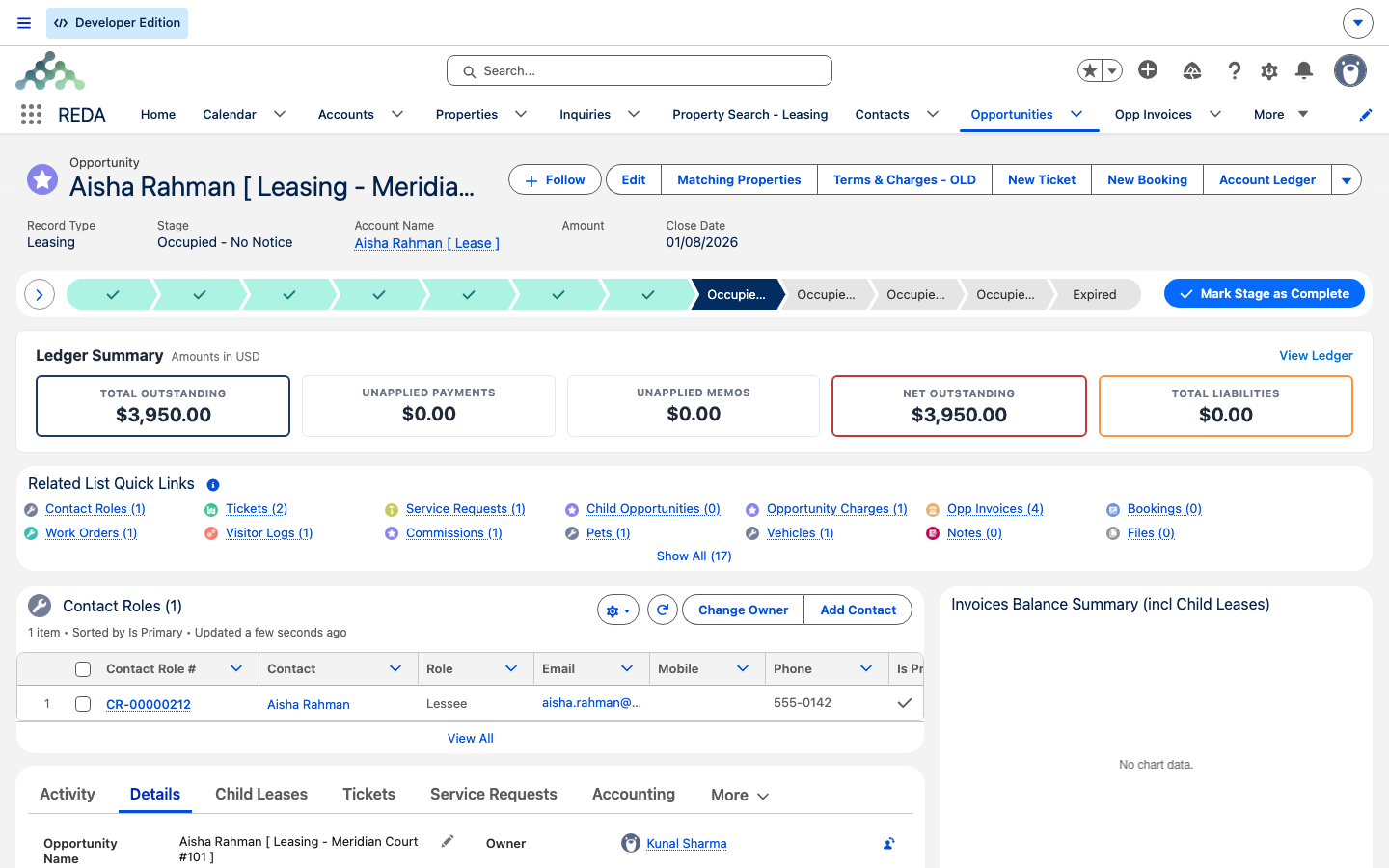
Occupied - No Notice. The header exposes the lease actions (Terms & Charges, New Ticket, New Booking, Account Ledger, with more behind the chevron), and below the Path the Ledger Summary band and Related List Quick Links. This is where the day-to-day changes on an occupied lease begin.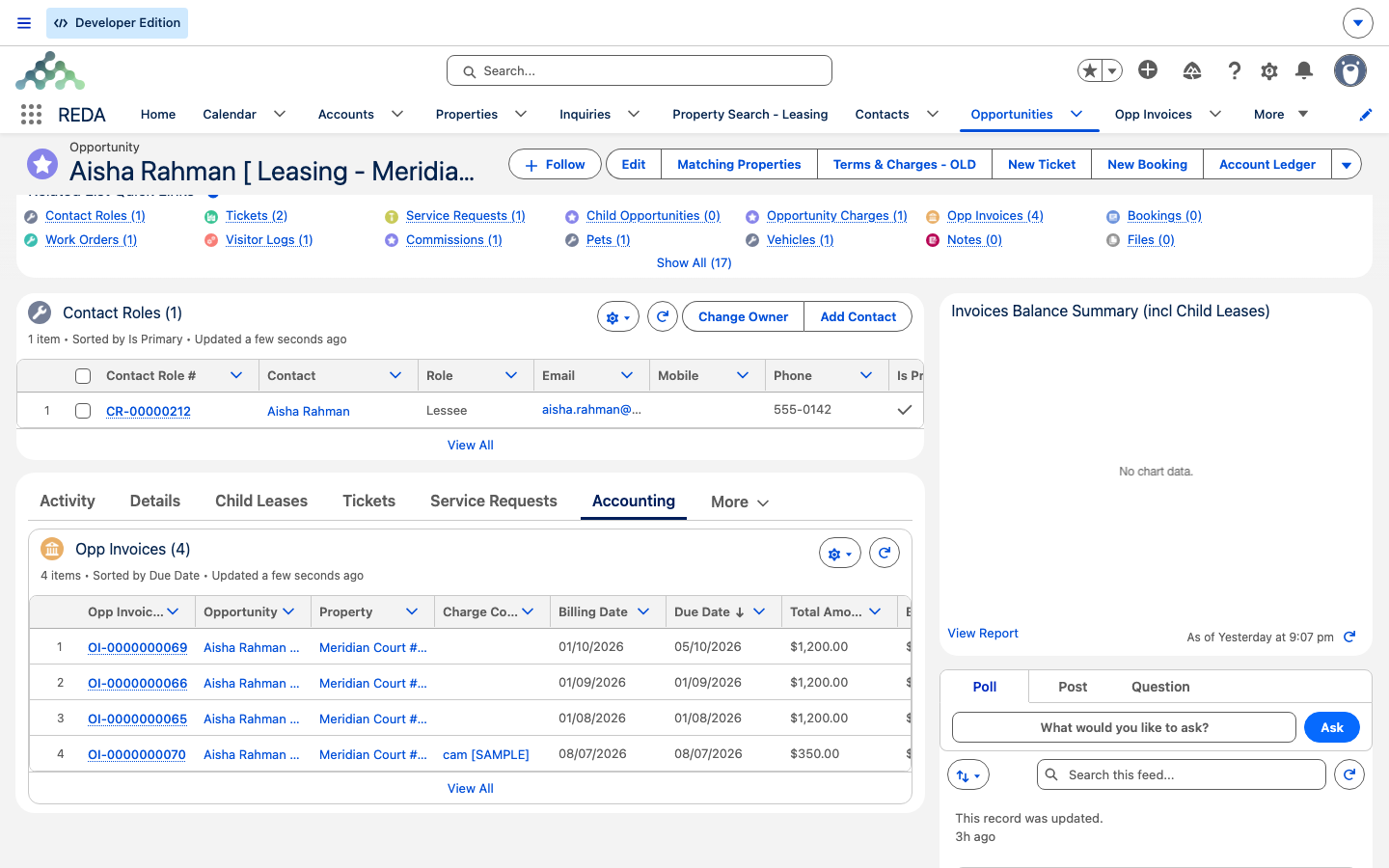
Reference: the active-lease action hub
One row per tool, what it does, and where the deep dive lives.
| Need | Action or ticket | What it does | Deep dive |
|---|---|---|---|
| Add a charge | Add Lease Charge (ticket) | Creates a new charge line on close | Adjusting Lease Charges |
| Stop a charge | Remove Lease Charge (ticket) | Stamps an inactive date — a soft stop | Adjusting Lease Charges |
| One-off fee or credit | New Charge/Memo (ticket) | Raises an invoice (or credit memo) | Adjusting Lease Charges |
| Renew | Renewal ticket + Renewal Terms & Charges | Extends the lease; arms the next renewal | Renewing a Lease |
| End the lease | Move Out / Termination / Eviction tickets | Drives the notice stages; schedules move-out | Notice, Move-Out & Lease End |
| Record a payment | Post Payment (action) | Posts a cash receipt; auto-applies to invoices | Posting Tenant Payments |
| Maintenance | Service Request → Create Work Order | Logs and dispatches the work | Service Requests |
| Inspection | Auto from Move In / Out ticket; else Inspections tab | Runs the checklist inspection | Move-In / Move-Out Inspections |
| Visitor / package | Request Visitor Access / New Package / Parcel | Logs a visitor or a package | Visitor Access |
| Commissions | Calculate / Recalculate Commissions | Rebuilds the deal's commissions | Commission Calculation |
| Straight-line | Calculate Straight-Line Schedule | Builds the recognition schedule | Straight-Line Rent Recognition |
Where to go next
- Adjusting Lease Charges — the Add, Remove, and New Charge/Memo tickets in full.
- Renewing a Lease — the renewal cycle, start to finish.
- Notice, Move-Out & Lease End — how a lease ends.
- Posting Tenant Payments — the Post Payment action, in depth.
- The Lease Stages Reference — what stage the lease is in and what that means.
- Understanding Tickets — the process engine behind the hub.
Frequently asked questions
The lease is locked once it's approved: "The record is locked for editing. Charges can not be created and updated if the opportunity or opportunity's parent opportunity or associated ticket is Approved." Use the Add / Remove Lease Charge or New Charge/Memo tickets instead.
Add Lease Charge for a recurring or contracted item; New Charge/Memo for a single one-off fee. See Adjusting Lease Charges.
Use the Post Payment action on the lease record. It posts a cash receipt on REDA's accounting side and can auto-apply it to the tenant's open invoices.
No. Reset Lease is blocked once a tenant has moved in. To change an active lease, use the charge and lifecycle tickets.
That's how the occupancy stages work — they're written by the tickets. Closing a lifecycle ticket advances the lease, and cancelling one rewinds it to the stage it was on when the ticket was created.
On the lease's Accounting tab. The Ledger Summary tiles at the top — Total Outstanding, Unapplied Payments, Unapplied Memos, Net Outstanding, and Total Liabilities — roll every invoice, credit, and payment into a handful of headline numbers. Watch Net Outstanding for what the tenant actually owes after credits and unapplied payments are netted off.
Was this article helpful?