
Month-to-Month Fees
A lease reaches its end date and the tenant simply stays on, with no renewal and no move-out booked. That's holdover, or month-to-month tenancy — and REDA can bill a surcharge for it automatically, month after month, until the lease is either renewed or ended. This article explains when a lease counts as month-to-month, the two ways the fee can be charged, how a partial first window prorates, and the one trait that lets you recognize a month-to-month fee on sight: it has no charge line behind it. No prior REDA experience is assumed — every term is defined as we reach it.
Access you'll need. Configuring the Leasing Rule requires the REDA - Master Data - Admin permission set. Working the fee invoices requires REDA - Invoice Management Admin or REDA - Property Leasing User; the REDA - Invoice Management Read Only set can view them. Scheduling the two month-to-month background runs is administrator-only.
What "month-to-month" means here
A lease has a fixed term — a start date and an expiration date. When that expiration date passes and the tenant is still in the unit, but no renewal has been signed and no move-out has been scheduled, the lease enters a month-to-month state: the tenancy continues on a rolling monthly basis rather than under a fresh term. Many operators charge a premium for this, both to cover the uncertainty and to nudge the tenant toward renewing. REDA calls that premium the month-to-month fee (MTM fee for short), and once the policy is configured it bills on its own.
REDA flags a lease as month-to-month for you — you don't set the state by hand. A lease counts as month-to-month once its expiration date has passed while the lease is still billing (accounting-active) and a month-to-month fee type and fee are set on it. The expiration date REDA watches is the renewed-through date if the lease has been renewed, otherwise the lease's end date — which is exactly why signing a renewal pushes that date out and takes the lease out of holdover. From the point a lease is flagged, the month-to-month runs pick it up and bill the surcharge each period.
The policy fields
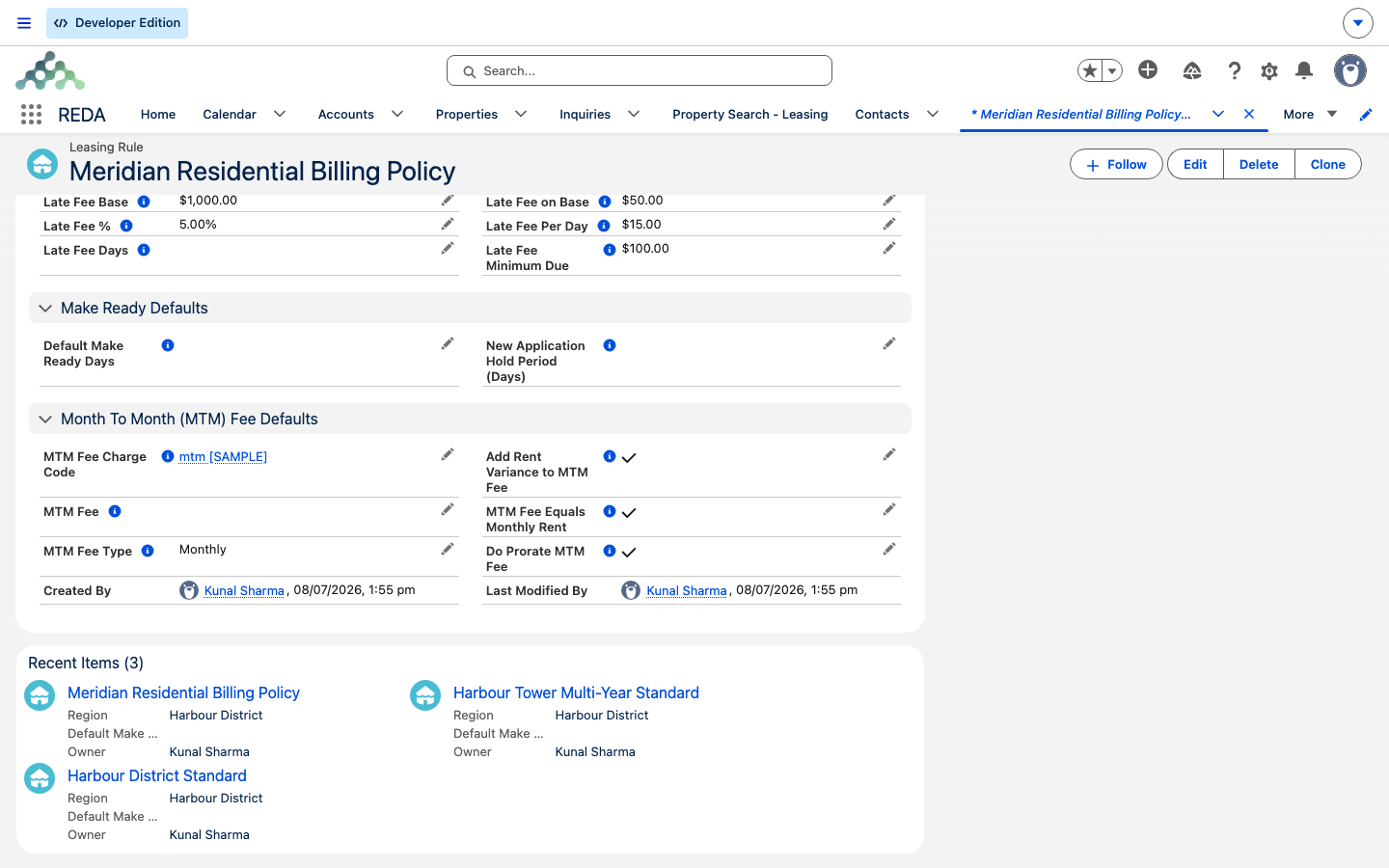
The month-to-month policy lives on the Leasing Rule and is stamped onto each lease when the lease turns billable. These are the settings that decide whether — and how — the fee bills:
| Field | What it controls |
|---|---|
| MTM Fee | The flat surcharge amount, used unless MTM Fee Equals Monthly Rent is on. |
| MTM Fee Type | How the fee is charged — Monthly or Per Day. |
| MTM Fee Equals Monthly Rent | When on, the holdover tenant keeps paying their current monthly rent instead of the flat fee. Monthly type only. |
| Add Rent Variance to MTM Fee | When on, adds the gap between market rent and the lease rent (when the tenant is below market) on top of the fee. Monthly type only. |
| Do Prorate MTM Fee | Whether a partial window prorates (see the first window). Monthly type only. |
| MTM Fee Charge Code | On the Leasing Rule — sets the billing category, routing, and grace days for the fee invoices. |
The MTM Fee Type is the switch that matters most: it decides whether the surcharge is billed as a monthly amount or accrued day by day. The rest of this article follows each type in turn.
What the fee amount comes to. The starting figure is the flat MTM Fee — unless MTM Fee Equals Monthly Rent is on, in which case the fee is the tenant's current monthly rent instead. Then, if the fee is Monthly and Add Rent Variance to MTM Fee is on and the tenant sits below market, the market-minus-lease gap is added on top. All three of these options — equals-rent, add-variance, and prorate — are for the Monthly type only; the per-day type uses the flat MTM Fee as a daily rate and nothing else.
When the fees generate
A month-to-month fee bills only when several conditions line up — the same "opt-in twice, plus a scheduled run" pattern that governs all of REDA's automated billing (see How Billing Works in REDA). Walk this list when a holdover fee doesn't appear:
| # | Condition |
|---|---|
| 1 | The lease is flagged month-to-month. |
| 2 | The lease has an expiration date on file. |
| 3 | The MTM Fee Type is set (Monthly or Per Day). |
| 4 | The lease's month-to-month next-invoice date has been reached. |
| 5 | The matching month-to-month background run is scheduled. |
The monthly variant
When MTM Fee Type is Monthly, the surcharge is billed one month at a time — but the very first window is usually a stub. In the month a lease expires, the first month-to-month window runs from the day after the lease expiration date through the end of that month. Every window after that is a whole calendar month.
If Do Prorate MTM Fee is switched on, that partial first window prorates, using exactly the same daily-rate math as ordinary rent — including the 30-day-month convention set on the Leasing Rule (see Proration). So a lease that expires mid-month bills only for the days the tenant actually held the unit past expiry, and then settles into a full monthly fee from the next month on.
The per-day variant
When MTM Fee Type is Per Day, REDA accrues the fee day by day instead of in monthly blocks. Each run bills the days that have passed since the lease was last charged — the number of days multiplied by the daily fee — and advances the lease's month-to-month last-invoice date to the day it just billed through. It's the same day-counter pattern used by per-day late fees: the first run after holdover begins sweeps up every accrued day at once, and each later run bills just the days since.
Because a per-day fee is daily by nature, there's no partial-window proration to think about — every day is billed at the same rate.
What the invoice looks like
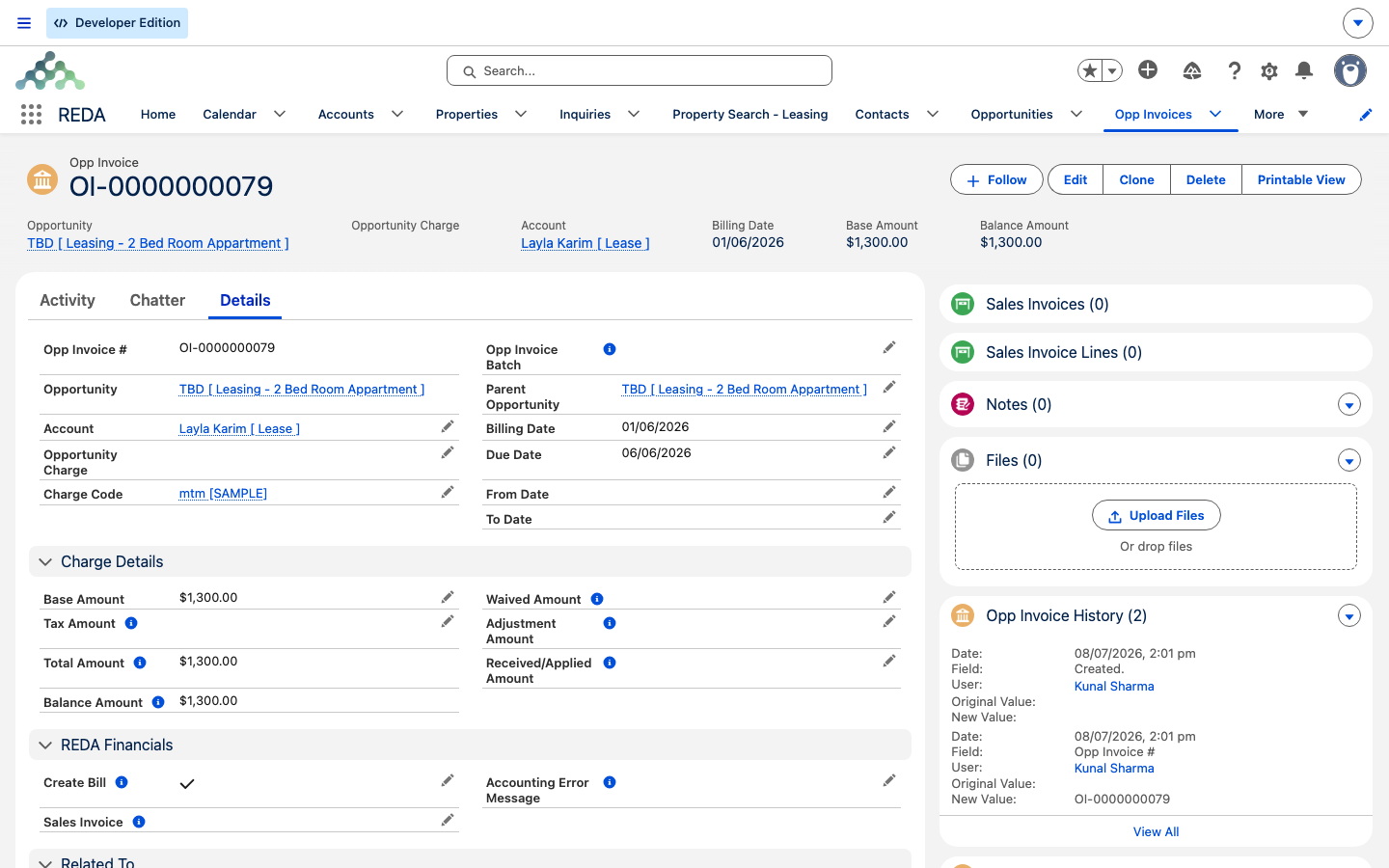
A month-to-month fee produces an ordinary Opp Invoice — a single billed instance — on the lease's Accounting tab, but with one distinguishing trait: it has no source charge behind it. Ordinary rent invoices trace back to an Opportunity Charge on the lease; a month-to-month fee is generated straight from the lease's month-to-month policy, so there's no charge line to link to. That absence is the identification trick support uses to tell a holdover fee apart from everything else at a glance.
| Trait | Month-to-month fee | Late fee | Recurring rent |
|---|---|---|---|
| Source charge linked | None | Yes | Yes |
| Parent Invoice populated | No | Yes | No |
| Charge code | The rule's MTM Fee Charge Code | The rule's Late Fee Charge Code | From the rent charge |
| Billing Date | Today | Today | Period start |
Otherwise it behaves like any invoice: the billing date is the day it was raised, the due date follows the month-to-month charge code's grace days, and the billing description falls back to that code's default.
Month-to-month versus delayed move-out
REDA has a second holdover mechanism that's easy to confuse with month-to-month fees, so it's worth naming the difference plainly. A delayed move-out happens when a tenant had a scheduled move-out date that came and went without them actually leaving — REDA then bills one extra period of the tenant's normal charges, not a surcharge. A month-to-month fee, by contrast, applies when the lease simply expired with no move-out scheduled at all — it's an ongoing surcharge on top of the tenancy, with no end date until the lease is renewed or closed. Both are holdover situations; they bill different things. For the move-out side, see Notice, Move-Out & Lease End.
Worked example: Aisha stays past expiry
Aisha Rahman's lease on Meridian Court #101 expires on 15 August, and she stays on without renewing or booking a move-out. Her Leasing Rule sets a flat Monthly month-to-month fee of 300.00 (an illustrative figure — set your own on the rule), with Do Prorate MTM Fee on and the 30-day-month convention in use. Here is how the surcharge bills:
| Window | What REDA bills |
|---|---|
| 16–31 August (first window, 16 days) | Prorated: 300.00 ÷ 30 × 16 = 160.00 |
| September onward (full months) | The full monthly fee of 300.00 each month |
Had the rule used the Per Day variant instead — say 10.00 a day — the first run on 20 August would sweep up the five days since holdover began (16–20 August): 5 × 10.00 = 50.00. Each later run would then bill just the days since the last one.
Monthly versus per-day at a glance
| Aspect | Monthly | Per Day |
|---|---|---|
| First window | Day after expiry → month-end | A day-counter from holdover start |
| Then | Whole calendar months | Days since the last charged day, each run |
| Proration | Partial windows, if Do Prorate MTM Fee is on | Not applicable — daily by nature |
| Scheduling tracker | Month-to-month next-invoice date | Month-to-month last-invoice date |
Where to go next
- Late Fees — the per-day fee pattern in its original home, and how it differs from a holdover surcharge.
- Proration — the daily-rate math behind the partial first window.
- Renewing a Lease — the alternative to holdover, and how a renewal ends the month-to-month state.
- Notice, Move-Out & Lease End — scheduled move-outs and the delayed-move-out case.
- Scheduling Background Jobs — the two month-to-month runs that must be scheduled before any fee bills.
Frequently asked questions
Walk the checklist: the lease must be flagged month-to-month and have an expiration date; the MTM Fee Type must be set; the month-to-month run for that variant must actually be scheduled; and the lease's next-invoice date must have been reached. The missing piece is almost always the scheduled run.
The first window runs only from the day after expiry to the end of that month, and it prorates when Do Prorate MTM Fee is on. From the next month onward, the full monthly fee applies.
By design. Month-to-month fees generate directly from the lease's month-to-month policy, not from an Opportunity Charge — so there's no source charge to link. That absence is exactly how you recognize one.
The Leasing Rule's MTM Fee Charge Code — its grace days and routing decide the fee invoice's due date and where it posts.
Yes. Renewing the lease ends the holdover state and normal billing resumes under the renewed term (closing the renewal ticket re-opts the lease's charges back in, so rent carries on). The month-to-month surcharge only runs while the lease is in holdover.
Was this article helpful?