
Invoices Explained
Open any invoice in REDA and you're looking at a record with a lot on it — amounts, dates, two different accounts, a covered period, and a trail of links back to whatever created it. This article decodes every block so you can read an invoice with confidence: where it came from, how the amounts add up from base to balance, what the two dates mean, who is billed versus who is owed, and why REDA sometimes refuses to let you delete one. Whether you're a leasing agent answering a tenant, an invoicing admin, or an accountant tracing a balance, by the end you'll be able to explain any figure on the page. No prior REDA experience is assumed.
Access you'll need. Creating and editing invoices requires the REDA - Invoice Management Admin or REDA - Property Leasing User permission set; REDA - Invoice Management Read Only can view them but not change them.
One invoice, five stories
Every invoice REDA raises is created for you — you rarely type one by hand. An invoice always carries an Auto Created (Sys) flag confirming this, and it records where it came from by filling in one of several origin links. Knowing which link is populated tells you instantly what kind of invoice you're looking at:
| If the invoice points to… | …it came from |
|---|---|
| An Opportunity Charge | A recurring or one-time charge on a lease (rent, deposit, fees) |
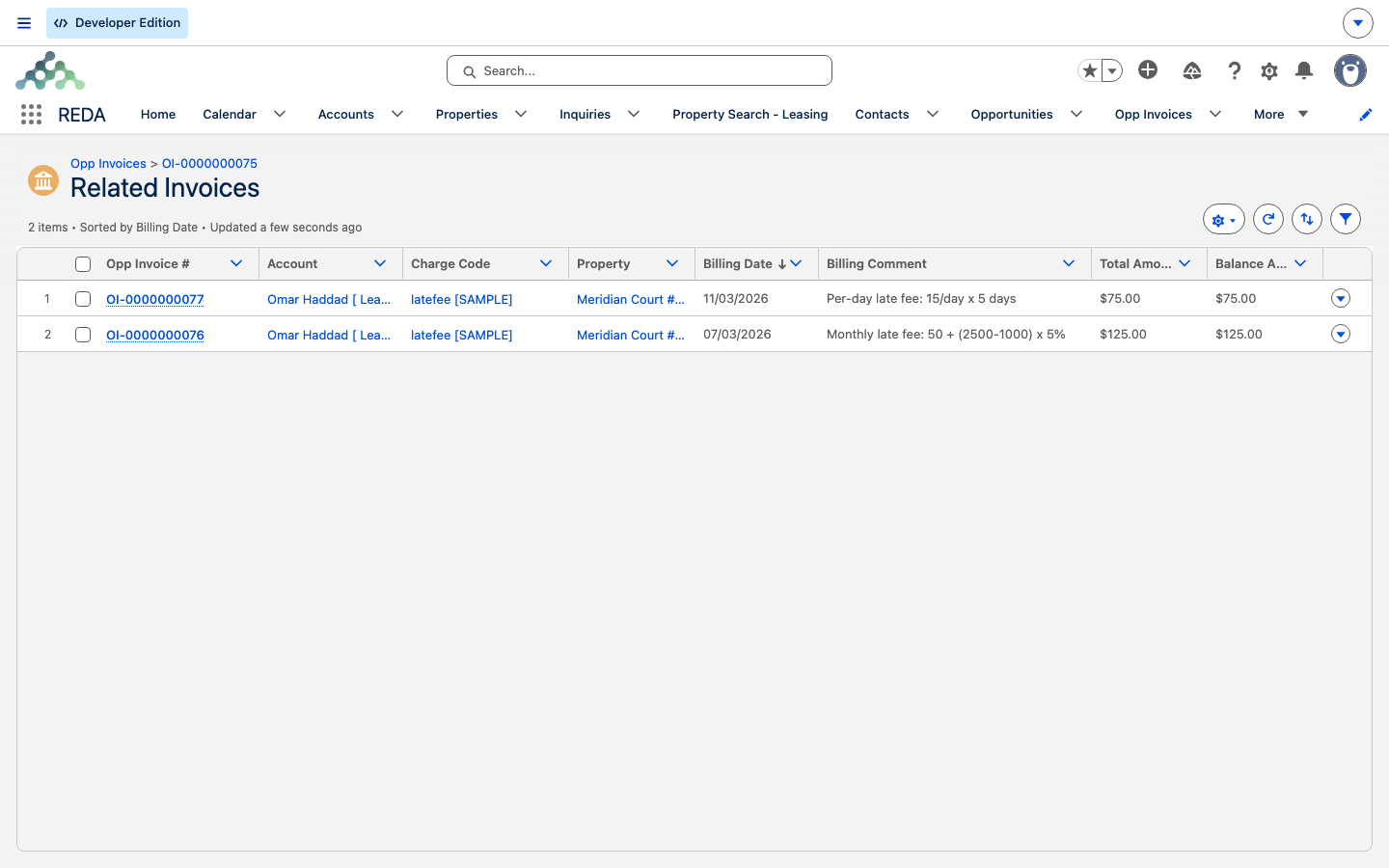
| A Parent Invoice | Late-fee generation — this is a late fee on the overdue invoice named as its parent |
| A Booking, Work Order, or Expense Reconciliation Line | Those respective processes |
| A Ticket only | A charge attached to a lease ticket |
At most one origin is populated on any given invoice. Two quick tells worth remembering: a non-blank Parent Invoice always means "this is a late fee" (the parent is the invoice it was charged against, shown under the Related Invoices list); and a month-to-month fee invoice carries no Opportunity Charge link at all.
The amounts chain
The money on an invoice is a short chain. Read it top to bottom and every total explains itself:
| Field | What it is |
|---|---|
| Base Amount (required) | What REDA computed — the charge's net amount (prorated where applicable), or the late-fee / month-to-month calculation |
| Tax Amount | Added by the accounting extension's tax engine |
| Total Amount | Base Amount + Tax Amount |
| Received/Applied Amount | Cash applied to the invoice (accounting extension) |
| Waived Amount / Adjustment Amount | Credit-control reductions (accounting extension) |
| Balance Amount | (Base + Tax) − (Received + Waived + Adjustment) — what's still owed |
One extra wrinkle: if a charge is subsidized, the invoice copies the Subsidizer Account and Subsidy $ from the charge, and the subsidy scales with the billed amount — a half-month bill carries half the subsidy.
The dates
Two dates run the invoice, and it's worth being precise about the difference:
- Billing Date is when the invoice is raised. For recurring invoices it's the start of the period being billed; for one-time charges, late fees, and month-to-month fees it's the day of generation.
- Due Date is when payment is expected — the billing date plus the grace days granted by the charge code. If the code grants no grace days, the due date equals the billing date. (Grace days live on the charge code; see Charge Codes.)
Recurring invoices also carry a From Date and To Date — the period they cover — and REDA appends that period to the invoice's Billing Comment as a bracketed range so the covered dates are visible on the invoice itself.
Who gets billed and who is owed
An invoice names two accounts, and confusing them is a common source of "why does this say the wrong company" questions:
| Field | Meaning |
|---|---|
| Account | The bill-to — the deal's account at the time the invoice was generated |
| Default Receivable Account | Who is owed the money: normally the property's Owner Account; for a pass-through charge code, the code's Default Receivable Account, or failing that the property's PM Company/Entity |
| Property | The billed property — which a pass-through code can swap to its own Default Property |
| Charge Code | The resolved billing category (see Charge Codes for how it's chosen) |
So if the receivable looks unexpected, the charge code is almost always the reason — a pass-through code reroutes it. On the owner's account, these invoices appear under the Opp Invoices (Property Owner Account) related list.
Rent invoices keep the lease in step
When a rent invoice is raised, REDA keeps the lease's current-rent figure in step with it — so the lease record always reflects what's actually being billed. There's nothing to do here; it's automatic, and it's why a rent change flows through to the lease as soon as the next rent invoice generates.
The running totals from these invoices also roll up into the lease's Ledger Summary — the Total Outstanding, Unapplied Payments, Unapplied Memos, Net Outstanding and Total Liabilities tiles at the top of the lease — so you can read the whole balance without opening each invoice. See How Billing Works for what each tile means.
Batched invoices
Groupable invoices can be folded into a consolidated bill — an Opp Invoice Batch (see Consolidated Invoices). While an invoice sits in a batch, it must stay aligned with the batch on its header fields: the account, receivable account, property, opportunity, billing date, and due date all have to match. Try to change one out of step and REDA stops you:
Deleting and correcting invoices
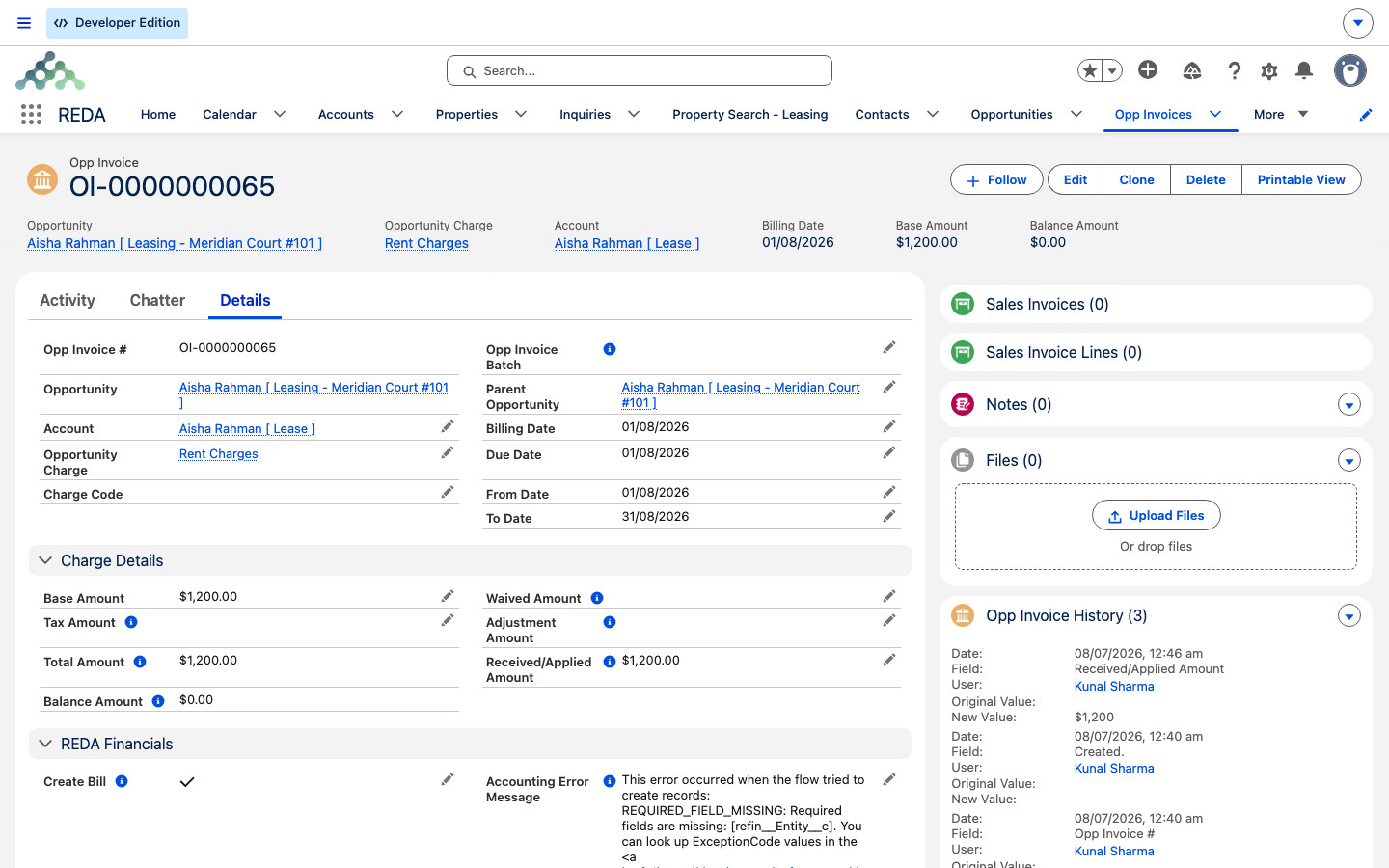
REDA deliberately protects invoices that carry money or belong to a batch. An invoice can't be deleted once any amount has been applied to it — meaning its balance no longer equals its total — or while it's part of a batch. Attempt it and you'll see:
The practical rule: if a receipt, waiver, or adjustment has touched the invoice, or it's in a batch, it's locked against deletion. To correct such an invoice you don't delete it — you use the accounting extension's waive and adjustment tools, or reverse the applied cash there. To free an invoice from a batch, remove it from the batch first.
Field reference
The invoice's fields, grouped the way they appear:
| Group | Field | Meaning |
|---|---|---|
| Provenance | Opportunity | The lease or deal being billed |
| Opportunity Charge | The source charge (recurring / one-time origins) | |
| Parent Invoice | Set only on late-fee invoices — the overdue invoice | |
| Auto Created (Sys) | On for every generated invoice | |
| Routing | Account | Bill-to (the deal's account at generation) |
| Default Receivable Account | Owner account, or the pass-through target | |
| Property / Charge Code | Billed property and resolved billing category | |
| Amounts | Base Amount | REDA's computed amount (required) |
| Tax / Received / Waived / Adjustment | Maintained by the accounting extension | |
| Total Amount | Base + Tax | |
| Balance Amount | (Base + Tax) − (Received + Waived + Adjustment) | |
| Dates & comment | Billing Date | Period start; day of generation for one-time / fees (required) |
| Due Date | Billing Date + the code's grace days (required) | |
| From / To Date, Billing Comment | Covered period; comment gains a "[from - to]" suffix on recurring invoices | |
| Batch | Opp Invoice Batch | Membership in a consolidated bill (six header fields must match) |
Worked example: Aisha's February rent
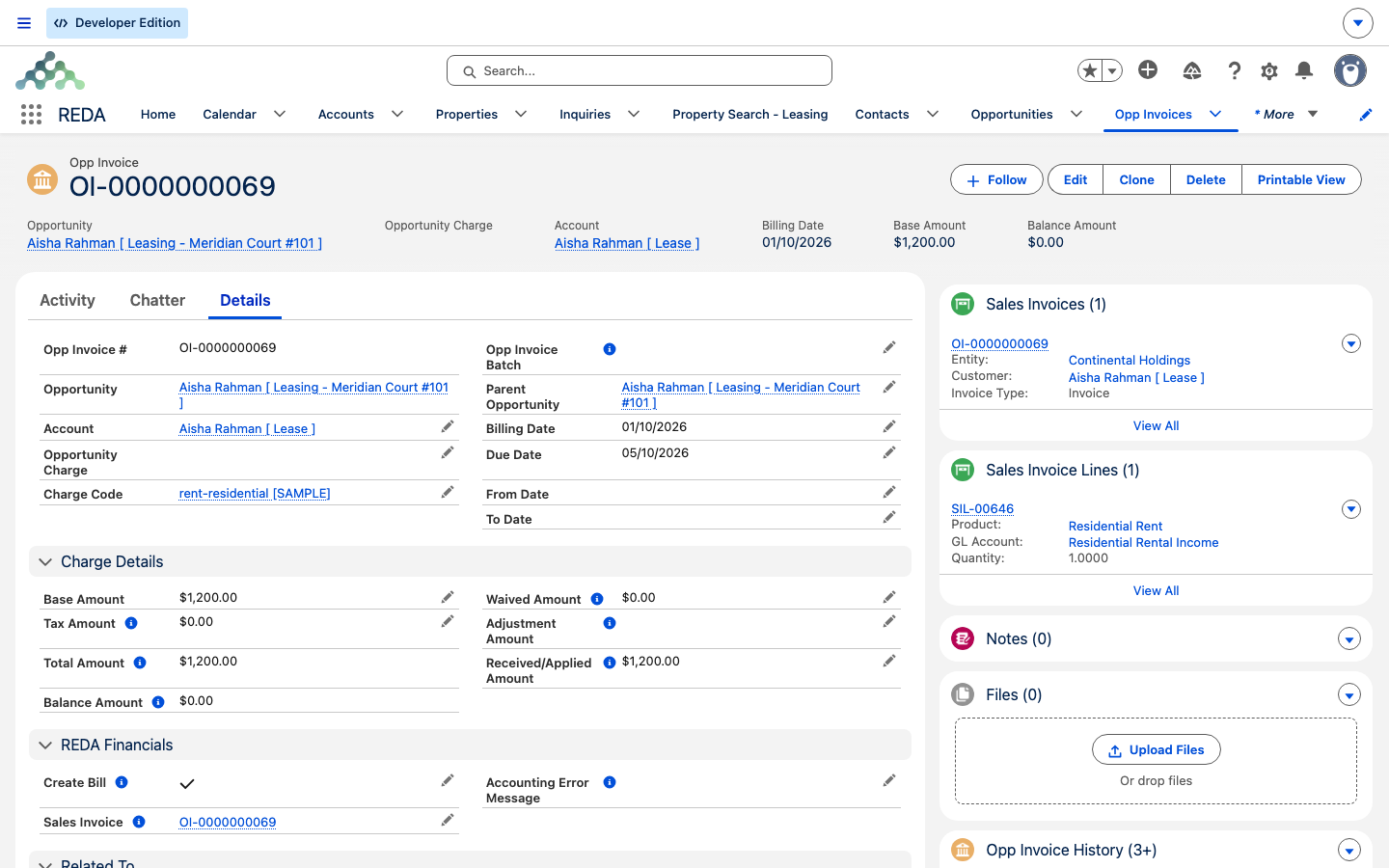
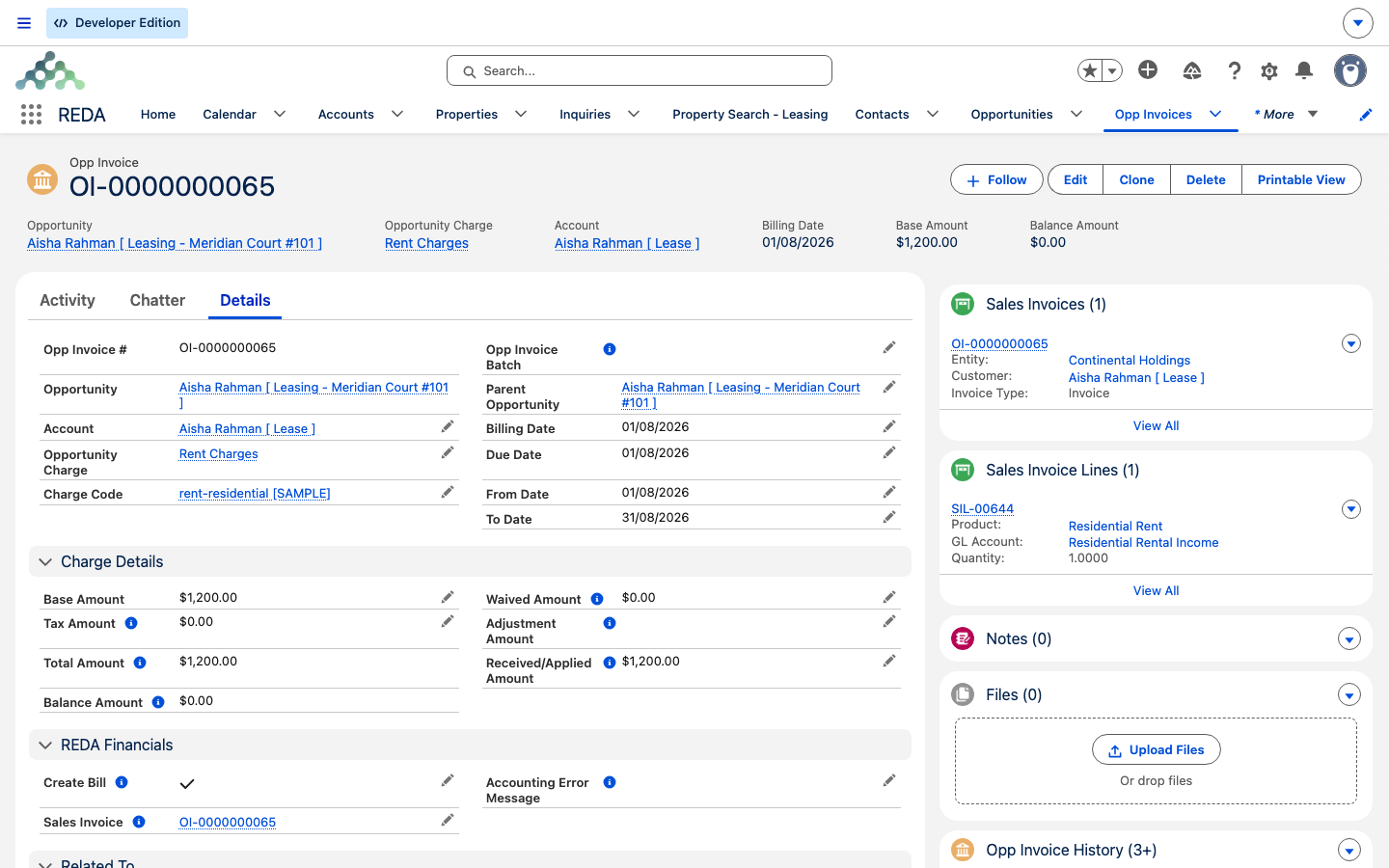
Aisha Rahman rents Meridian Court #101 at 1,200.00 a month, on a rent charge code that grants 5 grace days. Her February invoice reads:
| Field | Value |
|---|---|
| Base Amount | 1,200.00 |
| Tax Amount | 0.00 |
| Total Amount | 1,200.00 |
| From / To Date | 1 Feb – 28 Feb |
| Billing Date | 1 Feb |
| Due Date | 6 Feb (1 Feb + 5 grace days) |
| Billing Comment | … with the covered period appended as a bracketed range |
| Received/Applied Amount | 800.00 (a partial payment, written by the extension) |
| Balance Amount | 400.00 (1,200.00 − 800.00) |
Where to go next
- Charge Codes — grace days, routing, and pass-through, all set here.
- How Recurring Invoicing Works — how rent invoices generate month after month.
- Proration — why a first or last invoice isn't a round month.
- Consolidated Invoices (Batches) — how invoices are combined and what that locks.
- Late Fees — the invoices that carry a Parent Invoice link.
Frequently asked questions
The charge code grants payment grace days. REDA sets the due date to the billing date plus those grace days. If you want them due on the billing date, remove the grace days on the charge code.
You'll see "This Opp Invoice cannot be deleted." Deletion is blocked once any amount has been applied — a received, waived, or adjusted amount means the balance no longer equals the total — or while the invoice is in a batch. Reverse the applications in the accounting extension or remove it from the batch first, or correct it with a waiver or adjustment instead.
Batched invoices must stay aligned with their batch: "Receivable account, Account, Property and Billing Date on the batch must be same as on opp invoice Record." Remove the invoice from the batch to change these header fields.
From the accounting extension — its tax engine sets the tax, and cash application sets the received amount. REDA never writes them itself.
It's a late-fee invoice. The Parent Invoice is the overdue invoice that triggered the late fee, and you'll find the late fee listed under the parent's Related Invoices.
Recurring invoices append the period they cover — the from and to dates — to the billing comment as a bracketed range, so the covered period is visible on the invoice.
Was this article helpful?