
Multi-Currency Behavior
Multi-currency is off by default, and off in the reference org. If your portfolio bills in a single currency, you can safely skip this page — everything just works in your one currency. If you operate across currencies, one switch decides whether every invoice, charge, commission, and booking gets its currency stamped automatically, and the Region is where that currency comes from. This article explains the master switch, how REDA stamps currency when it's on, why a Region's currency locks once it's in use, and how REDA's own screens format currency. It stays honestly scoped: it describes verified behavior, not exchange-rate features REDA doesn't have.
Access you'll need. A Salesforce administrator changes the setting. REDA - Master Data - Admin is needed for the Region records where currency is set.
The master switch
A single application setting — Multi-Currency Enabled — is the master gate for all of REDA's currency behavior. In the reference org its value is 0, meaning off. With it off, REDA does no currency stamping at all: records simply carry your org's single currency, exactly as they would in any single-currency Salesforce org. Turning it on is what activates everything described below.
Where currency comes from: the Region
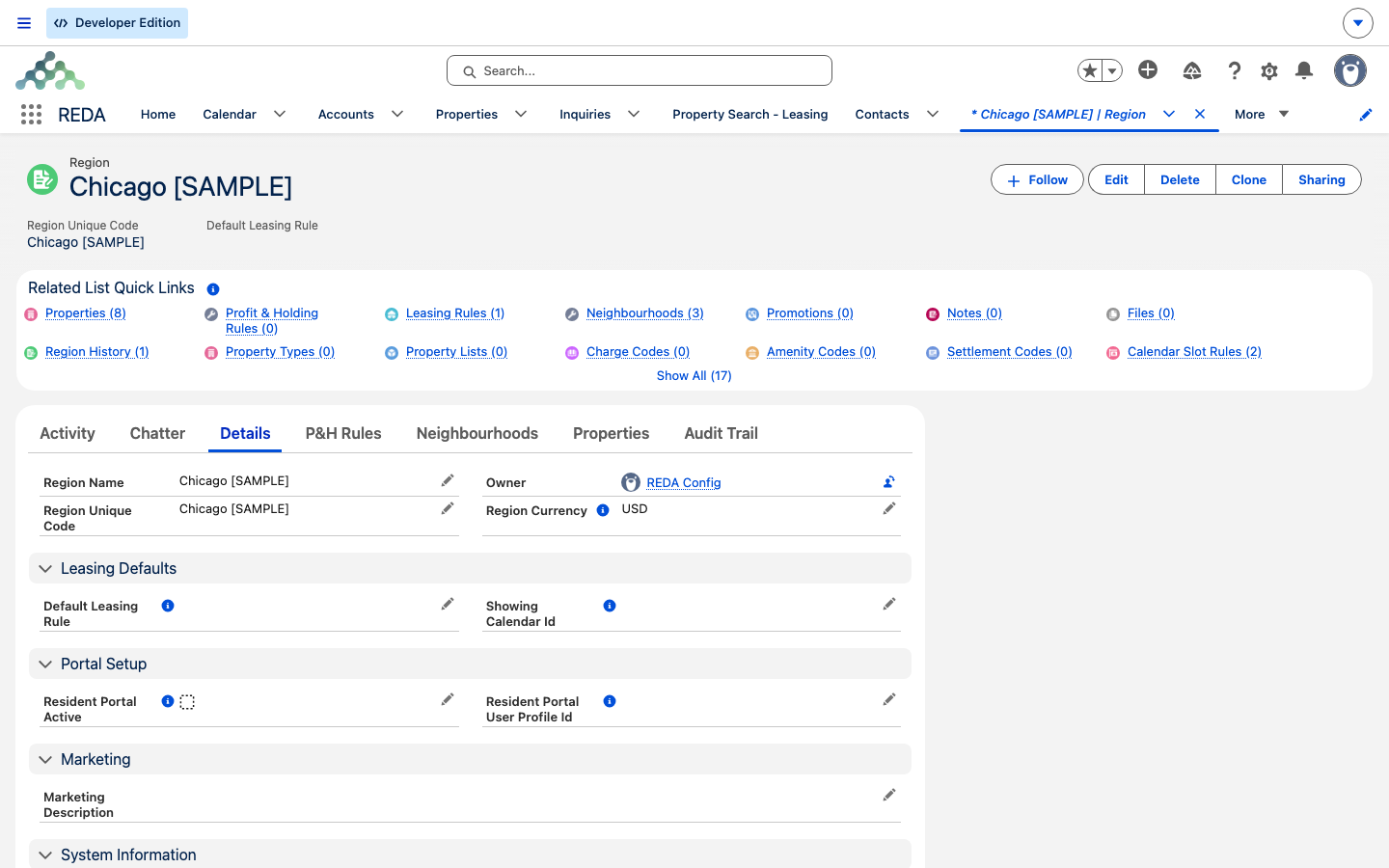
When multi-currency is on, REDA doesn't ask users to pick a currency — it derives one. The Region carries the currency, and every record traces its currency back through its property to that property's Region. A lease under a US region is a US-dollar lease; a lease under a Canadian region is a Canadian-dollar lease. The Region is, in effect, the currency control — there is no currency picker on REDA records because there doesn't need to be.
What happens when it's on
With the switch on, REDA stamps the correct currency onto a record just before it saves — with no user input — across essentially every financial and operational record. The behavior is uniform; this table exists so you can confirm your object is covered.
| Area | Records REDA stamps automatically |
|---|---|
| CRM | Accounts, Contacts, Inquiries |
| Leasing & deals | Deals and leases, lease charges, and the tickets their automation raises |
| Billing | Invoices, payment schedules, payment plan milestones, expense reconciliation lines |
| Property & setup | Regions, neighbourhoods, rent cards, admin charge setups, leasing rules, profit & holding rules, ownership trails, portfolio properties |
| Operations | Bookings, work orders, visitor logs, pets, vehicles |
| Commissions & lending | Commissions, loan payments |
The Region currency lock
Once a Region is in use, its currency is fixed. REDA prevents a currency change on a Region that already has linked Properties, Profit & Holding Rules, Neighbourhoods, or Leasing Rules — because changing it would silently reinterpret the currency of the financial records that depend on it. If you need a different currency, create a new Region for it rather than editing an existing one.
This guard is a strong reason to design Regions along currency lines during setup: one Region is one currency, permanently. See Regions for how currency fits into the Region model, and The Setup Roadmap for where currency planning belongs in your rollout.
Guards that switch on with the feature
Turning multi-currency on does more than start the stamping — it activates a set of alignment checks that keep currencies from crossing where they'd clash. These stay silent in a single-currency org; with the feature on, they block a save and explain why. You'll meet them as you set up cross-currency data:
| Where it fires | Message |
|---|---|
| A Region saved without a currency | "Currency is required when Multi-Currency is enabled." |
| An internal-entity account with no Region | "Provide Region for Internal Entity when multi-currency is enabled." |
| A property whose Region doesn't match its leasing rule's Region | "Property Region must match Leasing Rule Region when Multi-Currency is enabled." |
| A contact whose account Region currency differs from the deal's property Region currency | "Currency mismatch: The currency of the Contact's Account Region and the Property Region on the related Opportunity must match when multi-currency is enabled." |
Each one is really the same rule stated for a different record: a single deal, and everything under it, lives in one currency. They're the reason the setup order below matters — get the Regions and their currencies right first, and these checks stay out of your way.
Currency display in REDA screens
REDA's custom screens format currency from a small catalog of per-currency records — each holding an ISO code, a symbol, and the number of decimal places (2 by default). Only one ships: USD, with the $ symbol and 2 decimals. If you operate in other currencies, add a format record for each ISO code you use so REDA's screens show the right symbol and decimals. It's an administrator task with no code involved.
A note on totals
REDA's own rollup totals are currency-aware in a multi-currency org: they aggregate each record's stored value directly, so a total keeps every record's own currency honest rather than silently folding everything into a single corporate currency. Standard Salesforce reports still follow Salesforce's own conversion rules — REDA's promise here is specifically about its own rollups.
Enabling multi-currency safely
Turning multi-currency on is a go-live decision, not a switch to flip on a live org. There's no utility to restamp records that already exist, so the currency design has to be right before data is loaded.
Worked example: a Canadian building
Meridian Properties runs a US portfolio under the region "Harbour District - US" (US dollars) and acquires a building in Canada. With multi-currency enabled, the administrator creates a new region, "Harbour District - Canada," set to Canadian dollars — before creating any properties under it, because the currency will lock as soon as it's in use. They add a Canadian-dollar currency-format record so REDA's screens show the right symbol and decimals. From then on, every lease, charge, invoice, and commission under the Canadian region is stamped in Canadian dollars automatically: a monthly rent of 1,200.00 invoices as 1,200.00 in Canadian dollars, with nobody picking a currency. The counter-example: trying to switch "Harbour District - US" to Canadian dollars after go-live is blocked by the Region lock — the answer is a new region, not an edit.
Where to go next
- Global App Settings — where the multi-currency master switch lives.
- Regions — the record that owns each currency.
- How REDA Works with REDA Financials — where accounting-side currency handling belongs.
- The Setup Roadmap — where currency planning fits in your rollout.
- The REDA Admin Console — the administrator's control tower.
Frequently asked questions
No — the setting is 0 (off), and the reference org runs single-currency. If you bill in one currency, there's nothing to do.
Nobody — REDA stamps it automatically from the property's Region just before the record saves, across financial and operational records.
Once a Region has linked Properties, Profit & Holding Rules, Neighbourhoods, or Leasing Rules, REDA blocks currency changes to protect the financial records that depend on it. Create a new Region for the new currency.
Add a currency-format record for that ISO code, with its symbol and decimals. REDA ships only a US-dollar format.
No. REDA stamps and preserves each record's currency; it adds no exchange-rate engine of its own. Conversion in standard reports follows Salesforce's rates.
With multi-currency on, REDA enforces that a deal and everything under it share one currency. The most common triggers are a property whose Region doesn't match its leasing rule's Region, or a contact whose account Region currency differs from the deal's property Region currency. Line up the Regions (and their currencies) so they agree, and the save goes through. See Guards that switch on with the feature for the full set.
Was this article helpful?