
Monthly Snapshots & Occupancy Analytics
A reconciliation snapshot answers two questions about a unit for a single month: did it bill what it should have? and how occupied was it, and at what value? It captures both as a permanent record you can trend over time — a billing audit plus occupancy analytics, one per property per month. This article shows you how to read a snapshot (the Scheduled-versus-Invoiced audit and the occupancy metrics, each formula in plain words), how to choose standard versus advanced mode, how to generate one on demand, and — the one thing that surprises most teams — that the monthly job doesn't run out of the box and must be scheduled by an administrator first.
Access you'll need. Creating snapshots requires the REDA - Master Data - Admin or REDA - Property Analytics permission set. Scheduling the monthly job requires REDA - Master Data - Admin.
What a snapshot is
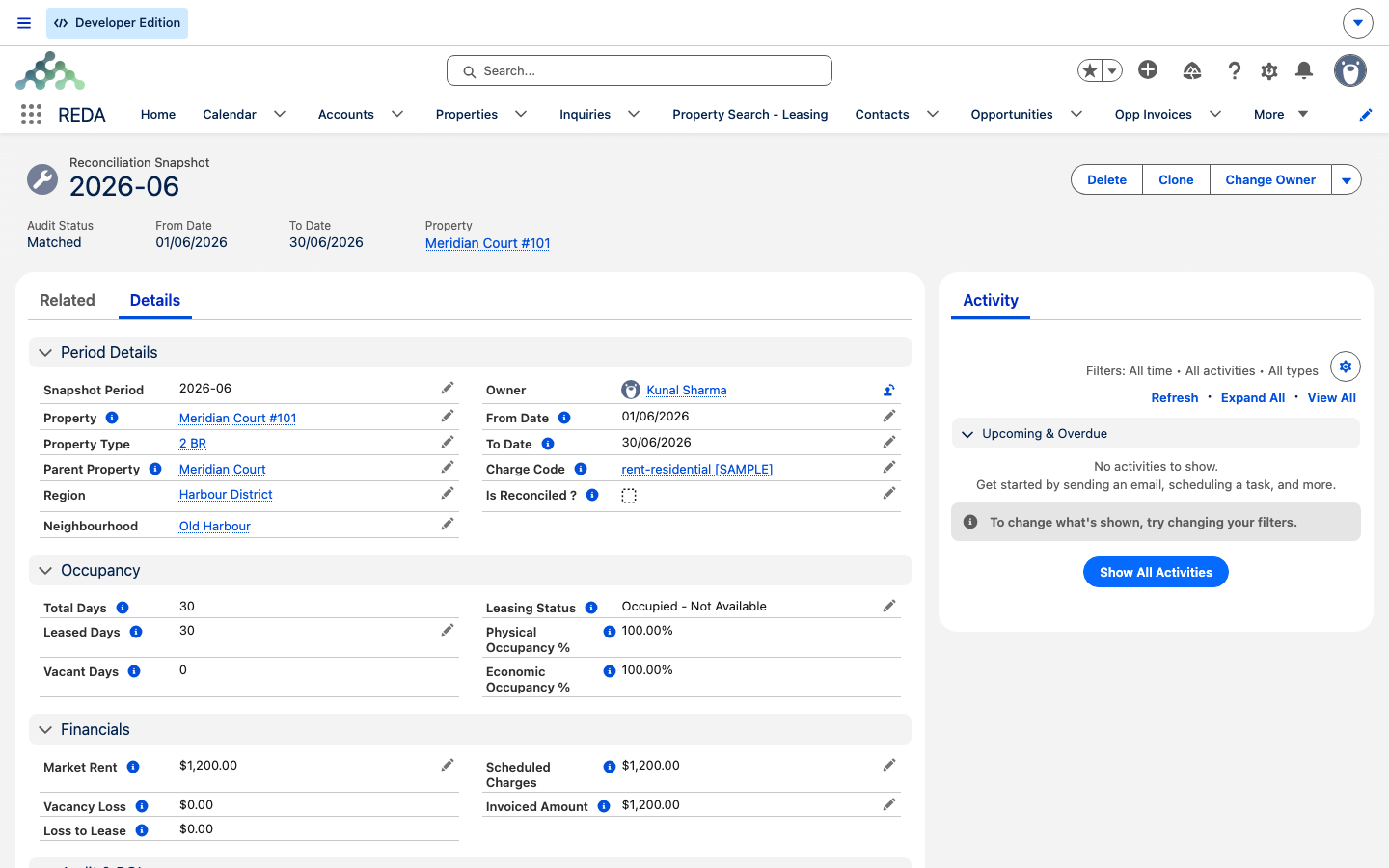
A snapshot is a single record for one property and one month. Its name is the period, written YYYY-MM — so 2026-01 is January 2026 for that property. On it, REDA records what should have been billed, what actually was, the difference, and a set of occupancy and loss figures for the month. Snapshots are rebuilt on demand: generating one for a month you already have replaces it, so the numbers always reflect the latest billing.
Because a snapshot is a monthly record, a property builds up a row per month — a run you can read down to spot the month billing slipped, or the month occupancy dropped.
The billing audit: Scheduled versus Invoiced
The heart of the audit is a comparison of two numbers:
REDA turns that gap into a plain verdict. Audit Status reads Matched when the variance is under one cent (|variance| < 0.01), and Action Required otherwise. So "Matched" means the unit billed what it should have, to the penny; "Action Required" means it didn't, and the month is worth a look — a missed invoice, a mid-month change, or a manual credit. A separate Is Reconciled ? checkbox is there for a human to tick once they've reviewed the row.
The occupancy analytics
Alongside the audit, each snapshot captures how occupied and how valuable the unit was that month. Every figure is a simple ratio of days or amounts — here's each one in words, with a worked number for a 31-day January on a unit whose market rent is 1,550.00 and contracted rent is 1,500.00:
| Metric | Formula in words | Worked (Jan, 31 days) |
|---|---|---|
| Total Days | (To − From) + 1 | 31 |
| Leased Days / Vacant Days | Days under charge coverage / Total − Leased | 31 / 0 |
| Physical Occupancy % | Leased Days ÷ Total Days | 100% |
| Economic Occupancy % | Invoiced Amount ÷ Market Rent (when Market Rent > 0) | 1,500 ÷ 1,550 = 96.77% |
| Loss to Lease | (Market Rent ÷ Total Days) × Leased Days − Scheduled Charges | (1,550 ÷ 31) × 31 − 1,500 = 50.00 |
| Vacancy Loss | (Market Rent ÷ Total Days) × Vacant Days | 0.00 |
Loss to Lease is the gap between what the unit could fetch at market and what it's actually contracted at, for the days it was leased — here, 50.00 left on the table by renting at 1,500 against a 1,550 market. It can go negative: a negative Loss to Lease simply means you're billing above market for that unit. Vacancy Loss is the market value of the empty days — zero here because the unit was full all month. The snapshot also stores the property's Leasing Status and its Market Rent so you can trend them.
Standard versus Advanced mode
By default a property produces one snapshot row per month — the whole unit in a single record. Switch on a property's Advanced Reconciliation Snapshot setting and REDA instead produces one row per charge code (rent, amenity, admin, promotion — resolved from the property's setup). The row for the rent charge is flagged (Is Rent Snapshot) and is the only row that carries the occupancy and loss metrics; on the other charge-code rows, Physical and Economic Occupancy, Loss to Lease, and Vacant Days are blank by design.
| Standard | Advanced | |
|---|---|---|
| Rows per property-month | 1 | 1 per resolved charge code |
| Turn on via | (default) | The property's Advanced Reconciliation Snapshot switch |
| Occupancy / loss metrics | On the single row | Only on the flagged rent row |
| Billing audit | Whole property | Per charge code |
| Answers the question | "Is the unit billed right?" | "Which charge is off?" |
Which properties get snapshots
A property is only picked up if it meets two prerequisites — check these when a unit is missing from the run:
Generating snapshots
There are two ways to produce snapshots, and both rebuild rather than duplicate:
| Ad hoc (property action) | Monthly batch | |
|---|---|---|
| Scope | One property, any month (YYYY-MM) you enter | All flagged properties, the previous month |
| Trigger | The Create Reconciliation Snapshot button | A scheduled job (must be set up — see below) |
| Errors | Shown on the action's screens | Written to a log; good rows still insert |
| Rerun | Enter the same month again — deletes and rebuilds it | Next run rebuilds its month |
The Create Reconciliation Snapshot action generates a snapshot for one property and one month; the input must be a month in YYYY-MM form. Enter something else and REDA rejects it:
Snapshots carry the same date rules the audit relies on, and REDA enforces them verbatim if you ever create one by hand:
"The Period To Date must be the last day of the month corresponding to the From Date."
"The Snapshot Period name (YYYY-MM) must match the Year and Month of the From/To dates."
"The From Date and To Date must belong to the same month and year."
Scheduling the monthly job (required setup)
An administrator schedules it from the REDA Admin Console → Scheduled Jobs. The catalog's default timing is the 1st of the month at 6:00 AM (in the scheduler's time zone). When it runs, it processes the previous month for every flagged property, in batches, and logs any failures without stopping the good rows. The full job catalog and a go-live checklist live in Scheduling Background Jobs — set this up as part of go-live so your occupancy history starts accumulating from day one.
Worked example: Meridian Court, January 2026
Meridian Properties reviews the January snapshots for Meridian Court (31 days). Each unit's market rent is 1,550.00 and its contracted rent 1,500.00:
| Unit | Scheduled / Invoiced | Audit Status | Occupancy & loss |
|---|---|---|---|
| #101 — leased all month, billed correctly | 1,500.00 / 1,500.00 → variance 0.00 | Matched | Physical 100%; Economic 96.77%; Loss to Lease 50.00; Vacancy Loss 0.00 |
| #102 — leased, but the invoice was missed | 1,500.00 / 0.00 → variance 1,500.00 | Action Required | — |
| #103 — leased 20 days, then vacant | (prorated) | (per billing) | Physical 64.5%; Vacant 11 days; Vacancy Loss (1,550 ÷ 31) × 11 = 550.00 |
Reading down the run, unit #102's Action Required flags the missed January invoice. Once billing is corrected, Meridian regenerates the 2026-01 snapshot for #102 — the old row is replaced and, with the invoice now present, it reads Matched. In Advanced mode, #101 with a rent charge and an amenity charge would produce two rows: the rent row carrying all the occupancy metrics above, and the amenity row auditing only its own scheduled-versus-invoiced numbers.
Reference: the snapshot fields
| Field | Formula in words | Blank when |
|---|---|---|
| Name | The period, YYYY-MM | — |
| From / To Date · Total Days | Month bounds; days = (To − From) + 1 | — |
| Scheduled Charges | Month's prorated share of in-period lease charges, net of discounts | No qualifying charges |
| Invoiced Amount | Sum of the month's invoices under snapshot-included charge codes | Nothing invoiced |
| Billing Variance | Scheduled − Invoiced | — |
| Audit Status | "Matched" if variance under 1 cent, else "Action Required" | — |
| Is Reconciled ? | Manual sign-off checkbox | — |
| Market Rent | The property's market rent at generation | — |
| Leased Days / Vacant Days | Charge-coverage span / Total − Leased | Vacant Days blank on non-rent advanced rows |
| Physical Occupancy % | Leased ÷ Total Days | Non-rent advanced rows |
| Economic Occupancy % | Invoiced ÷ Market Rent (Market Rent > 0) | Non-rent advanced rows; no market rent |
| Loss to Lease | (Market Rent ÷ Total Days) × Leased Days − Scheduled Charges | Non-rent advanced rows |
| Vacancy Loss | (Market Rent ÷ Total Days) × Vacant Days | Non-rent advanced rows |
| Leasing Status | The property's leasing status snapshotted | — |
| Is Advanced Snapshot / Charge Code / Is Rent Snapshot | Advanced-mode markers | Standard mode |
Where to go next
- Scheduling Background Jobs — required setup: schedule the monthly snapshot job.
- Expense Reconciliation: Concepts — the other engine, which recovers costs rather than auditing them.
- How Recurring Invoicing Works — why Scheduled and Invoiced can drift apart.
- Proration — the 30-day-month switch that shapes Scheduled Charges.
- Owner Draws & Owner Statements — the owner-facing side, where occupancy and billing feed what the owner sees each period.
- Third-Party Property Management in REDA — where owner reporting fits overall.
Frequently asked questions
The monthly job isn't scheduled by default. An administrator must schedule it (Admin Console → Scheduled Jobs; the catalog default is the 1st of the month at 6:00 AM), or you can generate one ad hoc from a property. Nothing runs until the job is set up.
Either its Include In Reconciliation Snapshots flag is off, or it has no Market Rent and no best-term rent to draw on. Both are prerequisites for a property to be picked up.
The name must be the period in YYYY-MM form: "Snapshot Period (Name) must follow the YYYY-MM format (e.g., 2026-01)." Enter 2026-01, not "Jan 2026".
The scheduled and invoiced amounts for the month differ by a cent or more, so the unit's billing needs a look — a missed invoice, a mid-month change, or a manual credit. Matched means they agree within one cent.
Yes. Generating a snapshot deletes the existing snapshot for that property and month first, then rebuilds it, so you can rerun a month freely. Any manual Is Reconciled ? sign-off is on the deleted row, so you'll re-mark it after regenerating.
In Advanced mode only the rent row carries the occupancy and loss metrics. The other charge-code rows audit billing only, so their occupancy and loss fields are blank by design.
Was this article helpful?