
Straight-Line Rent Schedules
A commercial lease charges 2,000.00 a month in year one, 2,100.00 in year two, and 2,200.00 in year three — but for accounting purposes, the rent should be recognized evenly across the whole term, not stepped. That even figure is straight-line rent, and the gap between it and the cash actually billed is the deferred-rent balance that accounting standards such as ASC 842 and IFRS 16 (the US and international lease-accounting rules) ask you to track. This article shows you how to switch the feature on, generate a schedule, and read it line by line — the linearized rent, each month's adjustment, and the running receivable that builds up and unwinds to zero. Where accounting judgment is involved, check with your accounting team; this article explains the tool, not the standard. No prior REDA experience is assumed.
Access you'll need. Full access to schedules requires the REDA - Master Data - Admin or REDA - Property Analytics permission set; the calculate action needs schedule-create rights.
Why straight-line
When cash rent escalates over a lease, the money you collect rises step by step, but the value the tenant receives each month — the use of the space — doesn't. Straight-line recognition smooths the rent into one constant monthly figure, the linearized rent, calculated across the entire term. In the early, cheaper months you recognize more than you bill (building a receivable); in the later, dearer months you recognize less than you bill (unwinding it). By the end of the lease, the receivable returns to zero. REDA builds the whole schedule for you, month by month, so you have the numbers without a spreadsheet.
Switching it on
A charge is included in a straight-line schedule only when a chain of conditions is met. Miss any link and the charge is silently left out:
| # | Requirement | Where |
|---|---|---|
| 1 | The Leasing Rule has Calculate Straight-Line Schedule switched on | Leasing Rule |
| 2 | The charge is recurring, with From/To dates | The charge |
| 3 | The charge's charge code has Include In Straight-Line Calculation ticked | Charge Code |
| 4 | Any ticket linked to the charge is Closed | Ticket |
| 5 | The lease is accounting-active with a property set (checked by the action) | The lease |
Generating a schedule
There are three ways a schedule gets built. You can trigger one on demand with the Calculate Straight-Line Schedule action on the lease — a short screen that first checks the lease is a lease, is accounting-active, has straight-line enabled on its rule, and has a property. When a relevant charge changes, REDA also flags the lease as pending straight-line calculation, so it can be swept up automatically. That automatic sweep runs as a background job — but like most billing runs, it isn't scheduled out of the box:
Reading the schedule
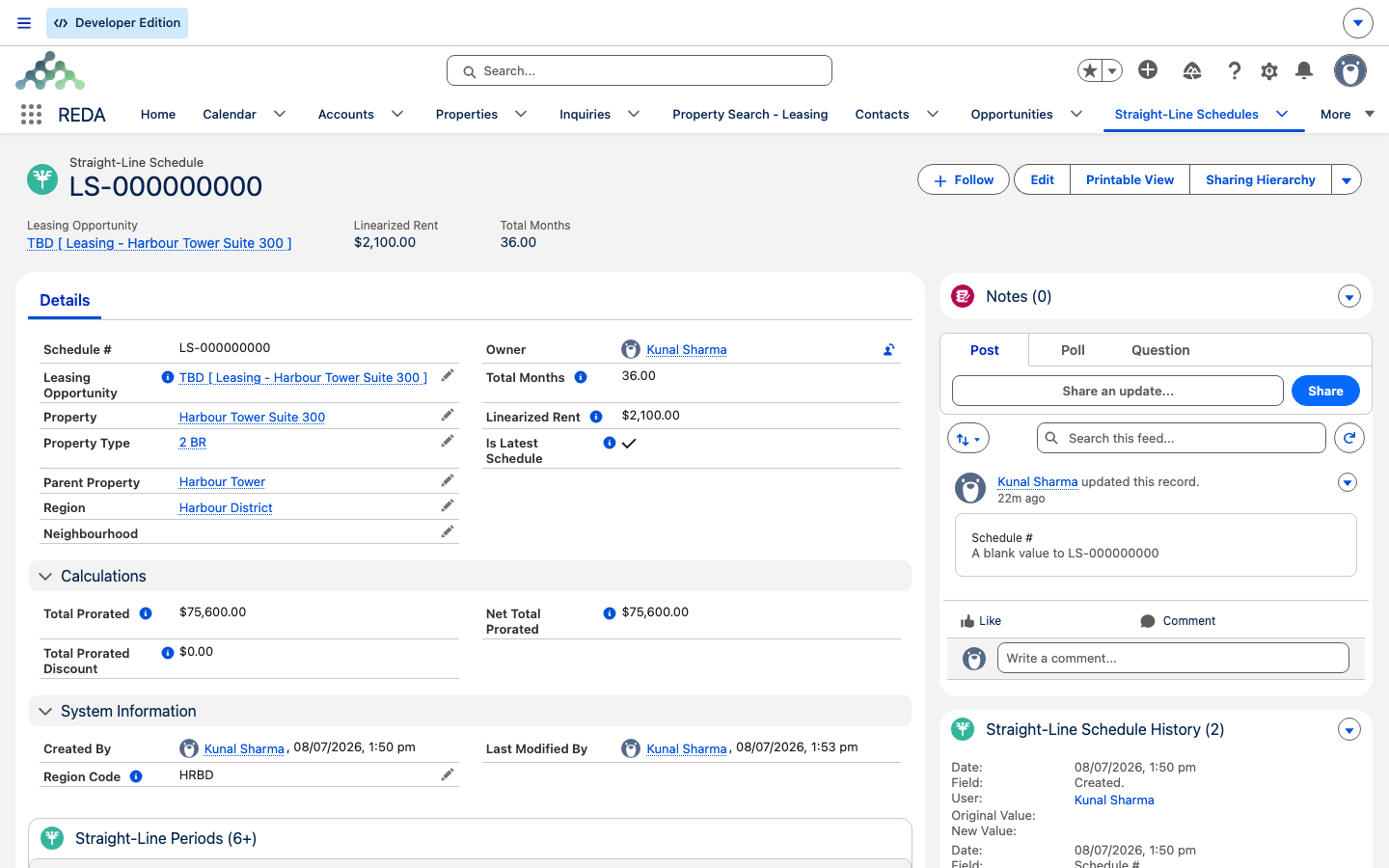
A straight-line schedule has a header that summarizes the whole term, and one row — a period — per calendar month. The header's roll-ups build to the single most important figure, the linearized rent:
| Header field | Meaning |
|---|---|
| Total Months | The sum of the month weights across all periods. |
| Total Prorated / Total Prorated Discount | The sum of cash rent / the sum of discounts across the term. |
| Net Total Prorated | Total Prorated minus Total Prorated Discount. |
| Linearized Rent | Net Total Prorated ÷ Total Months — the constant monthly figure. |
| Is Latest Schedule | True only for the schedule the lease currently points at. |
Reading a period
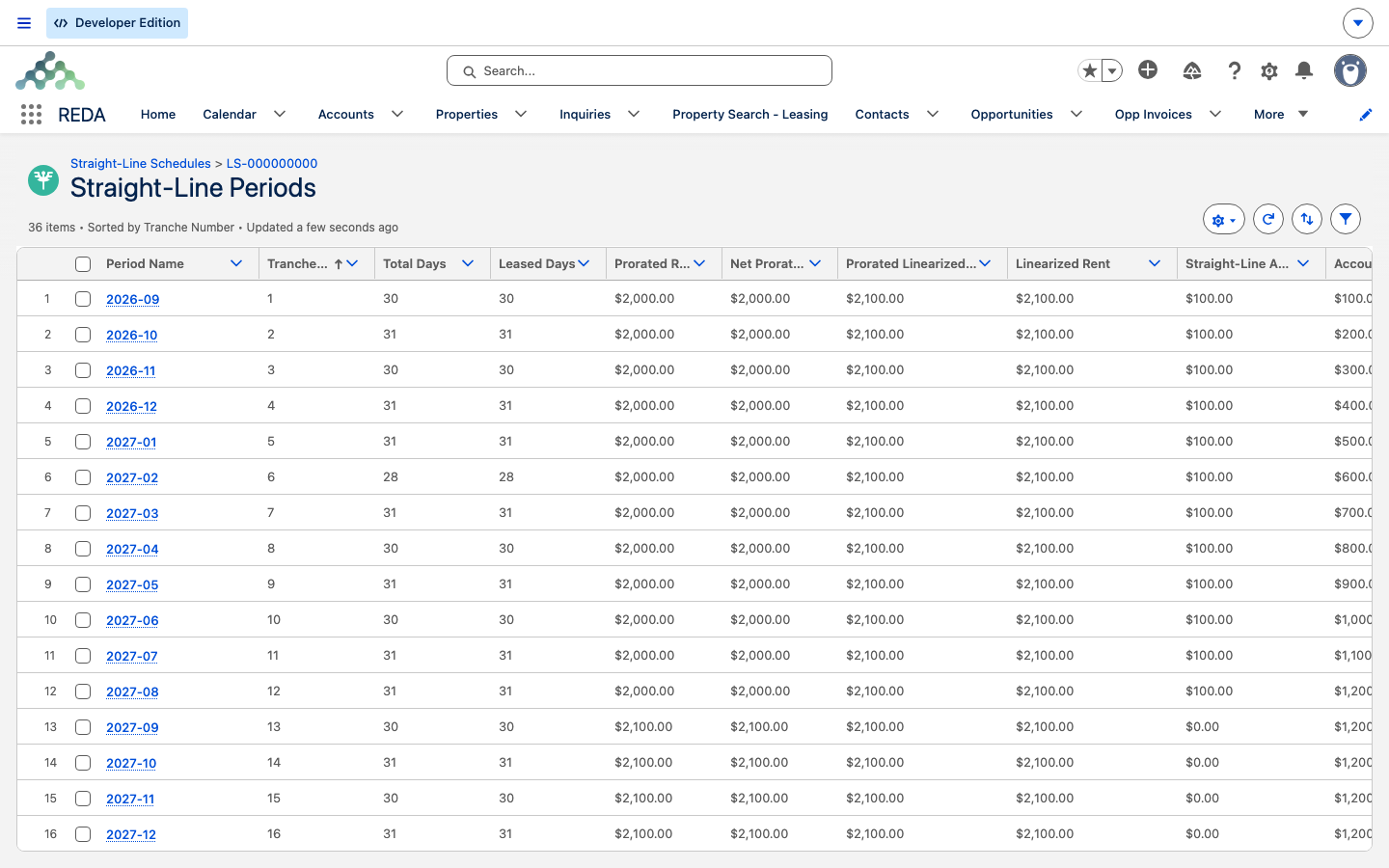
Each period is one calendar month of the term. Its name is written by REDA as a year-month key — 2026-01, for instance — and the numbers on it trace the recognition for that month:
| Period field | Meaning |
|---|---|
| Period Name | The month, written year-month (e.g. 2026-01), by the system. |
| Period Start / End, Total Days | The calendar month the period covers. |
| Leased Days / Vacant Days | How much of the month the lease actually covers. |
| Month Weight | With advanced proration on: leased days ÷ total days. Otherwise: 0.5 for a partial month, 1 for a full one. |
| Prorated Rent / Prorated Discount / Net Prorated Rent | The cash side for the month. |
| Prorated Linearized Rent | Linearized Rent × Month Weight. |
| Straight-Line Adjustment | Prorated Linearized Rent minus Net Prorated Rent — the deferred-rent movement for the month. |
| Account Receivable | The running sum of the adjustments to date. |
The Straight-Line Adjustment is the heart of it: a positive figure means you recognized more than you billed (deferring rent into a receivable), a negative figure means you recognized less (unwinding it). The Account Receivable column accumulates those adjustments and, over a balanced schedule, returns to zero at the final period.
A note on the period-name message
Periods are named automatically, and you shouldn't rename them. If a validation ever fires on the period name, be aware of a quirk in its wording:
The message says "MM-yyyy," but the format REDA actually writes and accepts is year-month (yyyy-MM, e.g. 2026-01). The wording is misleading; the behavior is what counts. Leave period names as the system sets them.
Worked example: a three-year step-up on Harbour Tower Suite 300
Harbour Tower Suite 300 is a commercial lease that runs 36 months of full months, no discounts, with the rent stepping up each year: 2,000.00 a month in year one, 2,100.00 in year two, and 2,200.00 in year three. The total cash rent is (12 × 2,000.00) + (12 × 2,100.00) + (12 × 2,200.00) = 75,600.00 over 36 months, so the linearized rent is 75,600.00 ÷ 36 = 2,100.00 a month — which, for an evenly-stepped lease like this, lands right on the middle year's rent. Here's how the adjustment and the receivable move:
| Months | Cash rent | Linearized | Adjustment | Running receivable |
|---|---|---|---|---|
| 1–12 (Year 1) | 2,000.00 | 2,100.00 | +100.00 | climbs by 100 each month → 1,200.00 at month 12 |
| 13–24 (Year 2) | 2,100.00 | 2,100.00 | 0.00 | holds flat at 1,200.00 through month 24 |
| 25–36 (Year 3) | 2,200.00 | 2,100.00 | −100.00 | unwinds by 100 each month → 0.00 at month 36 |
In year one you bill 2,000.00 but recognize 2,100.00, so each month adds 100.00 to the receivable — which peaks at 1,200.00. Year two bills and recognizes the same 2,100.00, so the adjustment is zero and the receivable simply holds. In year three you bill 2,200.00 but still recognize 2,100.00, so each month draws the receivable down by 100.00, landing it back at zero as the lease ends.
Partial months prorate too. If this lease had started on 16 January (a 31-day month) with advanced proration on, that first period's Month Weight would be 16 ÷ 31 ≈ 0.516 and its prorated cash rent 2,000.00 ÷ 31 × 16 = 1,032.26; with advanced proration off, the weight would simply be 0.5. The same daily-rate logic as ordinary Proration runs here.
When it doesn't calculate
If the action reports no lease or no charges, the engine couldn't find something it needs:
"Opportunity Charges Not Found."
"Opportunity Charges Not Found." almost always means no charge qualified — walk the eligibility chain: the rule's straight-line flag, the charge code's Include In Straight-Line Calculation flag, the recurring From/To dates, and that any linked ticket is Closed.
Where to go next
- How Billing Works in REDA — the charge model straight-line reads from.
- Proration — the daily-rate math behind the partial-month periods.
- Charge Codes — the Include In Straight-Line Calculation flag.
- Scheduling Background Jobs — the sweep job that drives automatic recalculation.
- The REDA Financials Bridge — where the deferred-rent adjustment is booked.
Frequently asked questions
"Opportunity Charges Not Found." means no charge qualified. Check the rule's straight-line flag, the charge code's Include In Straight-Line Calculation flag, the recurring From/To dates, and that any linked ticket is Closed.
Recalculation never edits in place — it creates a new schedule and marks it latest, leaving the older one for audit. The one flagged Is Latest Schedule is the live one.
Period names are system-generated as year-month (e.g. 2026-01) — don't rename them. The validation enforces that format; note its message reads "MM-yyyy" but the accepted format is year-month.
The zero-out option absorbs any rounding residue in the final period, so the schedule lands exactly on zero.
The lease is flagged pending, but the sweep job that processes flagged leases must be scheduled by your administrator — or run the Calculate Straight-Line Schedule action by hand.
Was this article helpful?