
Renewing a Lease
Renewals in REDA are a self-perpetuating cycle. Ahead of a lease's expiry, REDA raises a Renewal ticket for you; you negotiate and set the renewed terms and charges on that ticket; and when you close it, REDA extends the lease and creates the next renewal ticket automatically. This article walks the whole cycle: where the Renewal ticket comes from, each status it can take (including opt-out and cancellation), where the renewal rent number comes from, and exactly what changes on the lease when a renewal closes. A ticket, in REDA, is a short tracked checklist for one step in a record's life — it has its own status Path and drives the parent record as you work it.
Access you'll need. Working renewals requires the REDA - Property Leasing User permission set (for editing the ticket and its charges).
How renewals work
You don't have to remember to start a renewal — REDA does. When automation is on, the Renewal ticket appears well before the lease ends, and the ticket is the workspace: you record the tenant's intent, set the new dates and rent, track the paperwork, and close it. The Renewal path even carries step-by-step guidance text on screen — the only ticket path in REDA that does — so expand the "Guidance for Success" panel as you work.
Where the Renewal ticket comes from
The renewal cycle is driven by the lease's Leasing Rule (see Leasing Rules: the Policy Engine). When the lease reaches Occupied - No Notice — billable and moved in — and the rule has Renewal Automation ticked with a Renewal Policy (a days value) set, REDA creates a Renewal ticket at status New, already filled with:
Then it perpetuates: every time you close a renewal, REDA creates the next one (status New; start = this renewal's end plus one day; due = that end minus the renewal days). If the lease later stops being billable — it reaches Expired — any open future renewal tickets sitting in "Renewal - Opted In" with a start date on or after today are automatically cancelled.
Occupied - No Notice. Try it on any other stage and REDA responds: "Renewal Request can be created for Leasing Opportunity in stage "Occupied - No Notice"."
The renewal statuses
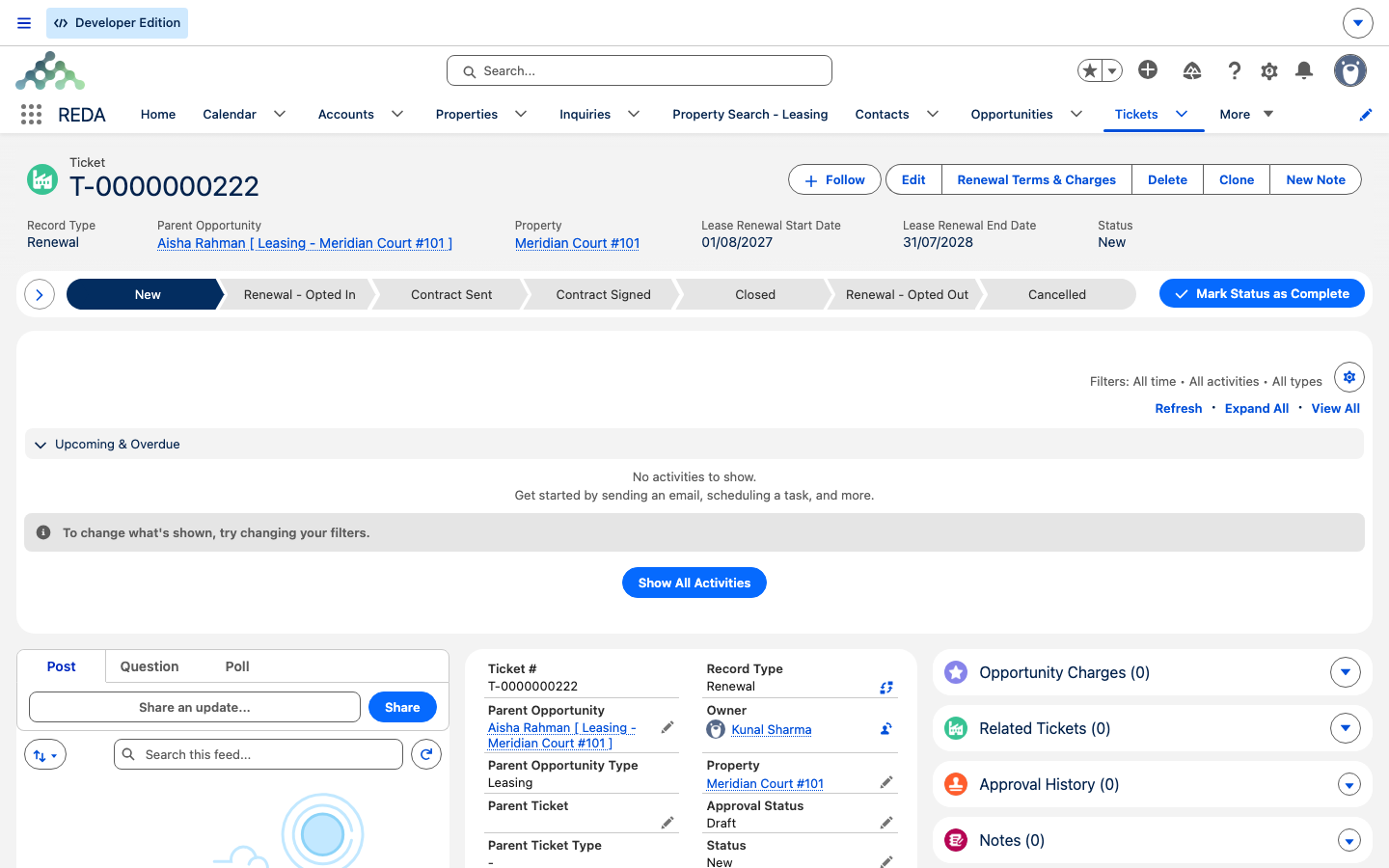
A Renewal ticket moves through its own status Path. The statuses are: New, Renewal - Opted In, Contract Sent, Contract Signed, Closed, plus the two exits Renewal - Opted Out and Cancelled. The happy path runs New → Renewal - Opted In → (set the terms) → Contract Sent → Contract Signed → Closed.
Setting the renewed terms & charges
On the ticket you set the renewal dates: Lease Renewal Start Date, Lease Renewal End Date, and Lease Renewal Term (Months). The start date must not open a gap or overlap — it has to fall on or before the current lease expiry — and REDA checks this right up until the ticket closes; if it's off, you'll see "Lease Renewal Lease Start Date is invalid." The Renewal Due Date drives reminders, and Renewal Opted Out Reason captures a decline.
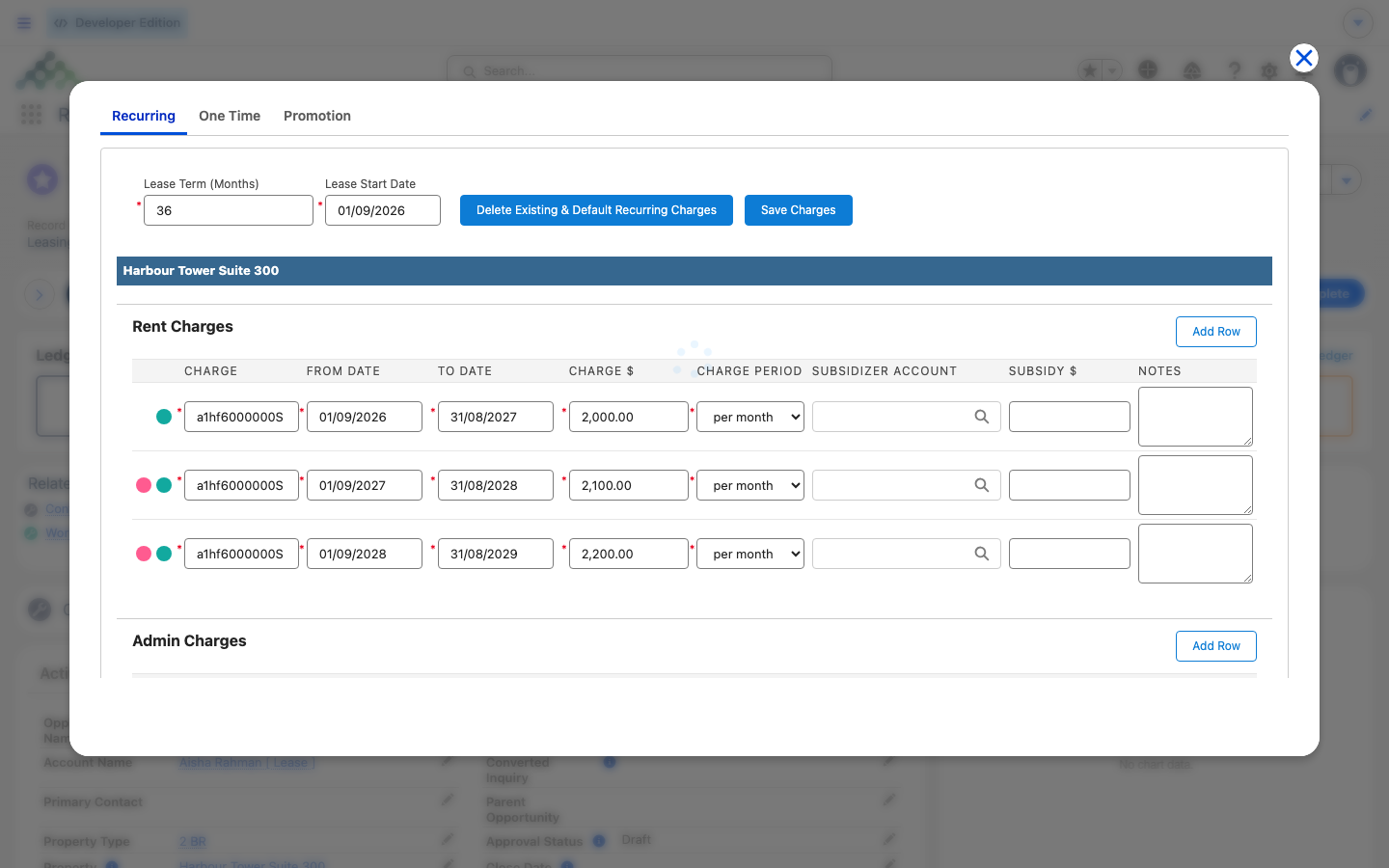
To set the money, click Renewal Terms & Charges on the ticket; it opens the charges editor scoped to this renewal. Renewal rents resolve from the property's rent cards using the Renew Lease Base Amount (not the new-lease amount), with a term-specific card beating a term-independent one, and the renewal total including the property's amenity additional rent. So the renewal figure is set by the card, not carried over from the current rent — a card with a New Lease Base Amount of 1,200.00 and a Renew Lease Base Amount of 1,250.00 renews at 1,250.00, not at the 1,200.00 the tenant is paying today. Promotions flagged Applicable On Renewal are offered here; new-lease-only promotions are excluded. Multi-year step-ups apply on renewal charge generation the same way they do on a new lease (see Multi-Year Leases & Step-Ups).
What closing the renewal does
Setting the ticket to Closed executes the renewal. In one step REDA:
Closing a renewal does not change the lease's Stage — it stays at Occupied - No Notice. Only the dates and references change.
When the tenant opts out
If the tenant declines to renew, set the ticket to Renewal - Opted Out. This requires a move-out date — "Please provide Move Out Date if renewal is opted out." — and once set, REDA spawns a Move Out ticket as a child of the renewal and stops the renewal's charge lines from invoicing. From there the move-out runs its normal course (see Notice, Move-Out & Lease End).
Cancelling a renewal
If a renewal is abandoned rather than declined, set it to Cancelled. REDA deletes the un-invoiced renewal charge lines it created, restores the lease's renewal references to the last previously-closed renewal (or clears them if there wasn't one), and reverts the lease's stage to the snapshot the ticket captured when it was created.
The signed document
Renewals follow the same document rules as other agreement tickets. Paper-signed renewals can't close until the signed document is attached — "Please attach Document prior closing Ticket." — and marking Document Attached as "Yes" requires a real file: "No document found associated to this ticket. Please upload document prior provide Document Attached as "Yes"."
Worked example: Aisha renews
Aisha Rahman holds a 12-month lease on Meridian Court #101 at 1,200.00 per month, ending 31 Jul 2027, under a rule with Renewal Automation on and a 90-day Renewal Policy. Here's the cycle:
| You do | REDA does |
|---|---|
Aisha moves in (lease reaches Occupied - No Notice) | Creates Renewal ticket #1: due 2 May 2027, renewal start 1 Aug 2027 |
| In April, open Renewal Terms & Charges | Rent card's Renew Lease Base Amount = 1,250.00 → renewal rent line 1 Aug 2027–31 Jul 2028 at 1,250.00 (dormant) |
| Aisha signs; attach the PDF; set Closed | Sets Renewed Till Date 31 Jul 2028 and Renewal Agreement; switches the renewal charges on; creates Renewal ticket #2 (start 1 Aug 2028) |
Opt-out variant: instead of signing, Aisha declines. Set the ticket to Renewal - Opted Out with a Move Out Date of 31 Jul 2027. REDA spawns a Move Out ticket and stops the renewal charges — the lease is now on the move-out path.
Reference: the renewal statuses
One row per Renewal ticket status and what REDA does when you set it.
| Ticket status | What it means | What REDA does |
|---|---|---|
| New | Ticket raised (auto or manual); due date visible | Nothing yet |
| Renewal - Opted In | Tenant intends to renew | Nothing automatic — proceed to terms & charges |
| Contract Sent | Renewal papers out | Document tracking only |
| Contract Signed | Papers back | Document tracking; close when done |
| Closed | Renewal executed | Renewal Agreement + Renewed Till Date written to the lease; renewal charges switch on; next Renewal ticket created; children synced |
| Renewal - Opted Out | Tenant declines (Move Out Date required) | Move Out ticket spawned as a child; renewal charges stopped |
| Cancelled | Renewal abandoned | Un-invoiced renewal charges deleted; lease references restored to the last closed renewal (or cleared); stage reverted to snapshot |
The date math, in words. With automation on and renewal days = N: the first ticket is created at Occupied - No Notice, with renewal start = current expiry + 1 day and due date = expiry − N days. Every next ticket is created when the previous renewal closes, with start = previous renewal end + 1 day and due = previous renewal end − N days.
Where to go next
- Notice, Move-Out & Lease End — where an opt-out sends the lease.
- Setting Up Lease Charges — how the renewal charges editor works.
- Multi-Year Leases & Step-Ups — step-ups on renewal generation.
- Rent Charge Setups — where the Renew Lease rent number lives.
- The Lease Record — the Renewed Till Date and Lease Expiration Date fields.
- Understanding Tickets — the process engine and the cancellation rewind.
Frequently asked questions
Manual renewals can only be raised on a lease at Occupied - No Notice: "Renewal Request can be created for Leasing Opportunity in stage "Occupied - No Notice"." If automation is on, REDA raises the ticket for you.
The renewal start can't leave a gap or overlap — it must fall on or before the current lease expiry: "Lease Renewal Lease Start Date is invalid." Set the start to the day after the current expiry.
Opting out needs a move-out date so the move-out can be scheduled: "Please provide Move Out Date if renewal is opted out." Enter the date, then set Renewal - Opted Out.
By design. Closing a renewal creates the next cycle's ticket automatically, so a renewal is never missed.
Cancellation restores the lease to the last previously-closed renewal's references (or clears them if there was no earlier renewal). The old dates you see belong to that prior, valid renewal.
Renewal charges stay dormant on purpose. They only switch on for invoicing when the ticket is closed, so setting up terms never bills the tenant early.
When the lease expires and stops billing, any open future opted-in renewal tickets are automatically cancelled so they don't linger against a lease that has ended.
Was this article helpful?