
Customizing REDA Objects
You can extend REDA's objects freely — add a custom field to Property, put it on a page layout, add a record type, write a validation rule. Those are all standard Salesforce customization, so this article keeps the mechanics short and points to Salesforce's documentation. What it covers in full is the part that's unique to customizing REDA: you cannot rewrite REDA's own packaged fields and rules, and you shouldn't fight REDA's built-in automation. After reading, you'll know how to safely extend REDA's objects without breaking upgrades or the automation that runs the product.
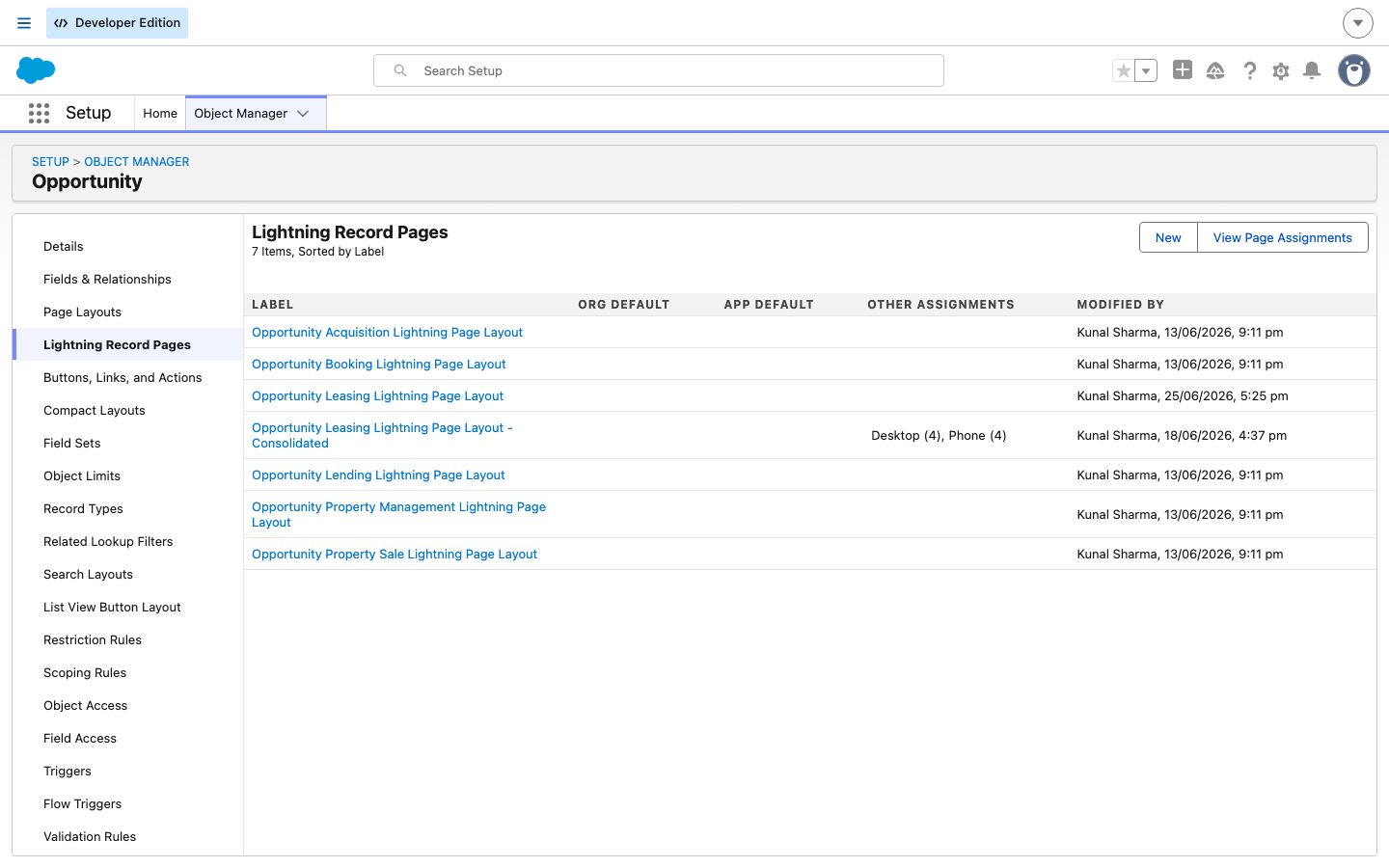
Access you'll need. Salesforce administrator rights (Customize Application). Note that REDA already ships its own Lightning record pages per record type — for example, the six Opportunity pages — so tailoring those is org-side page-builder work.
What you can customize
On a REDA object — Property, Opportunity, Inquiry, Ticket, and the rest — you can do everything you'd do on any Salesforce object, alongside what REDA ships:
- Add custom fields and put them on page layouts.
- Create your own list views on any REDA object — filtered, saved views of Properties, Opportunities, Inquiries, or Tickets for your team.
- Add your own record types and their paths.
- Add validation rules (with care — see below).
- Build custom report types for reporting across REDA data.
- Clone and assign your own Lightning record pages. REDA ships a record page per object and record type; you can build your own org-side version and assign it.
None of these touch REDA's own packaged components — they sit alongside them — so all of them are safe. The rest of this article is about the two lines you must not cross: don't edit what REDA ships, and don't add a rule that fights REDA's automation.
What you cannot change
REDA is delivered as a managed package — a sealed bundle of components the vendor controls. That protection has a hard consequence you need to internalize:
The same protection means upgrades re-deliver REDA's packaged components. If you edit one of REDA's packaged page layouts or record pages directly, a later upgrade can overwrite your change. The safe pattern: build your own record pages rather than expecting edits to REDA's to survive an upgrade.
Don't fight REDA's automation
REDA's objects carry heavy built-in automation — the logic that advances a deal's stage, raises invoices, and stamps ownership trails. That automation has no bypass switch: there is no setting that turns it off for a given object or transaction. That matters the moment you add your own rules:
Two habits keep you safe. First, don't duplicate or contradict REDA's own gates — REDA already enforces its business rules (for example, the price, date, and binder checks on an Opportunity) through packaged validation rules, and a competing rule of yours can conflict. Second, where you want a field to be mandatory, prefer making it required on the page layout rather than through a hard validation rule, so REDA's automation can still write records that don't come through the UI.
Record types and Paths REDA ships
A record type is a variant of an object with its own picklist values and layout; a Path is the stage-or-status ladder shown across the top of a record. REDA ships several of each, and they are packaged — extend around them, don't try to rewrite them:
- Opportunity ships six record types — Acquisition, Leasing, Lending, Property Management, and Property Sale are active, each with its own Path.
- Inquiry ships six record types with their own paths.
- Ticket ships sixteen record-type-specific Paths.
Adding your own record type and Path is fine. But the stage ladders REDA ships, and the gate rules that guard them, are packaged — build alongside them.
Custom-field best practices
A few REDA-specific habits keep custom fields clean:
- Don't shadow REDA's fields. Avoid naming your field to collide with one of REDA's packaged fields or its system-managed helper fields (the ones REDA's automation writes for you — see Data Management for REDA Objects). Shadowing invites confusion and can clash with automation.
- Currency fields and multi-currency. If you add a currency field and your org uses multiple currencies, understand that REDA stamps a record's currency from its Region. Align with that rather than overriding it (see Working with Multiple Currencies).
- Grant field-level security yourself. A new custom field is invisible until you grant access to it org-side. REDA's permission sets won't pick up your fields automatically — grant field-level security through the profile or an org-side set.
Customize your edition's object
REDA ships in two editions with different object names. On the OEM (Platform) edition the prospect, deal, service, and marketing records are REDA's custom Inquiry, Opportunity, Service Request, and Promotion. On the ISV (Sales Cloud) edition they are standard Lead, Opportunity, Case, and Campaign. Customize your edition's object — a custom field you add on OEM's Inquiry has no automatic counterpart on the ISV Lead (see Editions: OEM vs ISV).
Safe vs unsafe customization at a glance
| Action | Safe? | Note |
|---|---|---|
| Add a custom field to a REDA object | Yes | Grant field-level security org-side; don't shadow packaged or system fields |
| Add the field to a page layout / build your own record page | Yes | Clone REDA's record page rather than editing the packaged one |
| Add a new record type and Path | Yes | Extend; don't try to edit REDA's packaged record types or paths |
| Add a validation rule | With care | Test against REDA's flows — a rule can block REDA's own stage updates |
| Make a field required | With care | Prefer layout-level required over a hard rule so automation can still write |
| Edit REDA's packaged field / rule / record type / Path | No | Managed-package: locked, not possible |
| Activate the inactive Booking Opportunity record type | No | Inactive on both editions — unsupported |
Worked example: adding a field to Property
Meridian Properties wants a Referral Source Detail field on Property. Here's the safe way to add it:

Where to go next
- Data Management for REDA Objects — system-managed fields, imports, and exports.
- Working with Multiple Currencies — how REDA stamps currency from the Region.
- Editions: OEM vs ISV — which object you're customizing on each edition.
- The REDA Admin Console — the administrator's control tower.
Frequently asked questions
Yes — add custom fields, put them on layouts, add record types, and build report types. Remember to grant field-level security org-side; REDA's sets won't pick up your fields automatically.
No. REDA's packaged components are managed and locked. You can only add your own alongside them.
REDA's automation has no bypass. A rule that blocks REDA's own stage or record updates will fail the flow. Test new rules in a sandbox, and prefer making fields required on the layout rather than through a hard rule.
No. It's inactive on both editions and unsupported. Leave it inactive.
Edits to REDA's packaged pages can be overwritten by an upgrade. Build your own record pages so your changes persist.
Was this article helpful?