
The Acquisition Purchase Agreement Ticket
The Acq - Purchase Agreement ticket is the controlled process that contracts an acquisition and moves the deal to Under Contract. This article shows you how to create the ticket on an acquisition deal, walk it through its statuses, attach the signed document correctly, and understand why the deal's stage changes when you sign — which in turn triggers the Property and loan REDA creates (covered in Property Creation and Funding an Acquisition). Every "why can't I…" here is answered with the exact message REDA shows. No prior REDA experience is assumed.
Access you'll need. Creating and working the purchase agreement ticket requires the REDA - Property Acquisition User permission set.
What the purchase agreement ticket does
A ticket in REDA is a short, controlled process you work step by step — moving its status is running the process, and finishing it moves the parent record forward. The Acq - Purchase Agreement ticket is the process for contracting an acquisition: as you drive it to signed, it advances the deal to Under Contract. For the ticket engine in general, see Understanding Tickets.
This ticket type has its own status Path — New (default), In Process, Contract Sent, Contract Signed, Closed, and Cancelled — and its approval starts at Draft.
Creating the ticket
Create the ticket from the acquisition deal (or from the Tickets tab, linking the deal). Two rules govern what you can link:
When you create the ticket, REDA quietly records the deal's current stage so it can undo the change later if you cancel — you don't touch that.
The status path
Each status move has a defined effect on the deal:
| Ticket status | Effect on the acquisition deal |
|---|---|
New (default) / In Process / Contract Sent | None — acquisitions have no Contract Out stage |
Contract Signed | Deal stage → Under Contract |
Closed | Deal stage → Under Contract |
Cancelled | Deal reverts to the stage saved when the ticket was created — only if it's still in the stage this ticket set |
So sending the contract out (Contract Sent) doesn't move the deal — unlike property sales, acquisitions have no intermediate "Contract Out" stage. Only signing or closing the ticket advances it, and it goes straight to Under Contract.
Attaching the signed contract
The ticket records how the agreement was signed — Paper (which needs an uploaded file) or Electronic. Two validations keep the paperwork honest:
"Please attach Document prior closing Ticket."
The first fires if you try to flag the document as attached before a file actually exists on the ticket. The second stops you closing a paper-signed ticket with no file. In both cases: upload the file first, then proceed.
What signing does
Setting the ticket to Contract Signed (or Closed) advances the deal to Under Contract. That's a milestone: once the deal reaches Under Contract it becomes active, and — if no Property was linked yet — REDA creates the Property record and a placeholder loan for it. That whole automation is covered in Property Creation and Funding an Acquisition; here it's enough to know the signing is what sets it off.
Cancelling the ticket
Set the ticket to Cancelled and the deal rewinds to the stage it was on when the ticket was created — REDA remembers that stage from the moment of creation. The rewind is a safety net: it only applies if the deal is still in the stage this ticket set, so cancelling never overwrites a stage some later process has since moved the deal to.
The walkthrough
Contract Sent — the deal's stage doesn't change yet.Contract Signed (or Closed) → the deal jumps to Under Contract.Worked example: contracting Meridian Court
On Meridian Properties' deal "Meridian Court [ Acquisition ]" (at Offering, binder recorded), Meridian creates an Acq - Purchase Agreement ticket. They send the agreement to Continental Holdings and move the ticket to Contract Sent — the deal stays at Offering, since acquisitions have no Contract Out stage. Continental signs; Meridian uploads the signed PDF, sets the signing type to Electronic, and moves the ticket to Contract Signed → the deal advances to Under Contract. Because the deal is now active with no Property linked yet, REDA creates the Property "Meridian Court" and a placeholder loan (continued in Property Creation and Funding an Acquisition). Had Meridian tried to close a paper-signed ticket before uploading the contract, they'd have hit "Please attach Document prior closing Ticket."
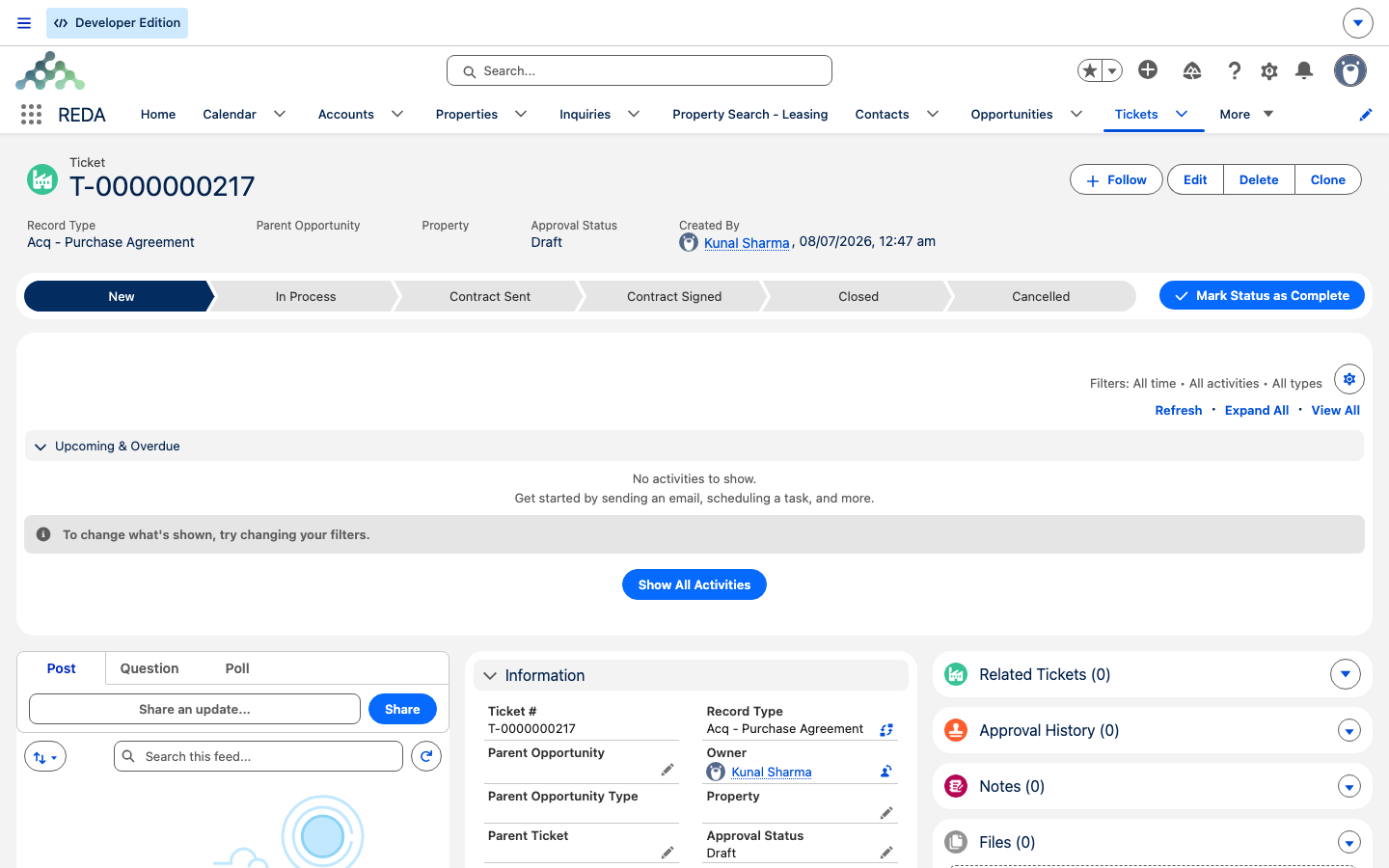
Under Contract.Where to go next
- Property Creation and Funding an Acquisition — what
Under Contracttriggers, and how to fund the purchase. - Running an Acquisition Deal — Binder to Contract — getting the deal to the point of contracting.
- Understanding Tickets — the ticket engine and its snapshot/revert behavior.
- How Acquisitions Work in REDA — the whole pipeline map.
Frequently asked questions
The ticket must link an acquisition deal: "Only Acquisition Opportunity can be selected."
Signing or closing the purchase agreement ticket drives the deal to Under Contract — that's by design. Work the ticket, and the deal follows.
A paper-signed ticket needs the file first: "Please attach Document prior closing Ticket." Upload the signed document, then close it.
No file is on the ticket yet: "No document found associated to this ticket. Please upload document prior provide Document Attached as "Yes"." Upload the document first.
Cancelling reverts the deal to the stage saved when the ticket was created — but only if the deal is still in the stage this ticket set, so it never overwrites a later move.
Acquisitions don't have that stage. The purchase agreement moves the deal straight to Under Contract — Contract Sent doesn't change the deal.
Was this article helpful?