
Payment Schedules & Auto-Posting
A property sale rarely pays in one lump. It pays in stages: a booking deposit up front, instalments tied to construction milestones, a final payment at handover. REDA models that with payment plans — a reusable template of staged percentages — and turns each sale into a set of dated payment schedules, the actual instalments. This article shows you how to build a plan, what schedules REDA generates when a sale activates, how completing a milestone releases its due date, and the nightly run that posts due instalments to accounting — the one billing job that ships already scheduled. No prior REDA experience is assumed; every term is defined as we reach it.
Access you'll need. Sales and payment plans require the REDA - Property Sales User permission set (or REDA - Master Data - Admin); the REDA - Master Data - Read Only set can view them.
The three-layer model
Four words name four different things here, and the article never blurs them. Getting the layers straight up front saves confusion later:
So a plan item is the template for a stage; a payment schedule is the instalment that stage produces on a real sale. Milestones sit alongside, gating the milestone-based items.
Building a plan
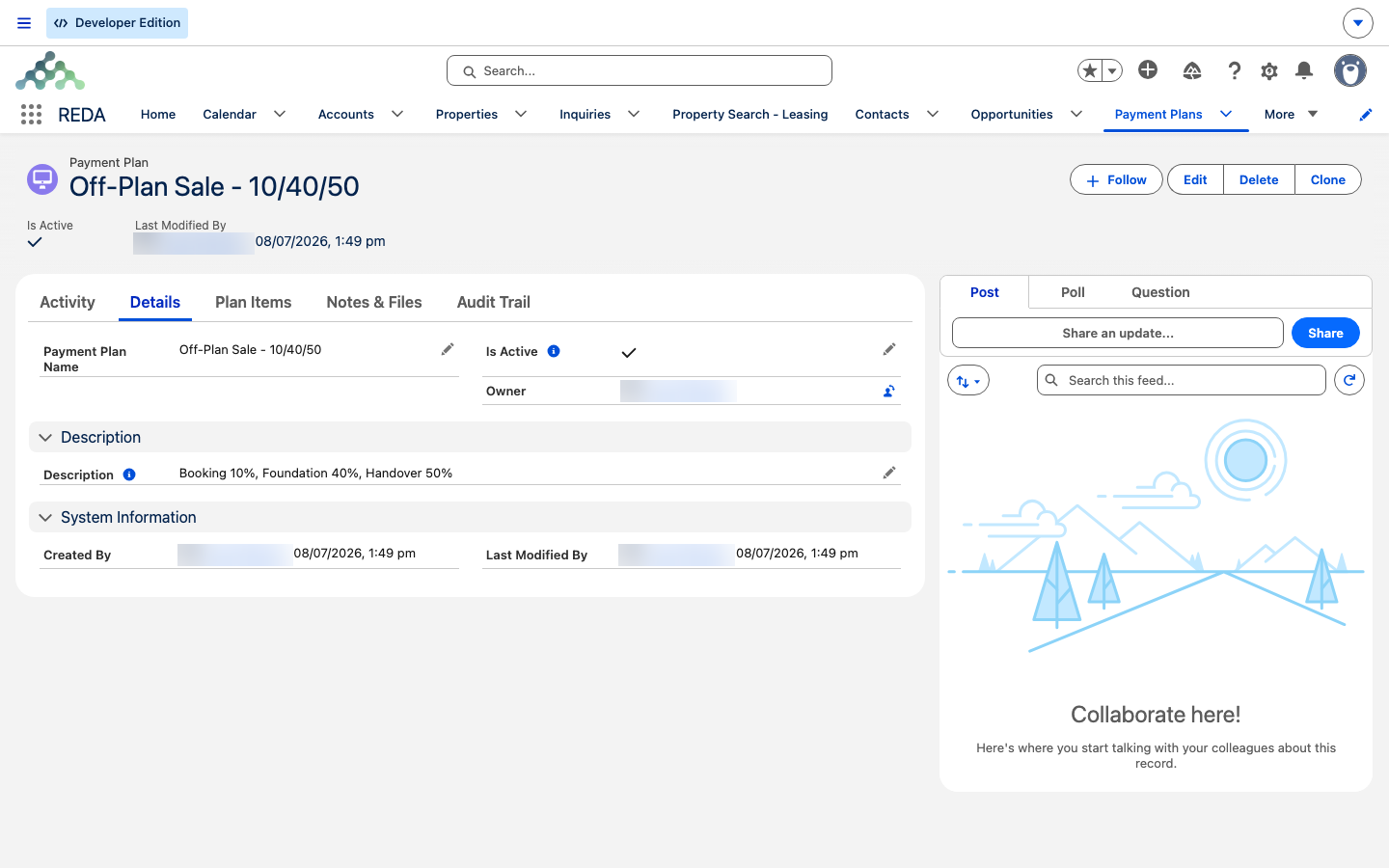
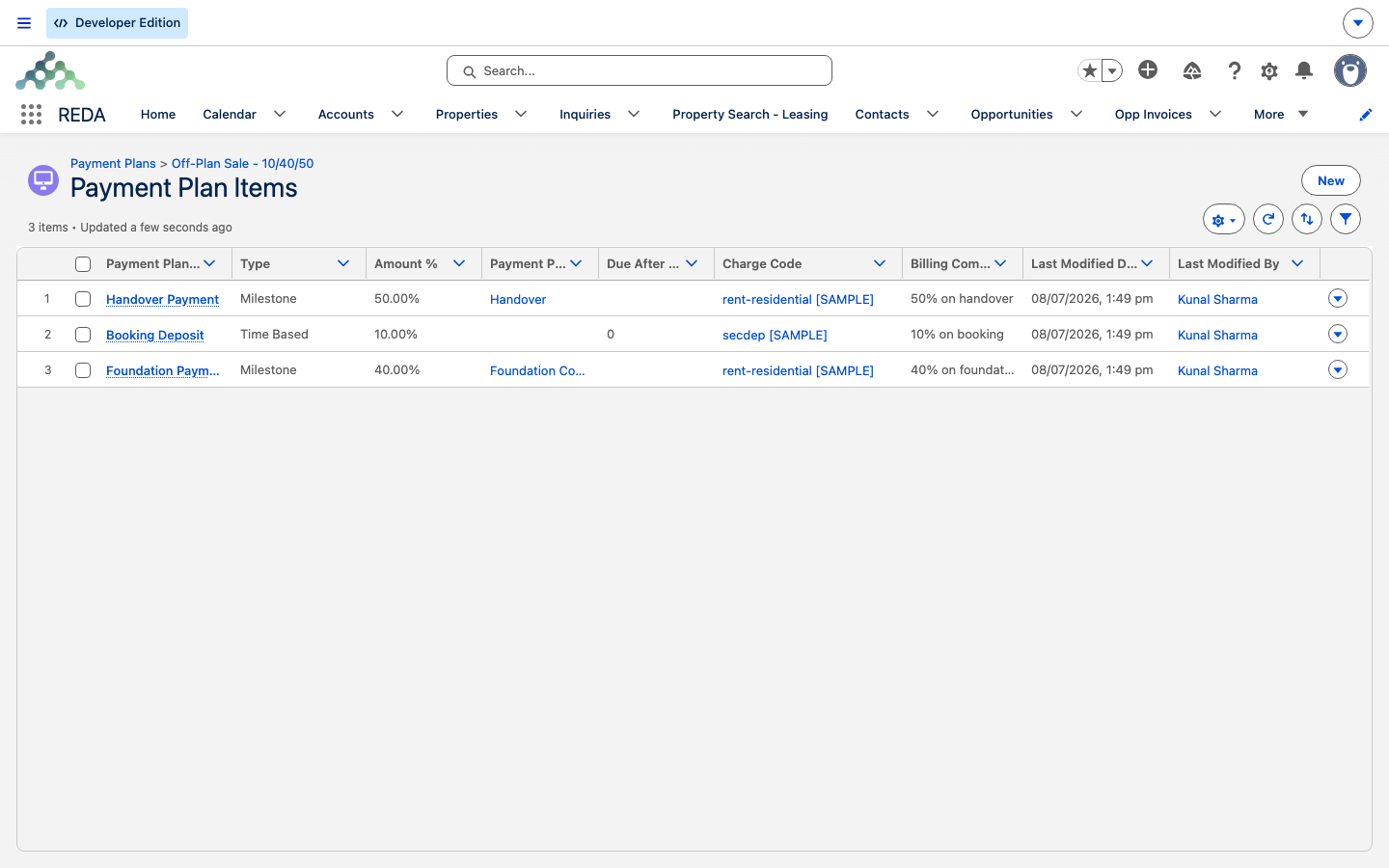
A payment plan itself is just a header — a description, and an active flag (only active plans are offered when you attach a plan to a property or sale). The substance is in its items:
| Field | Required | Meaning |
|---|---|---|
| Name | Yes | The stage label — copied onto the schedules it produces. |
| Amount % | Yes | This stage's share of the sale price. |
| Charge Code | Yes | The billing category for the instalment. |
| Type | Yes | Milestone or Time Based — there is no default, so you must choose. |
| Due After Days | For Time Based | The offset, in days, from the deal's under-contract date. |
| Payment Plan Milestone | For Milestone | The construction milestone that releases this instalment. |
REDA enforces the type-specific requirement. A Time Based item needs its offset, and a Milestone item needs its milestone:
"The Payment Milestone is required for milestone-based payment plan items."
Milestones
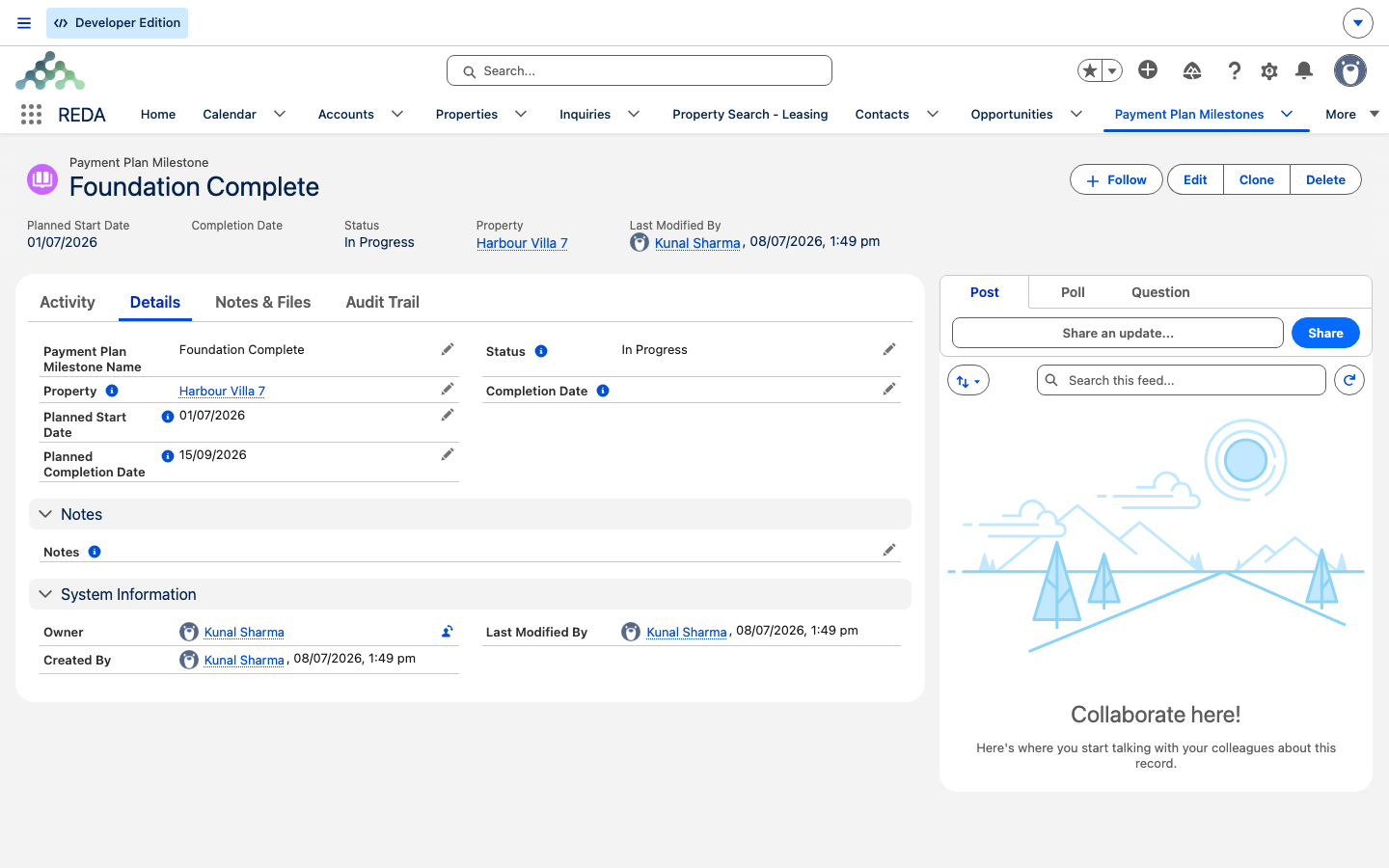
A payment plan milestone represents a point in construction — foundation complete, handover ready. It carries a property, planned start and completion dates, an actual completion date, and a Status that climbs a fixed ladder. That status is what releases the money:
| Status | What it requires |
|---|---|
| Draft | — |
| Planned / In Progress | Both the Planned Start Date and the Planned Completion Date |
| Completed | The actual Completion Date — which then stamps the due date onto every linked schedule |
REDA guards each rung of the ladder:
"Planned Completion Date must be provided prior to update the status to "Planned" or "In Progress"."
"Completion Date must be provided prior to update the status to "Completed"."
The payoff is automatic: when you set a milestone to Completed, every payment schedule linked to it gets its Due Date set to the milestone's completion date. That's how a milestone instalment goes from undated to due.
What happens when a sale activates
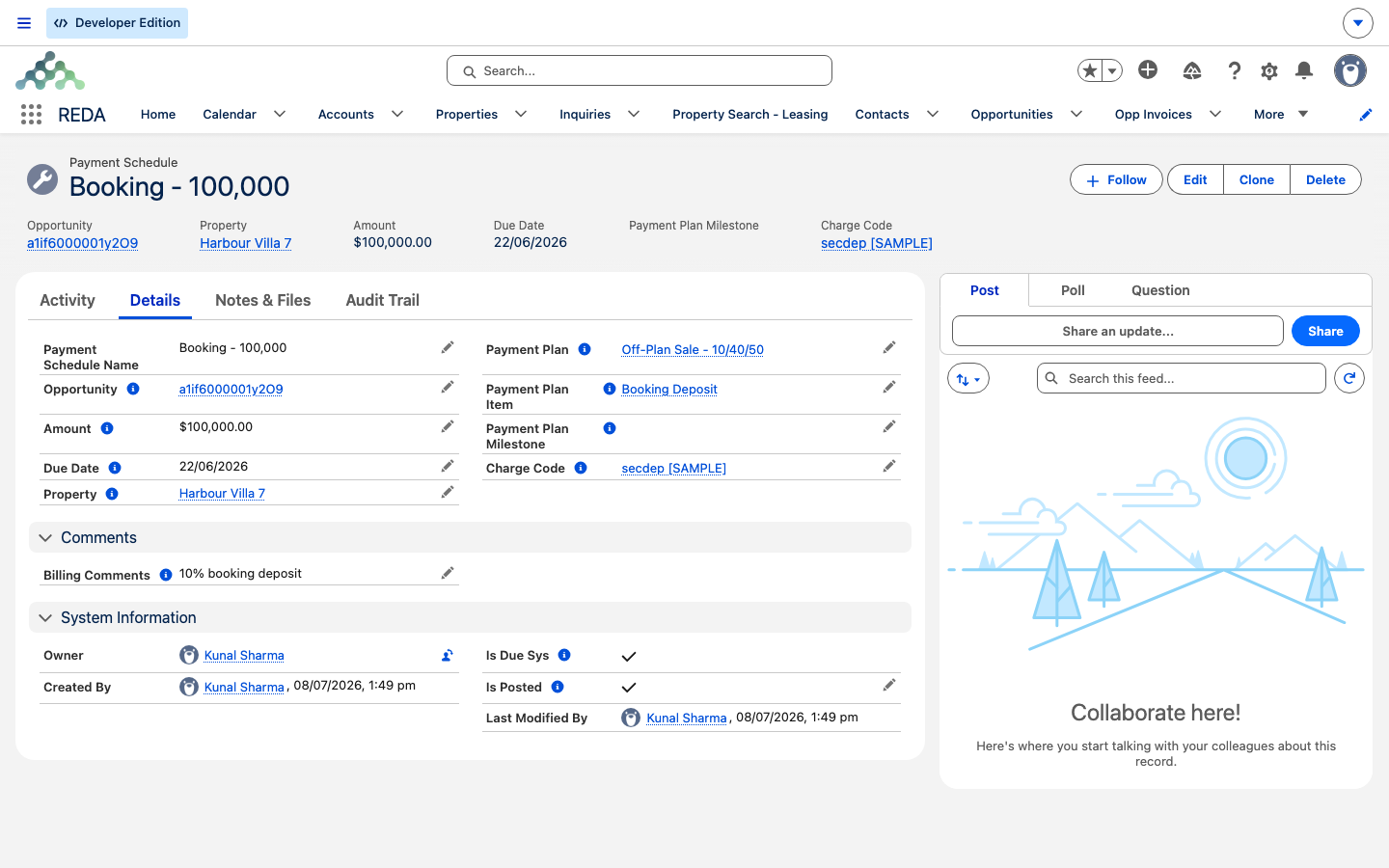
Schedules aren't created when you build the plan — they're created when a sale uses it. The moment a sale deal turns active and the property has a sale payment plan set, REDA generates one payment schedule per plan item, filling each in from the item:
- Amount = the item's percentage × the sale/purchase price ÷ 100.
- Due Date — for a Time Based item, the deal's under-contract date plus its Due After Days; for a Milestone item, blank until the milestone completes.
- Name, Charge Code, and any billing comments — copied straight from the item, along with links back to the plan, item, milestone, and property.
Two schedules sitting there with no due date isn't a bug — those are the milestone instalments, waiting for their milestones. Each schedule also carries an Is Due flag (true once its due date is set and has arrived) and an Is Posted flag, which is the gate the nightly run watches.
Auto-posting at 2:00 AM
Here's the part that runs itself. A scheduled run fires daily, finds every schedule that is due but not yet posted, and sets its Is Posted flag to true. A posted schedule is the signal the accounting extension consumes to raise its entries — so posting is the hand-off point from REDA into accounting (see The REDA Financials Bridge).
The payment schedule, field by field
| Field | Meaning |
|---|---|
| Opportunity (required) | The property-sale deal this instalment belongs to. |
| Amount (required) | Item % × sale/purchase price ÷ 100. |
| Charge Code (required) | Copied from the plan item. |
| Due Date | Time Based: contract date + days. Milestone: blank until the milestone completes. |
| Is Due | System flag — true when the due date is set and on or before today. |
| Is Posted | Set by the nightly run — the hand-off gate into accounting. |
| Plan / Item / Milestone / Property | Traceability links back to where the schedule came from. |
Worked example: a 10 / 40 / 50 sale
A plan with three items: 10% booking (Time Based, 0 days), 40% foundation (Milestone), and 50% handover (Milestone). The sale is Harbour Villa 7 at a Sale/Purchase Price of 1,000,000.00, with an under-contract date of 1 July. Here's the timeline:
| Date | Event | Result |
|---|---|---|
| 1 Jul | Sale activates on the plan | Three schedules created: 100,000.00 due 1 Jul; 400,000.00 (no due date); 500,000.00 (no due date) |
| That night, 2:00 AM local | Posting run | The booking instalment is marked posted |
| 15 Sep | Foundation milestone set to Completed | The 400,000.00 schedule gets Due Date 15 Sep |
| Next night, 2:00 AM local | Posting run | The foundation instalment is marked posted |
| (at handover) | Handover milestone Completed | The 500,000.00 schedule is dated, then posted on the next run |
Notice the pattern: activation creates and dates only the time-based instalment; each milestone dates its own instalment when it completes; and the nightly run posts whatever has come due. The two undated schedules were never wrong — they were waiting.
Where to go next
- The Property Sale Lifecycle — how a sale activates and moves to closing.
- Charge Codes — the billing categories your plan items reference.
- The REDA Financials Bridge — what a posted schedule triggers on the accounting side.
- How Billing Works in REDA — the wider billing model this fits into.
- Scheduling Background Jobs — the billing runs that, unlike this one, need scheduling.
Frequently asked questions
It's missing its type-specific field. A Time Based item needs an offset: "The Due After Days value is required for time-based payment plan items." A Milestone item needs a milestone: "The Payment Milestone is required for milestone-based payment plan items."
Set its actual completion date first: "Completion Date must be provided prior to update the status to "Completed"." (Moving to Planned or In Progress likewise needs both planned dates.)
No — milestone-based instalments stay undated until their milestone completes. Completing the milestone stamps the due date automatically.
Daily at 2:00 AM in your org's default time zone. It's already scheduled out of the box — no administrator setup needed for this one.
Each schedule's amount is the item's percentage of the sale/purchase price: percentage × price ÷ 100. So a 10% item on a 1,000,000.00 sale becomes a 100,000.00 instalment.
Was this article helpful?