
Property Types
Every property in REDA has to declare what kind of asset it is — a unit, a building, a community, a parking bay, a storage locker — and it does that through its Property Type. This article is for administrators building that catalogue. After reading, you'll be able to create property types, set the all-important Is Building/Community flag correctly, and predict the three ways that flag changes how a property behaves. No prior REDA experience is assumed.
Access you'll need. Setting up property types requires the REDA - Master Data - Admin permission set. REDA - Master Data - Read Only can view them but not change them.
Why Property Type matters
A property in REDA has no separate record "kinds" to choose between — so its Property Type is the one thing that says what kind of asset it is. That single choice does a lot of work: it controls whether a property can hold child properties, how it appears in leasing, sales and booking, and how it behaves in rent inflation. Because it carries so much, Property Type is required on every property, and you can't delete a type while any property still uses it.
Creating a property type
A property type is a short record — a name and a handful of fields:
| Field | What it's for |
|---|---|
| Abbreviation (required) | A three-letter short code — UNT, BLD, PRK. It shows on booking and leasing search cards, so keep it recognisable. |
| Is Building/Community | The structural flag — tick it for types that contain units. Covered in full below. |
| Portfolio | A reporting classifier: Residential, Commercial, Industrial (you can pick more than one). See the note below — this is not the Portfolios feature. |
| Publish to Web | Whether properties of this type appear on your integrated website. |
| Region | Ties the type to a region for visibility; REDA stamps a matching region code for you. |
| Description | A note for your own reference. |
The Is Building/Community flag
This one checkbox is the structural switch of the whole property model. Tick it, and any property of that type becomes a container — a building or community that holds units. That has three consequences you can rely on:
The flag also shapes how a property behaves in expense allocation and calendars — containers are treated differently there. Those mechanics belong to the bookings and property-management sections; here, the point is that ticking this box changes behaviour well beyond the property record itself.
Portfolio classification & web publishing
Two fields on the type are about reporting and marketing rather than structure. Portfolio tags the type as Residential, Commercial or Industrial for grouping and reporting. Publish to Web decides whether properties of this type surface on your integrated public website. Neither affects how the property saves or moves through its lifecycle.
Worked example: Meridian's type catalogue
Meridian Properties sets up a handful of types to cover its portfolio. One is a container (its buildings); the rest are the leasable units and add-ons that sit inside them:
| Property Type | Abbreviation | Is Building/Community | Portfolio |
|---|---|---|---|
| Building | BUL | Yes | Residential |
| 1 BR | 1BR | No | Residential |
| 2 BR | 2BR | No | Residential |
| Single Family Home | SFH | No | Residential |
Now the rules follow naturally. Create the building Meridian Court as type Building and it demands a Property Code (MC) and refuses a parent. Create the unit Meridian Court #101 as type 2 BR and it happily takes Meridian Court as its parent. And on a leasing search card, that unit shows its 2BR abbreviation.
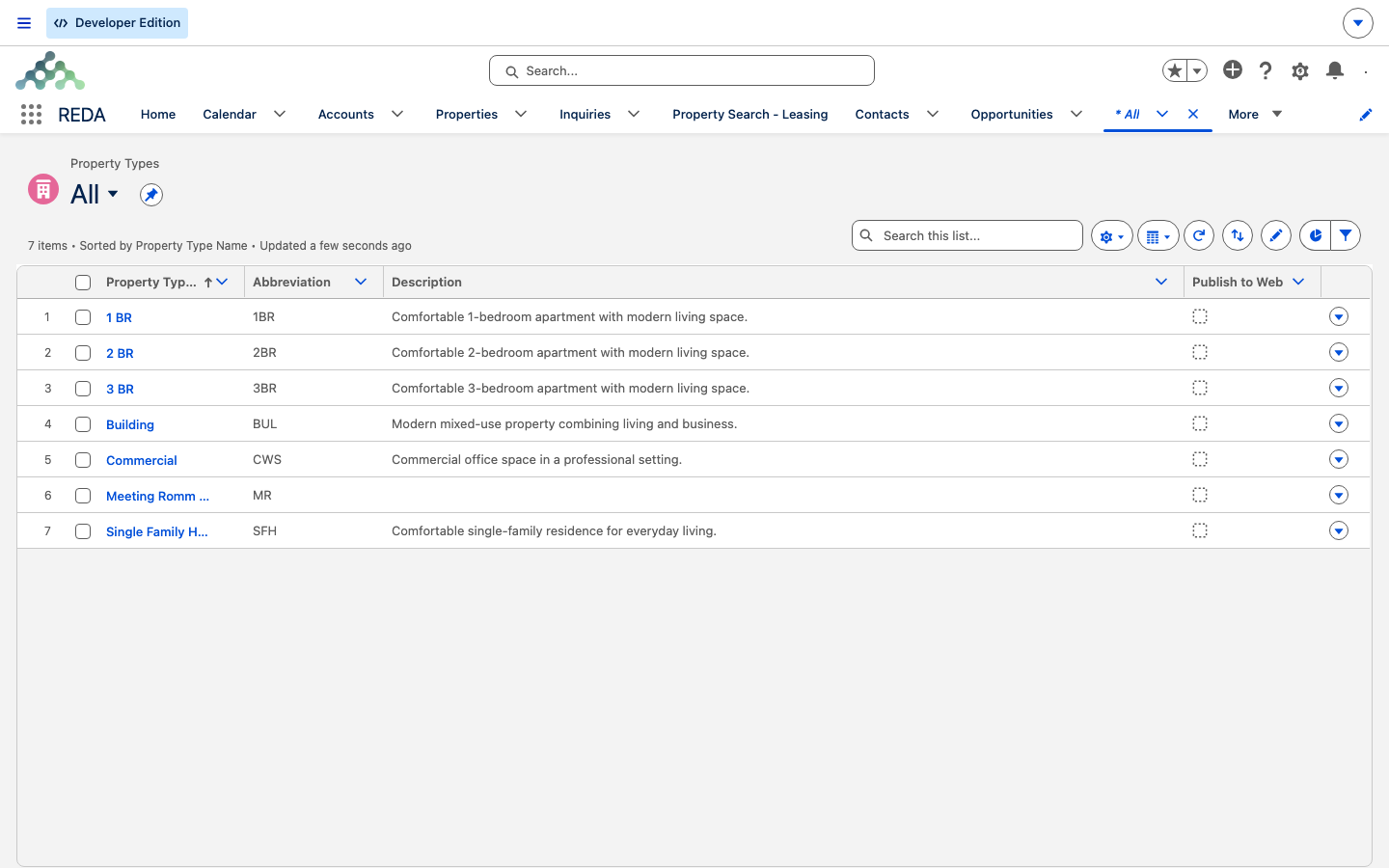
Reclassifying a type in use
Reference: type fields at a glance
| Field | Required? | Drives |
|---|---|---|
| Abbreviation | Yes | The code shown on search cards |
| Is Building/Community | No | Container behaviour: parent rule, code rule, inflation exclusion |
| Portfolio | No | Residential / Commercial / Industrial reporting |
| Publish to Web | No | Website visibility |
| Region | No | Region-based visibility |
| Description | No | Your own reference note |
Where to go next
- Understanding Properties — how communities, buildings and units nest.
- Creating & Editing Properties — put your types to work creating properties.
- Regions — the geography that sits above your types.
Frequently asked questions
Because its type has Is Building/Community ticked, which makes it a container. Containers must carry a Property Code — "Property Code is required for Buildings/Communities." — and can't have a parent — "Parent property cannot be provided for building or communities."
No. On a Property Type, Portfolio is a Residential / Commercial / Industrial reporting label. It's unrelated to the Portfolio records feature used to group properties for investors.
Property-level rent inflation deliberately skips building and community types — the increases apply at the unit level, where the rent is set.
A type can't be deleted while any property still uses it. Reassign or remove those properties first.
That message — "Web portfolio must be provided to publish the property type to web." — comes from the website-listing add-on, not from core REDA: core ships a Publish to Web checkbox and a Portfolio field on the type, but no rule tying them together. Set the web portfolio the add-on asks for, or untick Publish to Web, and save again. Orgs without the listing extension never see it.
Was this article helpful?