
Understanding Inquiries
Every prospect in REDA starts life as an Inquiry — a future tenant, a buyer, a seller, a borrower, or an owner looking for a property manager. The Inquiry is REDA's own lead record: the first thing you create when someone shows interest, and the thing you work until it either becomes a deal or is set aside. This article explains what an inquiry is, the five kinds REDA recognises, the status funnel each kind follows, how inquiries are named, and the two ways an inquiry can end. No prior REDA experience is assumed — every term is defined as we reach it, and this is the anchor for the capture, qualify, and convert how-to articles that follow.
Access you'll need. Each line of business works its own inquiries. Creating and editing them requires one of the line-of-business permission sets — REDA - Property Leasing User, REDA - Property Sales User, REDA - Property Acquisition User, REDA - Property Management User, or REDA - Property Lending User. Viewing comes with the same sets.
What an inquiry is
An inquiry is a single record that holds everything you know about one prospect: who they are, what they want, where they came from, and how far along they are. It is REDA's equivalent of a lead — the working record for someone who has expressed interest but is not yet a customer with a signed deal.
Inquiries are private by default: you see the ones you own plus any your administrator shares with you. Each inquiry keeps an activity history and an audit trail — the record page carries a Details tab and an Audit Trail tab — and inquiries feed reports, so the funnel is fully measurable. The rest of this article is about the two things that give an inquiry its shape — its type (which business line it belongs to) and its status (how far along it is).
If you've used a generic CRM lead before, the inquiry is the same idea sharpened for real estate. Where a plain lead is just a name and a company, an inquiry also holds the property interest — the unit, region, and preferences the prospect is asking about — and it knows which line of business it belongs to, so it carries the right fields and converts straight into the matching real-estate deal (a lease, a sale, a loan, and so on) rather than a generic opportunity. That's why REDA gives prospects their own Inquiry record instead of a one-size-fits-all lead.
The five inquiry types
REDA recognises five kinds of inquiry, one per line of business. You pick the type when you create the inquiry, and it decides the record's layout, the status ladder it follows, and — most importantly — what kind of deal it becomes when you convert it.
| Inquiry type | Who it represents | What conversion produces |
|---|---|---|
| Leasing | A prospective tenant for an available property | A lease |
| Property Sale | A prospective buyer for a property you're selling | A property-sale deal |
| Acquisition | A property you might buy (the seller / the opportunity) | An acquisition deal |
| Lending | A new investor or lender to onboard | A loan deal |
| Property Management | An owner to onboard for management services | A management deal |
Each type has its own page layout and its own status Path — the horizontal progress bar across the top of the record. Because the type drives so much, choosing the right one at creation matters; see Capturing Inquiries for how the type is set.
The Inquiry Status funnel
Every inquiry carries an Inquiry Status — where it sits in the funnel, from just-captured to won or lost. You move it forward yourself by clicking along the Path at the top of the record; nothing advances the status automatically. Every inquiry starts at New.
The full list of statuses is shared plumbing, but each type only offers the stations that make sense for it. That's why a leasing inquiry shows a showing step while a lending inquiry shows a strategy-session step. The working ladders are:
| Type | Working ladder | Ends at |
|---|---|---|
| Leasing | New → Contacted → Showing Scheduled → Showing Attended → Qualified | Unqualified or Converted |
| Lending | New → Contacted → Strategy Session Scheduled → Strategy Session Attended → Qualified | Unqualified or Converted |
| Property Management | New → Contacted → Strategy Session Scheduled → Strategy Session Attended → Qualified | Unqualified or Converted |
| Acquisition | New → Contacted → Underwriting → Qualified | Unqualified or Converted |
| Property Sale | New → Underwriting → Qualified (no Contacted station) | Unqualified or Converted |
Qualified means "ready to become a deal". Unqualified is the honest close — the prospect isn't going ahead, and you keep the record with a reason. Both appear as stations on the Path itself, so you set either one the same way you set any other status: click it on the Path, then confirm. Working an inquiry along its ladder, including the showing and strategy-session stations, is covered in Qualifying & Working Inquiries.
The status you never set by hand
Converted appears at the end of every ladder, but you never pick it yourself — the system stamps it when you run the Convert action. If you try to set it by hand on an inquiry that hasn't been converted, REDA stops you:
Use the Convert Inquiry action (see Converting an Inquiry) and the status is set for you.
What's on an inquiry
An inquiry gathers a lot, but you only fill what's relevant to the type. It helps to think of the fields in a few groups rather than as one long form:
| Group | Key fields | Notes |
|---|---|---|
| Who | First / Middle / Last Name, Email, Phone, Mobile, mailing address | First Name, Last Name and Email are required on every layout |
| Classification | Inquiry Type, Company | Company auto-formats on save unless it's a real business name |
| Interest | Property, Parent Property, Region, Neighbourhood, Property Type | Auto-filled once you pick a property |
| Leasing preferences | Move In Date, Lease Term (Months), Max Rent Amount, Beds, Baths | These also drive the property-matching search |
| Underwriting (Acquisition) | Asking Price, ARV, cost estimates, Maximum Allowed Offer, Underwrite Complete / Date | The offer figure is computed for you |
| Source & marketing | Inquiry Source, the web-attribution block, Promotion | See Web & Marketing Attribution |
| Progress | Inquiry Status, Loss Reason, Notes, Description | Status is set via the Path |
The Property field only offers properties that are available for the inquiry's purpose in a matching region — a leasing inquiry sees units available for leasing, a sale inquiry sees units available for sale. Picking one fills in the Region, Neighbourhood, Property Type and Parent Property for you. On an acquisition inquiry, the underwriting block computes a Maximum Allowed Offer — the most you should pay, worked out as the estimated after-rent market value less holding cost, less profit, less renovation cost; see Acquisition Analysis for the detail.
How inquiry names work
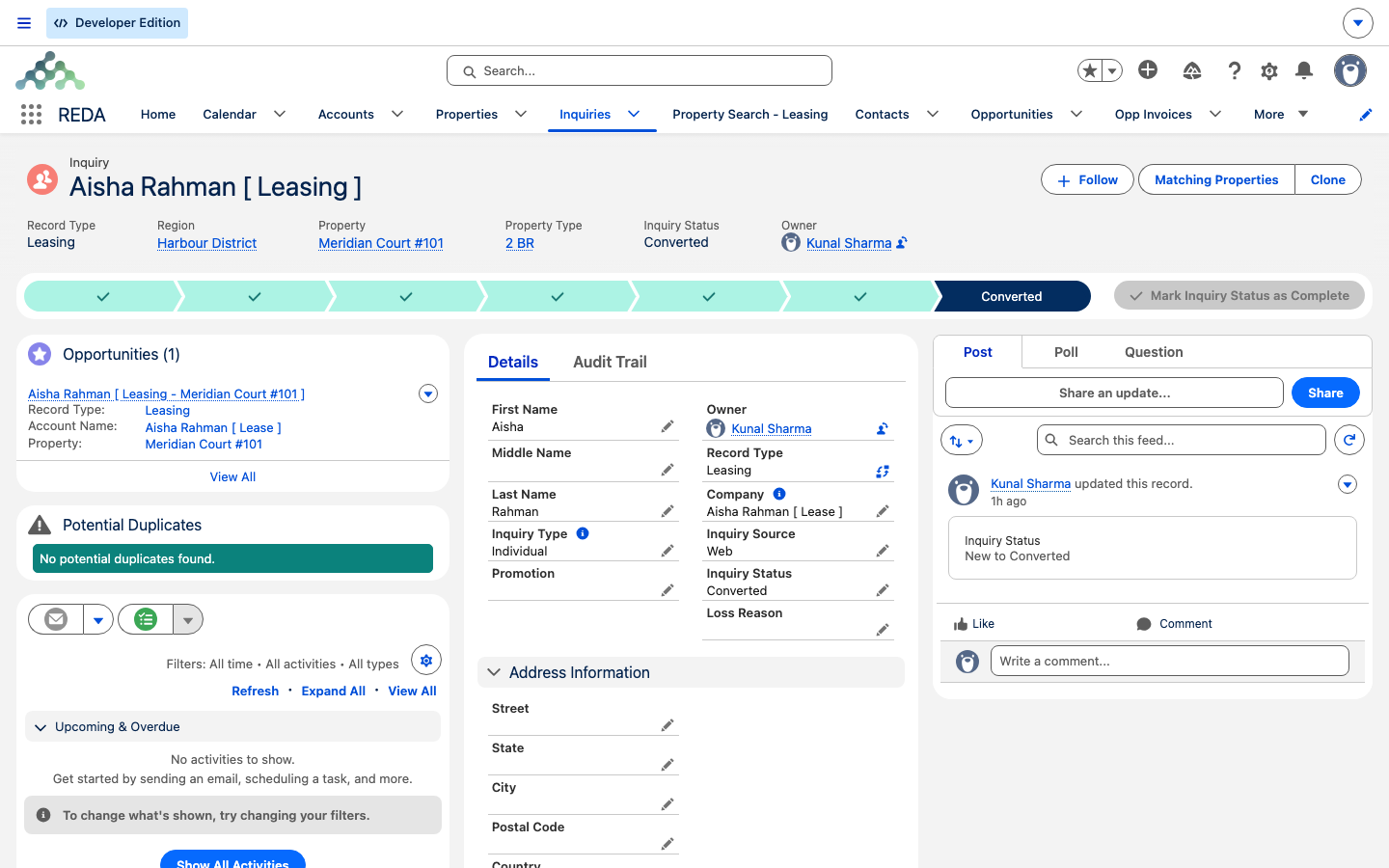
You don't type the inquiry's name — REDA builds it for you as First Last [ suffix ], where the bracketed suffix tells you the type at a glance: Leasing, Sale, Acq, Lending, or PM. So a new leasing prospect named Aisha Rahman shows up as Aisha Rahman [ Leasing ]. Search by the person's name; the suffix is just a signpost. (Administrators can override the name, but that's rare.)
How inquiries are born, and how they end
Inquiries arrive three ways: you type them in by hand, your website submits them automatically, or they're created when a Tenant Referral ticket is closed for a referred person. Capturing Inquiries walks all three.
An inquiry ends one of two ways:
Converted inquiries stay visible too. The All Converted list view collects them, and each one links forward to the deal it produced, so the lineage from first contact to signed deal is never lost.
Worked example: Aisha's inquiry
Aisha Rahman emails about Meridian Court #101. An agent creates a Leasing inquiry: the record saves at status New and names itself Aisha Rahman [ Leasing ]. Over the next few days the agent calls Aisha (Contacted), books a viewing (Showing Scheduled), holds it (Showing Attended), and — once Aisha confirms she wants the unit and the agent has filled in the Move In Date of 1 Aug 2026 and a Lease Term of 12 months — marks the inquiry Qualified. A click on Convert Inquiry then stamps the status to Converted and opens the new lease. One record, one clean journey from first email to a live deal.
Reference: status availability by type
Which statuses appear on which type. New is the default everywhere; Converted is set only by the Convert action.
| Status | Leasing | Lending | Prop. Mgmt | Acquisition | Prop. Sale |
|---|---|---|---|---|---|
| New (default) | ✓ | ✓ | ✓ | ✓ | ✓ |
| Contacted | ✓ | ✓ | ✓ | ✓ | — |
| Showing Scheduled | ✓ | — | — | — | — |
| Showing Attended | ✓ | — | — | — | — |
| Strategy Session Scheduled | — | ✓ | ✓ | — | — |
| Strategy Session Attended | — | ✓ | ✓ | — | — |
| Underwriting | — | — | — | ✓ | ✓ |
| Qualified | ✓ | ✓ | ✓ | ✓ | ✓ |
| Unqualified | ✓ | ✓ | ✓ | ✓ | ✓ |
| Converted (system-set) | ✓ | ✓ | ✓ | ✓ | ✓ |
The shipped list views double as ready-made working queues:
| List view | Use it as |
|---|---|
| Today's Inquiries | The morning triage queue |
| All Open Inquiries | Everything not yet converted or unqualified |
| All Open - Leasing Inquiries | The leasing team's queue |
| All Open - Lending Inquiries | The lending team's queue |
| All Open - Acquisition Inquiries | The acquisition team's queue |
| All Open - Sales Inquires | The property-sales team's queue |
| All Converted | Won-funnel and attribution follow-up |
| All Unqualified | Loss-reason review |
Where to go next
- Capturing Inquiries — create one cleanly, by hand or from your website.
- Qualifying & Working Inquiries — move an inquiry along its ladder to Qualified.
- Converting an Inquiry — turn a qualified inquiry into a deal.
- Opportunities: the Deal Hub — what the inquiry becomes once it's converted.
- Web & Marketing Attribution — how source and campaign data travels with an inquiry.
- Merging Duplicate Inquiries — when the same person comes in twice.
Frequently asked questions
Converted is stamped by the system, not chosen by hand. REDA shows: "Please convert inquiry prior updating status to "Converted"." Use the Convert Inquiry action and the status is set for you — see Converting an Inquiry.
It ships switched off in the current release, so it never appears when you create an inquiry. Short-term reservations are handled by Booking records and calendar slots, not by an inquiry pipeline.
Names are formatted for you as First Last [ suffix ], where the suffix (Leasing, Sale, Acq, Lending, PM) shows the type at a glance. Search by the person's name; the suffix is just a signpost.
"Nurturing" exists on the shared status list but isn't offered on any inquiry type in the current release, so it never appears on the Path and can't be set. If you see it in a report filter or a picklist of all statuses, treat it as unused — work your inquiries with the stations that do show on their Path.
No — once an inquiry is converted the Convert action is no longer offered, and work continues on the deal it produced. The converted inquiry stays visible (in the All Converted view) and links forward to that deal.
Inquiries are private: you see the ones you own plus any your administrator chooses to share with you.
Was this article helpful?