
Marking a Property Available for Sale
Before a buyer can be matched to a property or a sale deal can pick it up, the property has to be listed — marked available for sale. This article shows exactly what to set on the property record to list it, explains the one field REDA computes for you (and why you should never tick it yourself), covers the sale defaults you can pre-load onto the property, and tells you why a property sometimes fails to appear in a deal's picker. No prior REDA experience is assumed.
Access you'll need. Editing a property requires the REDA - Property Sales User permission set — or any of the other operational sets (Leasing, Acquisition, Management, Lending), all of which can create and edit properties. REDA - Master Data - Read Only can view. Deleting a property is REDA - Master Data - Admin only.
What "available for sale" means
Two fields work together here, and keeping them straight is the whole trick. Sale Status is what you set — a picklist that describes where the property sits in its selling journey. Available For Sale is what REDA computes — a checkbox it turns on or off automatically based on the Sale Status.
Setting the Sale Status
To list a property for sale, set Sale Status = Inventory - Available. The other values keep it out of the pipeline, or are maintained by REDA later in the sale:
| Sale Status | What it signals | Set by |
|---|---|---|
| Inventory - Not Available | In the portfolio, but not being sold | You |
| Inventory - Available | Listed for sale — shows in the sale-deal picker | You |
| Inventory - Upcoming | Coming to market, not yet sellable | You |
| Under Contract - In Progress | A sale is underway | The Sales Agreement ticket |
| Under Contract - Complete | The contract is fully signed | The Sales Agreement ticket |
| Sold | The sale has closed | The sale close |
You only ever set the three Inventory - values by hand. The Under Contract - statuses and Sold are driven for you — by the Sales Agreement ticket as the contract progresses, and by the close when the deal is won.
The sale defaults you set on the property
Beyond the status, the property record holds a few defaults that flow onto a sale deal later, so agents don't have to re-enter them per deal:
One more thing carries across without any field on this list: the property's current Owner Account. When a sale deal opens on the property, REDA sets the deal's Selling Account to that owner automatically, so the selling party is filled in for you — you don't re-enter who's selling.
What happens after you save
Saving is all it takes to publish a listing. On save, REDA recomputes Available For Sale from the Sale Status and stamps the region codes — there's no separate "publish" step. Once the property is Available For Sale, it becomes selectable on any Property Sale inquiry or deal in the matching region.
Why my property isn't showing in the sale deal
The property picker on a Property Sale inquiry or deal applies three filters at once: the property must be Available For Sale, its Region must match the deal's, and its Property Type must match. A property that's genuinely Inventory - Available but sits in a different region — or is a different property type — than the deal simply won't appear. If a listing is missing from a picker, check those three things first: the Sale Status, the region, and the property type.
Worked example: listing Harbour Villa 7
Meridian Properties prepares Harbour Villa 7 — a villa currently owned by Continental Holdings — for sale. On the property's Details tab, the master-data admin sets:
| Field | Value |
|---|---|
| Sale Status | Inventory - Available |
| Sale Price | 1,000,000.00 |
| Default Commission Rule (Property Sales) | The brokerage's standard sale rule |
| Sale Payment Plan | An active off-plan plan |
On save, Available For Sale ticks itself on. Now when an agent creates a Property Sale deal — or converts David Okafor's buyer inquiry — Harbour Villa 7 appears in the property picker for its region, the commission rule copies onto the deal, and the payment plan is ready to generate the buyer's instalments once the sale activates.
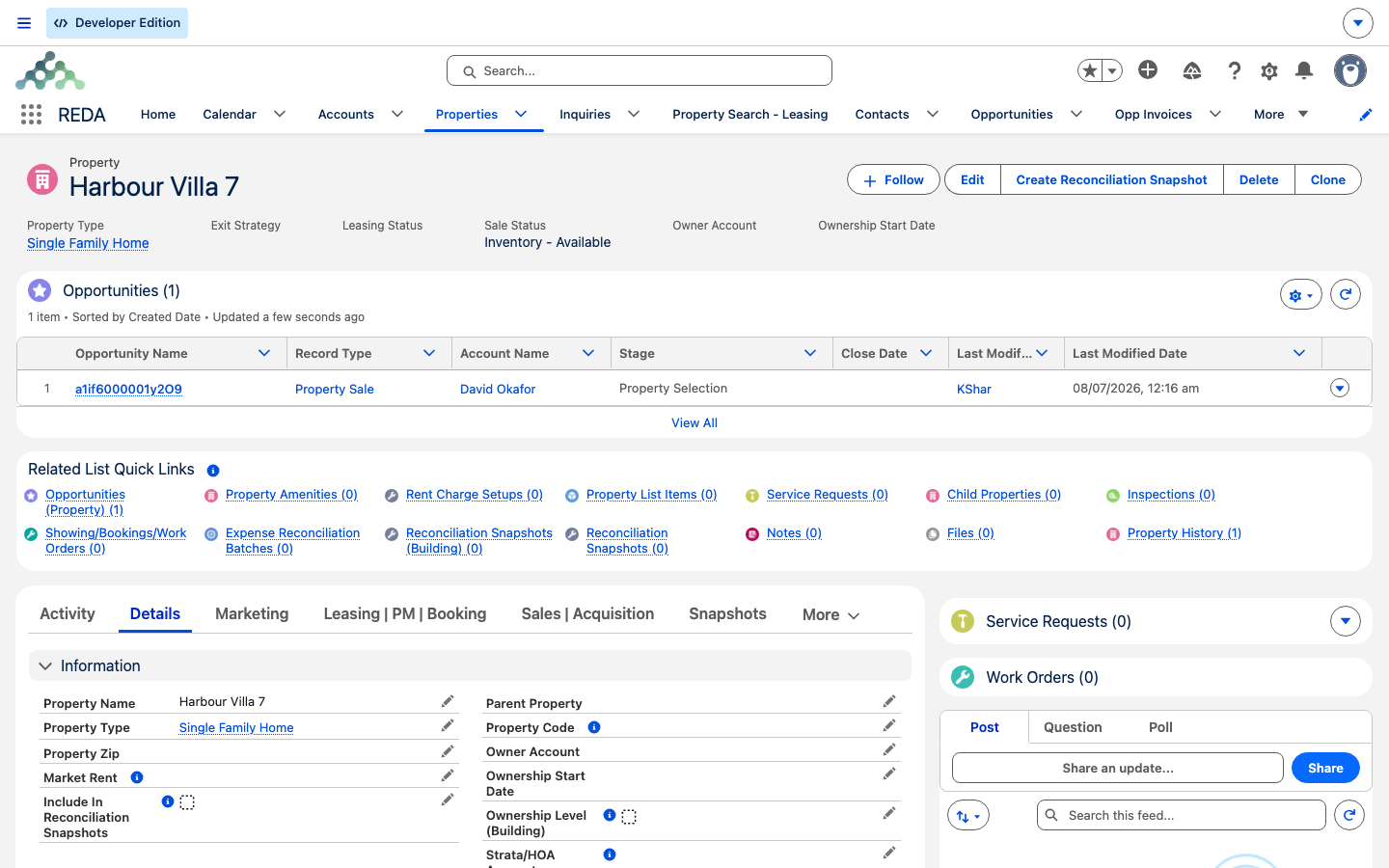
Inventory - Available, and its Opportunities related list already carries the Property Sale deal raised against it.Reference: the sale defaults
What you set on the property, and what each drives downstream:
| Field | What you set | What it feeds |
|---|---|---|
| Sale Status | Inventory - Available to list | The Available For Sale flag and picker visibility |
| Sale Price | The listing sale price | The reference figure for the listing |
| Default Commission Rule (Property Sales) | The commission rule for sales | Copied onto a new sale deal's Commission Rule |
| Sale Payment Plan | An active payment plan | Generates the buyer's instalments when the sale activates |
| Region | The property's region | Which sale deals can pick this property |
Where to go next
- Selling a Property — open a sale deal on the property you just listed.
- Working Buyer Leads — match and convert a buyer onto the listing.
- Payment Plans & Milestones — build the payment plan you attach here.
- Sale Commissions — the commission rule you default here.
- Understanding Properties — the property record overall.
Frequently asked questions
REDA recomputes it from the Sale Status on every save — it's checked only when the Sale Status is Inventory - Available. Set the Sale Status, not the checkbox.
The picker only offers properties available for sale in the deal's region and of the deal's property type. Confirm the property's Region and Property Type both match the deal's.
The property's Sale Price is the listing figure. The deal's Sale / Purchase Price is the agreed price you enter on the sale deal — and it's the one that drives payment-plan and commission math.
No. You set only the Inventory - values. The Under Contract - statuses are maintained by the Sales Agreement ticket, and Sold by the close.
Only active payment plans are offered. Check the plan's Is Active flag — see Payment Plans & Milestones.
Was this article helpful?