
The Sale Stages Reference
This is the look-up reference for the Property Sale stage ladder: the eight stages in order, what each one means, which stages REDA treats internally as active or won, and which gates block a stage change until a required field is filled. It's the companion to Selling a Property — that article walks a sale through the pipeline; this one lets you look up any stage without re-reading the whole journey.
Access you'll need. Advancing a sale requires the REDA - Property Sales User permission set. REDA - Master Data - Read Only and the invoice read-only sets can view a deal but not change it. Deleting a deal is limited to REDA - Master Data - Admin and REDA - Property Leasing User.
The stage ladder
A Property Sale deal moves through eight stages, in this order:
Property Selection → Binder → Contract Out → Under Contract → Funded → Clear to Close → Closed Won (or Closed Lost)
A new sale opens at Property Selection — REDA sets that automatically when you convert a Property Sale inquiry. Note the order in the middle: Funded comes before Clear to Close. A sale is fully funded first, then cleared to close.
System states: active and won
Behind the stages, REDA tracks internal states that you don't set — they follow from the stage — but that are worth understanding because they drive real behavior:
- Active — the deal is in progress. Active is what triggers generation of the buyer's payment schedule (when the property carries a sale payment plan). Stages:
Under Contract,Funded,Clear to Close,Closed Won. - Won — REDA starts treating the sale as won. This is what drives the commission flag and the reopen guard. Stages:
FundedandClosed Won.
Funded onward — before the final Closed Won stage. That's an internal system state, not a sign the sale is finished: read it as "REDA now treats the deal as won," not "the deal is done." It's why a fully funded deal can already be commission-ready while the walkthrough and title work are still under way.
Stage gates
A gate is a validation check that blocks a stage change until a required field is filled. These are the gates on the sale pipeline, with the exact message REDA shows:
| When | Message |
|---|---|
Advancing to Under Contract or beyond with the price blank | "You must provide the value of Sale / Purchase Price prior updating the stage." |
Advancing to Under Contract or beyond with the date blank | "You must provide the value of Under Contract Date prior updating the stage." |
| Setting Binder = Yes without the full binder details | "Provide complete Binder Details. Binder Amount , Binder Date & Binder Title Company" |
| The deal is won without an Account | "Account is required to update an opportunity." |
Reopening a Closed Won sale | "The property ownership was updated when this opportunity was marked as "Closed Won." Please revert the property ownership changes on the associated property before updating the opportunity stage." |
How stages get set
Some stages you set by hand; the middle two are normally driven for you:
- The middle of the pipeline —
Contract OutandUnder Contract— is normally driven by the Sales Agreement ticket, not by hand-editing the stage. Setting the ticket to Contract Sent moves the deal toContract Out; Contract Signed or Closed moves it toUnder Contractand stamps the Under Contract Date. See The Sales Agreement Ticket. - Binder, Funded, Clear to Close, and Closed Won / Closed Lost are typically advanced by the agent on the deal, subject to the gates above.
Full stage reference
One row per stage: what it means, its internal states, what REDA does at or after it, and the gate to enter it.
| Stage | Meaning | Active? | Won? | What REDA does | Gate to enter |
|---|---|---|---|---|---|
Property Selection | New sale; buyer and property confirmed | — | — | Default stage on conversion; defaults Selling Account and Commission Rule; names the deal | — |
Binder | Earnest money recorded | — | — | — | Binder details, all or nothing (if Binder = Yes) |
Contract Out | Contract sent to buyer | — | — | Usually set by the Sales Agreement ticket at Contract Sent | — |
Under Contract | Contract signed | Active | — | Ticket at Contract Signed / Closed stamps the Under Contract Date; activation generates the payment schedule (if a plan is set) | Price and Under Contract Date required from here on |
Funded | Buyer funds received | Active | Won | Deal counts as won (an internal state) from here | Price / date required |
Clear to Close | Title clear / final walkthrough | Active | — | — | Price / date required |
Closed Won | Sale closed | Active | Won | Ownership transfer, ownership trail, and commission flag (see Selling a Property) | Account required; reopen guard applies afterward |
Closed Lost | Deal ended without a sale | — | — | Deal inactive; property stays with its current owner | — |
Closing out: won versus lost
The ladder ends two ways, and they behave very differently:
Closed Wonis the positive close. Reaching it transfers ownership of the property to the buyer, writes an ownership-trail entry, and flags the deal for commission — the details are in Selling a Property. Because that ownership change is real, the stage is protected afterward: you can't move the deal back down the ladder until you first revert the ownership on the property. That's what the reopen guard in the table above enforces.Closed Lostis the negative close — the deal ended without a sale. Nothing transfers: the property stays with its current owner, and the deal simply becomes inactive. There's no reopen guard, because no ownership change was made to protect.
Only Closed Won counts as won. A deal that reached Closed Lost was never treated as won at any point — so it never generated a commission and never triggered an ownership change.
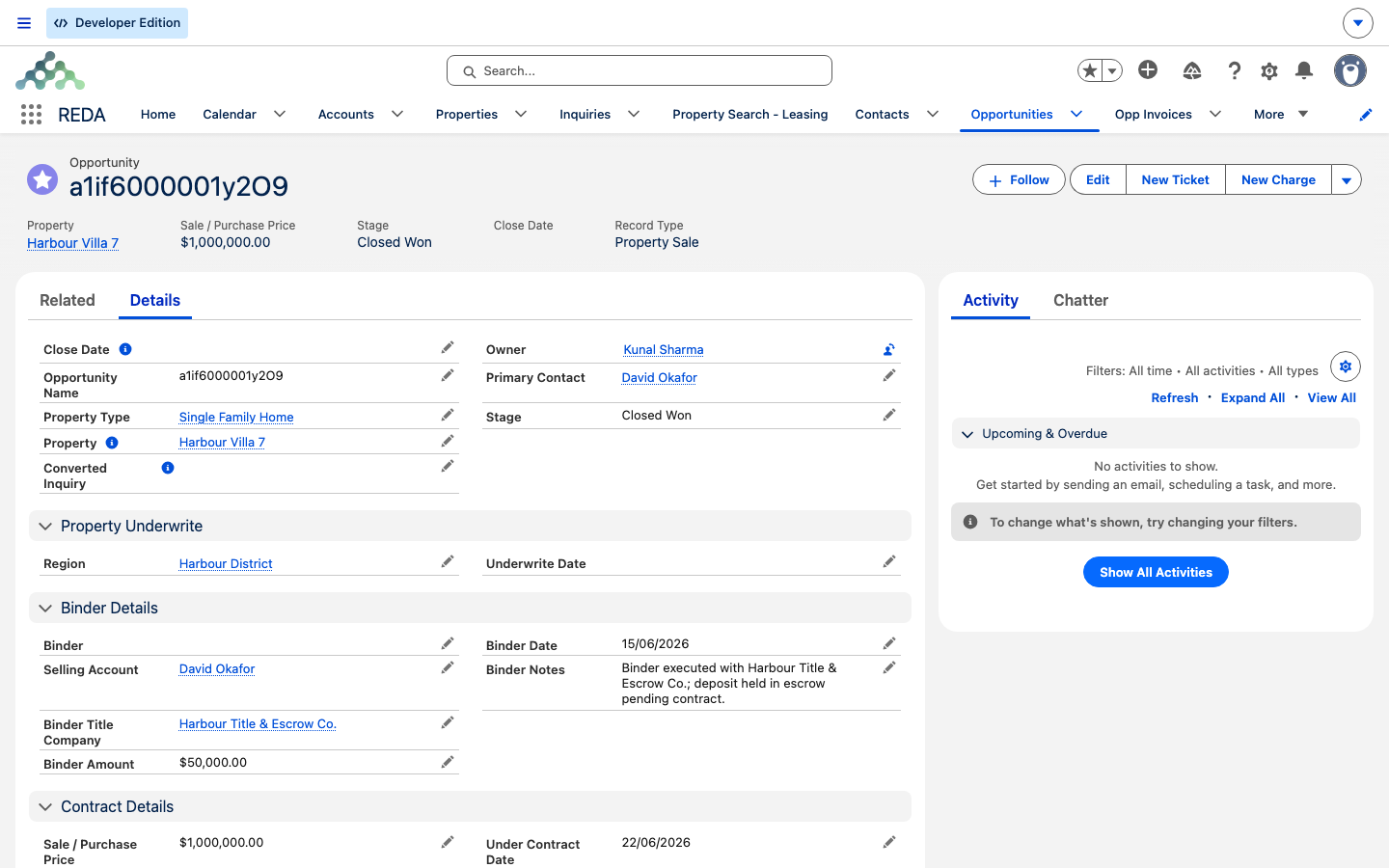
Property Selection. Advancing the deal moves it along the eight-stage sequence described above.Worked example: Harbour Villa 7 by stage
Meridian's sale of Harbour Villa 7 to David Okafor, one line per stage:
Property Selection— deal opens on conversion.Binder— Binder = Yes, 50,000.00 recorded.Contract Out— Sales Agreement ticket set to Contract Sent.Under Contract— ticket signed; Sale / Purchase Price 1,000,000.00 and Under Contract Date entered first, or the two gates block.Funded— buyer's funds received; the deal now counts as won.Clear to Close— title clear.Closed Won— sale closed; ownership transfers.
The full what-to-click walkthrough lives in Selling a Property.
Where to go next
- Selling a Property — the how-to walkthrough this reference supports.
- The Sales Agreement Ticket — what drives
Contract OutandUnder Contract. - Property Sales in REDA — the section map.
Frequently asked questions
Property Selection → Binder → Contract Out → Under Contract → Funded → Clear to Close → Closed Won (or Closed Lost). Funded comes before Clear to Close.
From Funded onward — that is, at Funded and Closed Won. This is an internal system state, so a deal can be treated as won before it reaches the final Closed Won stage.
The Sale / Purchase Price and the Under Contract Date must both be set. REDA shows "You must provide the value of Sale / Purchase Price prior updating the stage." and "You must provide the value of Under Contract Date prior updating the stage."
The Sales Agreement ticket drives Contract Out and Under Contract. See The Sales Agreement Ticket.
The reopen guard blocks it until you revert the property's ownership: "The property ownership was updated when this opportunity was marked as "Closed Won." Please revert the property ownership changes on the associated property before updating the opportunity stage." See Selling a Property.
Was this article helpful?