
Service Requests
When a tenant calls about a leaking faucet, an owner asks a question, or someone lodges a complaint, you need one place to record it and track it to resolution. That place is the Service Request. This article shows you how to log a request, how REDA fills in the tenant and property details for you, how the Reason, Assignment, and Status choices depend on one another (so you'll know why some options are greyed out), and how to hand a request off to a Work Order when someone actually has to do the work. No prior REDA experience is assumed — every term is defined as we reach it.
Access you'll need. Creating and editing Service Requests requires the REDA - Service Request Admin permission set. The REDA - Service Request Read Only set (and REDA - Master Data - Read Only) can view requests but not change them. Handing a request to a Work Order additionally needs Work Order access — see Work Orders.
What a Service Request is
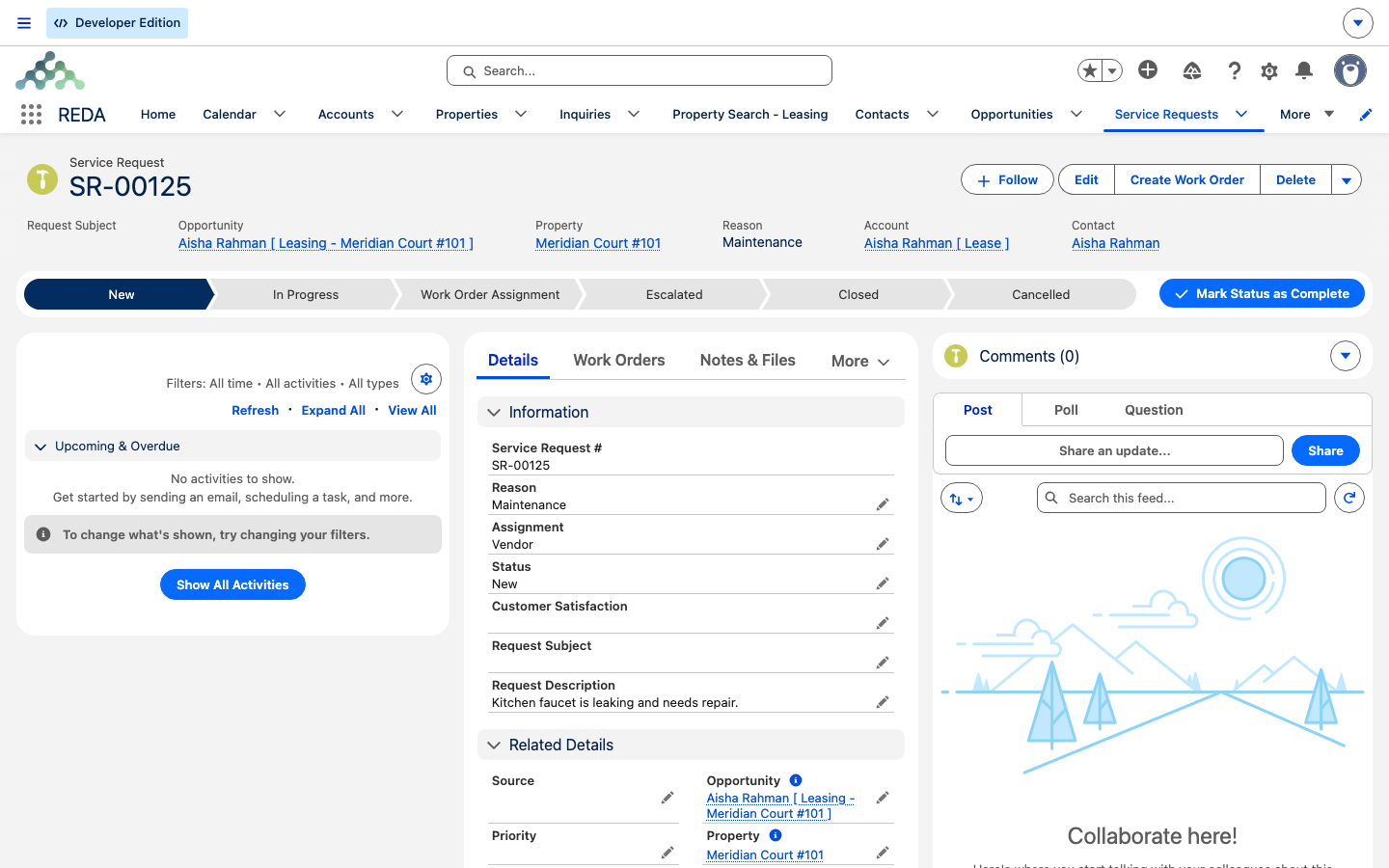
A Service Request is the intake record for anything a tenant or owner reports — a maintenance problem, a complaint, a suggestion, a question, a move-out notice, a referral. It is a numbered record (REDA labels each one SR- followed by a running number) that captures what was reported, who reported it, and where. It is a place to log and triage; it is not where the work happens. When a request needs a vendor to show up and fix something, you create a Work Order from it — the request stays as the record of the original report, and the Work Order carries the scheduling and billing.
A Path — the progress bar you see across the top of the record — tracks the request's Status as you move it from new to closed. Service Requests are private by default: you see the ones you own or that have been shared with you.
How REDA fills in the details for you
Most requests come from a tenant, and a tenant is attached to a lease. REDA calls a lease an Opportunity — it is REDA's single "deal" record, and for a rented unit that deal is the lease. When you create a Service Request and choose the lease in the Opportunity field, REDA looks up everything it can and fills in the blanks for you:
REDA only fills a field you left blank, so anything you typed yourself is respected. If you later change the lease on the request, REDA refreshes the property, account, and contact to match the new lease.
Logging a request
From the Service Requests tab, click New and describe what was reported:
Reason, Assignment, and Status work together
Three of the request's fields are linked, and understanding the chain prevents the two most common "why is this greyed out?" questions. Two more fields join the reason:
- Assignment — who handles the request: Internal (your own team) or Vendor (an outside contractor).
- Status — where the request stands: New, In Progress, Work Order Assignment, Escalated, Closed, or Cancelled.
The rule works in two steps. First, Reason controls which Assignment values you can pick:
| Reason | Assignment choices |
|---|---|
| Maintenance | Internal, Vendor |
| Complaint / Suggestion / Question / Booking / Move Out / Referral / Other | Internal only |
So Vendor is offered only when the reason is Maintenance — a vendor fixes a leak, but you wouldn't send a complaint to a plumber. Then, Assignment controls which Status values you can pick:
| Assignment | Status choices |
|---|---|
| Internal | New, In Progress, Escalated, Closed, Cancelled |
| Vendor | New, In Progress, Work Order Assignment, Escalated, Closed, Cancelled |
The Work Order Assignment status appears only when Assignment is Vendor — it is the status that says "this has been handed to a vendor job." If you don't see that status offered, the request is set to Internal, which means the reason isn't Maintenance. These dependencies are how the form guides you; there is no error message, the unavailable option simply isn't shown.
Working a request
A request moves through its Status Path as you handle it. The usual order is:
New → In Progress → Work Order Assignment (for vendor jobs) → Closed
Each status has a plain meaning: New is logged but not yet triaged; In Progress is being handled; Work Order Assignment means it's been handed to a vendor job (see Work Orders); Closed is resolved; Cancelled is withdrawn. This order is a recommended convention, not an enforced sequence — REDA does not lock the transitions, so you can move the status as your process requires.
Escalation — what REDA does and doesn't do
Escalated is a status you set by hand when a request needs urgent attention. It is important to be clear about what that word does and does not mean in REDA, so nobody assumes a safety net that isn't there:
To watch for requests that need attention, build a list view or report on Priority and record age and keep it open — that is the manual pattern that replaces an automatic queue. If your team wants a request reassigned to someone else, change its owner by hand.
Handing off to a Work Order
When a request needs someone to actually do the work — schedule a visit, dispatch a vendor, and possibly bill the tenant — you create a Work Order from it. Open the request and click Create Work Order. REDA builds the Work Order, carries the lease, property, and contact across, and confirms with:
From there, scheduling, calendar appointments, and tenant billing all happen on the Work Order. Set the request's Status to Work Order Assignment so the queue shows it's been dispatched. The full Work Order workflow — the slot picker, rescheduling, and billing — is covered in Work Orders.
Worked example: a leaking faucet
A tenant at Meridian Court #101 calls Meridian Properties about a leaking kitchen faucet, and the maintenance dispatcher, Tom Reyes, logs the request. Here is how it plays out from call to hand-off:
| You do | What happens |
|---|---|
| Create a request: Subject "Kitchen faucet leaking", Source = Phone, Priority = Medium, Reason = Maintenance; choose the Meridian Court #101 lease | REDA fills in the property, account, and the tenant's contact (with email and phone) automatically |
| Set Assignment = Vendor (offered because Reason = Maintenance), Vendor = SwiftFix Maintenance | The Work Order Assignment status becomes available |
| Click Create Work Order, then set Status = Work Order Assignment | REDA creates the Work Order (see Work Orders) and confirms "Work Order has been created successfully." |
Contrast this with a request logged as Reason = Complaint: because the reason isn't Maintenance, Vendor is never offered, so the request stays Internal and the Work Order Assignment status never appears. You handle it in-house and close it.
Reference: fields and choices
Every field on the Service Request, at a glance:
| Field | What it holds | Notes |
|---|---|---|
| Request Subject | Short summary (up to 255 characters) | — |
| Request Description | The full detail | Long text |
| Source | Email / Phone / Portal / Other | How the request arrived |
| Priority | Low / Medium / High | You set it; no automation reads it |
| Reason | Maintenance / Complaint / Suggestion / Question / Booking / Move Out / Referral / Other | Controls the Assignment choices |
| Assignment | Internal / Vendor | Vendor only when Reason = Maintenance; controls the Status choices |
| Status | New / In Progress / Work Order Assignment / Escalated / Closed / Cancelled | Work Order Assignment only when Assignment = Vendor |
| Opportunity | The lease | Changing it refreshes Account, Contact, and Property |
| Account / Contact / Property | Who and where | Auto-filled from the lease when left blank |
| Vendor | The vendor account | For vendor-assigned maintenance |
| Contact Email / Phone / Mobile | Read-only echoes of the contact's details | For quick reference |
A note for Sales Cloud editions
REDA ships in two editions. This article describes the Platform edition, where maintenance and communication intake use the custom Service Request record on its own Service Requests tab. In the Sales Cloud edition, the same intake is handled on standard Case records instead, and Work Orders and Bookings link to the Case. The concepts in this article carry over; only the object and tab names differ. See REDA Editions: Platform and Sales Cloud for the full mapping.
Where to go next
- Work Orders — turn a request into a scheduled job and, if it's chargeable, a tenant invoice.
- Billing a Tenant for a Work Order — the completion-to-invoice step in depth.
- The Maintenance Calendar — where the appointment slots come from.
- Understanding Tickets — a different engine; Service Requests are not tickets.
Frequently asked questions
Vendor is offered only when Reason is Maintenance; every other reason is Internal-only. There's no error — the option simply isn't shown. Change the reason to Maintenance if the job needs an outside contractor.
That status appears only when Assignment is Vendor. Set Assignment to Vendor (which itself requires Reason = Maintenance) and the status becomes available.
No. There are no service-level timers and no escalation rules. Escalated is a status you set by hand. If you need a queue to watch, build a list view or report on Priority and record age.
There are no routing or assignment rules. A request stays with whoever created or owns it until someone reassigns it by hand.
No — the request's status is yours to manage. Closing the Work Order records that the job is done; set the Service Request to Closed yourself when you're satisfied it's resolved.
No. Tickets are REDA's lifecycle engine for deals and leases; Service Requests are the maintenance and communication intake record. Work Orders link to Service Requests, never to Tickets. See Understanding Tickets.
Was this article helpful?