
Web Inquiries & Tour Requests
A prospect fills in the tour form on your website at eleven at night; by morning, a leasing agent has an inquiry that already knows the unit, the ad that brought the prospect in, and a showing on the calendar. That's the web-inquiry loop: your public listing pages turn a form submission into a REDA Inquiry — REDA's record for someone who has reached out — carrying the visitor's details, where the property page was, and the full campaign attribution. This article is for the leasing agents who work those inquiries and the marketing analysts who report on them. After reading it, you'll be able to read a web inquiry's provenance fields with confidence, and trust the attribution data behind your campaign reports.
Access you'll need. Creating and editing inquiries requires the REDA - Property Leasing User permission set (or one of the Sales, Acquisition, Property Management, or Lending sets).
Where web inquiries come from
Web inquiries arrive from the public listing pages that REDA publishes for your properties — the search and unit-detail pages embedded in your marketing website. Each unit page carries a contact form and a "schedule a tour" form. When a visitor submits either one, REDA writes an inquiry on the spot. (For how those pages are set up and what they show, see Publishing Properties to Your Website.)
What the form writes onto the inquiry
The form fills in far more than a name and an email. Here's the full picture of what lands on the inquiry, and when:
| What the visitor did or carried | Inquiry field | Always? |
|---|---|---|
| Entered their name, email, phone, message | First and last name, email, phone, description | Yes |
| Was on a specific unit page | Property = that unit | Yes |
| — (set by the system) | Inquiry Source = Web | Yes |
| Chose to rent or to buy | Record type = Leasing (rent) or Property Sale (buy) | Yes |
| — (from the web request) | Web IP address | Yes |
| Landed on a unit carrying a promotion | Web leasing promotion | When present |
| Requested a tour | Requested tour date, tour preference, showing type | Tour form only |
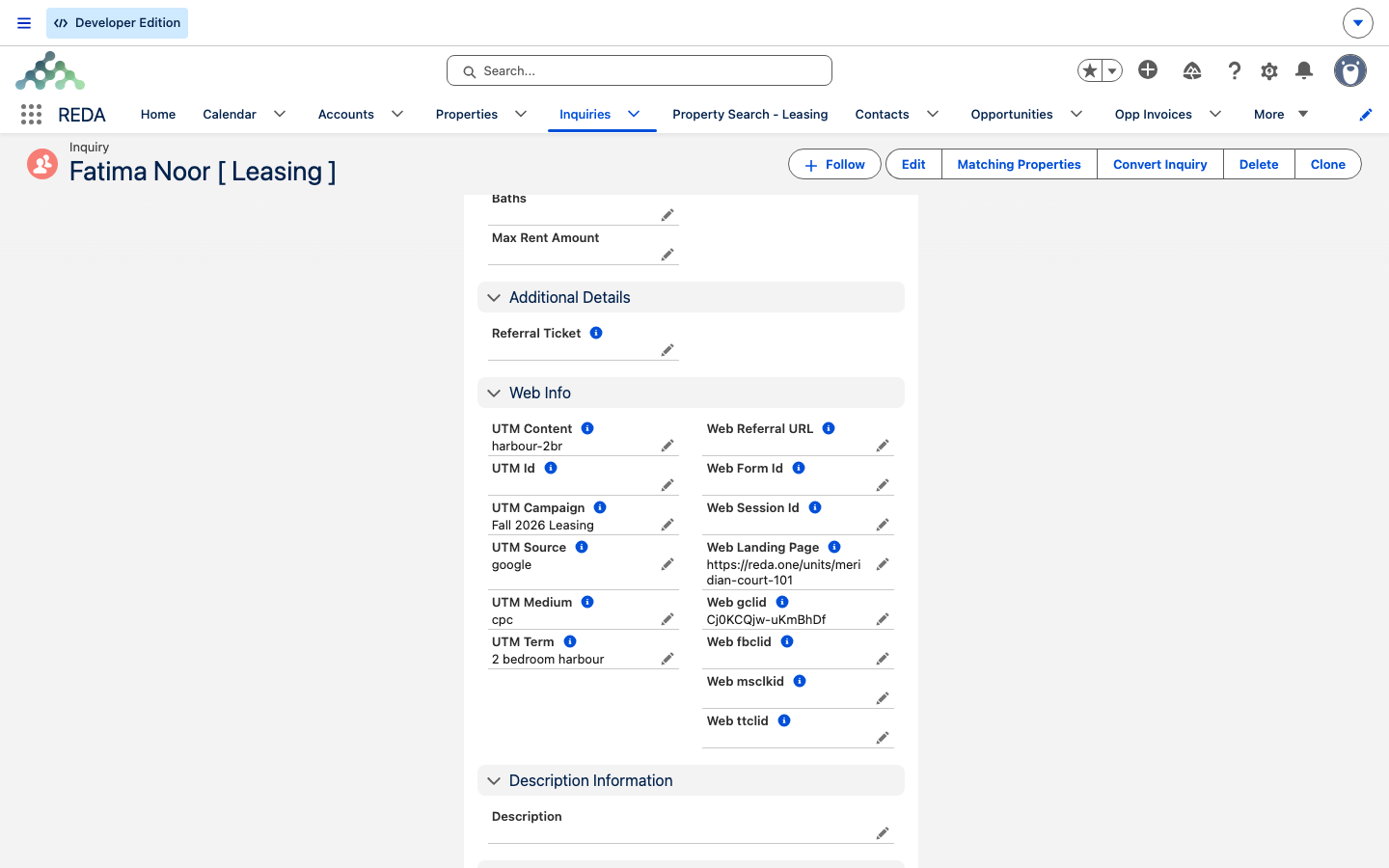
| Arrived via a campaign link | The six UTM fields | When present |
| Arrived via an ad click | Facebook, Google, Microsoft, TikTok click IDs | When present |
| — (web context) | Web form ID, landing page, referral URL, session ID | When present |
| Requested a tour | A linked showing event is created | Tour form only |
The record type matters: it's set from the visitor's action — a rent enquiry becomes a Leasing inquiry, a buy enquiry becomes a Property Sale inquiry — and it drives the path the inquiry follows afterward.
The automatic showing event
When the visitor uses the tour form rather than the plain contact form, REDA doesn't just record the requested date on the inquiry — it also creates a showing event linked to the inquiry, so the requested tour lands on the calendar rather than sitting as a note someone has to action. The tour request itself is captured on the inquiry as three details:
| Tour field on the inquiry | What the visitor chose |
|---|---|
| Requested Showing / Tour Date | The date the prospect asked to view the unit |
| Requested Showing Tour Preference | A time-of-day preference: Morning, Around Noon or Afternoon |
| Requested Showing Type | In-Person or Live Virtual Tour |
So a prospect who asks for an afternoon virtual walkthrough on the fifteenth arrives with all three details on the record — the agent knows the when, the roughly-when, and the how before they even pick up the phone.
Attribution data for marketing
The reason web inquiries are worth reading closely is the attribution they carry. When a visitor arrives through a tagged campaign link or an ad click, the form records exactly where they came from, so your reports can credit the right campaign. Two kinds of data do this work:
| What it is | What it tells you |
|---|---|
| UTM parameters (campaign, content, id, medium, source, term) | The campaign tags carried on a click-through link — which campaign, channel, and content brought the visitor in. |
| Ad click IDs (fbclid, gclid, msclkid, ttclid) | Per-network identifiers stamped on an ad click — from Facebook, Google, Microsoft, and TikTok respectively. |
Only visitors who arrive with these tags carry them — someone typing your address directly has none, which is expected, not a fault.
Working a web inquiry
Once it's created, a web inquiry is an ordinary inquiry — the Web source and its record type simply tell you where it came from. From here it follows the normal path:
- The Web source value sets these apart in list views and reports, so you can filter to website leads.
- If the same prospect submitted twice, REDA flags it: use the Potential Duplicates card and Merge Duplicates on the inquiry (see Finding & Merging Duplicate Inquiries).
- When the prospect is ready, convert the inquiry to a lease or opportunity with the standard convert action; for rentals, an online lease application may run first.
Two web paths, same fields
Your REDA listing pages aren't the only way a web inquiry can appear. External forms — a Webflow-native form, another landing page — can send the very same attribution payload through the Data Service, which offers exactly this set of web parameters as a no-code intake. Same fields on the inquiry, a different pipe feeding them: the listing page writes the inquiry directly, while an outside form posts through the Data Service.
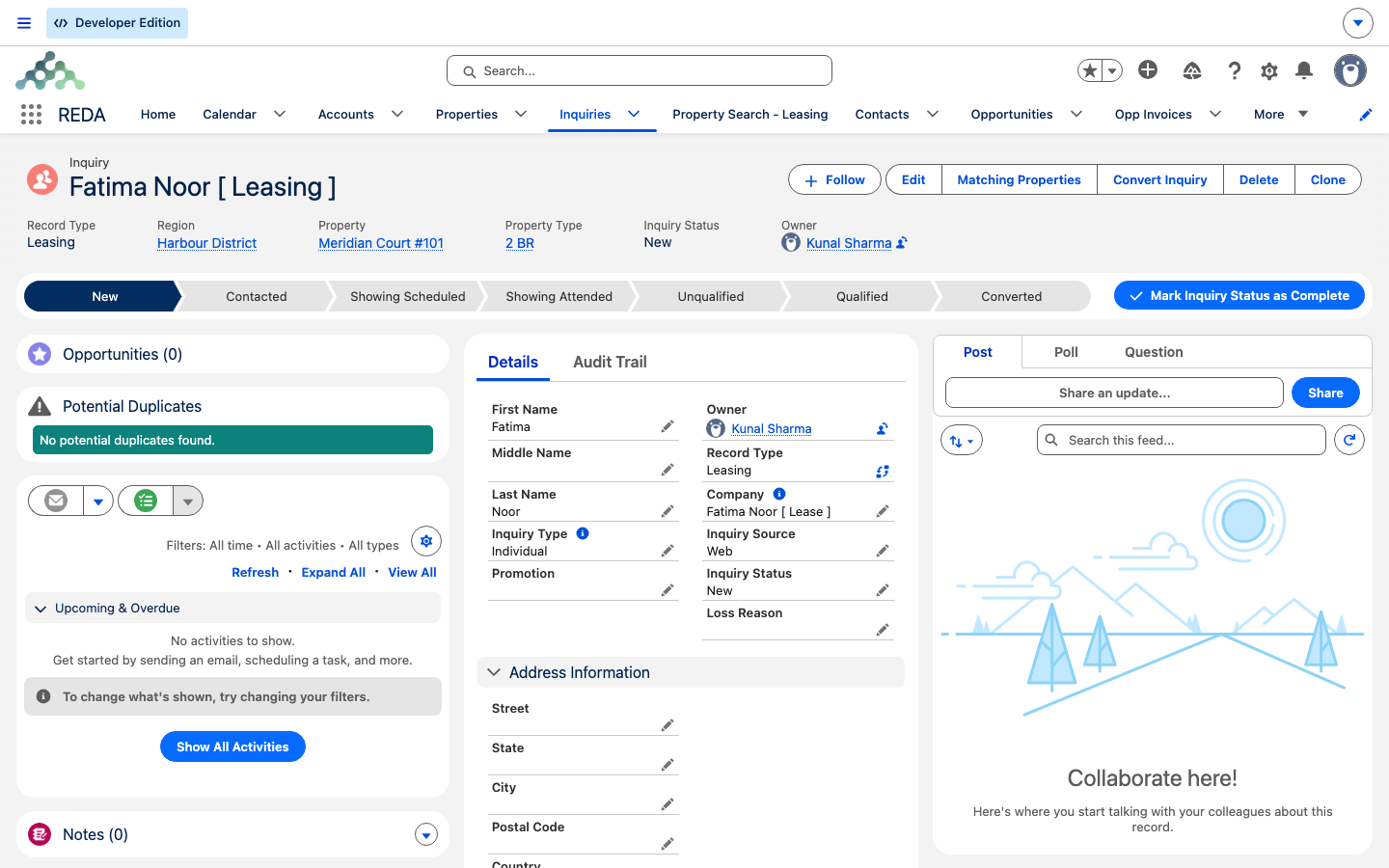
Worked example: Aisha finds Meridian Court #101
Aisha spots Meridian Court #101 through a Google ad and clicks through — landing on the unit page with utm_source=google, utm_campaign=summer-lease, and a Google click ID in the address. On the page she requests a Saturday-morning tour. The result in REDA:
| On the inquiry | Value |
|---|---|
| Name | Aisha Rahman |
| Source / record type | Web / Leasing |
| Property | Meridian Court #101 |
| Tour request | Saturday, morning preference |
| Attribution | Campaign summer-lease, Google click ID, IP captured |
| Calendar | A linked showing event for Saturday |
Marketing's "leads by campaign" report counts Aisha under summer-lease, and the agent has her tour on the calendar before the office opens.
Where to go next
- Publishing Properties to Your Website (RDELS) — the pages that host these forms.
- REDA Data Service: Connect Your Forms — the other pipe that writes web inquiries.
- Online Lease Applications (RLA) — the usual next step for a rental prospect.
- Finding & Merging Duplicate Inquiries — handling the same prospect twice.
Frequently asked questions
The UTM and click-ID fields are filled only when the visitor arrived carrying them — through a tagged campaign link or an ad click. Direct traffic has none, which is normal.
Yes. The action they take on the page sets the record type — a Leasing inquiry for rent, a Property Sale inquiry for buy — which then drives the path the inquiry follows.
Use the Potential Duplicates card and Merge Duplicates on the inquiry to combine them. If the same person tends to resubmit through an external form, the Data Service path can update an existing inquiry instead of creating a new one.
It records the network address the submission came from, captured from the web request. It's a factual provenance detail on the record.
Was this article helpful?