
Scenario: From Web Inquiry to Leasing Hand-off
This is the CRM-first view of the very front of a lease. A prospect submits a form on Meridian's website; REDA's inbound form service lands it as an inquiry with full marketing attribution; an agent qualifies it; and Convert Inquiry hands a ready-to-work lease to the leasing team. We follow Aisha Rahman enquiring about Meridian Court #101. The scenario stops at the moment the lease is born, at stage Application - New — the lifecycle from there continues in Leasing an Apartment End to End. Its job is to show how a web lead becomes a working deal, and what carries (and what stays behind) across the conversion boundary.
Access you'll need. Capturing, qualifying and converting needs the REDA - Property Leasing User permission set. Converting also creates a standard Account and Contact, so the user needs the org-side create access for those. The inbound form service itself is configured by an administrator.
The story at a glance
Aisha finds Meridian Court #101 online and submits the "enquire" form. Behind the scenes, REDA's form service turns that POST into an inquiry, complete with the marketing attribution that tells Meridian where the lead came from. An agent picks it up, qualifies it, and converts it — and in one all-or-nothing step, REDA builds the account, the contact, and the lease, and hands the deal to leasing. Here is the whole front of the funnel in one table.
The timeline
Prospect Aisha Rahman, unit Meridian Court #101, target rent 1,200.00/mo, 12-month term, move-in 1 Aug 2026.
| Step | Actor | What they do | What REDA does automatically | Owning article |
|---|---|---|---|---|
| 1 | Prospect (website) | Aisha submits the "enquire / schedule a tour" form on Meridian's site | The inbound form service creates a Leasing inquiry, mapping the shipped web parameters — name, email, phone, company, Source = Web, the full UTM set, form and landing-page details, and the ad click IDs; failures are logged, not lost | The Inbound Data Service |
| 2 | (automatic) | — | Fills Region, Neighbourhood and Property Type from the unit; formats the display name; if the org's duplicate rules match, surfaces a Potential Duplicates card | Handling Duplicate Inquiries |
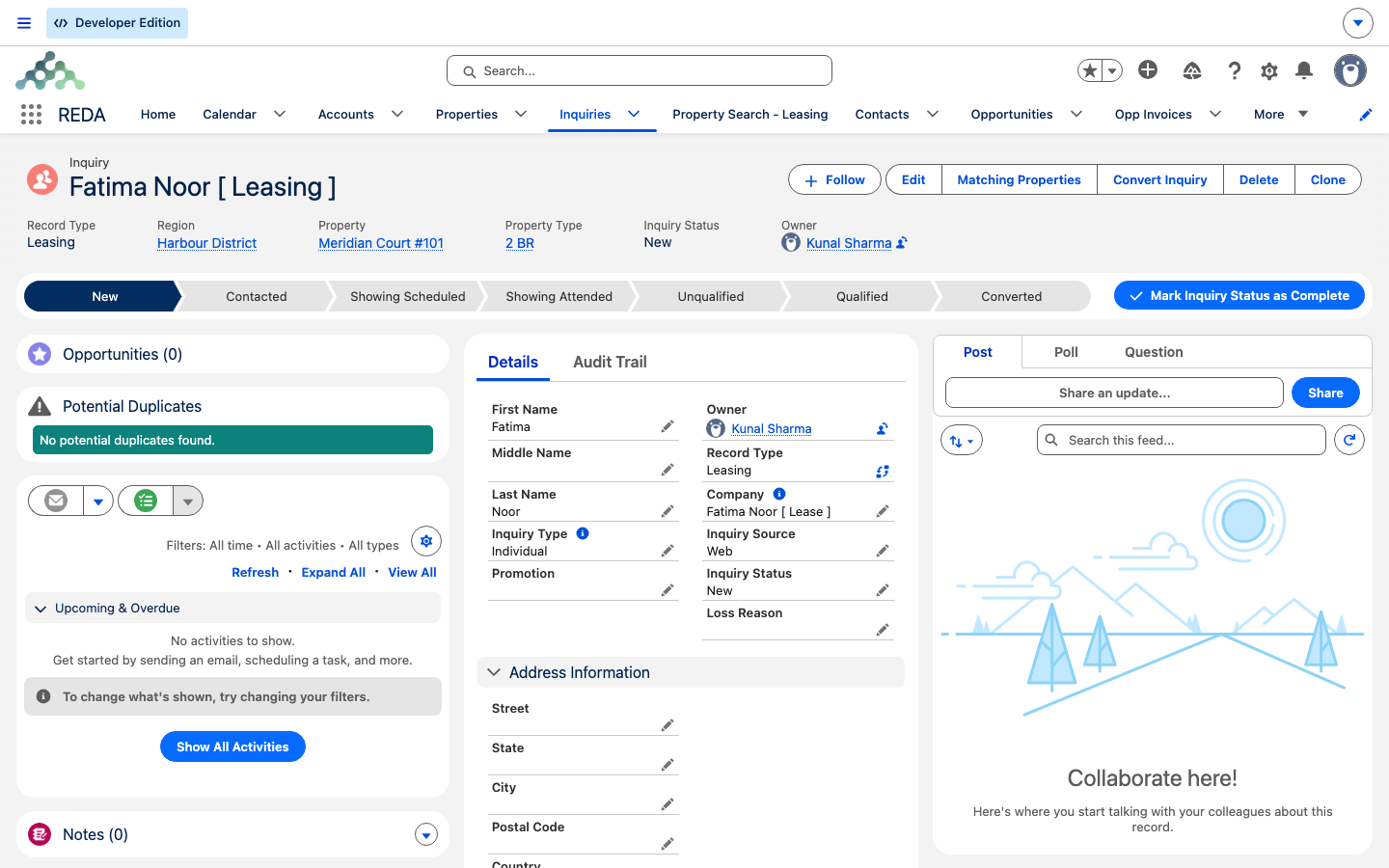
| 3 | Agent | Reviews the inquiry; works the manual status funnel; confirms the Move In Date (1 Aug 2026) and Lease Term (12) are set | — nothing advances on its own; qualification is manual | Qualifying Inquiries |
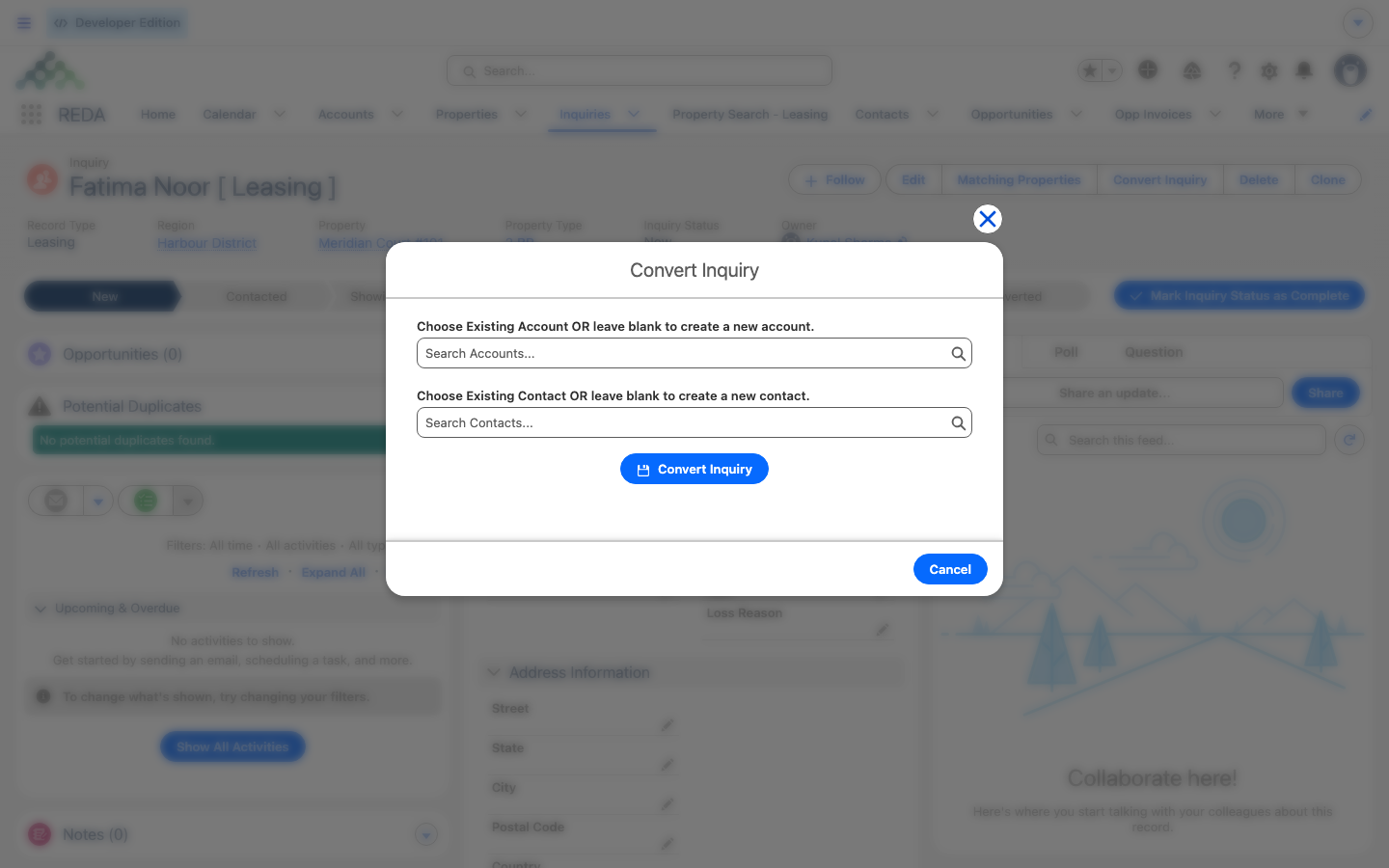
| 4 | Agent | Clicks Convert Inquiry, leaving the pickers blank (or picking an existing Account / Contact) | Creates the Account, Contact, Opportunity (the lease) and a primary Lessee contact role in one all-or-nothing step; forces the lease to Application - New; writes the move-in date into three date fields; marks the inquiry Converted; the marketing attribution stays on the inquiry | Converting Inquiries |
| 5 | Leasing team | Picks up the new lease and continues the lifecycle | — | Leasing an Apartment End to End |
Act 1 — The form lands
REDA ships an inbound, REST-based form service that Meridian's website posts to. When a visitor submits the enquiry form, REDA maps the shipped web parameters onto a new inquiry, defaulting Inquiry Source = Web and populating the full marketing-attribution set — the UTM campaign, source, medium, content and term; the form id and landing page; the session and referral details; and the Google, Facebook, Microsoft and TikTok click IDs. A returning submission can update the existing inquiry when the form passes the record back. The endpoint and key mechanics are administrator territory — see The Inbound Data Service and Capturing Web Inquiries; a failed post is logged for admins rather than dropped.
Act 2 — Qualify
Nothing advances automatically after capture. The agent works the manual status funnel and, crucially for a leasing inquiry, must make sure the Move In Date and Lease Term are filled before converting. The conversion enforces this at the very end, so a miss surfaces as a failed conversion rather than a form error. Detail: Qualifying Inquiries.
Act 3 — Convert and hand off
On Convert Inquiry, REDA builds the Account, the Contact, the lease Opportunity, and a primary Lessee contact role in a single transaction — any error rolls the whole thing back, so there's no partial conversion. The classic tripwire is the missing move-in date or term: "Move-in date and lease terms must be provided prior to converting the leasing inquiry." The new lease opens at Application - New, already carrying its dates. Marketing attribution — the UTM values and click IDs — stays on the inquiry; you report through the inquiry-to-deal lineage (see Web Attribution). From here, the lease is the leasing team's, and the story continues in Leasing an Apartment End to End. Detail: Converting Inquiries.
If you're on the Sales Cloud edition
Where to go next
- Converting Inquiries — the conversion action in full, including every message.
- Leasing an Apartment End to End — where the lease goes after the hand-off.
- The Inbound Data Service — how the website form becomes an inquiry.
- Handling Duplicate Inquiries — the Potential Duplicates card and merge.
- Web Attribution — reporting a lease back to the campaign that sourced it.
Frequently asked questions
Meridian's website posts the form to REDA's inbound form service, which creates the inquiry and maps the web parameters (including Source = Web). Ask your administrator for the endpoint and key setup — see The Inbound Data Service.
Your org's duplicate rules evaluate every inquiry as it's created — web or typed by hand — and surface a Potential Duplicates card with a merge option. See Handling Duplicate Inquiries.
No. Conversion is all-or-nothing; fill in the Move In Date and Lease Term and convert again: "Move-in date and lease terms must be provided prior to converting the leasing inquiry."
Attribution stays on the inquiry by design; report through the inquiry-to-deal lineage. See Web Attribution.
Leasing deals are forced to Application - New on conversion, regardless of how qualified the inquiry was.
Was this article helpful?