
Qualifying & Working Inquiries
You have a queue of new inquiries. Now what? Qualifying is the work of moving a prospect from "just got in touch" to "ready to become a deal" — and in REDA that work is deliberately in your hands. You advance the inquiry's status along a ladder built for its line of business, find inventory that fits, and either qualify it or set it aside with a reason. This article walks the status ladder for every inquiry type, shows you how to find property matches, and points out the one hard requirement a leasing inquiry must meet before it can convert. No prior REDA experience is assumed.
Access you'll need. Editing inquiries requires one of the line-of-business permission sets — REDA - Property Leasing User, REDA - Property Sales User, REDA - Property Acquisition User, REDA - Property Management User, or REDA - Property Lending User.
Working an inquiry: the idea
Qualification in REDA is manual by design. Nothing advances an inquiry's status for you — there are no SLA timers, no auto-routing, and no automation that moves a status when something else happens. You move the inquiry; REDA simply guards the exits. Two guards matter: you can't hand-pick the Converted status (the Convert action sets it), and a leasing inquiry can't convert until its move-in date and lease term are filled. Everything else is a working convention — a ladder you climb at your own pace.
The status ladder per inquiry type
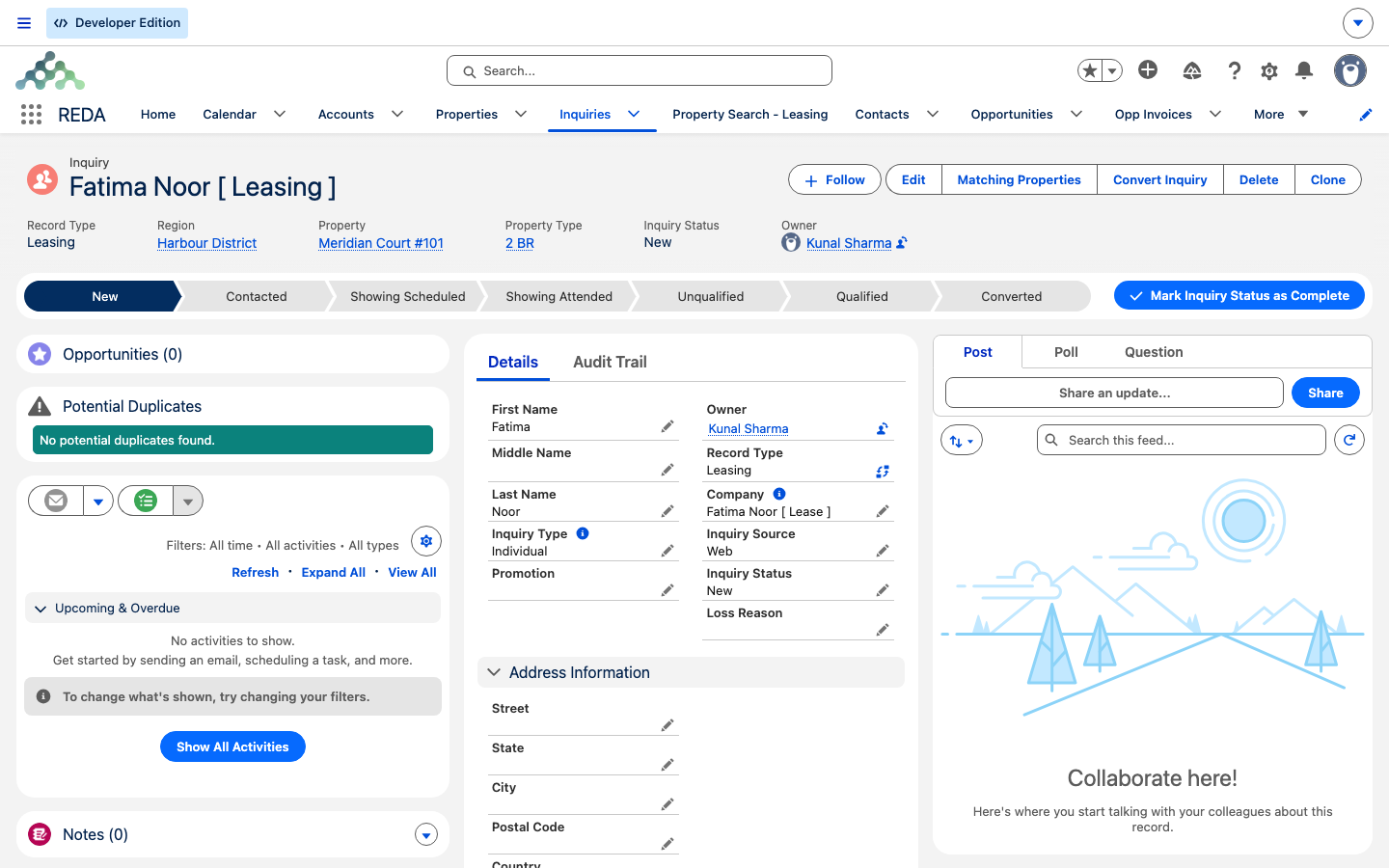
Each inquiry type has its own Inquiry Status Path. Every type starts at New and ends at either Unqualified (you're not proceeding) or Converted (a deal was created). In between, each line of business has its own working stations:
| Type | Working ladder | Extra stations | Terminal |
|---|---|---|---|
| Leasing | New → Contacted → Qualified | Showing Scheduled, Showing Attended | Unqualified / Converted |
| Lending | New → Contacted → Qualified | Strategy Session Scheduled, Strategy Session Attended | Unqualified / Converted |
| Property Management | New → Contacted → Qualified | Strategy Session Scheduled, Strategy Session Attended | Unqualified / Converted |
| Acquisition | New → Contacted → Qualified | Underwriting | Unqualified / Converted |
| Property Sale | New → Qualified | Underwriting | Unqualified / Converted |
You don't have to climb every rung — no rule forces the order, so you can jump from New straight to Qualified if you're ready. The stations exist to record where a prospect is; use the ones that fit your process. Converted appears on every ladder but you can never pick it yourself; if you try, REDA stops you: "Please convert inquiry prior updating status to "Converted"." Use the Convert action instead — see Converting an Inquiry.
Showing statuses (Leasing)
A leasing prospect usually wants to see the unit. The Showing Scheduled and Showing Attended statuses record that a tour was booked and then completed. Booking the actual appointment happens through showing slots and events (see Scheduling Showings); the status here is not synced from those events — nothing changes it automatically. After the tour, set Showing Attended yourself.
Strategy-session statuses (Lending & Property Management)
Lending and property-management prospects are worked through a consultation rather than a tour. Strategy Session Scheduled and Strategy Session Attended mark that an investor or owner consultation was booked and held. As with showings, these are manual stations — you set them.
Underwriting (Acquisition & Property Sale)
Acquisition and sale prospects run through analysis. An acquisition inquiry carries an underwriting block — asking price, the estimated after-rent market value (ARV), three cost estimates (renovation, holding, and profit, seeded from the region's Profit & Holding Rule), and a computed Maximum Allowed Offer (MAO) — the ARV minus holding cost, profit, and renovation cost. Mark Underwriting while that analysis is in progress, and record Underwrite Complete and the Underwrite Date when you finish. For the fields in detail, see Acquisition Analysis.
Finding property matches
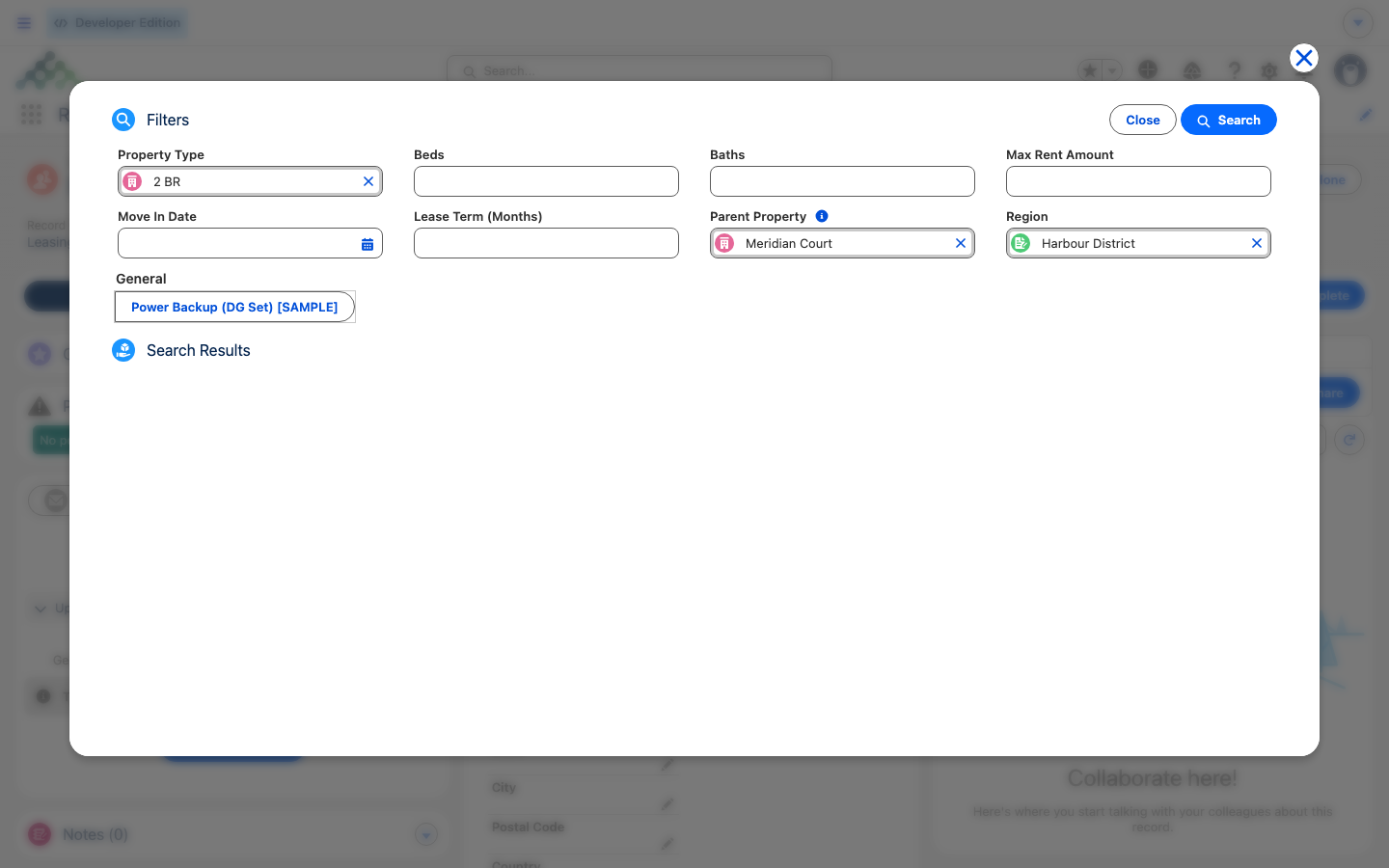
Once you know what a prospect wants, REDA helps you find inventory that fits. The Matching Properties action on the inquiry opens a property finder pre-loaded with the inquiry's own fields as filters:
| Filter | Comes from the inquiry field |
|---|---|
| Kind of property | Property Type |
| Size | Beds, Baths |
| Budget | Max Rent Amount |
| Timing | Move In Date |
| Term | Lease Term (Months) |
| Location | Region, Parent Property |
For deeper leasing searches there's a full-screen Property Search - Leasing tab. Its results are capped — "Search results are limited to 200 rows…" — so narrow your filters if you hit the ceiling. The tab ships with the Property Sales and Property Management permission sets; the Property Leasing set does not include it, so if your leasing agents need it, ask your administrator to grant it. For the search tool in depth, see Searching for Properties.
Getting to Qualified
Marking an inquiry Qualified is a signal that it's ready to become a deal. What "ready" means depends on the type — and for leasing, it's not just a judgment call:
| Type | Before you mark it Qualified, make sure… |
|---|---|
| Leasing | Move In Date and Lease Term are filled, and the property of interest is confirmed. Conversion will hard-stop without the date and term. |
| Lending | The strategy session was held and the investor's account details are known. |
| Property Management | The strategy session was held and the property details are captured. |
| Acquisition | The underwriting block is filled and the Maximum Allowed Offer has been reviewed. |
| Property Sale | The prospect's budget or financing is understood and matching properties are shortlisted. |
Disqualifying an inquiry
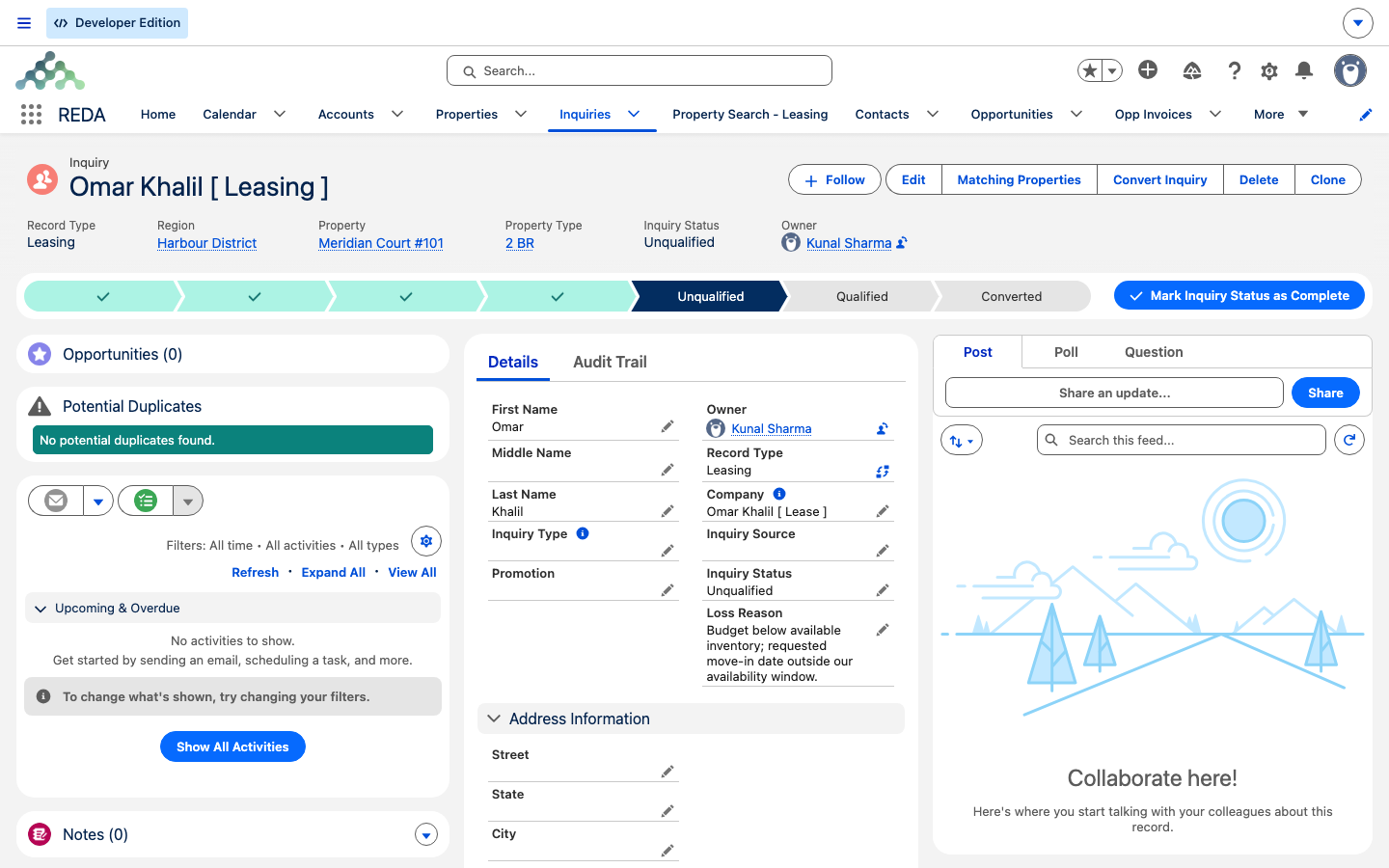
Not every prospect proceeds — and that's fine. To set one aside, mark it Unqualified and record a Loss Reason (and any Notes). Don't delete it: the record stays for your funnel reporting, and the All Unqualified list view keeps disqualified prospects together. If the prospect comes back, move the status back along the Path — nothing blocks reopening — and keep the history.
Working queues
List views act as your daily queues. Today's Inquiries and All Open Inquiries collect what needs attention, and each line of business has its own "All Open" view. One of them ships with a spelling quirk — All Open - Sales Inquires — so search for it exactly as written.
Worked example: qualifying Aisha
Aisha Rahman's inquiry (Aisha Rahman [ Leasing ]) starts at New. The agent calls her and sets Contacted. They run Matching Properties — 2 beds, max 1,200.00, move-in 1 Aug 2026, 12-month term — and book a Saturday tour, marking Showing Scheduled. After the tour, they set Showing Attended. Aisha confirms she wants Meridian Court #101; the agent checks that Move In Date and Lease Term are filled and marks Qualified. She's ready to convert.
Reference: what each status means
| Status | Meaning | Set by |
|---|---|---|
| New | Just captured; nobody has worked it yet | Default on create |
| Contacted | The first conversation has happened | You |
| Showing Scheduled | A property tour is booked (Leasing) | You |
| Showing Attended | The tour is complete (Leasing) | You |
| Strategy Session Scheduled | A consultation is booked (Lending / PM) | You |
| Strategy Session Attended | The consultation was held (Lending / PM) | You |
| Underwriting | Deal analysis is in progress (Acquisition / Sale) | You |
| Qualified | Ready to convert; the type's requirements are met | You |
| Unqualified | Won't proceed; kept with a Loss Reason | You |
| Converted | A deal was created from this inquiry | System only, via the Convert action |
Where to go next
- Converting an Inquiry — turn a qualified inquiry into a working deal.
- Capturing Inquiries — the previous step, where inquiries are created.
- Understanding Inquiries — the object, its types, and where the status matrix comes from.
- Searching for Properties — the leasing search tool in depth.
- Scheduling Showings — booking the tour behind the showing statuses.
Frequently asked questions
Nothing automates inquiry statuses. Booking or completing a tour doesn't move the status for you — mark Showing Attended yourself after the tour.
Converted is set by the Convert action, not by hand. REDA shows: "Please convert inquiry prior updating status to "Converted"." Use Convert Inquiry instead.
A leasing inquiry needs both before it can convert. The check runs as conversion completes and undoes everything: "Move-in date and lease terms must be provided prior to converting the leasing inquiry." Fill Move In Date and Lease Term first, then convert again.
The tab ships with the Property Sales and Property Management permission sets; the Property Leasing set doesn't include it. If your leasing agents need it, ask your administrator to grant it.
The leasing search caps at 200 rows — "Search results are limited to 200 rows…" — to stay fast. Narrow your filters (region, beds, budget) to bring the best matches to the top.
No. Mark them Unqualified with a Loss Reason and keep them — they feed your funnel reporting, and the All Unqualified view collects them.
Yes. No rule forces the order — the ladder is a working convention. The only hard gates are at conversion (for leasing, the move-in date and lease term).
Was this article helpful?