
Third-Party Property Management in REDA
When you manage a building for someone else, you are running an owner's property on their behalf under an agreement — collecting rent, handling maintenance, recovering shared costs, and reporting back. This article is the concept anchor for the whole Property Management section: it explains what that arrangement actually is in REDA, names the record that represents a management engagement, shows the two things that get stamped onto the building when the agreement closes, and points you to the day-to-day articles for each task. No prior REDA experience is assumed — every term is defined as we reach it. By the end you'll be able to tell a management deal apart from a sale or a lease, know where the fee terms live, and know which article to open next.
Access you'll need. Working with property-management operations requires the REDA - Property Management User permission set, which can create and edit Opportunities and Tickets. The REDA - Master Data - Read Only set can view but not change them. Property records can be edited by the Property Management set but deleted only by REDA - Master Data - Admin. Owner and management-company accounts are ordinary accounts — access to them is granted by your administrator separately.
What "third-party property management" means in REDA
In third-party management, you — the manager — operate a building that someone else owns, under a written agreement that sets your fees and responsibilities. REDA models this as a real relationship between two different parties, not as a single checkbox on a property. The owner remains the owner; you are engaged to run the building and to bill on the owner's behalf. Everything in this section flows from that one idea: owner and manager are distinct, and the agreement between them is a record you can point to.
Three records carry the model. The management deal is where the engagement is negotiated and closed. The agreement of record is the ticket that holds the fee terms. And the Property — the building or unit — ends up pointing at both, so anyone looking at the building can see who manages it and under what agreement. We'll take them in that order.
The Property Management Opportunity (the management deal)
REDA calls a deal an Opportunity — its single "deal" record. The same object represents a sale, a lease, an acquisition, a loan, and a management engagement; the record type tells them apart. A management engagement is an Opportunity of record type Property Management, one of the deal types REDA ships. (A lease, by contrast, is an Opportunity of record type Leasing — same object, different type.)
Like every deal, a management deal advances through a fixed set of Stages, shown as a Path — the progress bar across the top of the record. The Property Management path has exactly five stages, in this order:
Prospecting → Contract Out → Under Contract → Closed Won → Closed Lost
You rarely drag this Path by hand. The deal's stage is driven for you by the PMA ticket described next: sending the contract moves the deal to Contract Out, and signing it moves the deal to Under Contract. The full mechanics live in Property Management Agreements.
The PMA ticket: the agreement of record
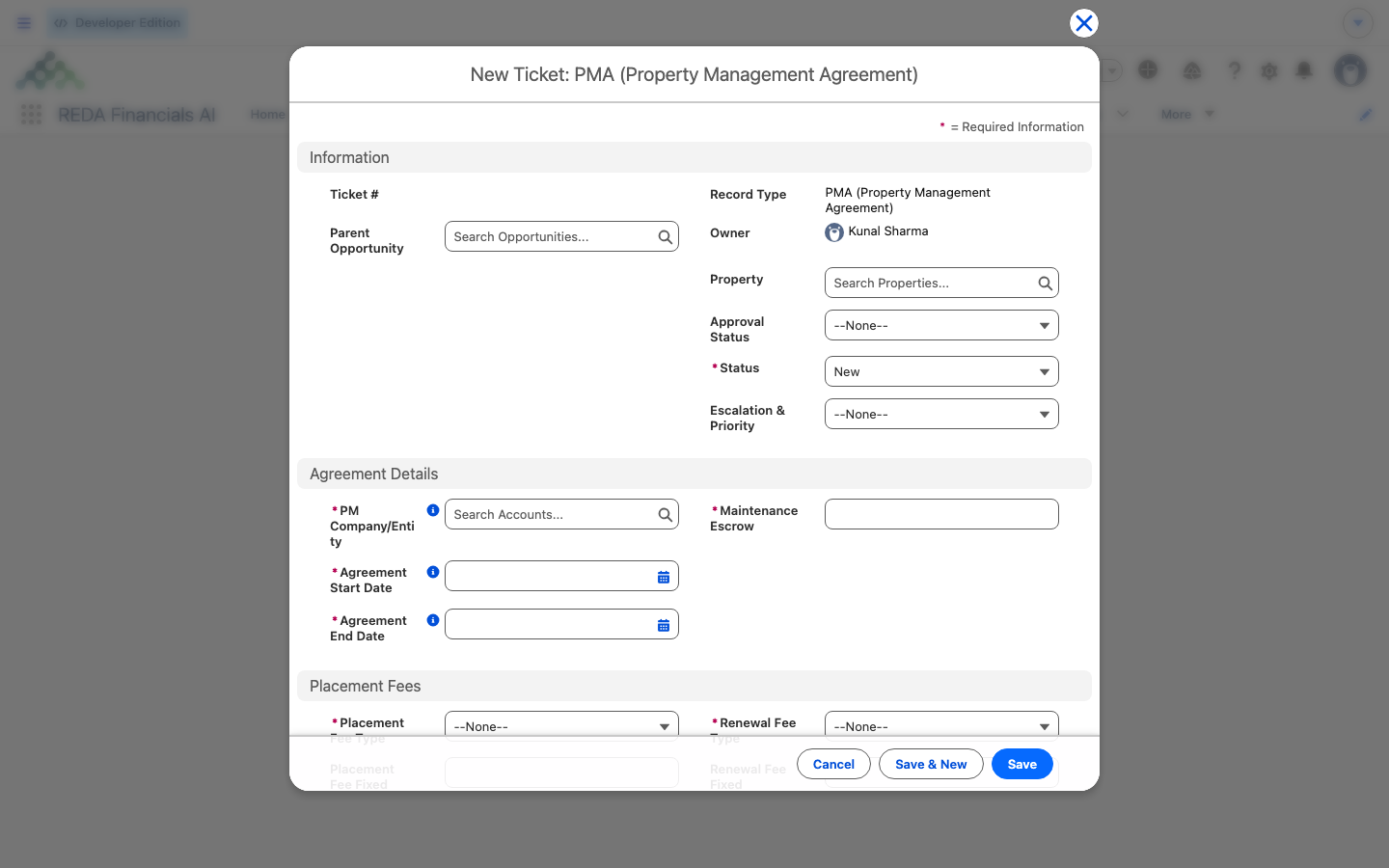
A ticket in REDA is a short, tracked checklist for one step in a record's life — it has its own status Path and, when you work it, it moves the parent deal forward. The management agreement is recorded as a PMA (Property Management Agreement) ticket, and it moves through the statuses New, In Process, Contract Sent, Contract Signed, Closed, and Cancelled.
The single most important fact about the PMA ticket is where the numbers live:
Not every deal may carry a PMA ticket. REDA restricts it to a management deal or to a completed sale (a buyer who then engages you to manage what they just bought). If you attach one anywhere else, REDA blocks the save with:
The step-by-step for building and closing a PMA ticket — filling the fee blocks, sending, signing, and closing — is Property Management Agreements. This article only names the ticket and its role.
What gets stamped on the Property at close
When the PMA ticket reaches Closed, REDA writes the management relationship onto the building's Property record so it's visible at a glance on the Details tab:
Sitting alongside these is the Owner Account — the account that owns the building. This is the distinction that makes third-party management real: the Owner Account and the PM Company/Entity are two separate fields holding two separate accounts. The whole point of managing on someone's behalf is that the owner and the manager differ.
REDA guards the owner relationship. If you set an ownership start date without naming the owner, or the reverse, you'll see:
"Please provide the Ownership Start Date."
The cast: owner, PM client, manager, tenant, vendor
A handful of roles appear again and again across the Property Management section. Naming them once here makes every later article easier to read:
| Role | Where it lives | In our running example |
|---|---|---|
| Owner — who owns the building | Property → Owner Account | Continental Holdings |
| PM Client — the owner's contact on the deal | Management deal → primary Contact Role "PM Client" | (the owner's representative) |
| Manager / billing entity — who runs and bills for it | Property → PM Company/Entity (from the PMA ticket) | Meridian Properties |
| Tenant — who rents a unit | The lease (a Leasing Opportunity) | (per lease) |
| Maintenance vendor — who fixes things | Work Order → Vendor | SwiftFix Maintenance |
A managed building still runs the ordinary leasing lifecycle for each unit, so tenants, leases, and their charges behave exactly as they do on any property — see From Application to Move-In. What management adds is the owner dimension on top.
What changes once a property is under management
Day-to-day, a managed property runs through the same machines as any other: leases raise their invoices, service requests become work orders, and repairs get billed. Management layers an owner-accounting dimension over all of it — management fees on the collected rent, expense reconciliation to recover shared building costs from tenants (with the owner absorbing vacancy), and monthly reporting. The task-level detail lives in Managing a Property Under a PM Agreement; the money mechanics live in the owner-accounting articles linked below. This article only orients you — it doesn't walk those tasks.
Worked example: Meridian Properties and Continental Holdings
Here is the running example the whole section reuses. Meridian Properties — the firm you work for — is engaged to manage a building owned by Continental Holdings. The engagement plays out like this:
| What happens | What REDA shows |
|---|---|
| You open a Property Management deal for the building | An Opportunity at Prospecting, with the five-stage management Path |
| You build a PMA ticket and send the contract | The ticket carries the fee terms; the deal moves to Contract Out |
| The owner signs; you close the ticket | The deal reaches Under Contract; the building's Property record is stamped with PM Agreement = the closed ticket, PM Company/Entity = Meridian Properties, Owner Account = Continental Holdings |
| A tenant later reports a repair; you dispatch SwiftFix Maintenance | A work order runs on the building, unchanged by the management layer |
The field-by-field walkthrough of the PMA ticket is Property Management Agreements; the day-to-day is Managing a Property Under a PM Agreement.
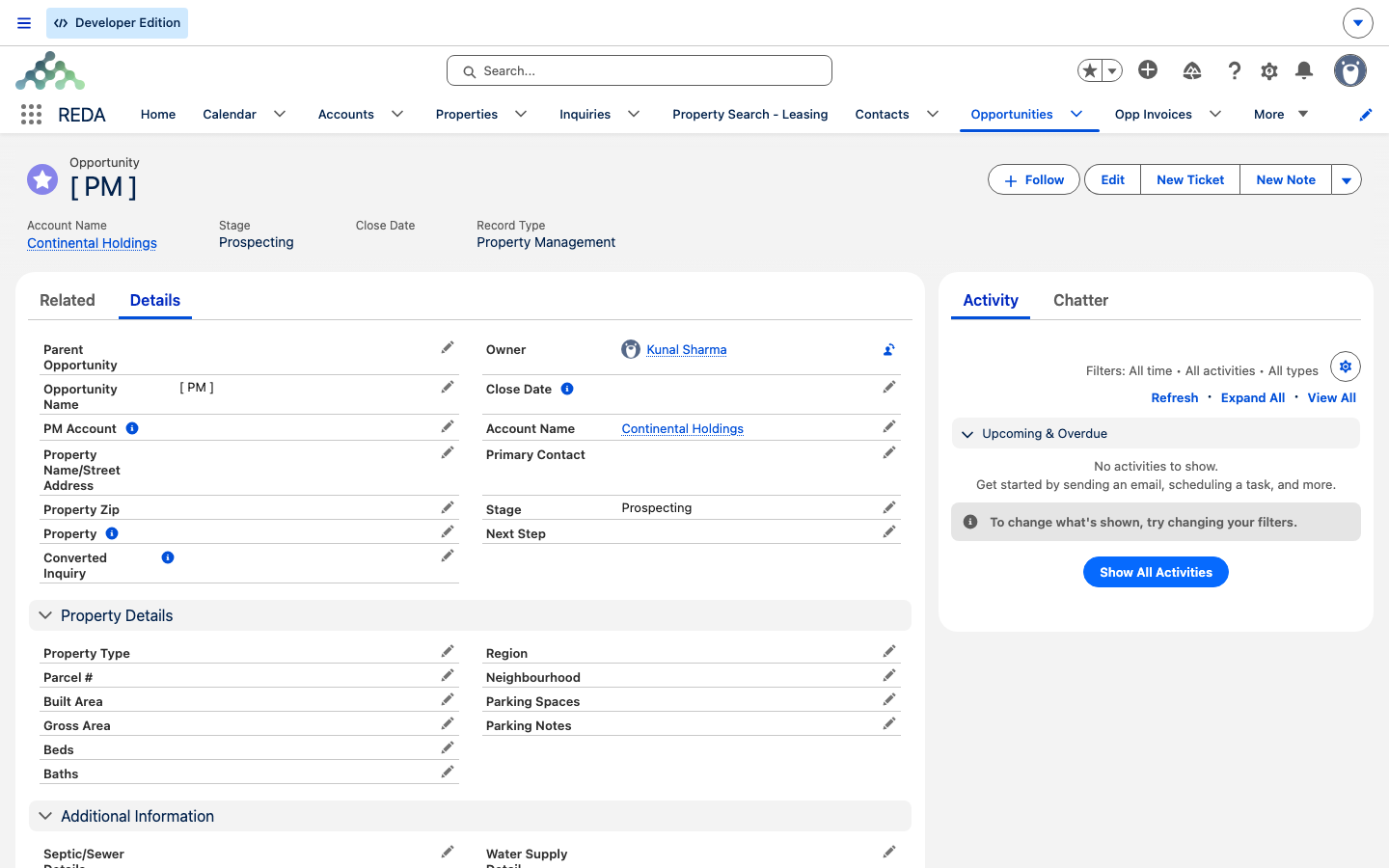
Prospecting, the first of the five stages) and Record Type Property Management; the Details tab below carries the PM Account and Property Details.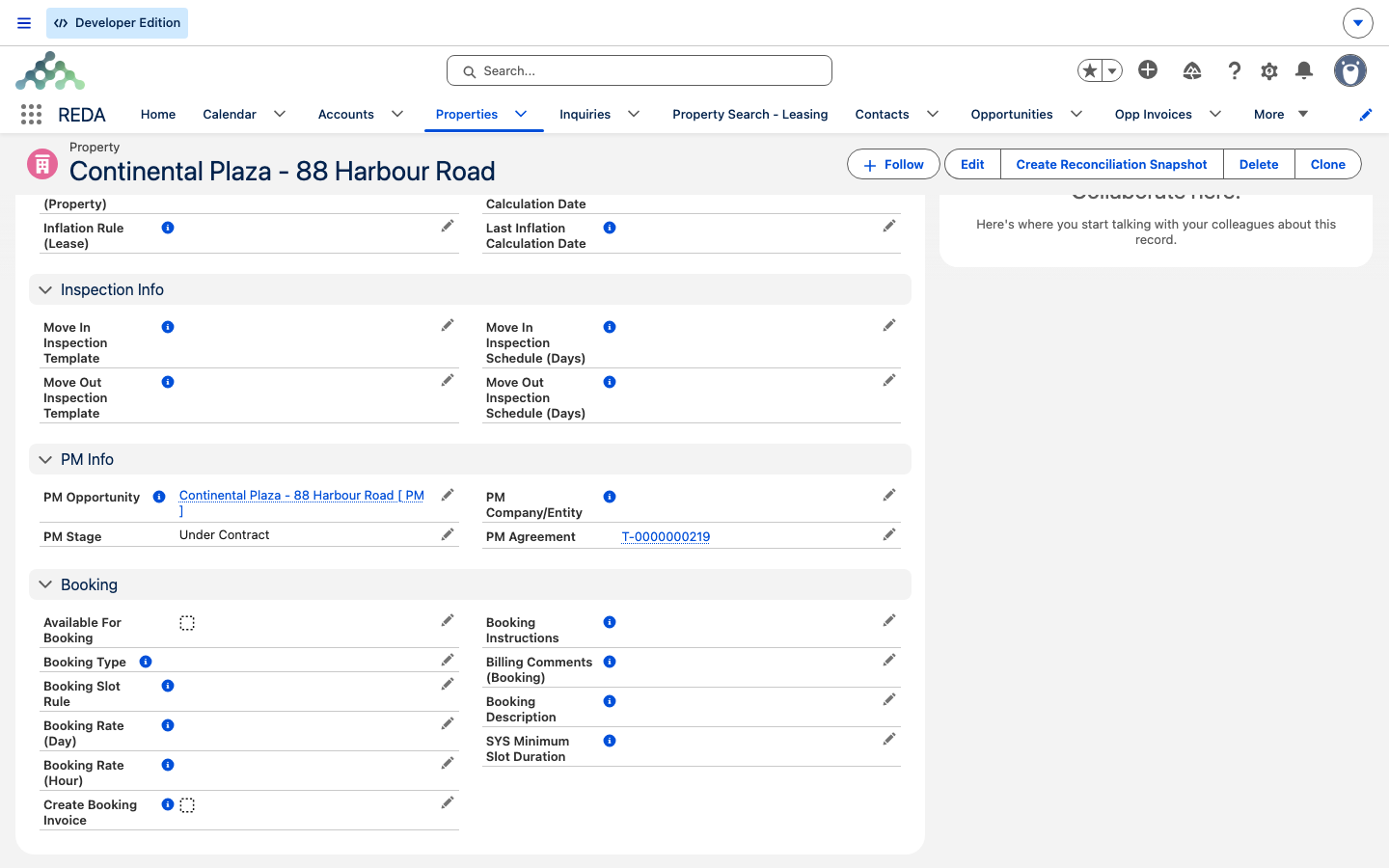
Key concepts at a glance
| Term | What it is | Where it lives |
|---|---|---|
| Property Management Opportunity | The management deal (a deal record type) | Opportunities tab, type "Property Management" |
| Stage (management path) | Prospecting → Contract Out → Under Contract → Closed Won → Closed Lost | The deal's Path |
| PMA ticket | The management agreement of record; holds all fee terms | Tickets, type "PMA (Property Management Agreement)" |
| PM Agreement | The closed PMA ticket the property points to | Property → Details |
| PM Company/Entity | The managing and billing company (an account) | PMA ticket, stamped on the Property |
| PM Opportunity | The management deal the property points to | Property → Details |
| Owner Account | Who owns the building (distinct from the manager) | Property → Details |
| Management / Placement / Renewal fee | The fee terms of the engagement | On the PMA ticket (never on the Property) |
Where to go next
- Property Management Agreements — build and close the PMA ticket, the fee blocks in full.
- Managing a Property Under a PM Agreement — the day-to-day on a managed building.
- Expense Reconciliation: Concepts — recovering shared building costs from tenants.
- Monthly Snapshots & Occupancy Analytics — auditing billing and reading occupancy numbers.
- Key Concepts — "the Opportunity is the deal", record types, and the Path.
- Understanding Tickets — the engine behind the PMA and every lifecycle step.
Frequently asked questions
The Owner Account owns the building; the PM Company/Entity manages and bills for it. On a managed property they are two different accounts — that difference is exactly what third-party management is.
On the closed PMA ticket the property points to (its PM Agreement), never on the Property record itself. The property just references the agreement.
A Property Management deal, or a closed-won Property Sale deal. REDA states it as: "Opportunity on Ticket type "PMA" must of type closed won "Property Sale" or "Property Management"."
Prospecting, Contract Out, Under Contract, Closed Won, and Closed Lost — five stages in that order.
No. There is no automatic reversal when a PMA ticket is cancelled — the property keeps its management stamps. Taking a property off management is a manual step.
Was this article helpful?