
Recording a Tenant Payment
The tenant paid — how do you record it so the invoice shows settled and the balance drops? In REDA the answer is a single action on the lease: Post Payment. It records the money as a receipt and, if you let it, applies that cash straight to the tenant's open invoices. This article shows you the action and what it does to the lease's balances. It's the short path in — the full accounting mechanics live in Recording a Payment (Post Payment), and this billing article deliberately points you there rather than duplicating them. No prior REDA experience is assumed.
Access you'll need. You reach the lease with the REDA - Property Leasing User permission set (or a sibling operational set). The payment itself is recorded in the accounting extension (REDA Financials on the reference setup), so posting it also needs that extension's user access — your administrator assigns it separately.
What Post Payment does
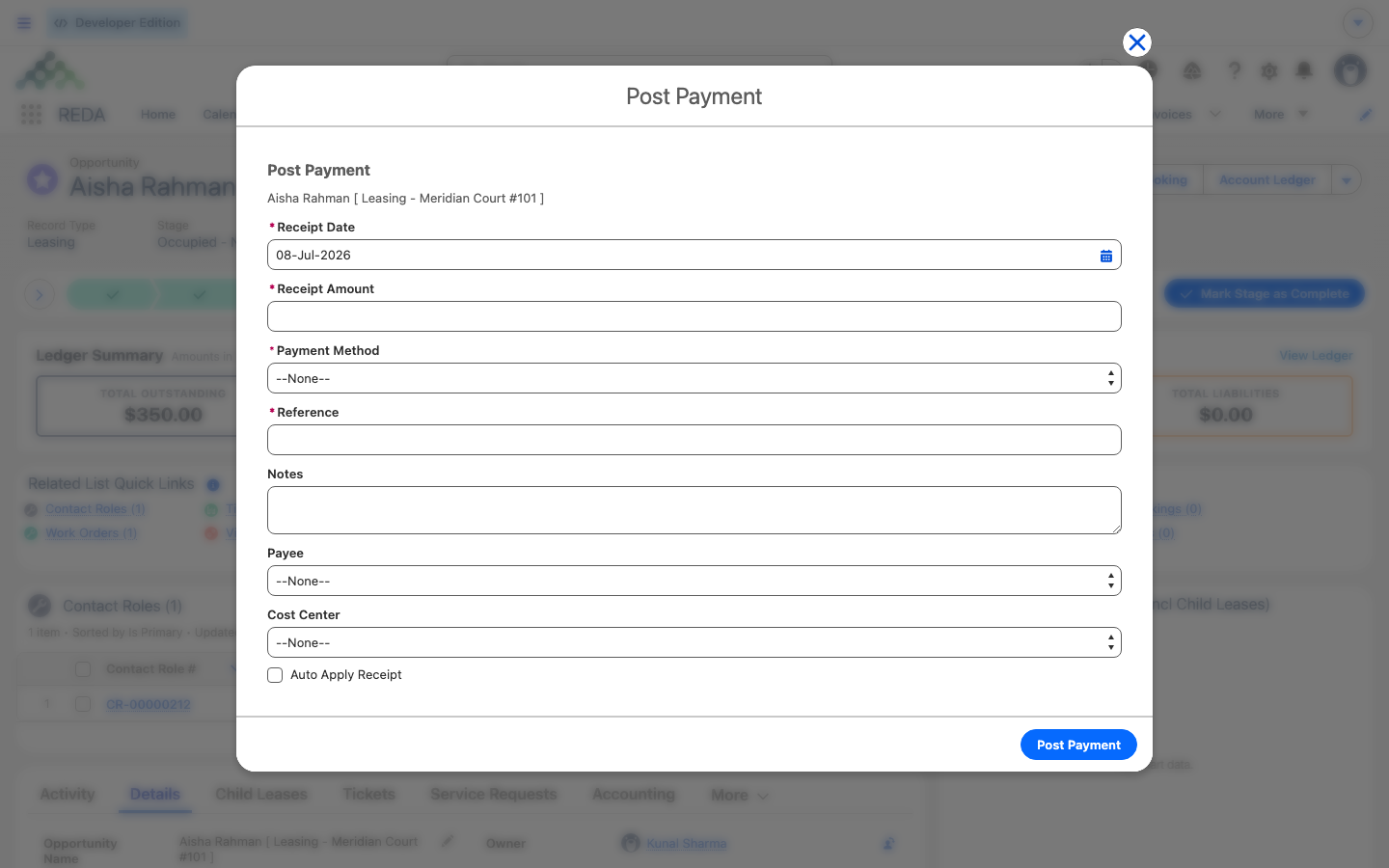
The Post Payment action opens a short screen where you enter the amount received. When you finish, REDA creates a posted cash receipt in the accounting extension — a permanent record of money taken in — with the tenant's account as the customer and the entity's bank and ledger defaults already filled in. You don't leave the lease to do accounting; the action does it for you.
The screen offers an auto-apply option. Leave it on and REDA matches the cash to the tenant's open invoices, settling them in order. Turn it off and the receipt is recorded but left unapplied, to be matched later. Either way, the payer offered is drawn from the lease's contacts marked as the payee — for a standard lease that's the tenant. (The full payer-eligibility logic is covered in the integrations article.)
What changes on the lease
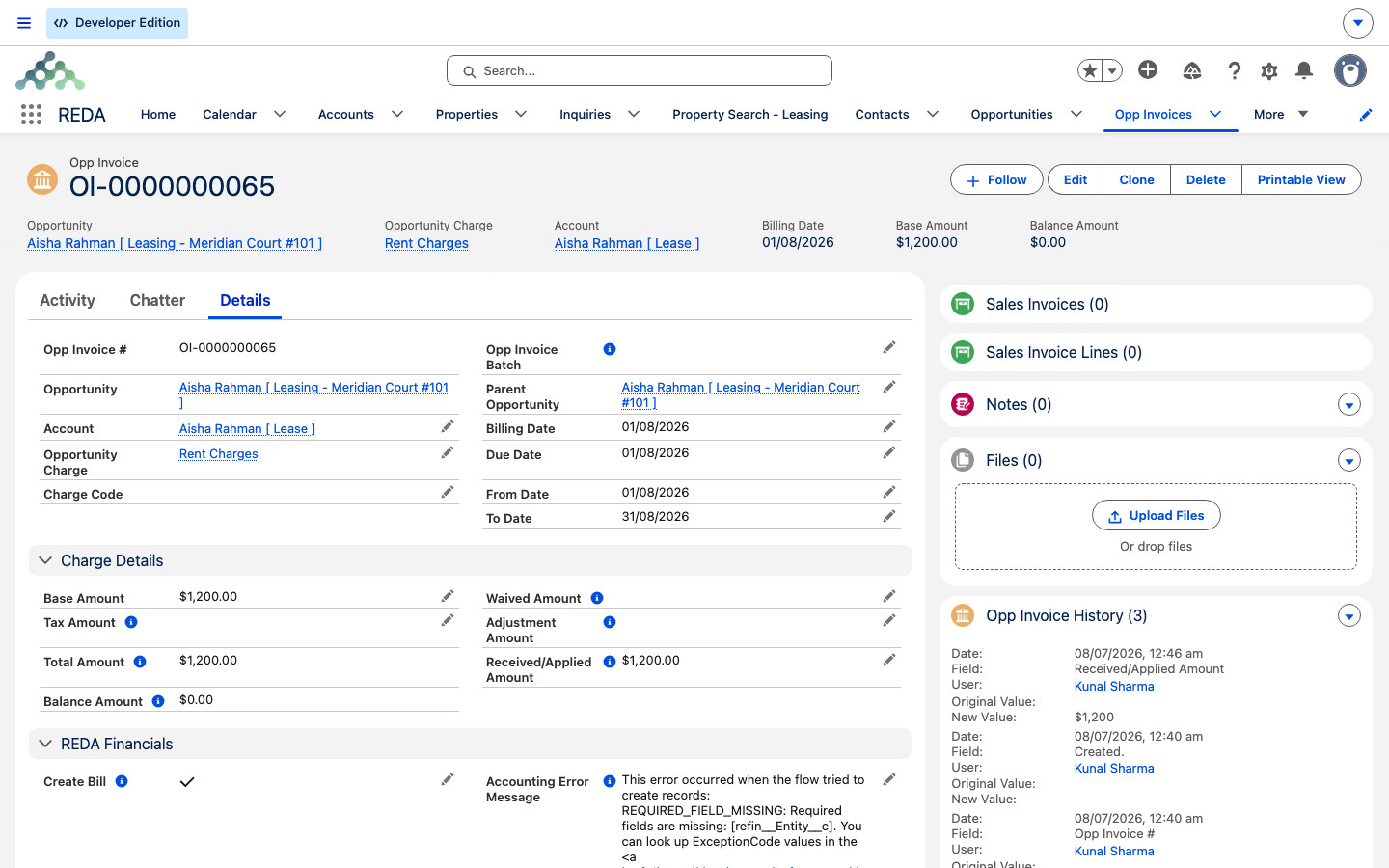
Once the receipt is posted and applied, the accounting extension writes the Received/Applied Amount back onto the matched invoice. That flows through the billing figures you already know:
Before you record
Two things make a payment land cleanly:
- The lease should have open invoices to apply the cash against. With none, the receipt is still recorded — it just sits as a prepayment until an invoice exists to match it.
- The tenant's account must be set up in accounting — linked to an entity with bank defaults — for the receipt to post. That's an integration prerequisite handled once per account; see Activating an Account for Accounting.
If a payment bounces
If a cheque or transfer is later returned, you void the cash receipt in the accounting extension. When the tenant's account is configured to charge a bounced-payment (NSF) fee, voiding the receipt automatically raises a new fee invoice, which re-enters the billing pipeline like any other charge. The mechanics of NSF handling live in the integrations article — here it's enough to know the fee appears on its own.
The accounting detail lives elsewhere
REDA's billing engine stops at the receivable boundary: it raises invoices and tracks what's outstanding, and Post Payment reaches across into the accounting extension, which owns the receipt, the cash application, the tax, and the ledger entries. This article covers the action and its effect on the lease's balances — nothing more. For the entity defaults, payer eligibility, NSF mechanics, and prepayment handling, go to Recording a Payment (Post Payment).
| Aspect | What happens |
|---|---|
| Where you start | The lease record → Post Payment action |
| What it creates | A posted cash receipt in the accounting extension (customer = the tenant's account) |
| Optional | Auto-apply the cash to the tenant's open invoices |
| Effect on the invoice | Received/Applied Amount written back → the invoice's Balance drops |
| Effect on the lease | The Total Outstanding and Net Outstanding tiles fall; unapplied cash → Unapplied Payments |
| If it bounces (void) | An NSF fee is auto-billed, when the account is configured for it |
| Owns the detail | integrations/post-payment |
Worked example: Aisha pays her rent
Aisha Rahman owes 1,200.00 on her current rent invoice for Meridian Court #101. She pays at the desk. The agent opens her lease, clicks Post Payment, enters 1,200.00, and leaves auto-apply on. REDA records a posted cash receipt and applies it to the open invoice: the invoice's Received amount becomes 1,200.00, its Balance goes to 0, and the lease's Net Outstanding tile drops by 1,200.00.
Now suppose she pays 1,500.00 instead. The first 1,200.00 clears the invoice, and the remaining 300.00 lands under Unapplied Payments — taking the lease's Net Outstanding to −300.00, the sign that she's in credit. None of these figures is typed by hand.
Where to go next
- Recording a Payment (Post Payment) — the full accounting walkthrough: entity defaults, payer eligibility, NSF, and prepayments.
- The Tenant Ledger & Balances — read the balance after a payment lands.
- Invoices Explained — the Received and Balance fields on the invoice itself.
- How Billing Works in REDA — why the cash-side fields belong to the accounting extension.
- Activating an Account for Accounting — the prerequisite that lets a receipt post.
Frequently asked questions
Open the lease and use the Post Payment action. It records a posted cash receipt in the accounting extension and, with auto-apply on, settles the tenant's open invoices for you.
The receipt was recorded but not applied. Check that auto-apply was on, or apply the cash to the invoice in the accounting extension. An unapplied receipt sits as a prepayment until it's matched.
It becomes Unapplied Payments (unapplied credit). The lease's Net Outstanding goes negative to show the tenant is in credit, and the surplus applies to their next invoice.
If the account is set up to charge a bounced-payment (NSF) fee, voiding the receipt automatically raises a fee invoice, which re-enters billing like any other charge.
No — that field belongs to the accounting extension, which owns cash application. Record the payment through Post Payment (or in the extension); REDA never writes that figure directly.
Was this article helpful?