
Web & Campaign Attribution
When a prospect finds you through an ad or a campaign, that trail is worth keeping. Every web-born inquiry (REDA's prospect record) can carry the full campaign fingerprint — the UTM tags, the landing page, the click identifiers — and you never type any of it; the website form fills it in. On top of that, REDA can automatically attach the matching Promotion to the inquiry. This article names the attribution fields, explains exactly how the automatic promotion match works — and, crucially, why it's one-shot with no back-fill — and shows the setup order that makes it work.
Access you'll need. Viewing inquiries comes with any of the five line-of-business permission sets. Managing Promotions needs REDA - Master Data - Admin; REDA - Master Data - Read Only and REDA - Inflation Adjustment User can view them.
What attribution REDA captures
Attribution is the record of where a prospect came from — which campaign, channel, and creative brought them in. A UTM tag is a labelled parameter on a link (for example utm_campaign=SUMMER26) that travels into the form when the visitor clicks through. Here's the shorthand:
| Tag | Answers |
|---|---|
| utm_campaign | Which campaign? (this is the promotion match key) |
| utm_source | From where? (the site or platform) |
| utm_medium | Via what channel? (paid, email, social) |
| utm_content | Which creative or ad variant? |
| utm_term | Which keyword? |
A web inquiry can carry all of these plus page and session context and ad click identifiers — captured automatically at the moment the form is submitted. You can type them by hand, but that's not the design.
The attribution field block
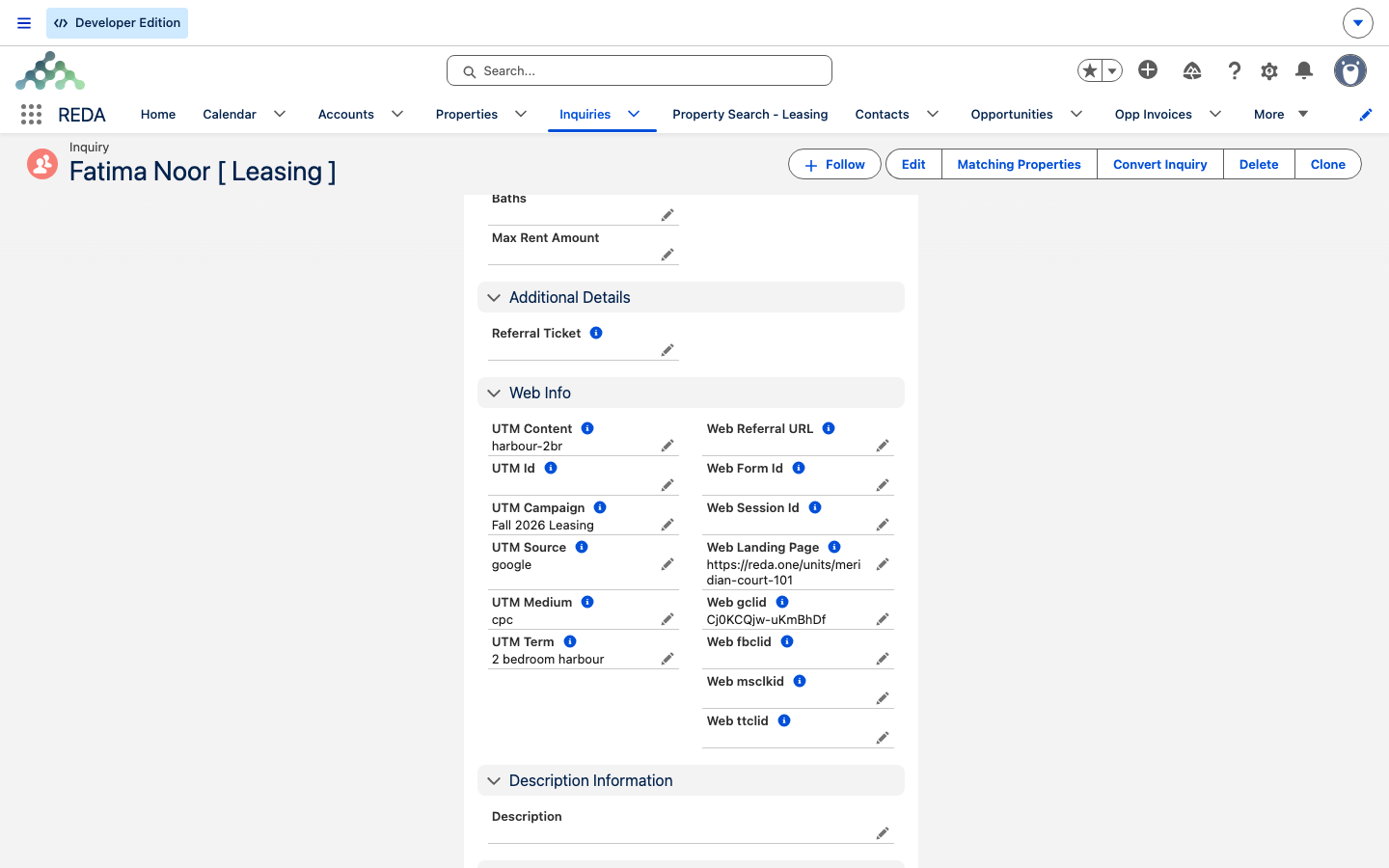
On the inquiry's Details tab, the attribution block holds these fields, each filled from a matching web parameter:
| Field | Filled from | Use it for |
|---|---|---|
| UTM Campaign | utm_campaign | Promotion auto-match key; campaign reporting |
| UTM Source | utm_source | Channel reporting (google, facebook, newsletter…) |
| UTM Medium | utm_medium | Paid vs. organic vs. email |
| UTM Content | utm_content | Ad or creative variant |
| UTM Term | utm_term | Paid keyword |
| UTM Id | utm_id | Platform campaign id |
| Web Form Id | form_id | Which form converted |
| Web Landing Page | landing_page | First page that captured the prospect |
| Web Session Id | session_id | Correlation with your analytics |
| Web Referral URL | referral_url | The referring site |
| Web gclid | gclid | Google Ads click correlation |
| Web fbclid | fbclid | Meta click correlation |
| Web msclkid | msclkid | Microsoft Ads click correlation |
| Web ttclid | ttclid | TikTok click correlation |
Where the values come from
Your website's inquiry form (through REDA's inbound form service) maps the incoming web parameters onto the new inquiry — the full UTM set plus the click identifiers — and sets the inquiry's Inquiry Source to Web. If you use REDA's packaged listing website, it forwards these parameters through its search and detail links into its contact and tour forms for you. The administrator side of that mapping is covered in The Inbound Data Service.
Here's what a tagged link produces:
The resulting inquiry lands with UTM Campaign SUMMER26, UTM Source facebook, UTM Medium paid-social, UTM Content video-a, the Facebook click ID filled, and Web Landing Page set to the unit page.
Automatic promotion matching
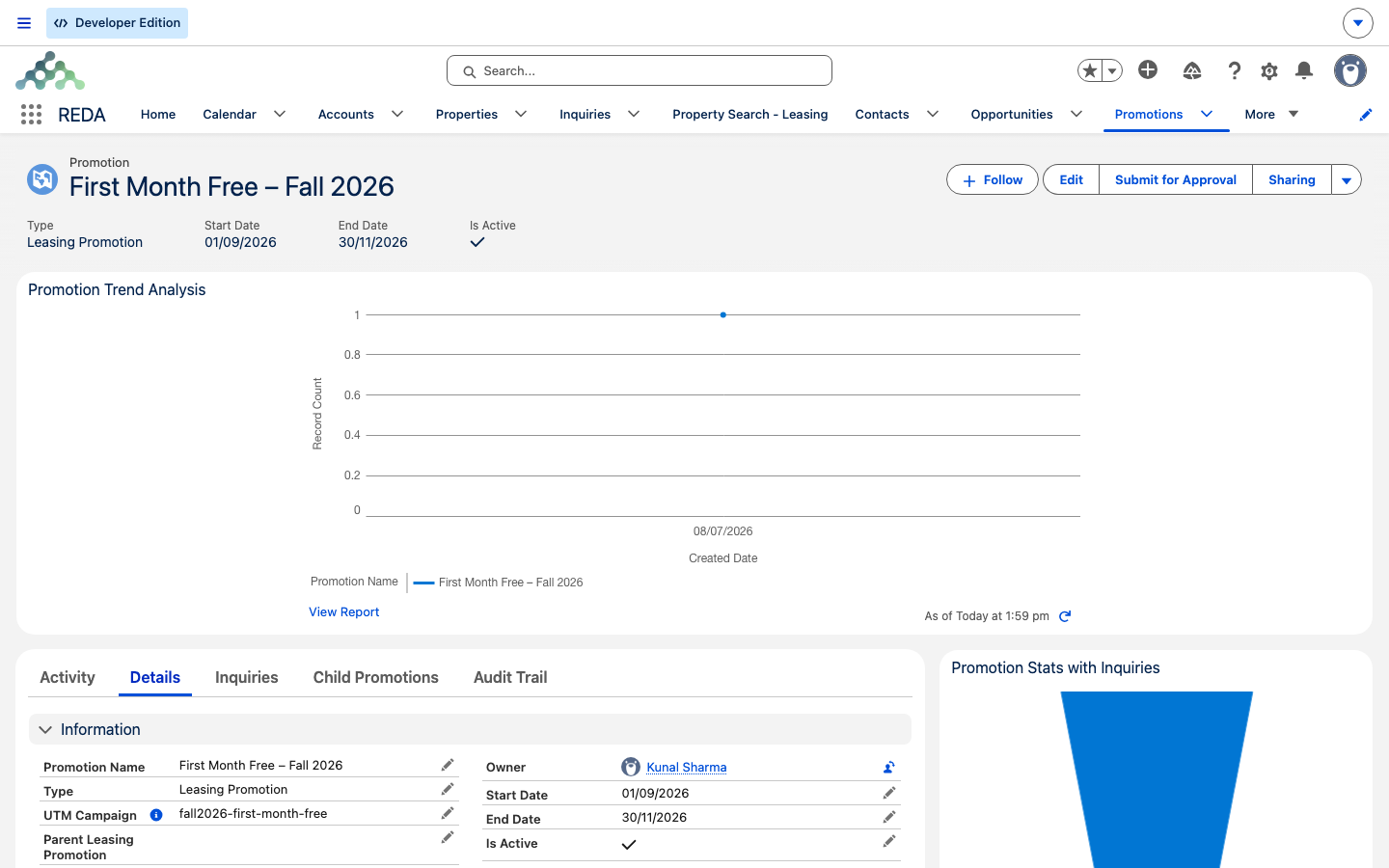
A Promotion is REDA's marketing campaign record (on the Promotions tab). When a web inquiry carries a campaign tag, REDA tries to attach the matching promotion for you. Understanding the rules is what keeps your reporting honest:
| Rule | Behavior |
|---|---|
| When | Shortly after the inquiry is saved with a campaign tag (in the background) |
| Match key | Exact match: the inquiry's UTM Campaign equals the promotion's campaign tag |
| The only gate | The promotion must be Active |
| Not checked | Dates, promotion type, and property or region scope are not consulted by the match |
| Existing link | Never overwritten — a manual or earlier automatic link wins |
| Later promotions | No back-fill — earlier inquiries stay unlinked |
| Ties | The first active match wins (not deterministic) — keep tags unique |
| Deletion | A promotion referenced by any inquiry can't be deleted — deactivate it instead |
Set up in the right order
Because the match is one-shot and checks only that the promotion is active, the sequence is what makes attribution land:
utm_campaign value.Get the order wrong and you pay for it: inquiries captured before the promotion existed keep a blank Promotion link forever unless you link them by hand. What the linked promotion then does — its lease-discount mechanics and renewal applicability — lives in Leasing Promotions.
From inquiry to deal: what attribution survives conversion
When an inquiry converts to a deal, the Inquiry Source carries across, but the UTM and web fields do not — attribution deliberately stays on the inquiry. That's by design: you report campaign performance from the inquiry, joined to the deal it produced through the conversion link. So a converted deal showing "Inquiry Source: Web" but no UTM data isn't missing anything — the detail is on the inquiry, one hop away.
Worked example: the SUMMER26 campaign
Marketing plans an August campaign called SUMMER26. Done in the right order: first they create the Promotion Summer 2026 Move-In Special, set its campaign tag to SUMMER26, and mark it active; then they launch ads whose landing links carry utm_campaign=SUMMER26. Aisha clicks a Facebook ad, and the form submission creates Aisha Rahman [ Leasing ] with Inquiry Source Web, UTM Campaign SUMMER26, UTM Source facebook, a Facebook click ID, and the landing page and session captured. Moments later, the Promotion link points at Summer 2026 Move-In Special.
The counter-example makes the rule concrete: if the promotion is instead created on Aug 10, the 40 inquiries captured Aug 1–9 keep a blank Promotion link forever — unless someone links them by hand.
Where to go next
- Leasing Promotions — what the linked promotion does to lease charges.
- Capturing Inquiries — how web inquiries arrive.
- Converting an Inquiry — what survives conversion.
- Finding & Merging Duplicate Inquiries — how attribution behaves when a duplicate web inquiry is merged.
- The Inbound Data Service — the parameter mapping behind web inquiries (admin).
Frequently asked questions
Matching is one-shot at capture; a promotion created or activated later doesn't back-fill. Link those inquiries by hand, and next time create the promotion first.
The auto-match checks only that the promotion is Active and the campaign tag matches — the date fields aren't consulted. Deactivate the promotion when the campaign ends.
Whichever is found first; it's not deterministic. Keep your campaign tags unique.
Yes — edit the inquiry's Promotion field. The auto-match never overwrites a value that's already set.
By design — attribution stays on the inquiry. Report through the inquiry-to-deal link; the deal carries only the Inquiry Source.
It's referenced by inquiries, so deletion is blocked. Deactivate it instead.
Type the campaign tag into the inquiry's UTM Campaign field (or set the Promotion link directly). The auto-match also runs on edits, as long as the Promotion link is still blank.
Was this article helpful?