
Creating a Loan
This is the step-by-step for creating a loan from scratch and entering its principal correctly. By the end you'll be able to create a loan deal, set the borrower and the collateral property, enter the Loan Amount, and clear every check REDA runs along the way. Just as important, you'll understand why the balance block reads 0.00 on a brand-new loan — that's expected, not a missing field. No prior REDA experience is assumed. This article gets the deal created and ready to fund; the terms detail (rate, frequency, allocation across a facility) lives in Loan Terms & Allocation.
Access you'll need. Creating and editing loans requires the REDA - Property Lending User permission set. Because a loan links to an account for the borrower and lender, you'll also need access to accounts, which your administrator grants separately.
Before you start
A loan in REDA is a deal — a record on the Opportunities tab whose type is Lending. There's no separate loan object (the model is explained in Lending in REDA). Before you create one, have three things to hand: the parties (the lender or deal account, and the borrower), the collateral property, and the principal — the loan amount.
Note that a loan often already exists before you'd think to create one. Every property born from an acquisition gets a placeholder loan created automatically. If that's your situation, you're editing that record, not making a new one. Everything below applies either way.
Create the deal
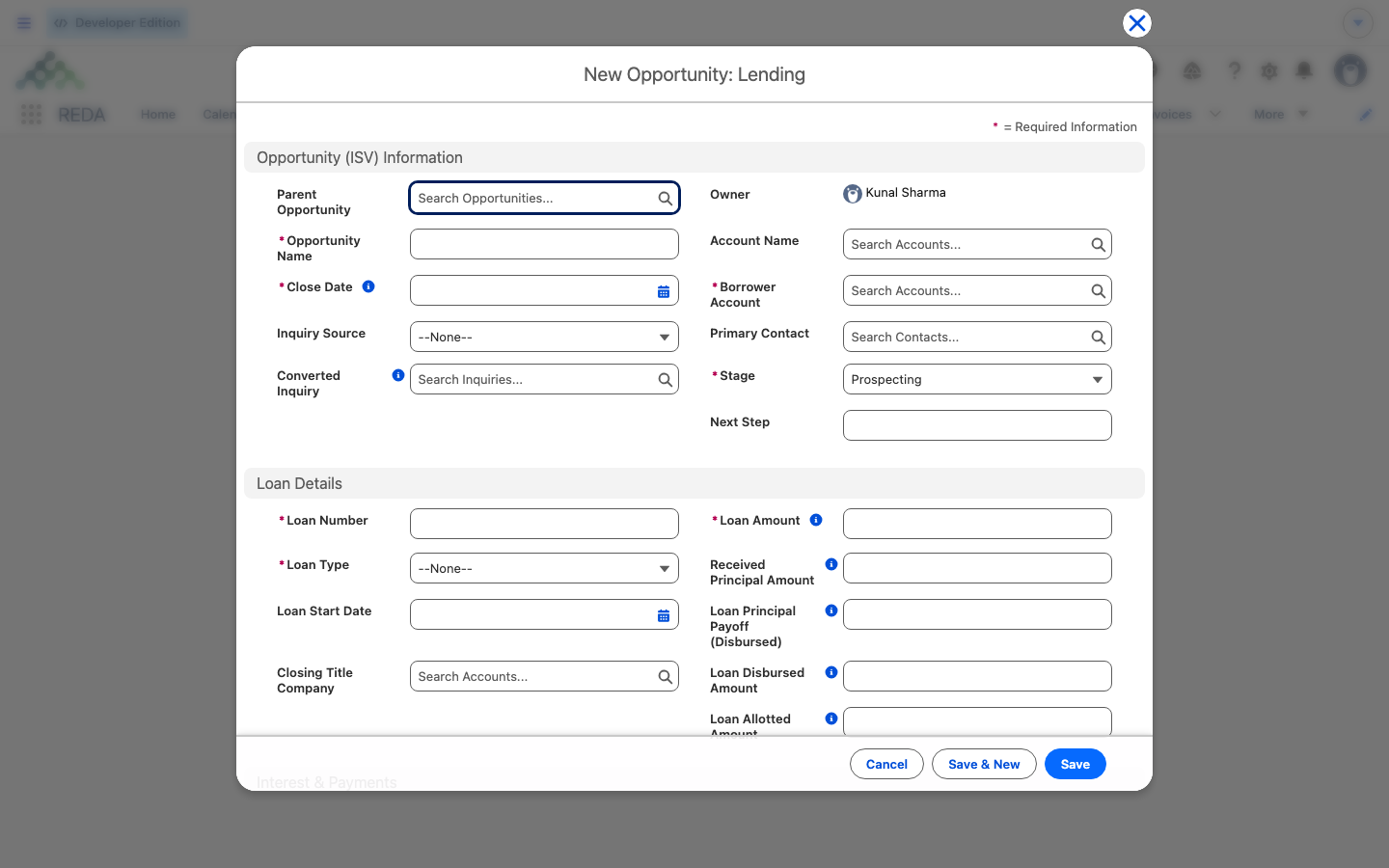
From the Opportunities tab, click New and choose the Lending record type. REDA names the loan for you from the deal account — you don't hand-name it. The new loan opens at stage Prospecting, the starting point of the loan lifecycle.
Set the parties and collateral
A loan needs to know who's involved and what it's secured against.
When you link an acquisition, REDA keeps the loan and the purchase consistent. Two checks apply:
"Property must be same as on Acquisition Opportunity."
In other words, the loan's borrower must be the same party that's buying, and the loan's collateral must be the property being bought.
Enter the Loan Amount
The Loan Amount is the loan's principal — and it's the cornerstone figure on the whole record. Enter it as a plain number. It does two things beyond recording the size of the loan:
- It's the ceiling for the loan. The amount disbursed, the principal received, and the amount allotted to any child loans can never exceed it — REDA enforces each of those caps.
- It rolls up to the property's total loan amount, so the property's debt figures reflect it.
Everything else about the money on the loan is measured against this number.
The figures REDA calculates for you
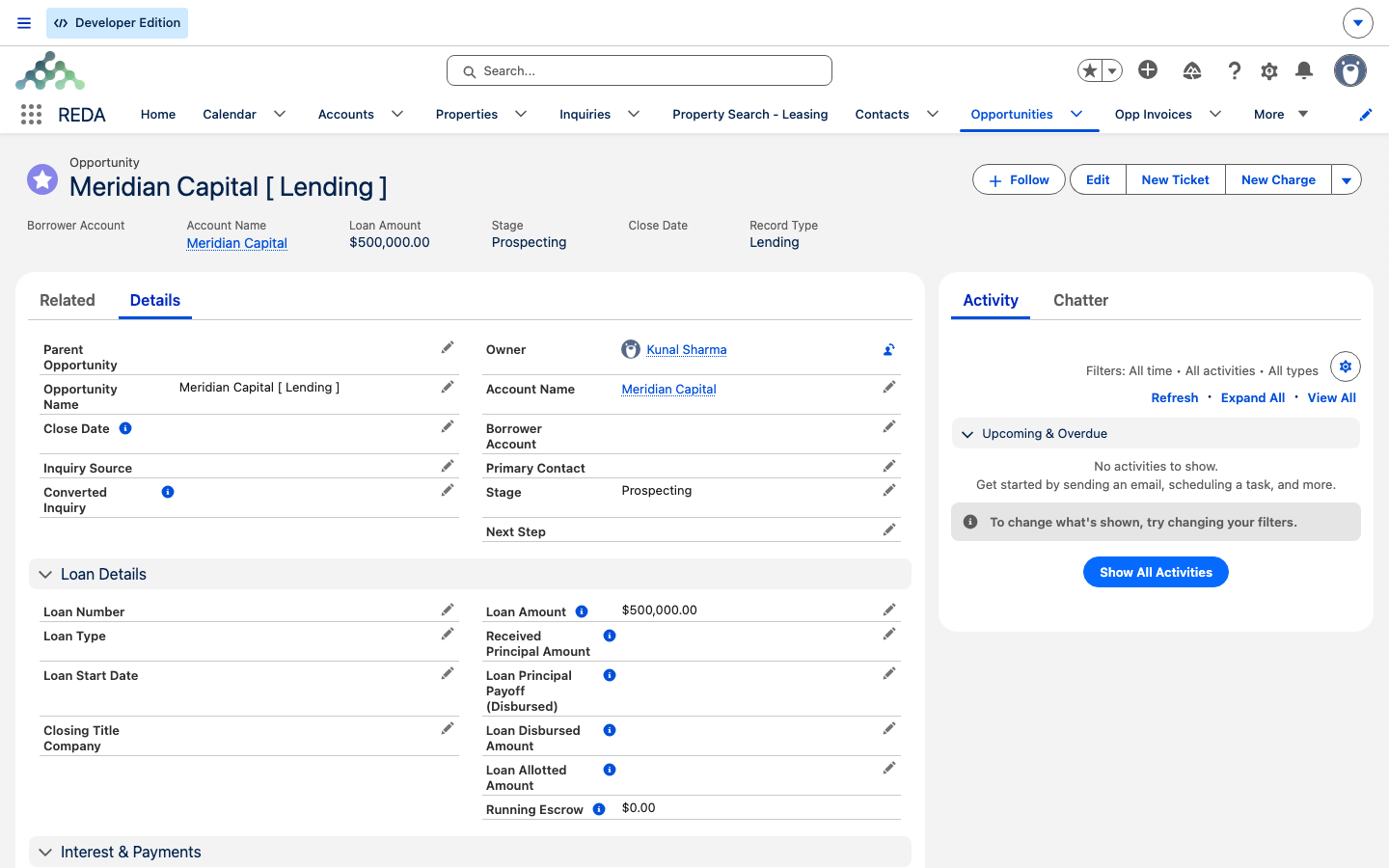
Here's the point that trips up most new users. The Loan Amount is the only principal figure you type. Every other money figure on the loan is calculated by REDA from the loan's payments and tickets — and every one of them starts at 0.00 on a new loan.
| You enter | REDA calculates (starts at 0.00) |
|---|---|
| Account Name (the deal party) | Received Principal Amount — from completed principal-received payments |
| Borrower Account | Paid Principal Amount / Paid Interest Amount — from completed instalment payments |
| Property (region- and type-matched) | Loan Disbursed Amount — from closed disbursement tickets |
| Acquisition Opportunity (optional link) | Loan Principal Payoff (Received) / (Disbursed) — from closed payoff tickets |
| Loan Amount (the principal ceiling) | Loan Principal Balance (computed) |
| Loan terms (see Loan Terms & Allocation) | Running Escrow (computed) |
You can't type into the calculated figures — to make one move, you record the underlying payment or ticket. If REDA ever rejects a recorded receipt for exceeding the principal, you'll see "Received Principal Amount must be less or equal to Loan Amount." Every formula behind these figures is explained in Escrow & Principal Balances.
Advancing the loan
Move the Path along as the real-world loan progresses. The Lending Path runs in this order: Prospecting → Pending → Funded → Closed Won → Payoff Pending → Closed Lost. At Funded, the loan starts counting as active — it begins feeding your property debt totals. A loan is marked Closed Won once it's fully in force, then rests at Payoff Pending while the principal is worked down over the life of the loan.
The money-movement tickets — draws and payoffs — only become available once the loan reaches Closed Won. Those are out of scope here; see Disbursements & Payoffs.
Worked example: Meridian's Harbour Tower loan
Meridian Properties is setting up its 500,000.00 loan on Harbour Tower, with Meridian Capital as the borrower. Here's the whole creation, step by step:
| You do | REDA does |
|---|---|
| New → Lending record type | Names the loan from the account; opens it at Prospecting |
| Set Account Name (the lender/deal account) and Borrower Account = Meridian Capital | Records the parties |
| Pick Property = Harbour Tower; link the Acquisition Opportunity for Harbour Tower | Checks Meridian Capital matches the acquisition's buying party and Harbour Tower matches its property (shows the two consistency messages if they don't) |
| Enter Loan Amount 500,000.00 | Sets the principal ceiling; rolls it up to the property total |
| Leave the balance block alone | Reads 0.00 everywhere — Received Principal, Paid Principal, Loan Principal Balance, Running Escrow — because no payment exists yet |
Advance Prospecting → Pending → Funded | The account is already set, so the account-required gate passes; the loan starts counting as active |
The loan is now ready for its funding receipt and instalments — continue in The Loan Repayment Schedule with the same 500,000.00.
Reference: what to check when REDA stops you
| When | Message |
|---|---|
| The loan is won without a deal account | "Account is required to update an opportunity." |
| The borrower doesn't match the acquisition's buying party | "Borrower Account must be same as Buying Account on Acquisition Opportunity." |
| The property doesn't match the acquisition's property | "Property must be same as on Acquisition Opportunity." |
| A recorded receipt would exceed the principal | "Received Principal Amount must be less or equal to Loan Amount." |
Where to go next
- Loan Terms & Allocation — enter the terms and allocate across a facility.
- The Loan Repayment Schedule — record the funding receipt and instalments.
- Disbursements & Payoffs — draws and payoffs, once the loan is Closed Won.
- Escrow & Principal Balances — how every balance figure is derived.
- Onboarding Borrowers & Lenders — converting an inquiry into this loan.
Frequently asked questions
No. Received Principal and the balances are calculated by REDA from completed payments. They stay at 0.00 until you record the funding as a loan payment. Entering the Loan Amount alone moves nothing.
No — it's calculated by REDA from completed principal-received payments. Record a payment instead (see The Loan Repayment Schedule).
Once a loan is won, it must have a deal account. REDA shows "Account is required to update an opportunity." Set the Account Name, then advance the stage.
When a loan links an acquisition, its borrower and property must match the purchase: "Borrower Account must be same as Buying Account on Acquisition Opportunity." and "Property must be same as on Acquisition Opportunity." Align them and save.
No — only when the loan funds a purchase. Without a link, the two consistency checks don't apply.
Automatically, from the deal account name. Don't hand-name it.
Was this article helpful?