
Consolidated Invoices (Batches)
When rent, parking, and a couple of other recurring charges all bill on the same day, a tenant shouldn't get four separate bills — they should get one. That single consolidated bill is a batch (its record is an Opp Invoice Batch), and REDA builds it automatically during the recurring run. This article explains when a batch is created, why some invoices join it and others don't, how to read its rolled-up amounts, and why REDA sometimes won't let you delete one. No prior REDA experience is assumed; every term is defined as we reach it.
Access you'll need. Creating and editing batches requires the REDA - Invoice Management Admin or REDA - Property Leasing User permission set; REDA - Invoice Management Read Only can view them but not change them.
What a batch is
A batch is one consolidated bill that stands in front of several same-cycle invoices on the same lease. Instead of a tenant receiving a separate document for rent, another for parking, and another for a service charge — all dated the same day — REDA groups them under a single record whose description reads "Periodic Rental Charges." The individual invoices still exist underneath; the batch is the wrapper that presents and totals them as one.
The batch doesn't replace its member invoices — it references them, and rolls their amounts up. Everything you'd want from a single bill (a combined amount, one due date, one balance) reads off the batch, while each invoice keeps its own detail.
When REDA creates a batch
Only the recurring run creates batches — the same run that produces the recurring invoices (see How Recurring Invoicing Works). As it generates a period's invoices, it groups the ones that belong together. Two conditions decide grouping.
First, the invoice has to be groupable. That comes from its charge code: the code's Group Invoices switch must be on, the code must not be a pass-through code, and the invoice amount must be greater than zero.
Second, at least two groupable invoices must share the same grouping key. The key has seven parts:
If two or more invoices match on all seven, REDA creates a batch and puts them in it. A lone groupable invoice with no match stays standalone — a batch is never created for a single invoice.
What's never batched
Some invoices never join a batch, regardless of the key:
| Invoice | Batches? |
|---|---|
| A one-time invoice | Never — only the recurring run batches |
| An invoice whose code has Group Invoices off | No |
| An invoice whose code is pass-through | No |
| An invoice with an amount of zero or less | No |
| A groupable invoice alone on its key | No — it stays standalone |
| Two or more groupable invoices sharing the full key | Yes |
Reading a batch
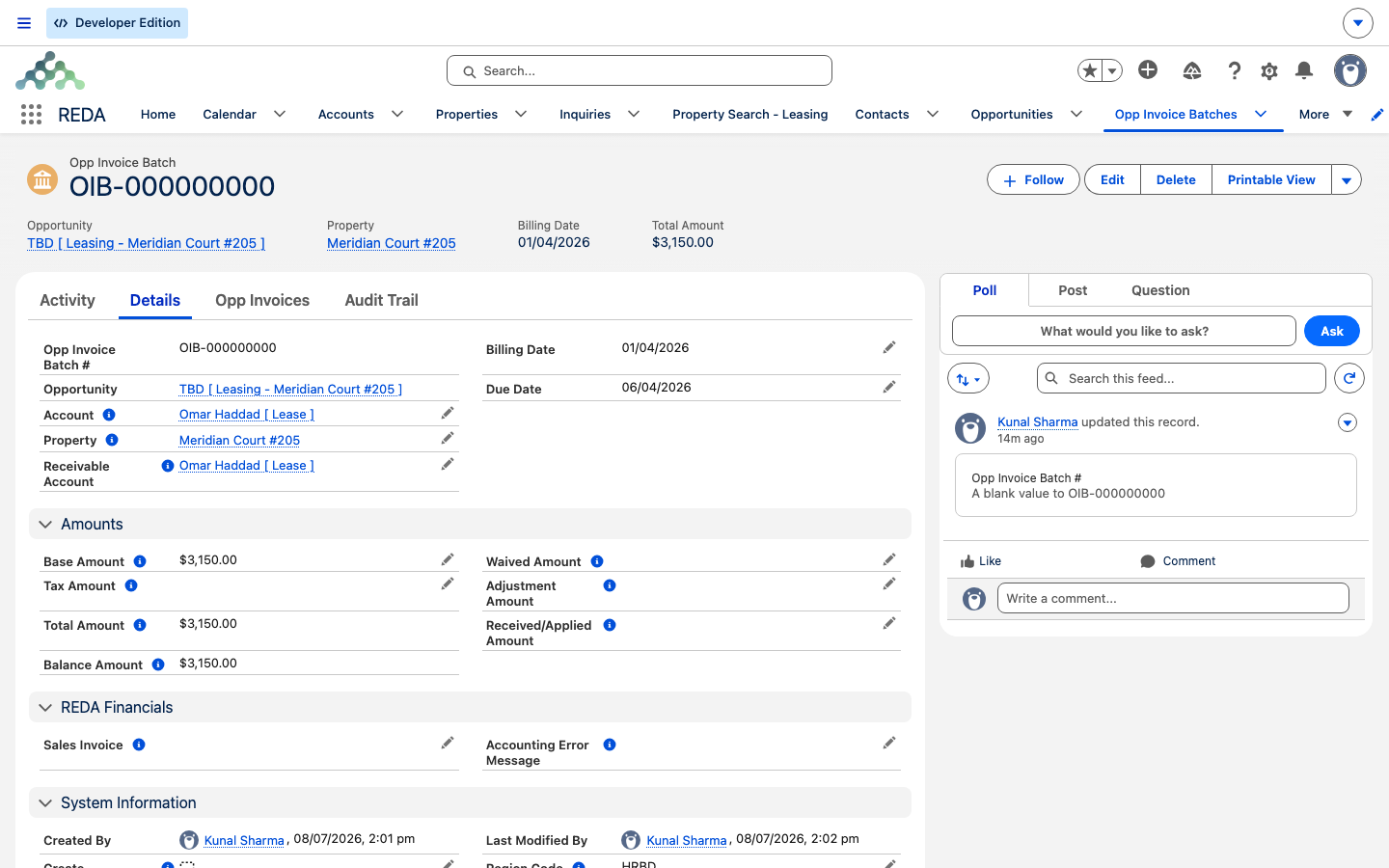
A batch's headline figure is its Base Amount — the sum of its member invoices' base amounts, rolled up automatically. You never type it: whenever member invoices are added, removed, or re-amounted, REDA recalculates it. Around that sit the cash-side figures maintained by the accounting extension — Tax, Received/Applied, Waived, and Adjustment amounts — and two computed totals:
- Total Amount = Base Amount + Tax.
- Balance = (Base Amount + Tax) − (Received + Waived + Adjustment) — what's still owed on the consolidated bill.
One field on the batch, Create Accounting Entry, is the signal the accounting extension watches to raise a consolidated sales invoice from the batch. The recurring run switches it on after it has inserted the member invoices — so a batch caught in the instant of creation may briefly show it unticked. That's normal; the same run sets it. (The posting itself belongs to the accounting extension — see the financials overview.)
Membership rules
A member invoice must stay aligned with its batch. If you try to edit a member so it no longer matches the batch's account, receivable account, property, lease, billing date, or due date, REDA blocks the change:
The invoice's batch-membership marker is maintained for you — and cleared automatically if the batch is ever legitimately deleted, releasing the invoice back to standalone.
Deleting a batch or its invoices
Batches and their members are protected once money is involved. Here's what's allowed and what isn't:
| Attempt | Outcome | Message |
|---|---|---|
| Delete an invoice that's in a batch | Blocked | "This Opp Invoice cannot be deleted." |
| Delete an invoice with money applied | Blocked | "This Opp Invoice cannot be deleted." |
| Delete an untouched standalone invoice | Allowed | — |
| Delete a batch with money applied | Blocked | "This Opp Invoice Batch cannot be deleted." |
| Delete an untouched batch | Allowed — its invoices are released and survive | — |
In short: an untouched batch can be dissolved — deleting it clears the membership marker on its invoices, which survive on their own — but once a payment, waiver, or adjustment has landed, the batch is locked. To remove a member invoice you must dissolve the batch first, and that's only possible while it's still untouched.
Worked example: Omar's April bill
Omar Haddad's lease on Meridian Court #205 bills three charges in the April run, all with a billing date of 1 April and a due date of 6 April:
- Rent 3,000.00 — groupable.
- Parking 150.00 — groupable.
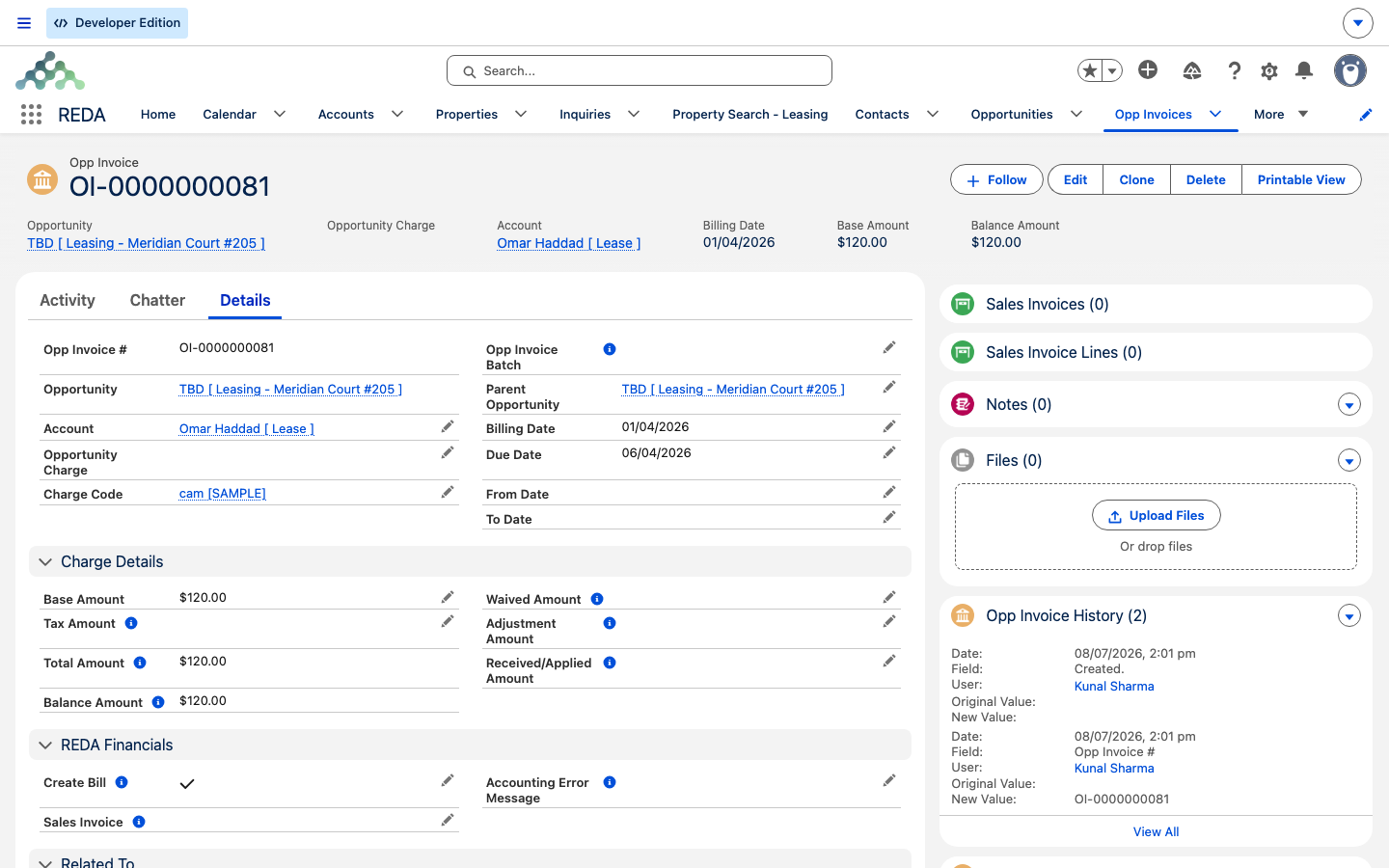
- Utilities 120.00 — a pass-through code.
Rent and parking share the full grouping key — same account, receivable account, property, lease, dates, and no ticket — so REDA batches them: a batch with Base Amount 3,150.00 and the description "Periodic Rental Charges." The utilities invoice is pass-through, so it never joins a batch and stands on its own.
Later, the accounting extension posts the batch and Omar pays 3,150.00. Now the batch's Balance is 0 while its Total is 3,150.00 — money has been applied, so the batch is locked and "This Opp Invoice Batch cannot be deleted." Had no payment landed, the fresh batch could have been dissolved and its two invoices released.
Batch field reference
| Field | Source | Meaning |
|---|---|---|
| Opp Invoice Batch # | Auto-number | The batch's identity. |
| Opportunity | Link | The lease being billed. |
| Account | Lookup (required) | Bill-to account — must match members. |
| Receivable Account | Lookup (required) | Receiving entity — must match members. |
| Property | Lookup (required) | Billed property — must match members. |
| Billing Date / Due Date | Dates | Cycle dates — must match members. |
| Description | Defaults "Periodic Rental Charges" | The consolidated bill's label. |
| Create Accounting Entry | Set by the run after members insert | The posting signal for the accounting extension. |
| Base Amount | Automatic rollup | Sum of member invoices' base amounts. |
| Tax / Received / Waived / Adjustment Amount | Extension-maintained | The cash-side figures. |
| Total Amount | Computed | Base Amount + Tax. |
| Balance Amount | Computed | (Base + Tax) − (Received + Waived + Adjustment). |
Where to go next
- How Recurring Invoicing Works — the run that creates batches.
- Charge Codes — the Group Invoices and pass-through switches that decide batching.
- Invoices Explained — reading a single member invoice.
- How Billing Works in REDA — the mental model behind it all.
Frequently asked questions
Batching needs the code's Group Invoices on, the code not pass-through, the amount above zero, and at least two invoices sharing the full grouping key — account, receivable account, property, lease, billing date, due date, and ticket. Anything that differs (different grace days give a different due date, for instance) stays out.
Only one groupable invoice existed. REDA creates a batch only when at least two invoices share the key; a lone invoice stays standalone.
"This Opp Invoice Batch cannot be deleted." — money has been applied, so its balance no longer equals its total and the batch is locked. Only an untouched batch can be dissolved.
"This Opp Invoice cannot be deleted." — batch membership locks the invoice. Dissolve the batch first, which is only possible while it's still untouched.
"Receivable account, Account, Property and Billing Date on the batch must be same as on opp invoice Record." A member invoice has to stay aligned with its batch on those fields.
Was this article helpful?