
Management Fee Automation
If you manage property for other owners, you earn a management fee — usually a percentage of the rent each landlord's properties bring in. Doing that by hand every month, property by property and landlord by landlord, and then recording it correctly on two different sets of books, is exactly the chore REDA takes off your desk. When you run REDA Financials, a management-fee calculation reads how much rent was collected on each property, works out the fee your management agreement calls for, subtracts anything you've already billed, and then books all three sides for you: the bill to the landlord on your company's books, the matching cost on the landlord's books, and the settlement that moves the fee cash between your operating and escrow accounts. This guide is for your finance or owner-services team. No accounting or product background is assumed — we define every term as we go. By the end you'll be able to run a calculation, trace the fee on any property number-by-number, read every field on the result, and find each document it produces.
Access you'll need. Running fee calculations is a finance-administrator task, because it posts to your ledger. If you can't reach the tab or the calculator, ask your administrator to grant the accounting access this feature requires.
How a fee run works, end to end
Before the detail, here's the whole run as a sequence. Everything later in the article is one of these six stages, expanded:
The rest of this article walks each stage in order — but the heart of it is stage 4, the calculation itself, so we start there.
What the fee is charged on: collected rent
The fee is always computed on collected rent — the money actually received on a property's rent for the period, not what was invoiced. If a tenant is billed 1,200.00 but pays 600.00, the fee is worked out on the 600.00. "Collected" here means the rent recorded against that property's property-management revenue accounts, within the period you chose.
Two figures therefore drive every line:
| Figure | What it is | Its role |
|---|---|---|
| Collected Amount | Rent actually received on the property's property-management revenue, in the period | The basis the fee is calculated on |
| Billed Amount | Fee already billed for the property this period | Subtracted from the computed fee — the double-bill guard, not a basis |
The calculation, number by number
Each property's fee is worked out in two steps. The first computes the fee from the agreement; the second nets off what's already billed.
Step 1 — the fee from the agreement
How the fee is computed depends on the Management Fee Type recorded on the landlord's Property Management Agreement:
| Fee Type | Fee Calculated is… | Then clamped by… |
|---|---|---|
| Fixed | the Management Fee Fixed amount — a flat figure, regardless of collected rent | — (no minimum or maximum applied) |
| Rent Percentage | Collected Amount × (Management Fee % ÷ 100) | the Minimum Management Fee (a floor) and Maximum Management Fee (a cap) |
For a Rent Percentage agreement, after the percentage is applied REDA checks the floor and cap: if any rent was collected and the fee came out below the minimum, it's lifted to the minimum; if it came out above the maximum, it's capped at the maximum. The result is rounded to two decimals. A Fixed agreement skips all of that and simply uses the flat amount.
Step 2 — subtract what's already billed
REDA then nets off any fee already billed for that property this period, and never lets the result go below zero:
To Be Billed is the amount that actually gets invoiced. On a first run for a fresh period the billed amount is zero, so To Be Billed equals Fee Calculated. On a re-run it's whatever you've already billed — which is what makes re-running safe (see below).
Tracing one property
Take Harbour Tower, managed by Meridian Properties for the landlord Continental Holdings. Its Property Management Agreement says Rent Percentage, 8%, minimum 100.00, maximum 5,000.00. This period, tenants paid rent totalling 12,500.00 on Harbour Tower, and nothing has been billed yet:
| Figure | Value | Where it comes from |
|---|---|---|
| Collected Amount | 12,500.00 | Rent received on Harbour Tower this period |
| Fee Type / Fee % | Rent Percentage / 8% | The Property Management Agreement |
| Fee Calculated | 1,000.00 | 12,500.00 × 8 ÷ 100 = 1,000.00 (above 100 minimum, below 5,000 maximum → unchanged) |
| Billed Amount | 0.00 | Nothing billed yet this period |
| To Be Billed | 1,000.00 | the greater of 0 and (1,000.00 − 0.00) |
So Harbour Tower's fee for the period is 1,000.00. Now see how the floor and cap bite if the collected rent were very different:
| If collected rent were… | 8% works out to… | Fee Calculated (after floor/cap) |
|---|---|---|
| 1,000.00 | 80.00 | 100.00 — lifted to the minimum |
| 12,500.00 | 1,000.00 | 1,000.00 — within range, unchanged |
| 100,000.00 | 8,000.00 | 5,000.00 — capped at the maximum |
Why re-running a period is safe
Say you post Harbour Tower's 1,000.00 fee, then run the same period again — perhaps a few more rents came in and you want to catch up. On the second run the billed amount is no longer zero; it's the 1,000.00 you already billed. So:
With nothing left to bill, Harbour Tower shows a To Be Billed of zero and is excluded from the run (its exclusion reason reads "Zero or negative fee amount"). Only genuinely new fee gets billed. This is why you can re-run a period as often as you like without ever double-charging an owner.
The three documents a run books
Once you post, REDA books the fee as real accounting documents — three of them per landlord, because a management fee is genuinely two events on two sets of books that then have to be settled in cash. For each landlord in the run:
| # | Document | On whose books | Counterparty | Amount & lines |
|---|---|---|---|---|
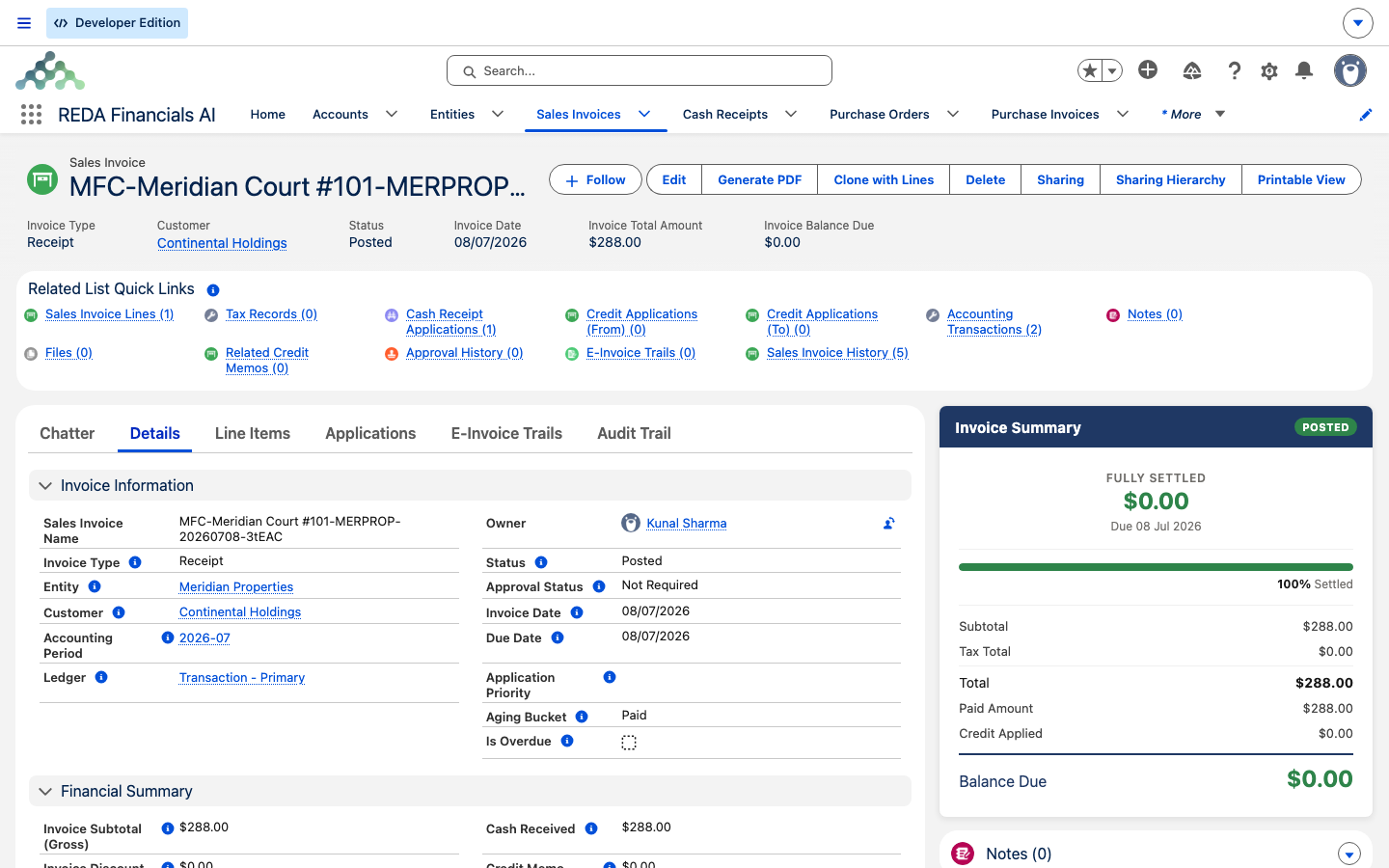
| 1 | The bill — a Receipt-type Sales Invoice (the fee as your income) | Your company's | Customer = the landlord | One line per property, each at its To Be Billed |
| 2 | The cost — an Expense-type Purchase Invoice (the fee as the landlord's expense) | The landlord's | Vendor = your company | One line per property, each at its To Be Billed |
| 3 | The settlement — a Journal Entry that moves the fee cash | Your company's | — | Total fee for that landlord, moved between two banks |
The bill and the cost are mirror images: the same fee, recorded as income on your books and as an expense on the landlord's, with each naming the other as its counterparty. The settlement then moves the actual cash: it takes the earned fee out of the rent escrow (where tenants' money sits) and into your operating account. Booking all three together, in one run, is what keeps your books and the owner's in step without anyone reconciling them by hand.
Which books each document lands on
Getting the routing right is the whole point, so it's worth stating plainly:
| Document | Books it's on | Why |
|---|---|---|
| The bill (fee revenue) | Your company's entity | The fee is income you earned |
| The cost (fee expense) | The landlord's entity | The fee is an expense the owner incurred |
| The settlement (cash move) | Your company's entity | The earned fee moves from rent escrow to your operating account |
The defaults these documents draw on live on each entity and are set when the account is activated: your company's entity supplies the Management Fee Revenue Product and the Management Fee Settlement Bank; the landlord's entity supplies the Management Fee Expense Product; and your company's operating and rent-escrow banks are what the settlement moves cash between. If any of those is missing for a landlord, that landlord's documents can't be built and the property is excluded — see Activating a Client Account as a Financial Entity for the full checklist. The finished documents also carry the property reporting dimensions, which is what makes property-level profit-and-loss possible (see Property Dimensions in Financial Reports).
One landlord, several properties
A run groups by landlord. A landlord with three managed properties gets one bill with three lines, one cost with three lines, and a single settlement for the total — not three of each. Each line names its property and carries that property's To Be Billed, so a single invoice still shows you the fee per property.
Setting it up: the prerequisites
A run only works for landlords that are configured for it. This is the one-time setup from stage 1. Confirm each of these:
Where fee terms live: the Property Management Agreement
The fee terms sit on the landlord's Property Management Agreement. These are the fields the calculation reads:
| Field | What it drives |
|---|---|
| Management Fee Type | Which formula is used: Fixed or Rent Percentage |
| Management Fee % | The percentage of collected rent (Rent Percentage agreements) |
| Management Fee Fixed | The flat fee amount (Fixed agreements) |
| Minimum Management Fee | A floor — the fee is lifted to this if the percentage falls short |
| Maximum Management Fee | A cap — the fee is held to this if the percentage runs over |
| Management Fee Calculation Notes | A note that appears alongside the property in the review grid |
Running a calculation
With the setup in place, the run itself is quick:
Reading the result
After a run, open the calculation record. The header summarises the run; the lines hold the per-property detail.
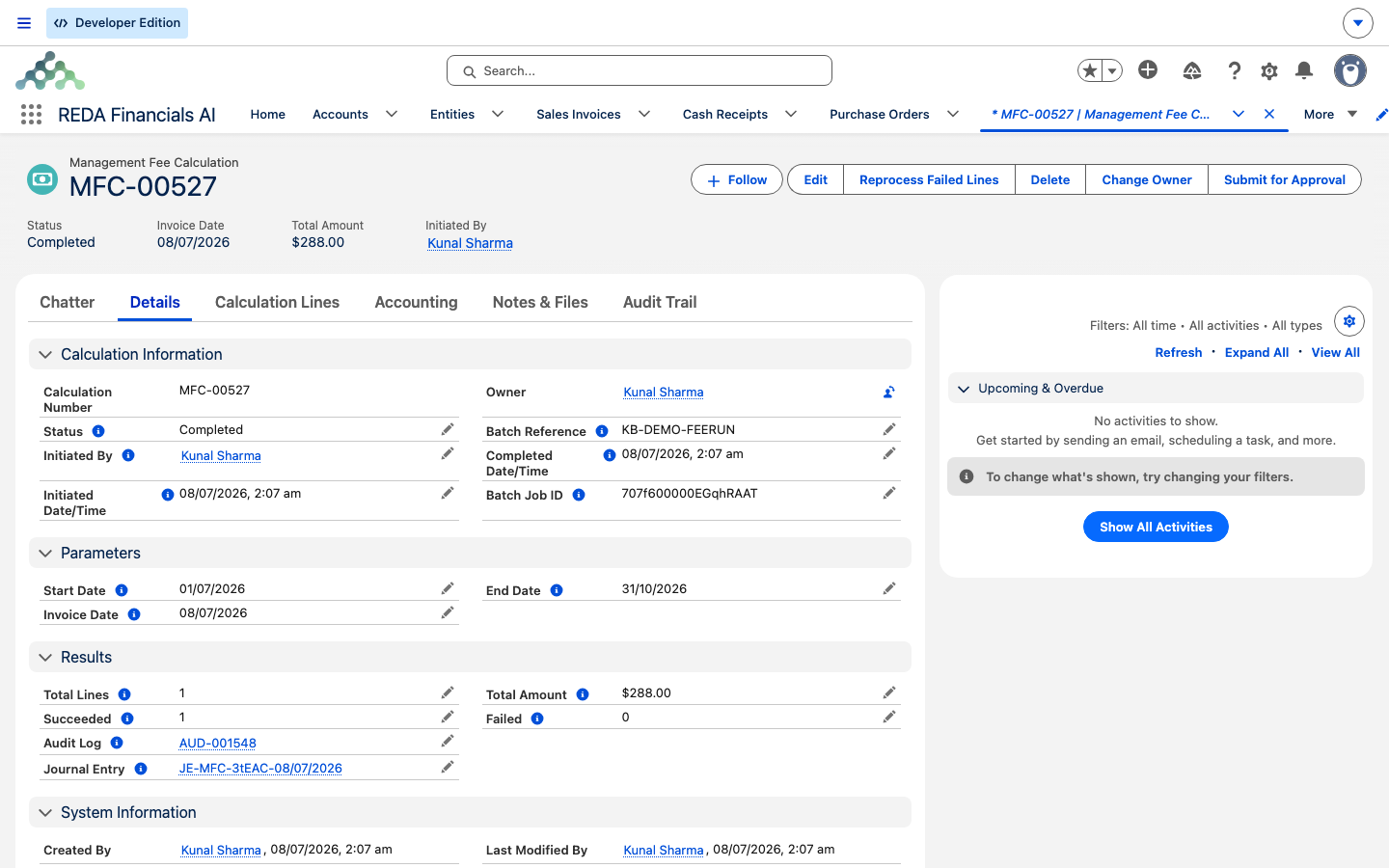
The calculation record (header)
| Field | What it tells you |
|---|---|
| Calculation Number | The run's own reference |
| Status | Where the run stands — one of New, In Progress, Completed, Completed with Errors, or Failed |
| Start Date / End Date | The period whose collected rent the fees are based on |
| Invoice Date | The date stamped on the bill, the cost, and the settlement |
| Batch Reference | Your reference, copied onto every document |
| Total Lines | How many property lines the run produced |
| Total Amount | The sum of To Be Billed across all lines — the total fee revenue expected |
| Succeeded / Failed | How many landlord groups posted cleanly, and how many errored |
| Journal Entry | A link to the settlement entry the run created |
The calculation lines (one per property)
| Field | What it tells you |
|---|---|
| Property | The managed property this line bills |
| Landlord Account | The owner — the customer on the bill |
| PM Company | Your management company — the vendor on the cost |
| Landlord Entity / PM Entity | The two sets of books involved |
| Collected Amount | The basis — rent received on this property in the period |
| Billed Amount | Fee already billed this period, which gets subtracted |
| Fee Type | Fixed or Rent Percentage, as taken from the agreement |
| Fee Percentage | The percentage used, on Rent Percentage lines |
| Fee Calculated | The fee before the already-billed subtraction |
| To Be Billed | The amount actually invoiced — the greater of 0 and (Fee Calculated − Billed Amount) |
| Sales Invoice Line / Purchase Invoice Line | Audit links into the bill and the cost this line produced |
| Status | Pending, Completed, or Error for the individual line |
From any fee figure you can trace forward into the ledger — each line links the invoice lines it produced, and the header links the settlement — and from any posted amount back to the run that created it.
When a property is excluded
The preview lists any properties the run couldn't bill, each with a plain-language reason. These are the reasons you'll see, and what to do about each:
| Reason shown | What it means & the fix |
|---|---|
| "PM Entity not configured" / "Landlord Entity not configured" | Your company or the landlord isn't set up as an accounting entity. Activate the account. |
| "Entity missing: …" | An entity is missing one of its fee defaults (a fee product, the settlement bank, or a bank account). Add the listed defaults. |
| "Currency mismatch (PM: …, Landlord: …)" | The two entities use different currencies. A fee can't be calculated across currencies — align them. |
| "Zero or negative fee amount" | Nothing left to bill — usually because the fee was already billed this period. Expected on a re-run. |
If every property is excluded, the run tells you so and points you at the excluded list; if only some are, it flags how many and lets you expand the detail. Either way, the fix is almost always a setup gap on the entity or the agreement.
Worked example: Meridian bills Continental Holdings
Your company, Meridian Properties, manages Harbour Tower for the landlord Continental Holdings. The Property Management Agreement is Rent Percentage, 8%, minimum 100.00, maximum 5,000.00. This period, 12,500.00 of rent was collected on Harbour Tower and nothing has been billed yet.
If you re-ran the same period after posting, Harbour Tower's billed amount would now be 1,000.00, To Be Billed would fall to 0.00, and the property would be excluded as "Zero or negative fee amount" — nothing double-billed.
Reference: the run at a glance
| Stage | What you set / see | Result |
|---|---|---|
| Configure | Fee terms on the agreement; entity fee defaults; tagged accounts | The run has everything it needs |
| Period & scope | Start Date, End Date, landlord accounts | Which rent, for whom |
| Calculate | Collected, Fee Calculated, To Be Billed per property; exclusions | A preview — nothing booked |
| Post | Invoice Date, Batch Reference | The bill, the cost, and the settlement per landlord |
| Read | Header status & totals; per-line detail & links | A full audit trail from fee to ledger |
Where to go next
- Activating a Client Account as a Financial Entity — where the fee products, settlement bank, and operating and escrow accounts are set.
- Owner Draws & Owner Statements — the companion owner-side run; the fees you bill here reduce what an owner can draw.
- Bank EFT / NACHA Processing — paying fees and settlements electronically.
- Property Dimensions in Financial Reports — how fee documents feed property-level profit-and-loss.
- How REDA Works with REDA Financials — the whole accounting seam these documents sit inside.
Frequently asked questions
On rent collected — the money actually received on the property in the period. The Billed Amount you see on each line is the fee you've already billed for that property this period, which REDA subtracts so a re-run never double-charges. It's a guard, not an alternate basis, and there's no billed-versus-collected toggle to set.
Yes. REDA subtracts what you've already billed, so a second run bills only the new fee. A property that's fully billed shows a To Be Billed of 0.00 and is excluded with the reason "Zero or negative fee amount". Re-run as often as you need after more rent comes in.
A Fixed agreement bills a flat Management Fee Fixed amount regardless of how much rent was collected, and the minimum and maximum don't apply. A Rent Percentage agreement bills the collected rent times the Management Fee %, then applies the Minimum (a floor) and Maximum (a cap) if they're set.
The preview shows the reason next to it — usually an entity that isn't configured, a missing fee default, a currency mismatch between the two entities, or nothing left to bill after the already-billed subtraction. Fix the setup gap it names, then run again.
Almost always because no rent-income account has been flagged as a property-management account. REDA tells you: "No Property Management GL Accounts found with Type = Revenue. Please flag rent collection GL Accounts as Property Management GL Accounts." Ask your administrator to tag those accounts.
A management fee has to be recorded on both your books and the landlord's, and both must be in the same currency: "The Landlord Entity and PM Entity must have the same Currency ISO Code. Management Fee calculations cannot be performed across different currencies." Align the two entities' currencies and re-run.
The bill (fee revenue) is on your company's books, with the landlord as customer. The cost (fee expense) is on the landlord's books, with your company as vendor. The settlement (a journal entry that moves the fee cash from rent escrow to your operating account) is on your company's books.
Each calculation line links to the invoice lines it produced, and the calculation record links to the settlement entry — so you can trace any fee figure into the ledger and back. The debit-and-credit mechanics behind each document are covered in the REDA Financials help center.
Was this article helpful?