
Escrow & Principal Balances
This is the reference for every computed money figure in REDA lending. For each balance you'll find what it means, its formula in plain words, which records feed it, and which limits it enforces. By the end you'll be able to reconcile any loan or property debt figure by hand from its inputs — which is exactly what you need when a number looks wrong or a transaction is being capped. No prior REDA experience is assumed. The three how-to articles in this section link here for every formula rather than repeating it.
Access you'll need. Viewing these figures requires any set with read access to loans and properties, such as REDA - Master Data - Read Only. Working the underlying records requires REDA - Property Lending User. Every balance here is calculated by REDA — nobody edits one directly.
The mental model
Every figure in this article is a sum of things you recorded elsewhere. There are three layers, and each rolls up into the next:
Payoff direction: Received versus Disbursed
Two of the figures below use the words (Received) and (Disbursed), and this is the single most-confused pair of labels in lending. State it once and keep it straight:
Loan-level figures
These are the balances on each loan. Formulas are given in words; each figure names its exact on-screen label.
| Figure | Formula in words | Fed by | Cap it enforces |
|---|---|---|---|
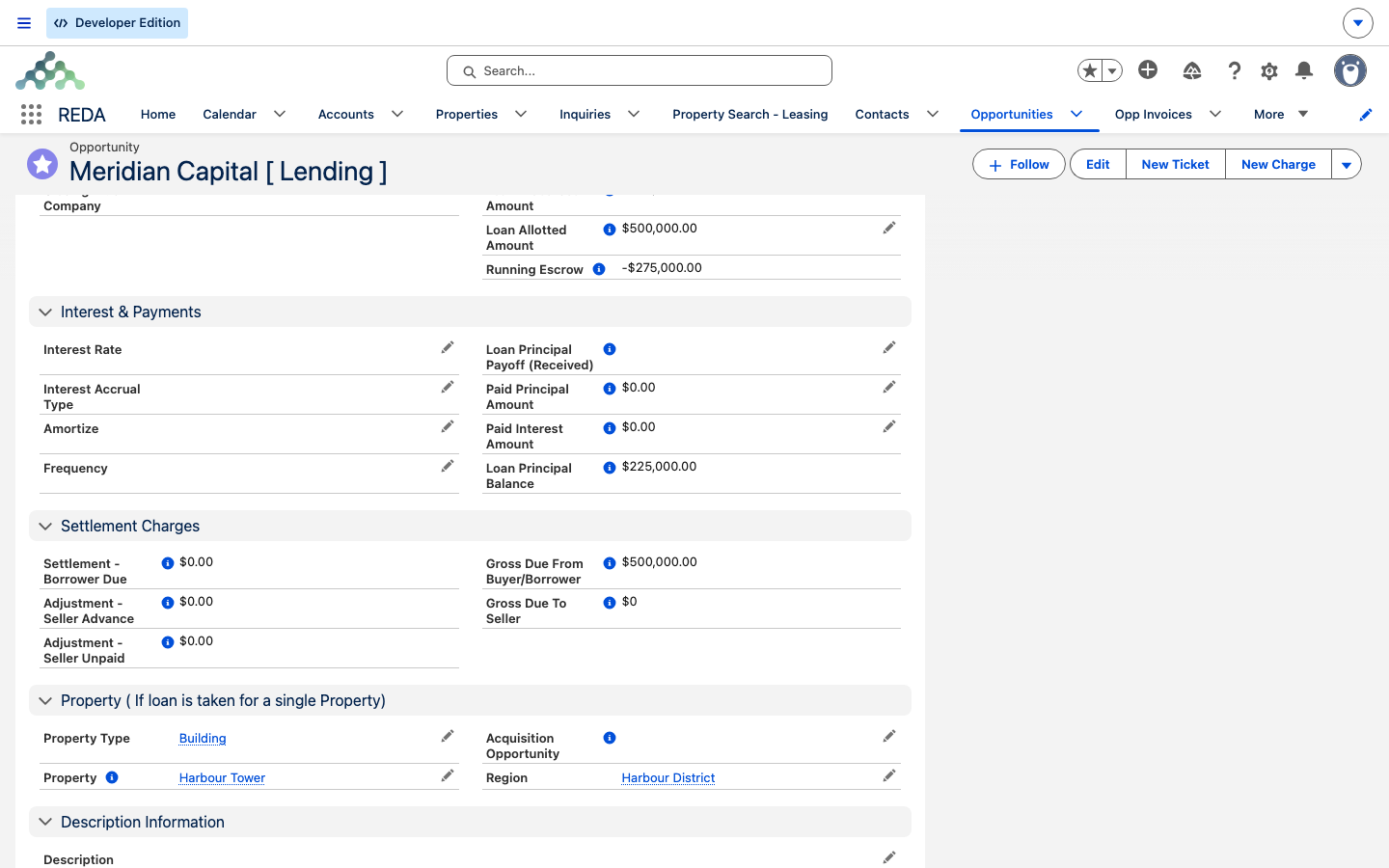
| Received Principal Amount | Sum of completed principal-received payments | Loan Payments | ≤ Loan Amount |
| Paid Principal Amount / Paid Interest Amount | Sums of the principal and interest parts of completed instalment payments | Loan Payments | — |
| Loan Disbursed Amount | Sum of closed disbursement tickets | Tickets | ≤ Loan Amount |
| Loan Principal Payoff (Received) | Money received to retire this loan | Closed payoff tickets pointed here | — |
| Loan Principal Payoff (Disbursed) | Money sent from this loan to retire another | Closed payoff tickets from here | — |
| Loan Principal Balance | Received Principal minus Paid Principal minus Payoff (Received) | the figures above | Ceiling for payoffs against this loan |
| Running Escrow (loan) | Received Principal minus Payoff (Disbursed) minus Disbursed | the figures above | Ceiling for payoffs from this loan |
| Loan Allotted Amount (parent loans) | Sum allotted to child loans | active child loans | < Loan Amount |
Three of these enforce a limit you'll meet in practice:
- Received Principal Amount can't exceed the loan's principal: "Received Principal Amount must be less or equal to Loan Amount."
- Loan Disbursed Amount can't exceed the loan's principal: "Disbursed Amount must be less or equal to Loan Amount."
- Loan Allotted Amount can't reach the loan's principal: "Allotted Amount must be less than Loan Amount".
The two computed figures — Loan Principal Balance and Running Escrow (loan) — are themselves the ceilings for payoff tickets, which is why a payoff that looks fine can still be rejected: "Payoff amount must not be greater than Loan Principal Balance Amount on provided Lending Opportunity." caps against the balance, and "Payoff amount must not be greater than available escrow on Opportunity." caps against the escrow.
Property-level figures
On a property's Debt Summary tab, the same inputs are summed across all the property's active loans.
| Figure | Formula in words |
|---|---|
| Total Loan Amount | Sum of Loan Amount across the property's active loans |
| Total Loan Disbursement Amount | Sum of closed disbursement tickets across the loans |
| Total Loan Principal Paid | Sum of Paid Principal across the loans |
| Total Loan Principal Payoff (Received) / (Disbursed) | The two payoff figures summed across the loans |
| Net Loan Balance | Total Loan Amount minus Total Loan Principal Paid minus Total Loan Principal Payoff (Received) |
| Running Escrow (property) | Total Loan Amount minus Total Loan Disbursement Amount minus Total Loan Principal Payoff (Disbursed) |
The property-side disbursement total is capped too: "Loan Disbursed Amount can not be greater than Loan Amount."
The acquisition's Rehab Escrow
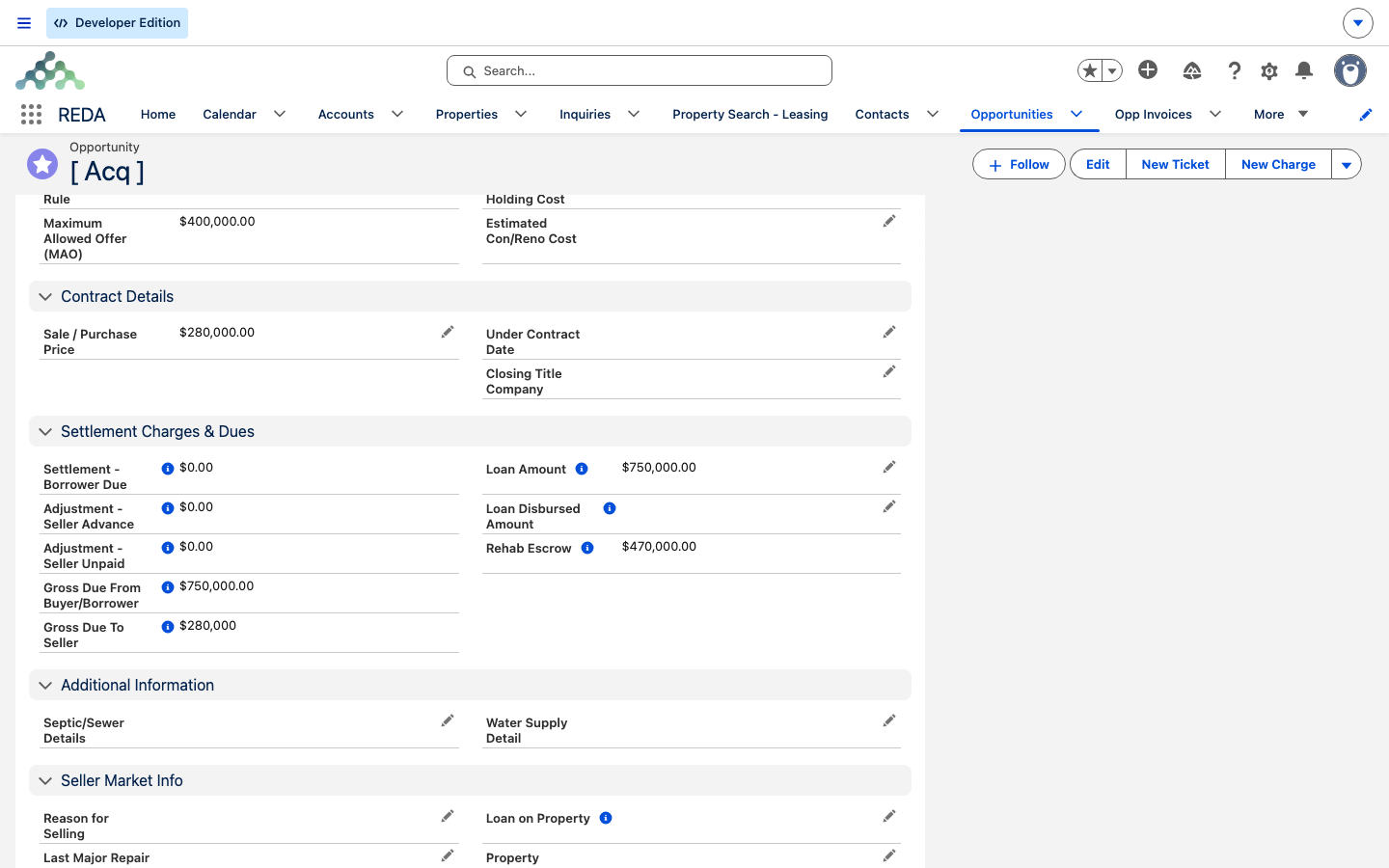
One related figure lives not on the loan but on the acquisition deal: the Rehab Escrow — the renovation holdback left after closing costs. When a loan amount exists on the acquisition, it's computed as the Loan Amount minus the Sale / Purchase Price minus the Settlement - Borrower Due minus the Adjustment - Seller Advance plus the Adjustment - Seller Unpaid; with no loan, it's zero. The settlement inputs come from the acquisition's settlement statement (see Settlement & Closing).
What counts, and when
| Record | Counts only when |
|---|---|
| Loan Payment | It's completed (with a payment date and reference) |
| Disbursement / Payoff ticket | Its status is Closed |
| A loan (in property totals) | It's active: Funded, Payoff Pending or Closed Won |
Why is this number what it is?
Use this ladder when a figure doesn't look right:
Worked reconciliation
Take a 750,000.00 loan on Meridian Court after a full run of activity: funded in full, one curtailment paid, a renovation draw, and a payoff of an old bridge loan.
| Input | Amount |
|---|---|
| Received Principal (funded in full) | 750,000.00 |
| Paid Principal (a curtailment) | 50,000.00 |
| Paid Interest | 5,625.00 |
| Loan Disbursed Amount (closed renovation draw) | 120,000.00 |
| Loan Principal Payoff (Disbursed) (retired Harbour Bridge Loan) | 400,000.00 |
The two computed figures follow directly:
- Loan Principal Balance = 750,000.00 minus 50,000.00 minus 0.00 = 700,000.00 (no payoff was received against this loan).
- Running Escrow (loan) = 750,000.00 minus 400,000.00 minus 120,000.00 = 230,000.00.
On the loan that was retired, Harbour Bridge Loan, the Loan Principal Payoff (Received) is 400,000.00; if its received principal was 400,000.00 and nothing was paid down separately, its Loan Principal Balance is 400,000.00 minus 0.00 minus 400,000.00 = 0.00.
At the property, while both loans are still active:
- Total Loan Amount = 750,000.00 plus 400,000.00 = 1,150,000.00.
- Net Loan Balance = 1,150,000.00 minus 50,000.00 minus 400,000.00 = 700,000.00.
- Running Escrow (property) = 1,150,000.00 minus 120,000.00 minus 400,000.00 = 630,000.00.
Closed Won, or advance to Payoff Pending, remains in the figures; only a non-active stage such as Closed Lost takes it out. Decide with your team which final stage you want a fully-retired loan to sit at, since it changes the property totals.
The Rehab Escrow, for comparison. On the acquisition deal, with a loan of 750,000.00, a Sale / Purchase Price of 280,000.00, a Settlement - Borrower Due of 38,000.00, an Adjustment - Seller Advance of 2,000.00 and an Adjustment - Seller Unpaid of 5,000.00: 750,000.00 minus 280,000.00 minus 38,000.00 minus 2,000.00 plus 5,000.00 = 435,000.00 of renovation holdback.
Where to go next
- Recording Loan Payments — the payments that feed the received and paid totals.
- Disbursements & Payoffs — the tickets that feed the disbursed and payoff totals, with the two caps in action.
- Loan Terms & Allocation — Loan Amount, allotted amounts, and parent/child facilities.
- Property & Acquisition Loan Rollups — the Debt Summary tour.
Frequently asked questions
They start from different places. The property's Running Escrow starts from the loan amounts committed; a loan's Running Escrow starts from principal actually received. Until a lender funds a loan in full, the two differ — that funding gap is expected.
Both — whichever is lower. The paying loan's Running Escrow ("Payoff amount must not be greater than available escrow on Opportunity.") and the retired loan's Loan Principal Balance ("Payoff amount must not be greater than Loan Principal Balance Amount on provided Lending Opportunity.").
Only closed tickets count. Reopening or cancelling a closed ticket removes its money, and the totals recompute to reflect that.
No — they're all calculated by REDA. To change one, correct the underlying payment or ticket, and the figure recomputes.
Loans count while they're active — Funded, Payoff Pending, or Closed Won — and Closed Won still counts as active. If you want a fully-retired loan out of the totals, it has to sit at a stage that isn't active; decide the final stage with your team.
Was this article helpful?