
Payment Plans & Milestones
Many property sales — off-plan sales especially — are paid in stages: a deposit up front, then instalments tied to the calendar or to construction milestones. REDA handles this with Payment Plans. You build a plan of percentage stages once, attach it to a property, and when a sale on that property becomes active REDA generates the buyer's instalments automatically. This article shows how to build a plan, tell time-based stages from milestone stages, track milestone completion, and understand when instalments become due and post to accounting. No prior REDA experience is assumed.
Access you'll need. Full access to Payment Plans and Payment Plan Milestones requires the REDA - Property Sales User or REDA - Master Data - Admin permission set; REDA - Master Data - Read Only can view.
The building blocks
A payment plan has three layers, plus the instalments REDA generates from it:
| Record | What it is |
|---|---|
| Payment Plan | The header — a named, reusable template (Name, Description, Is Active) |
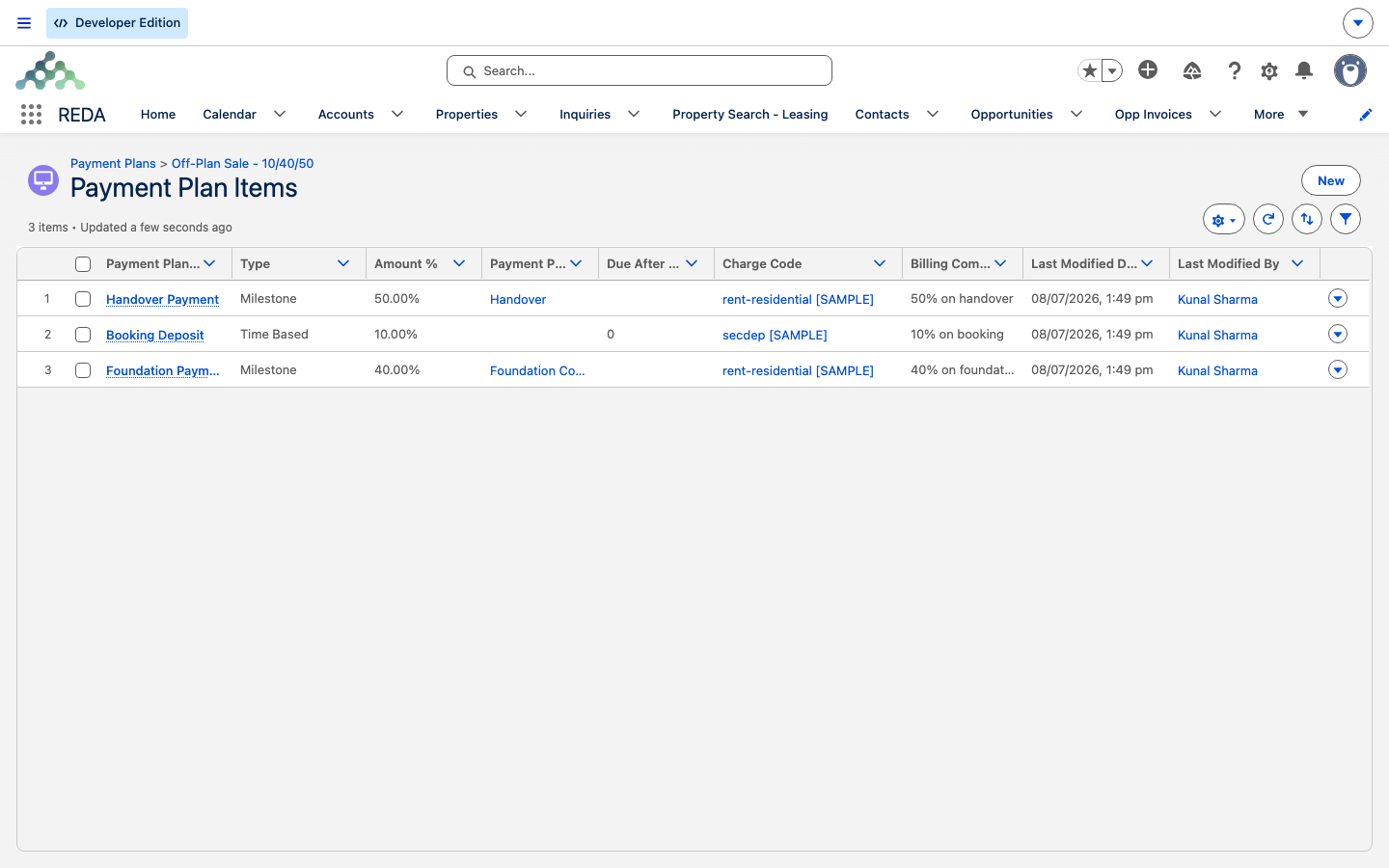
| Payment Plan Item | A percentage stage inside the plan (for example, "10% on booking") |
| Payment Plan Milestone | A construction milestone that can release a stage when it completes |
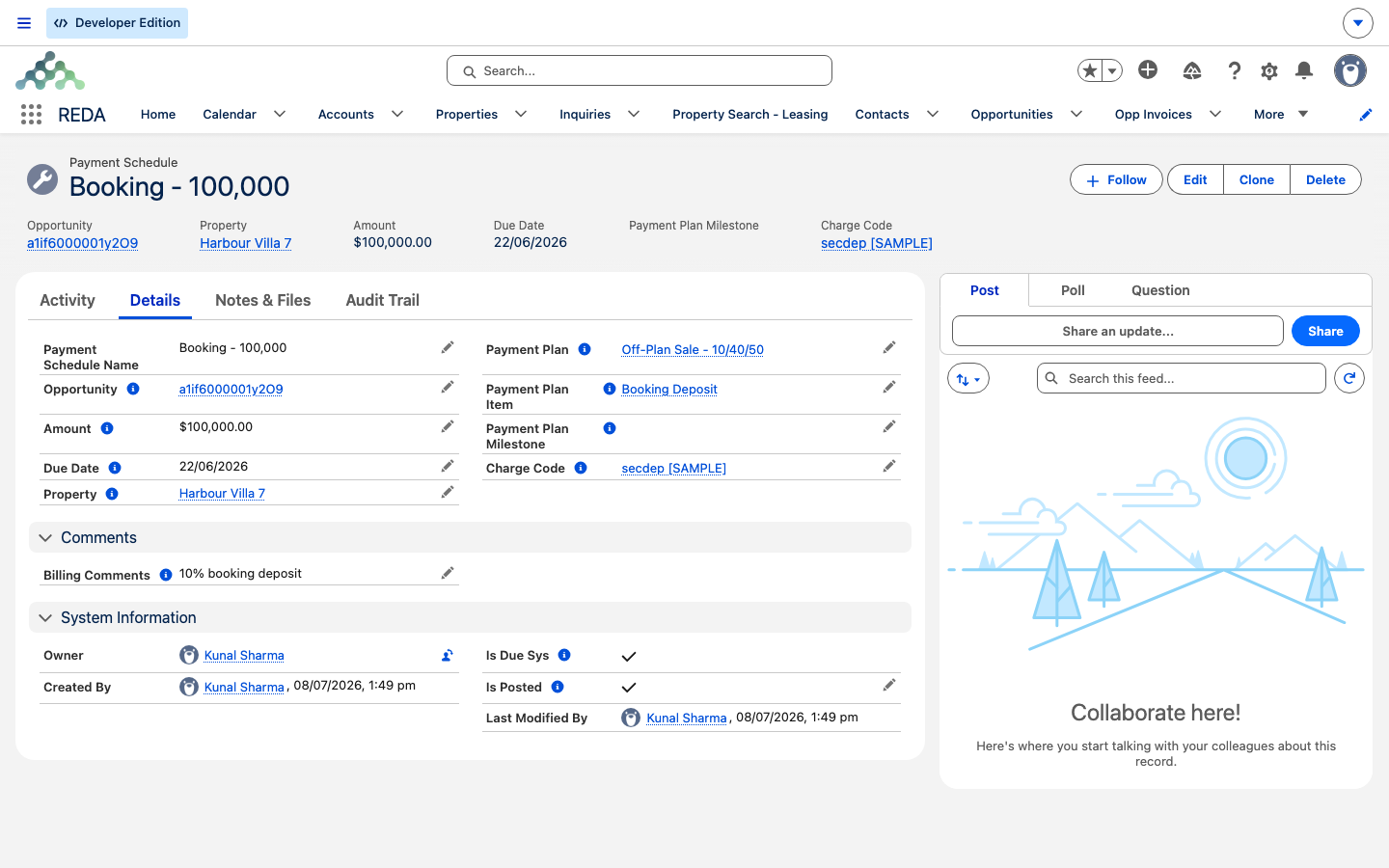
| Payment Schedule | A generated instalment on a specific sale — one per plan item, created when the sale activates |
Building a Payment Plan
Start with the header, then add the stages:
REDA enforces that last step. Leave the required piece off and it stops you:
"The Payment Milestone is required for milestone-based payment plan items."
Milestones
A Payment Plan Milestone represents a point in a property's construction — a foundation poured, a handover reached. Create milestones per property or project, and move each through its status ladder as work progresses. REDA requires the relevant dates before it lets you advance the status:
| Status | Required before you can set it | Effect |
|---|---|---|
| Draft | — | A parking state |
| Planned | Planned Start Date and Planned Completion Date | The roadmap is visible |
| In Progress | The same two dates | Work is underway |
| Completed | Completion Date | Every linked instalment gets its Due Date set to the Completion Date |
The date requirements surface as these messages:
"Planned Completion Date must be provided prior to update the status to "Planned" or "In Progress"."
"Planned Start Date must be provided prior to update the status to "Planned" or "In Progress"."
Attaching the plan to a property
A plan does nothing until it's attached to a property. On the property record, set the Sale Payment Plan field to your plan — only active plans appear in the lookup (see Marking a Property Available for Sale). From then on, sales on that property will use this plan.
What REDA generates on the sale
When a sale deal first becomes active — that is, it reaches an in-progress stage (Under Contract and beyond) — and the property has a Sale Payment Plan set, REDA creates one Payment Schedule per plan item on the sale. Each instalment is worked out like this:
| On the Payment Schedule | Where it comes from |
|---|---|
| Amount | The item's Amount % × the deal's Sale / Purchase Price ÷ 100 |
| Due Date | Time Based item → the Under Contract Date + Due After Days · Milestone item → left blank until the milestone completes |
| Charge Code, Billing Comments, Name | Copied from the plan item |
| Plan / Item / Milestone / Property links | Traceability back to where each instalment came from |
| Posted flag | Set by the nightly run once the instalment is due |
Because the amount is a percentage of the Sale / Purchase Price, and time-based due dates count from the Under Contract Date, both of those must be present on the sale by the time it activates — the sale's stage gates guarantee this (see Selling a Property).
Completing a milestone
When you set a milestone's status to Completed (which requires its Completion Date), REDA updates every Payment Schedule linked to that milestone, setting each instalment's Due Date to the milestone's Completion Date. The waiting instalment becomes due, and enters the posting queue.
Posting to accounting
A scheduled process runs daily at 02:00 in your org's local time zone and marks any unposted instalment whose due date has arrived as Posted. Being posted is the signal your accounting extension (REDA Financials) picks up to raise the actual receivable — the REDA Platform's job stops at the posting flag.
Worked example: a 10/40/50 off-plan sale
Meridian builds a plan named Meridian Off-Plan 10/40/50 for Harbour Villa 7:
- Item 1 — 10% booking, Time Based, Due After Days 0.
- Item 2 — 40% at "Foundation complete", Milestone.
- Item 3 — 50% at "Handover", Milestone.
The property carries the plan; the sale to David Okafor has a Sale / Purchase Price of 1,000,000.00 and an Under Contract Date of 1 Jul. Here's how it plays out:
| Event | What REDA does |
|---|---|
| The sale becomes active | Creates three instalments: 100,000.00 due 1 Jul (10% of 1,000,000, due Under Contract + 0 days); 400,000.00 with no due date; 500,000.00 with no due date |
| "Foundation complete" milestone set to Completed on 15 Sep | The 400,000.00 instalment's due date becomes 15 Sep |
| The nightly 02:00 run | Posts the 100,000.00 (already due), and later posts the 400,000.00 once its date arrives; accounting picks up the posted rows |
Note that the milestone here (15 Sep) falls after this sale's close (Closed Won on 15 Aug in the closing example). That's fine — buyer instalments outlive the close, and a milestone-based stage stays payable on its own schedule.
Laid out over the life of the sale, David Okafor's three instalments look like this:
| Stage | Type | Amount | Becomes due | Posts |
|---|---|---|---|---|
| Booking (10%) | Time Based, 0 days | 100,000.00 | 1 Jul (Under Contract + 0) | That night's 02:00 run |
| Foundation (40%) | Milestone | 400,000.00 | 15 Sep, when the milestone is marked Completed | The 02:00 run once 15 Sep arrives |
| Handover (50%) | Milestone | 500,000.00 | Blank until the Handover milestone completes | After that milestone's completion date |
The 10/40/50 shares total 1,000,000.00 — the whole sale price — because the three Amount % values add to 100. Nothing in REDA enforces that total, so a finance user (Sofia Alvarez, say) checks the plan's percentages before the sale activates: once the instalments are generated they're fixed snapshots, and a plan whose stages summed to 90% would quietly under-bill the buyer.
Reference: plan item fields
| Field | Required | What it does |
|---|---|---|
| Amount % | Yes | The stage's share of the Sale / Purchase Price |
| Charge Code | Yes | The billing category stamped onto the generated instalment |
| Type | Yes | Time Based (due by calendar) or Milestone (due on completion) — no default |
| Due After Days | Time Based | Days after the Under Contract Date the instalment falls due |
| Payment Plan Milestone | Milestone | The construction milestone that releases the instalment |
| Billing Comments / Notes | No | Copied onto the instalment / kept internal |
Where to go next
- Selling a Property — where "active" happens, and the price and date prerequisites.
- Marking a Property Available for Sale — attach the plan to the property.
- Settlement Charges & Closing Statements — the closing statement, a separate thing from instalments.
- Payment Schedules — the instalment concept across REDA.
Frequently asked questions
Generation runs when the sale first becomes active (reaches Under Contract or later), and only if the plan was on the property at that moment. Attaching a plan after the sale has already activated does not generate instalments retroactively.
Each status needs its dates first: "Planned Start Date must be provided prior to update the status to "Planned" or "In Progress".", "Planned Completion Date must be provided prior to update the status to "Planned" or "In Progress".", and "Completion Date must be provided prior to update the status to "Completed"."
A stage needs the piece its type requires: "The Due After Days value is required for time-based payment plan items." or "The Payment Milestone is required for milestone-based payment plan items."
Daily at 02:00 in your org's local time zone, once the due date has arrived. Posting is what hands the instalment to accounting.
Nothing enforces the total — REDA computes each stage independently. Check your plan's percentages yourself before relying on it.
Was this article helpful?