
Inflation Adjustments
Rents that keep pace with a published index — CPI, or whatever benchmark your leases reference — without anyone editing amounts in a spreadsheet. That's what REDA's inflation adjustments do: you build a rule, load the index figures month by month, and REDA escalates the rents on schedule. This article shows you how to set that up, explains the two tracks an adjustment can follow (property rent setups versus a live lease's charges), and helps you recover from the one failure everyone hits first — an adjustment that errors because the month's index was never loaded. It also explains why the adjustment tickets appear already closed. This is an administrator-facing feature; every term is defined as we reach it.
Access you'll need. Full control of rules requires the REDA - Master Data - Admin permission set. The REDA - Inflation Adjustment User set can view rules and run adjustments (and update rent setups) but not edit the rules themselves; REDA - Master Data - Read Only can view.
The moving parts
Five pieces work together. Understanding the chain makes everything else fall into place:
Building a rule
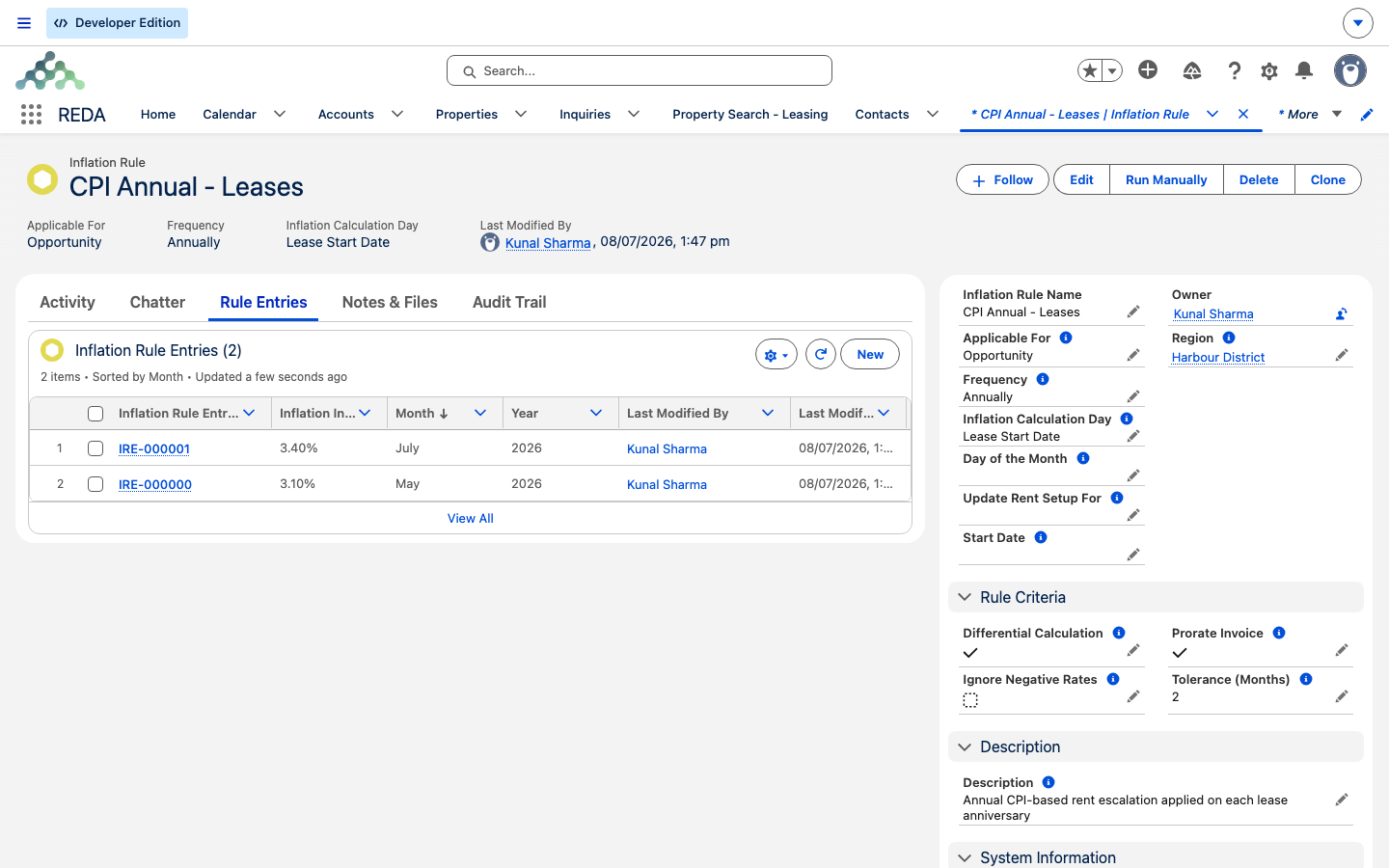
A rule is defined by a handful of required fields plus a few options that shape the calculation. The single most important choice is Applicable For, which decides whether the rule adjusts Property rent setups or Opportunity (lease) charges — it also controls which of the other fields you must fill in.
| Field | What it sets |
|---|---|
| Applicable For (required) | Property adjusts a property's rent charge setups; Opportunity adjusts an active lease's charges. |
| Frequency (required) | How often to escalate: Monthly, Quarterly (3 Months), Semi-Annually (6 Months), or Annually. |
| Inflation Calculation Day (required) | Day of the Month (required for Property rules) or Lease Start Date (the lease anniversary, for Opportunity rules). |
| Start Date | Required for Property rules — the anchor the schedule counts from. |
| Update Rent Setup For | Required for Property rules — which base amounts get inflated: New Lease, Renewal, or both. |
| Tolerance (Months) | A look-back window for finding the most recent published index; older entries are skipped. Blank means unlimited. |
Three options fine-tune the arithmetic. Differential Calculation applies only the change since the previous entry rather than the full index figure. Ignore Negative Rates floors the applied rate at zero, so rents never decrease. Prorate Invoice (on Opportunity rules) raises a prorated catch-up invoice for any part of the current period already billed.
REDA guards the required combinations. On a Property rule, all of these must be satisfied, and each has its own message if not:
"Day of the month must be provided if Inflation Calculation Day is selected "Day of the Month"."
"Please select "Update Rent Setup For" if rule is applicable on the property."
"Start Date must be provided for Inflation Rule applicable on Property."
Once a rule has leases attached to it, REDA also stops you from switching its Applicable For — changing the target of a rule that's already in use would strand its history, so make that choice before you attach anything.
Loading the index entries
A rule can't escalate anything until you feed it the index. Each rule entry is one month's published figure, and there is exactly one entry per month:
| Field | Required | Meaning |
|---|---|---|
| Inflation Index | Yes | The raw published rate (%) for the month. |
| Month / Year | Yes / Yes | The period. The year must be a valid four-digit year. |
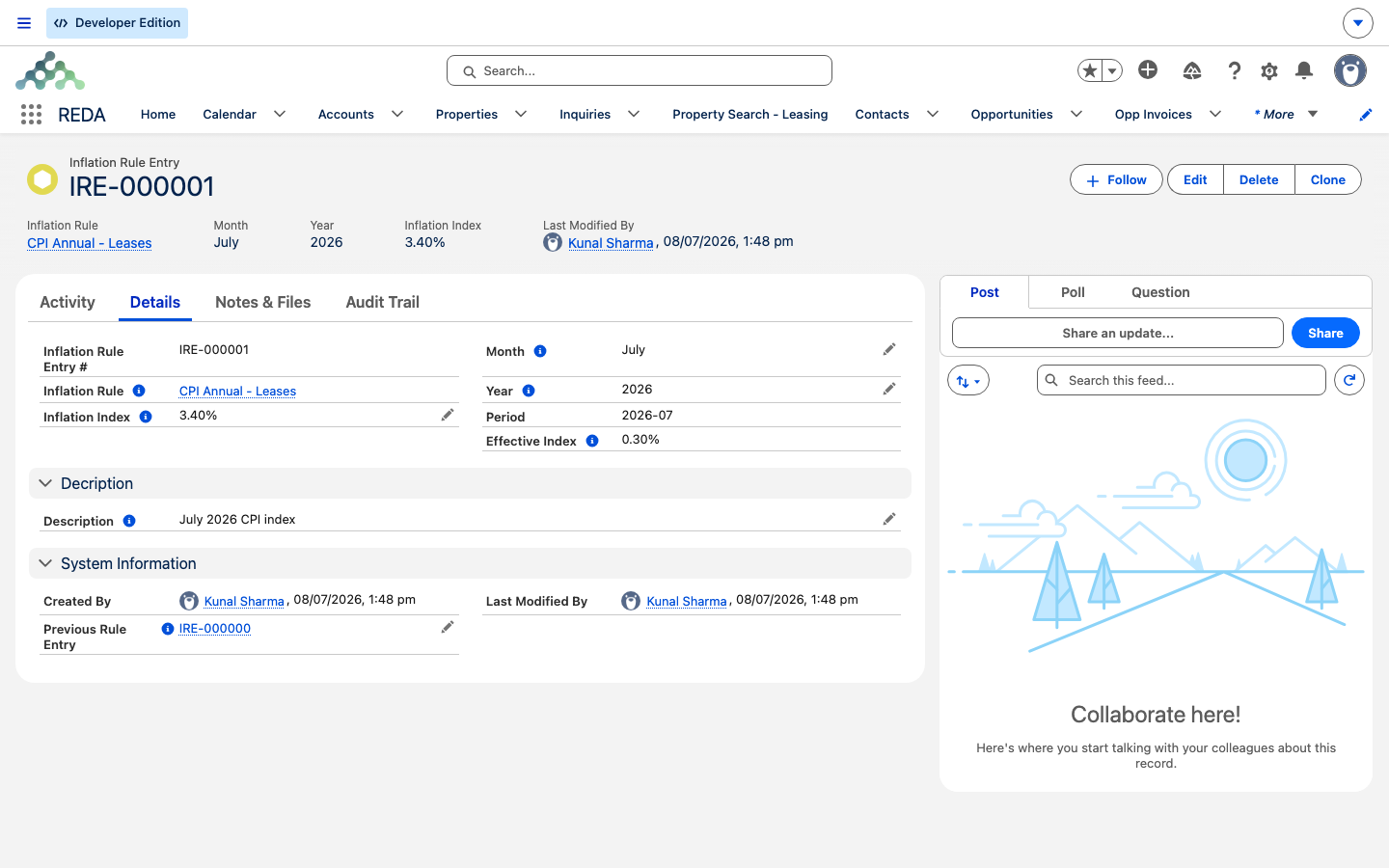
| Previous Rule Entry | Auto | The prior period's entry, which REDA usually fills in for you; it feeds the differential calculation. |
| Effective Index | Calculated | The rate actually applied — the differential (this entry minus the previous) when Differential Calculation is on, otherwise the full index, floored at zero under Ignore Negative Rates. |
Enter a year that isn't a real four-digit year and REDA stops you:
REDA also rejects a second entry for the same rule, month, and year, so you can't accidentally double-load a month. The key figure to watch is the Effective Index — that's the rate REDA actually uses, after the differential and negative-rate options have had their say.
Track A — property rent setups
When a Property rule runs, it looks for properties that have that rule, are of a rentable type (buildings and communities are excluded from property-level runs — you adjust the units, not the shell), and are due on the schedule. For each, it picks the newest index entry whose month is on or before the processing month and within the rule's tolerance window. If no such entry exists, the run errors — the classic first-time failure, covered under recovery below.
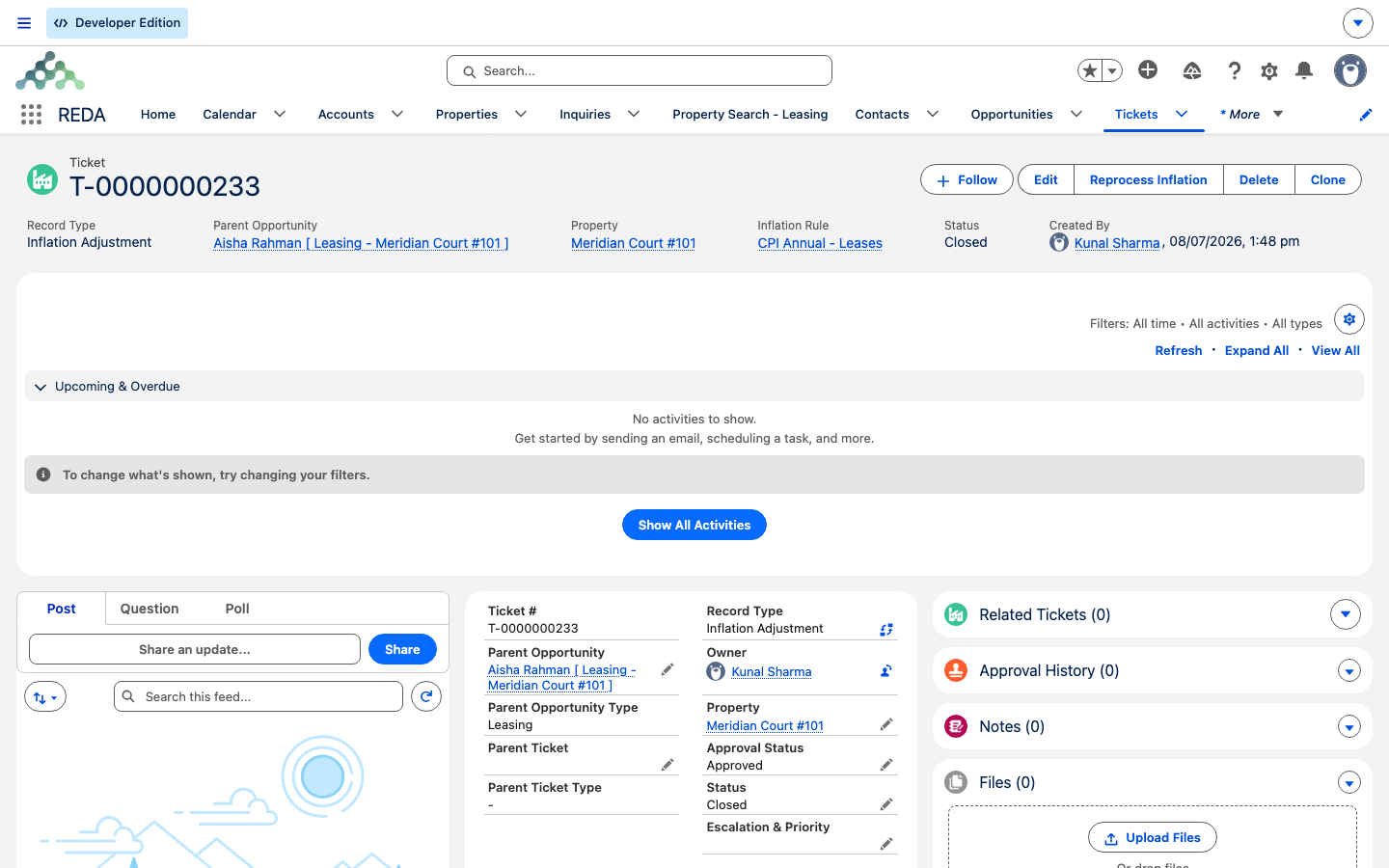
The run then creates a born-closed Inflation Adjustment ticket, and closing it applies the change: every rent charge setup's base amount is inflated by the effective index, for whichever of New Lease / Renewal you selected in Update Rent Setup For. The property's last-calculation date is stamped, and its next date is recomputed from there.
Track B — active lease charges
An Opportunity rule runs against accounting-active leases that are due. Each lease uses its own inflation rule if it has one, otherwise the property's designated lease rule. Entry selection and the born-closed ticket work exactly as in Track A — the difference is what gets changed.
Here, REDA re-rates the lease's live charges — but only the ones whose charge code has Include in Inflation Calculation ticked (so rent escalates while, say, a fixed parking charge doesn't). For each qualifying charge, the existing charge is inactivated (stopped the day before the adjustment) and a new charge is inserted at the inflated amount — the old amount × (1 + effective index ÷ 100) — covering the rest of the period.
If the rule's Prorate Invoice option is on and the current period was already billed at the old rate, REDA also raises a catch-up Opp Invoice for the prorated difference, its billing comment reading Inflation Adjustment (from - to) and its due date following the charge code's grace days. That prorated difference uses the same daily-rate math as any partial period — see Proration.
Why the adjustment tickets are born closed
Every adjustment produces an Inflation Adjustment ticket, and REDA creates it already closed. That's deliberate: for these tickets, closing is the act that applies the change, so there's nothing for you to work — a ticket that appears Closed is a successful adjustment. The only ones that need attention are those that landed in Processing Error, which carry the fault in their Error Message field and are also logged for review. To retry one, use the Reprocess Inflation action on the ticket; it clears the error and re-closes the ticket to run again. It won't touch a ticket that's already closed successfully — there's nothing to redo.
Running it
There are two background runs — one for the property track, one for the lease track — and, like most billing automation, neither ships scheduled. An administrator schedules them once in the Admin Console (see Scheduling Background Jobs). Both have one firm requirement:
To adjust a rule on demand without waiting for the scheduled run, open the rule and click Run Manually; REDA submits the job and emails you when it finishes.
When a run fails, and how to recover
The failure you'll meet first is a run that can't find an index for the month it's processing — because the entry was never loaded:
The fix is exactly what it sounds like: load the missing month's entry, then rerun (or use Reprocess Inflation on the errored ticket). Here's the full troubleshooting map:
| Symptom | Cause | Fix |
|---|---|---|
| "Inflation Index not defined for the period." | No entry for the month within the rule's tolerance window | Load the month's entry, then rerun or Reprocess Inflation |
| Ticket Status reads Processing Error | A fault occurred while applying the adjustment | Use the Reprocess Inflation action (it clears the error and re-closes) |
| Reprocess refuses the ticket | The ticket already closed successfully | Nothing to do — the adjustment is done |
| "Only one record can be processed in one job. Please limit batch size to 1." | The run was scheduled with a batch size above 1 | Reschedule it with batch size 1 |
| A building didn't adjust | Buildings and communities are excluded from property-level runs | Adjust the units, not the building shell |
Track A versus Track B at a glance
| Aspect | Track A — Property | Track B — Lease |
|---|---|---|
| Applicable For | Property | Opportunity |
| Timing anchor | Rule Start Date + frequency, on the Day of the Month | The lease anniversary (Lease Start Date), or a day of the month |
| Who qualifies | Properties with a Property rule, of a rentable type, due now | Accounting-active leases due now |
| Rule used | The property's Inflation Rule (Property) | The lease's own rule, else the property's Inflation Rule (Lease) |
| What changes | Rent charge setup base amounts (New / Renewal) | Live recurring charges (by code flag): old stopped, new at ×(1 + index/100) |
| Extra output | — | An optional prorated catch-up invoice |
| Vehicle | Born-closed Inflation Adjustment ticket | Same |
Worked example: an annual CPI escalation
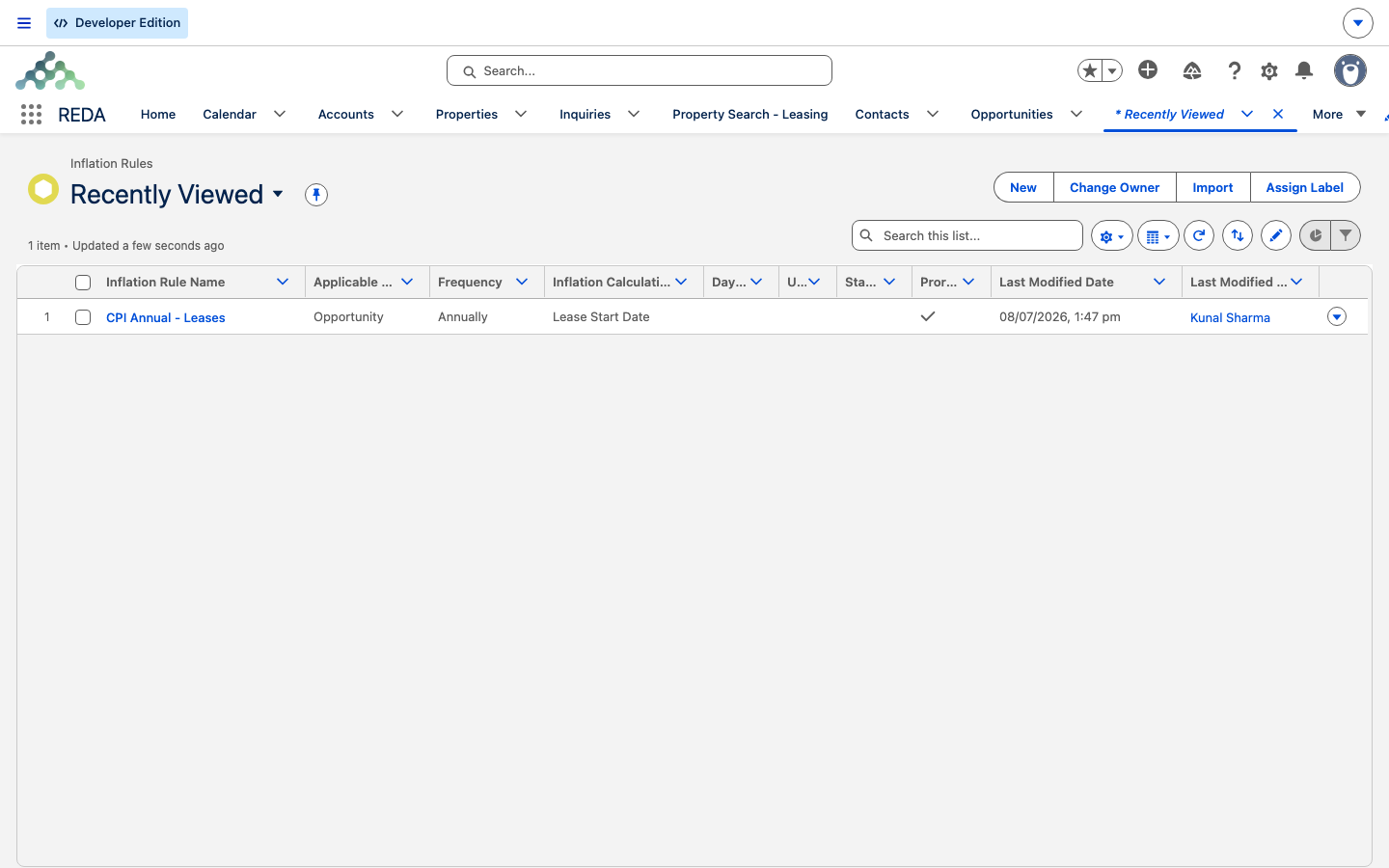
Build an Opportunity rule CPI Annual — Leases: Annually, on the lease anniversary, Tolerance 2 months, Prorate Invoice on. Load index entries: May 3.10%, June missing, July 3.40%. The demo lease is Meridian Court #101 — Aisha Rahman — with rent set at 1,200.00 and a January anniversary.
When the anniversary run reads the July entry, it inflates the rent by 3.40%: the old charge is stopped the day before, and a new charge takes over at 1,200.00 × 1.034 = 1,240.80. Because the current period was already billed at the old rate, REDA raises a catch-up invoice for the prorated 40.80 difference, its comment reading Inflation Adjustment (from - to).
Now the failure variant. Say the run lands in a month whose entry was never loaded and none within tolerance exists — it errors with "Inflation Index not defined for the period." You load the entry and use Reprocess Inflation on the errored ticket, and the adjustment completes.
Where to go next
- How Billing Works in REDA — the charge-and-invoice model the inflated charges plug into.
- Proration — the daily-rate math behind the catch-up invoice.
- Charge Codes — the Include in Inflation Calculation flag that decides which charges escalate.
- Scheduling Background Jobs — the two runs, and the batch-size-1 requirement.
- Straight-Line Rent Schedules — another schedule-driven billing feature for stepped rents.
Frequently asked questions
No index entry exists for the processing month within the rule's tolerance window. Load the month's entry, then use Reprocess Inflation on the errored ticket (or rerun the rule).
By design — the run creates these tickets born closed, because closing is what applies the adjustment. Only tickets in Processing Error need your attention.
Only charges whose charge code has Include in Inflation Calculation ticked are re-rated. A charge left off that flag stays at its fixed amount.
Only if you allow it. Switch on Ignore Negative Rates and the effective index is floored at zero, so a negative published rate never reduces the rent.
Property rules need three things in place: "Inflation Calculation Day should be Day of the Month if rule is applicable for Property." · "Please select "Update Rent Setup For" if rule is applicable on the property." · "Start Date must be provided for Inflation Rule applicable on Property." Supply all three and it saves.
Reprocess Inflation only retries tickets in Processing Error. A ticket that's already closed succeeded, so there's nothing to redo.
Was this article helpful?