
The Tenant Ledger & Balances
"How much does this tenant owe?" is the question the front desk asks most, and REDA has an authoritative answer for it — you just need to know which figure to read. The fastest answer sits in plain sight: a Ledger Summary band of tiles at the top of the lease, headed by the Net Outstanding figure. This is the reference for reading a tenant's balance: the summary tiles, the fuller balance fields behind them, what each one means, which figures REDA computes versus which the accounting extension owns, and why a negative balance is good news rather than an error. One thing to settle up front: there is no separate "ledger" record in REDA. The tenant ledger is a view — the Ledger Summary tiles, the lease's balance fields, the account's held balances, and a printable Account Ledger statement. No prior REDA experience is assumed.
Access you'll need. Viewing invoices and balances requires the REDA - Property Leasing User or REDA - Invoice Management Admin permission set; the REDA - Invoice Management Read Only set can view but not change them. Account-level figures also need access to Accounts, which your administrator grants separately.
The Ledger Summary tiles — start here
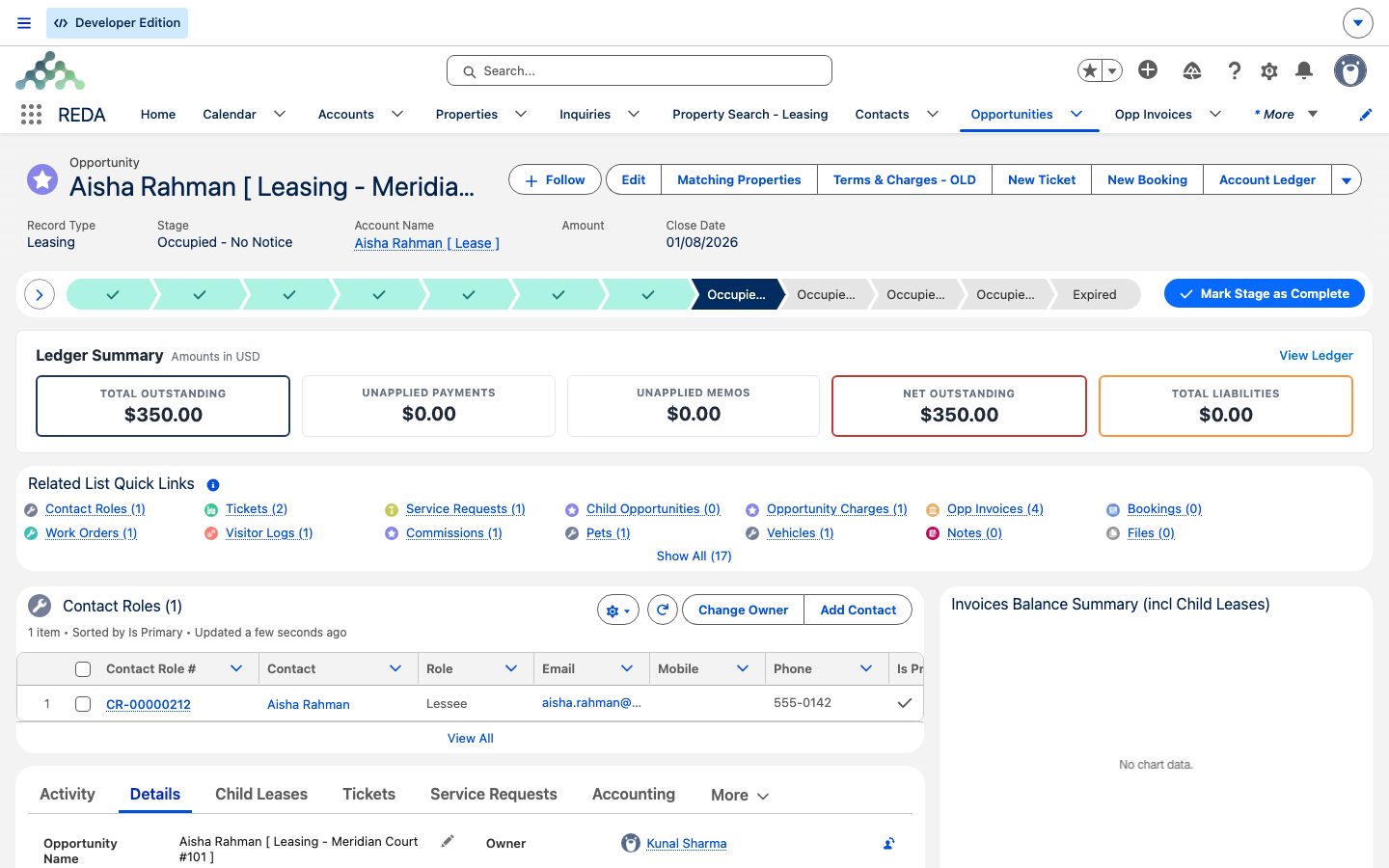
Before you go anywhere else, the top of the lease shows a Ledger Summary band: a row of tiles that gives the tenant's money position at a glance. For most questions these five tiles are all you need — the fuller fields below just break the same picture down further. REDA maintains every tile from the lease's invoices and payments; you never type into them.
| Tile | What it tells you |
|---|---|
| Total Outstanding | Everything billed on this lease that is still unpaid — the gross figure, before any of the tenant's unapplied money is taken into account. |
| Unapplied Payments | Money the tenant has paid that hasn't been matched to a specific invoice yet. |
| Unapplied Memos | Credits raised for the tenant (credit memos) that haven't been applied against a charge yet. |
| Net Outstanding | Total Outstanding after the unapplied payments and memos are taken into account — the true "what's still owed right now" figure. A negative value means the tenant is in credit. |
| Total Liabilities | Amounts the business holds on the tenant's behalf, such as the security deposit — money owed back to the tenant, not owed by them. |
There is no ledger object — there is a ledger view
Some systems give you one "ledger" record per tenant, a running list of debits and credits. REDA doesn't. Instead, the tenant's financial position is built up from a few places, and this article names each one:
- The Ledger Summary tiles — the at-a-glance headline at the top of the lease (above).
- The lease's balance figures — rolled-up totals on the Details tab that sum the tenant's invoices and consolidated bills.
- The account's held figures — unapplied cash and escrow held for the party.
- The Account Ledger statement — a printable PDF statement of the tenant's activity, opened from the action on the lease (and mirrored to tenants in the resident portal, where one is set up).
Read together, those give you the whole picture. The rest of this article defines every figure so you can quote the right one with confidence.
The lease balance figures
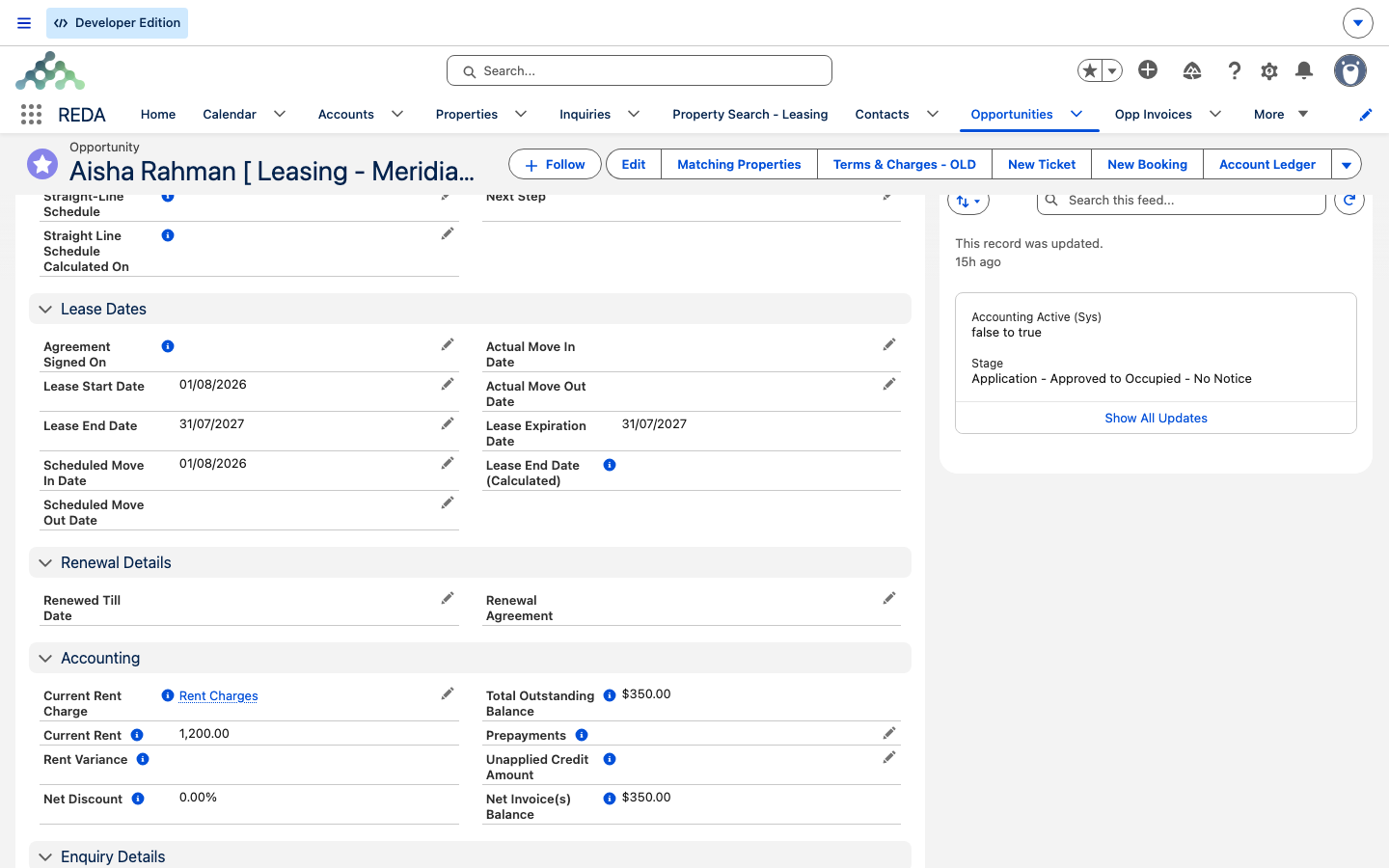
The Ledger Summary tiles are a headline; the lease's Details tab holds the fuller set of balance figures behind them. Each is a rollup or formula REDA maintains — you read them, you don't type them. They break the same picture into more pieces: the Total Outstanding Balance field is the detail behind the Total Outstanding tile, Net Invoice(s) Balance behind Net Outstanding, and Prepayments / Unapplied Credit Amount behind the Unapplied Payments / Unapplied Memos tiles.
| Figure | What it is |
|---|---|
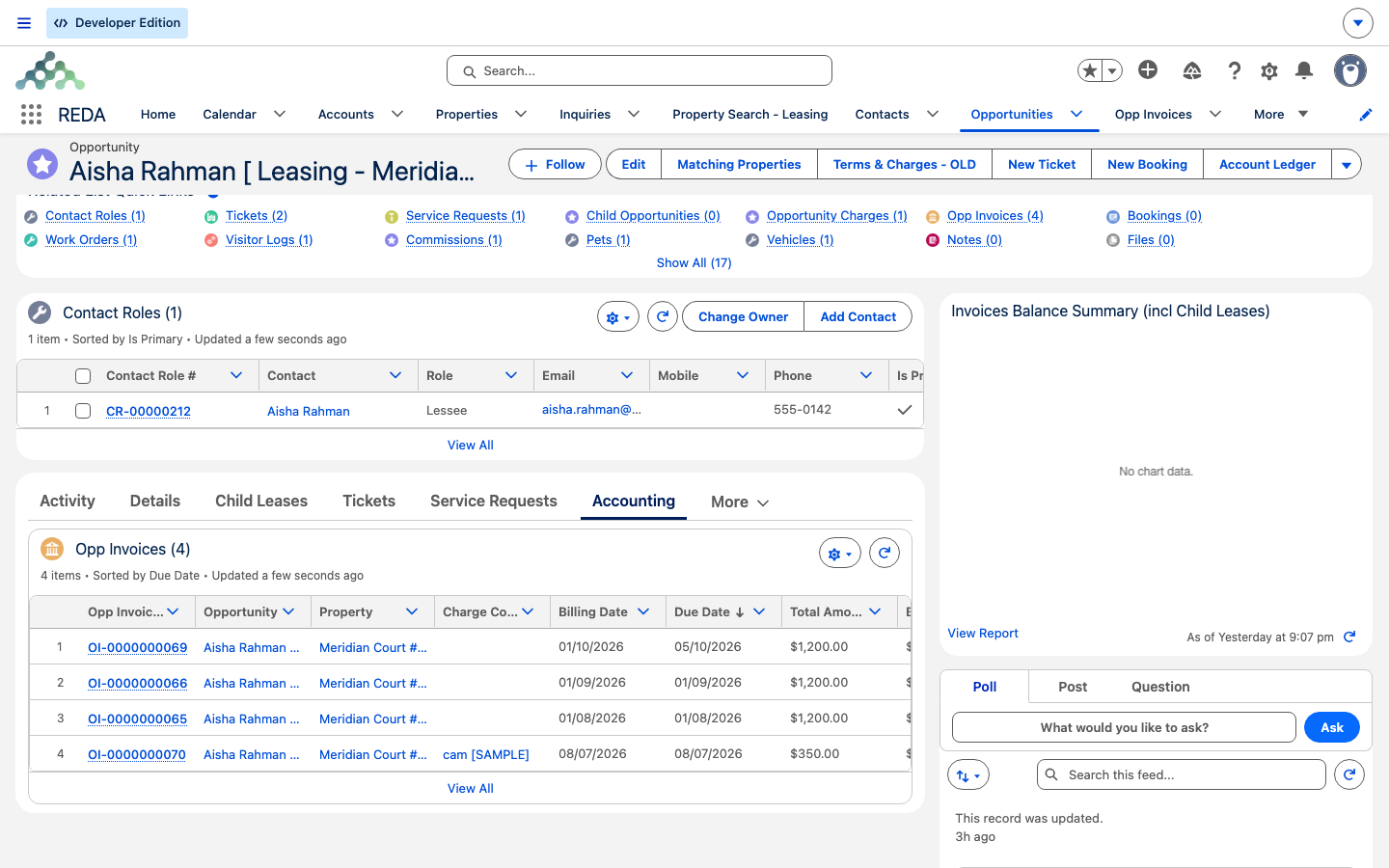
| Invoices Outstanding Balance | The sum of the balances of the lease's standalone invoices — those not folded into a consolidated bill, so nothing is double-counted. |
| Invoice Batches Outstanding Balance | The sum of the balances of the lease's consolidated bills (batches). |
| Total Outstanding Balance | Batches plus standalone invoices — the gross amount billed and not yet settled, before any credit is applied. |
| Net Invoice(s) Balance | Batches plus invoices, minus the tenant's prepayments and unapplied credit. This is what the tenant actually owes after their credits — and a negative value means they've overpaid. |
| Prepayments | Cash the tenant has paid that isn't yet applied to a specific invoice. |
| Unapplied Credit Amount | Credit on the lease not yet applied against an invoice. |
Gross versus net: outstanding versus after-credit
The two figures people reach for are the Total Outstanding and Net Outstanding tiles (with Total Outstanding Balance and Net Invoice(s) Balance as their fuller fields on the Details tab), and the difference between them is the whole game. Total Outstanding answers "what's been billed and not yet settled?" — the gross number on the books, before you account for any money the tenant has sitting in credit. Net Outstanding answers "after applying their unapplied payments and credit memos, what do they really owe right now?"
For a collections call or an arrears check, quote the net figure. And don't be alarmed when it's negative:
Who owns which number
Every balance figure traces back to the individual invoices, and each invoice is written by two parties. REDA computes the core of the bill; the accounting extension (REDA Financials on the reference setup) layers the cash and tax on top. Knowing the split explains why some fields are read-only:
| On each invoice | Written by |
|---|---|
| Base Amount, From/To period, Billing and Due dates, routing, batches | REDA |
| Tax Amount, Received/Applied Amount, Waived Amount, Adjustment Amount | The accounting extension |
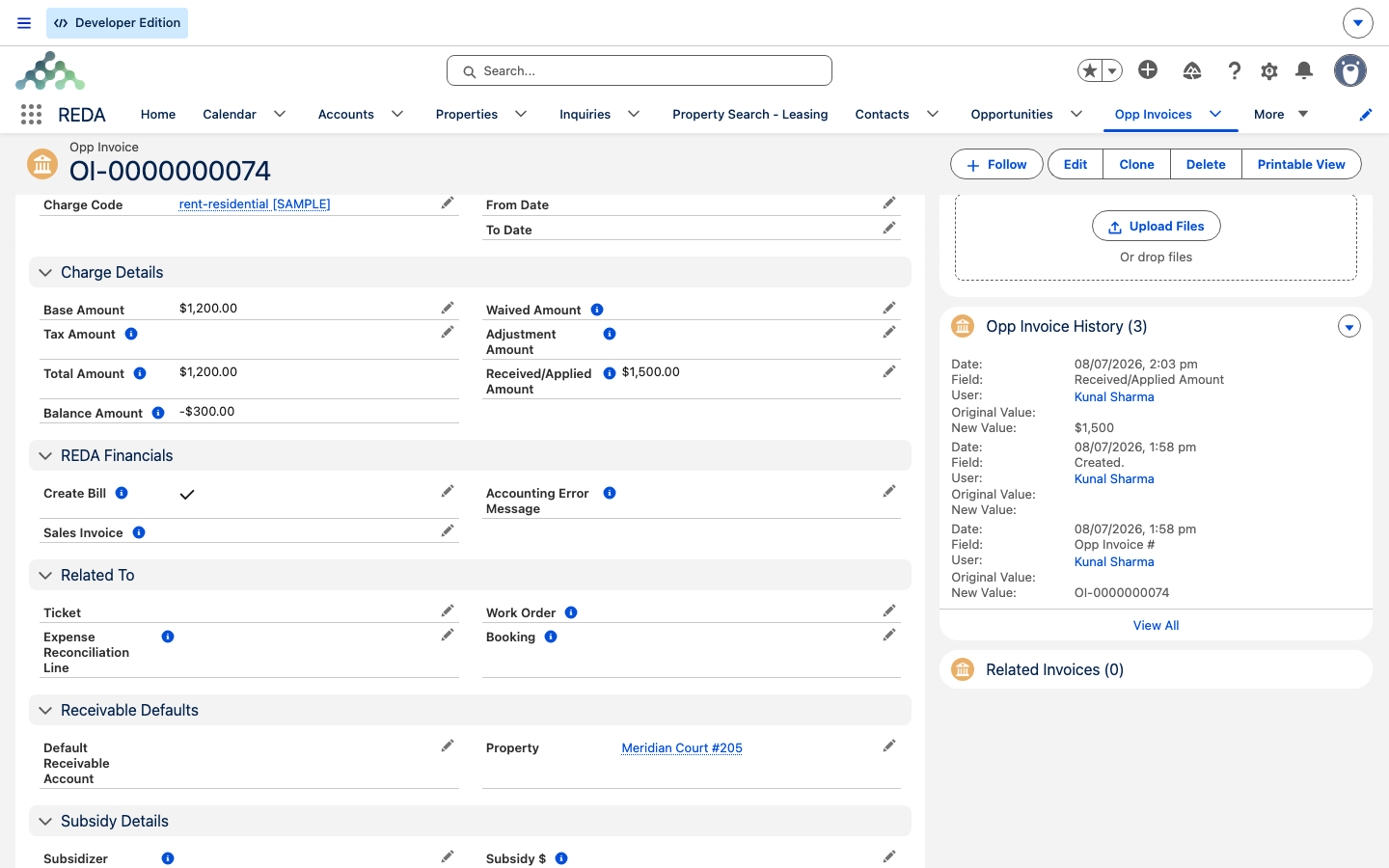
Two calculated figures tie those together: an invoice's Total Amount = Base Amount + Tax, and its Balance = (Base + Tax) − (Received + Waived + Adjustment). The lease's outstanding rollups then sum those invoice balances.
The balance on a single invoice
Sometimes the question is narrower — "what's the balance on this invoice?" Every invoice and consolidated bill carries its own Total Amount and Balance, computed by the same two formulas above. That per-invoice Balance is what the lease rollups add up. For a field-by-field walk through an invoice, see Invoices Explained.
Account-level figures
Some money isn't tied to one lease. The tenant's Account carries its own figures that the accounting extension maintains:
- Prepayments — the total unapplied cash held for the party, rolled up automatically whenever a cash receipt changes.
- Cumulative Escrow Amount — the escrow balance held for the party.
These are account-level balances the extension owns, not figures REDA writes — treat them as read-only, the same as the cash fields on an invoice.
The Account Ledger statement
When you need the whole story on paper — every charge, payment, and credit in date order rather than just the current balance — use the Account Ledger action along the top of the lease. It opens the tenant's full printable statement: their invoices, unapplied cash, and payment history, drawn from the accounting side (posted invoice balances and unapplied cash), not from a separate REDA ledger. It's the document you send a tenant who disputes a balance, or attach to a collections note.
The same statement mirrors to tenants in their own resident portal, where your administrator has set one up — the tenant-facing view of the exact figures in this article. See The Resident Portal for how that's configured.
Every balance figure at a glance
| Figure | Where it shows | What it means | Owner |
|---|---|---|---|
| Total Outstanding (tile) | Lease (Ledger Summary) | Everything billed and still unpaid, before unapplied money | REDA |
| Unapplied Payments (tile) | Lease (Ledger Summary) | Paid cash not yet matched to an invoice | REDA / accounting extension |
| Unapplied Memos (tile) | Lease (Ledger Summary) | Credit memos not yet applied to a charge | REDA / accounting extension |
| Net Outstanding (tile) | Lease (Ledger Summary) | Total Outstanding after unapplied payments and memos; negative = in credit | REDA |
| Total Liabilities (tile) | Lease (Ledger Summary) | Amounts held on the tenant's behalf (e.g. the deposit) | REDA |
| Invoices Outstanding Balance | Lease (Details) | Sum of standalone (non-batched) invoice balances | REDA rollup |
| Invoice Batches Outstanding Balance | Lease (Details) | Sum of consolidated-bill balances | REDA rollup |
| Total Outstanding Balance | Lease (Details) | Batches + standalone invoices, before credits | REDA formula |
| Net Invoice(s) Balance | Lease (Details) | Batches + invoices − prepayments − unapplied credit; negative = overpaid | REDA formula |
| Prepayments (lease) | Lease (Details) | Unapplied cash tied to the lease | Accounting extension |
| Unapplied Credit Amount | Lease (Details) | Unapplied credit on the lease | Accounting extension |
| Total Amount (per invoice / batch) | Invoice / batch | Base Amount + Tax | REDA formula |
| Balance (per invoice / batch) | Invoice / batch | (Base + Tax) − (Received + Waived + Adjustment) | REDA formula |
| Prepayments (account) | Account | Total unapplied cash for the party | Accounting extension |
| Cumulative Escrow Amount | Account | Escrow balance for the party | Accounting extension |
Which number do I quote?
| The question | The figure |
|---|---|
| How much has been billed and not settled? | The Total Outstanding tile |
| How much does the tenant actually owe right now (arrears / collections)? | The Net Outstanding tile (negative = they're in credit) |
| Does the tenant have money sitting unapplied? | The Unapplied Payments / Unapplied Memos tiles |
| How much do we hold on the tenant's behalf (e.g. their deposit)? | The Total Liabilities tile |
| What's the balance on this one invoice? | The invoice's own Balance |
| I need the full history on paper | The Account Ledger statement |
Worked example: reading Aisha's balance
Aisha Rahman rents Meridian Court #101 at 1,200.00 a month. Two months have billed and neither is paid, so her lease's Ledger Summary shows a Total Outstanding of 2,400.00 and — with no unapplied money yet — a Net Outstanding of 2,400.00. Her security deposit shows under Total Liabilities, quite separate from what she owes.
She pays 1,200.00 at the desk through Post Payment. The accounting extension writes the Received amount onto one invoice, that invoice's Balance drops to 0, and both the Total Outstanding and Net Outstanding tiles fall to 1,200.00. If she overpays by 300.00, the extension records the surplus under Unapplied Payments and the Net Outstanding tile reads −300.00 — she's in credit. None of these figures is typed by hand: REDA maintains the tiles and the outstanding side, the extension writes the cash side. To hand Aisha a full account of all of this, open the Account Ledger statement from the lease.
Where to go next
- Invoices Explained — the Total and Balance fields on a single invoice.
- Recording a Tenant Payment — how a payment lands and moves these balances.
- How Billing Works in REDA — the split between REDA and the accounting extension.
- Consolidated Invoices (Batches) — the batch balances that feed the rollups.
- The Resident Portal — the tenant-facing ledger PDF.
Frequently asked questions
Read the Net Outstanding tile in the Ledger Summary at the top of the lease — that's what they owe right now, after their unapplied payments and credit memos. The Total Outstanding tile is the gross billed-not-settled figure. The same figures sit in fuller detail on the Details tab (Net Invoice(s) Balance, Total Outstanding Balance).
No — a negative Net Outstanding means the tenant has overpaid and is in credit. The surplus will apply to their next invoice.
It shows amounts the business holds on the tenant's behalf, such as their security deposit — money owed back to the tenant, not owed by them. It's separate from what the tenant owes, so it never nets against the outstanding figures.
Those fields belong to the accounting extension — cash application and the tax engine maintain them. Correct a balance with a receipt, waiver, or adjustment on the accounting side, not by typing over the number.
No. The ledger is a view assembled from the Ledger Summary tiles, the lease's balance figures, and the account's held cash. For a full statement on paper, use the Account Ledger action on the lease — the same statement tenants see in the resident portal, where one is set up.
It's rolled up automatically by the accounting extension whenever cash is received or applied. It's meant to move on its own.
Was this article helpful?