
Activating a Client Account as a Financial Entity
Before REDA Financials can post a single figure for one of your clients, that client needs its own set of books. In REDA that is a one-checkbox job: mark a client account as Financial Active and REDA automatically creates a matching accounting Entity — the ledger container the accounting side posts into. But the checkbox only fires when a few things are already in place, and the Entity it creates arrives half-configured: it can receive posted invoices immediately, yet the property-management features (tenant payments, management fees, owner draws) each need a default or two set on the Entity before they will run. This guide is for the implementing admin or owner-services lead onboarding a landlord — or your own property-management firm — into accounting. By the end you will know which accounts to activate, how to satisfy every prerequisite, exactly what the auto-created Entity looks like, and how to complete its configuration field by field so nothing "skips" this client later.
Access you'll need. Access to Accounts is granted by your administrator, separately from REDA's own permission sets — if you can't open or edit the account, that is the first thing to check. Editing the accounting fields on the account (Financial Active, Account Code) and configuring the Entity is an administrator task.
What a financial entity is, and which accounts need one
Think of an Entity as a ring-fenced ledger for one party's money. When you manage properties on behalf of several landlords, each landlord's rent, fees and draws must stay in that landlord's own books — never mingled with another owner's, and never mingled with your firm's own operating money. An Entity is how REDA keeps them apart: every accounting document is stamped with the Entity it belongs to, and reports are drawn per Entity.
Not every account needs its own books. The rule is simple — activate the accounts that own a ledger (the ones that receive accounting documents in their own name) and leave the rest as ordinary accounts. Tenants and vendors are named directly on documents as the customer or the payee; they never need a set of books of their own.
| Account | Activate? | Why |
|---|---|---|
| A landlord / investor client | Yes | Owns a ledger; receives fee and owner-draw documents in its own name |
| Your own property-management firm | Yes | It is the entity that earns management-fee revenue and runs operations |
| A tenant | No | Named directly as the customer on invoices and receipts — no separate ledger needed to be billed |
| A vendor / supplier | No | Named directly as the payee on bills — no activation required |
Before you activate: the prerequisites
Checking Financial Active is the trigger, but REDA will only build an Entity when the account already qualifies on four counts. Miss any one and the box can sit checked with no Entity ever appearing — so it is worth confirming all four before you click.
| Prerequisite | What to set | Why it's required |
|---|---|---|
| The right kind of account | Record type Client, or record type Internal Entity with Internal Entity Type = Company | Only these two kinds own a ledger. A Lease or Vendor account — or an Internal Entity that's an Employee or Team — is skipped |
| Account Code | A short unique code, up to 10 characters (for example CLI-001) | It becomes the Entity's code, so set the one you intend before activating |
| Region | The account's region | The Entity's currency is inherited from the region's currency — no region, no currency to derive |
| Territory | The account's territory | Carried onto the Entity as a routing dimension; activation will not proceed without it |
What activation creates
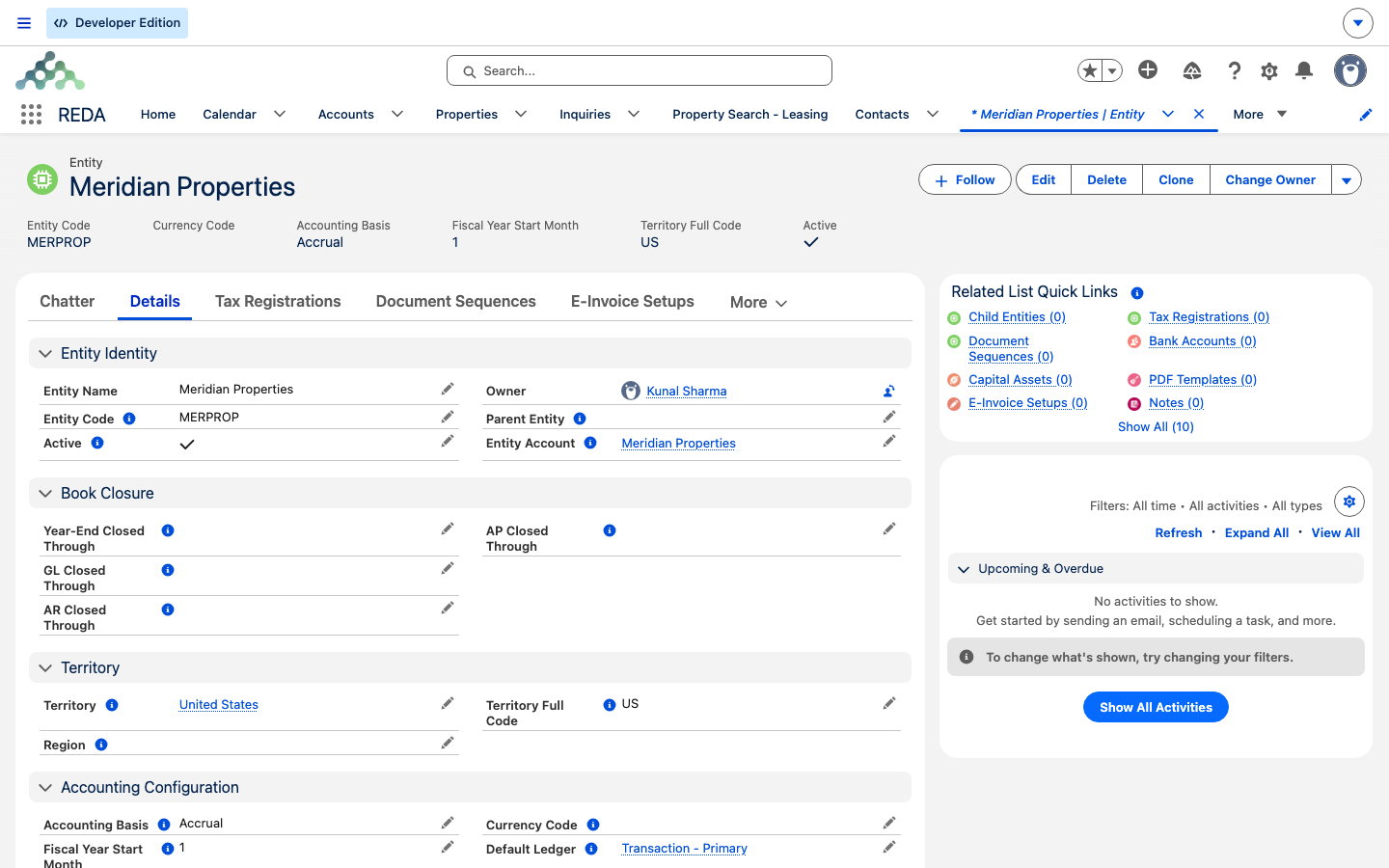
Activation is a single action with an automatic consequence. The instant you check Financial Active on a qualifying account and save, REDA builds an Entity for it and fills in the essentials from the account and its region. There is nothing to key in on the Entity — it arrives ready:
| On the new Entity | Value | Taken from |
|---|---|---|
| Name | The account's name | Account |
| Entity Account | The account itself | A back-link to where it came from |
| Entity Code | The account's Account Code | Account |
| Territory | The account's Territory | Account |
| Region | The account's Region | Account |
| Currency Code | The region's currency | Region |
| Accounting Basis | Accrual | Fixed default |
| Fiscal Year Start Month | January | Fixed default |
| Active | Yes | Fixed default |
Because the Entity Code and currency come straight from the account and its region, set the Account Code, Region and Territory before you activate, so the new Entity carries exactly what you intend. The Accounting Basis (Accrual) and Fiscal Year Start Month (January) are fixed at creation; if a client's books need different values, adjust them on the Entity afterward through your accounting configuration.
Activating an account, step by step
Here is the full sequence for onboarding a landlord — Continental Holdings — into accounting.
After activation: configuring the Entity
A fresh Entity can receive posted invoices right away, but tenant payments, management fees and owner draws each need a setting or two on the Entity before they will run for this client. Set them now, while you are here, rather than discovering them missing on the first run. The fields fall into three groups — banks, products, and one optional property — plus a set of accounting defaults that belong to REDA Financials.
The bank accounts
| Field | What it is | What it drives · what breaks if blank |
|---|---|---|
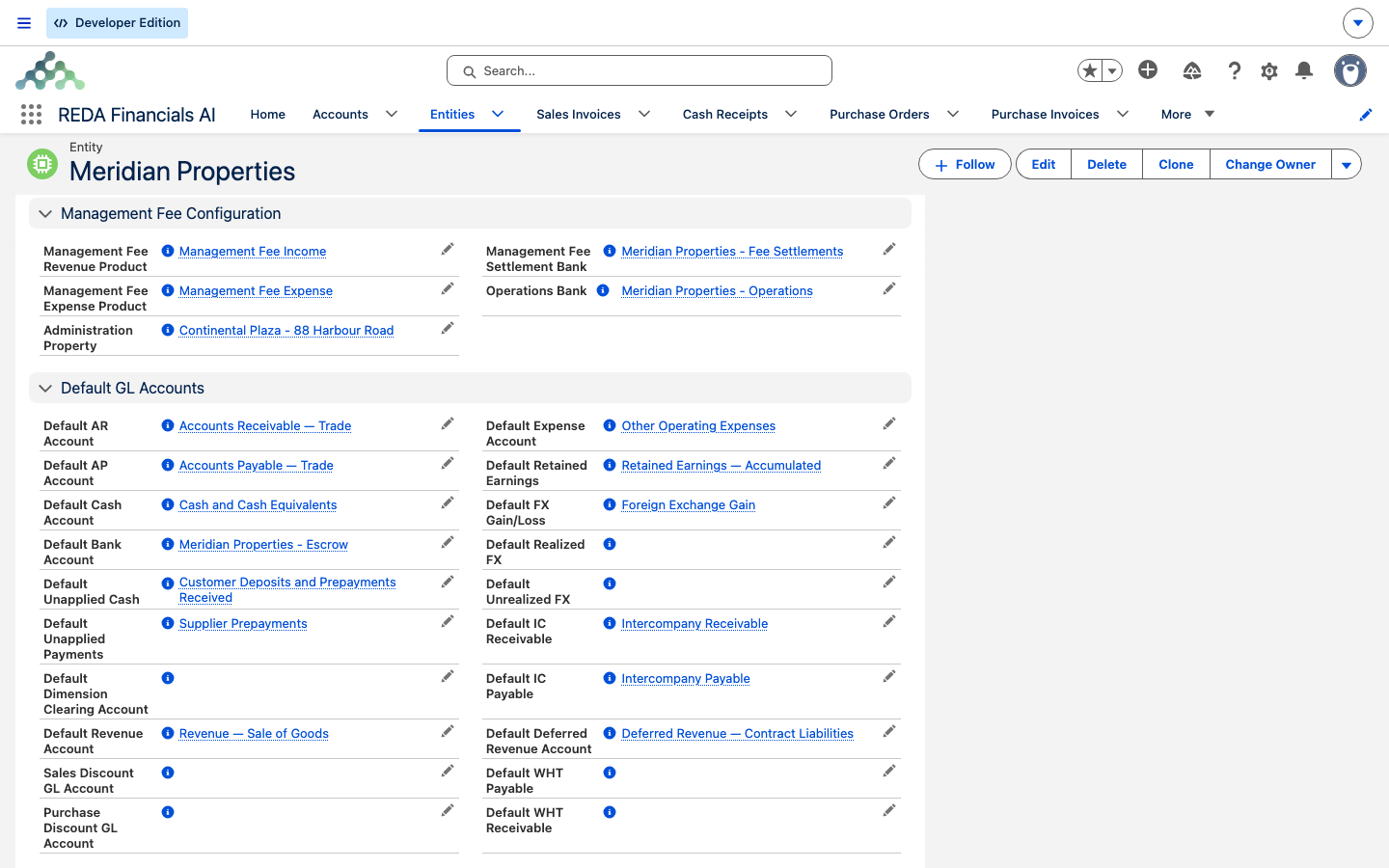
| Operations Bank | Your firm's day-to-day operating bank account | When a management-fee run settles, it moves the earned fee out of rent escrow and into this operating account. Blank → the earned fee has nowhere to land |
| Management Fee Settlement Bank | The bank used to settle the fee documents a fee run creates. Set it on both your firm's Entity and each landlord's Entity | The fee run records the receipt and payment for the fee through this bank. Blank → the run can't settle this client's fee |
The products
A "product" here is the accounting product that carries the general-ledger account a line posts to. The fee has two sides — your firm earns it, the landlord pays it — so the two products live on two different entities.
| Field | Set it on | What it drives · what breaks if blank |
|---|---|---|
| Management Fee Revenue Product | Your property-management firm's Entity | Supplies the revenue line when your firm bills the fee (your firm earning it). Blank → the revenue side of the fee run has no product to post to |
| Management Fee Expense Product | Each landlord's Entity | Supplies the expense line on the landlord's fee bill (the landlord paying it). Blank → the landlord's fee document can't be built and the run skips them |
| Owner Draw Product | Each landlord's Entity | Supplies the line on an owner-equity-draw payout (paying the owner their available balance). Blank → the draw document can't be built and the run skips them |
The administration property
Administration Property is optional. If you set it, the journal that settles a management-fee run books its lines against this one property — handy when you want all fee-settlement postings to sit under a single administrative property in reporting. Leave it blank and nothing breaks; the settlement lines simply aren't tied to a dedicated property.
The accounting defaults (for tenant payments)
The Entity also carries three defaults that belong to REDA Financials itself: Default Bank Account, Default Cash Account, and Default Ledger. When you record a tenant payment, REDA creates a cash receipt and copies these three onto it, so they must be set for the entity that owns the property being paid. See the REDA Financials help center for what each one means inside the ledger.
The Region-currency rule
The Entity's currency is inherited from its Region at creation, and REDA keeps them aligned. If you later change the Entity's Region to one whose currency no longer matches the Entity's currency, the save is blocked:
Currency consistency matters beyond this one message: a management-fee run cannot cross currencies. The landlord's Entity and your firm's Entity must share the same currency, or the fee for that landlord errors out. Keep every entity you intend to run fees between on one currency. See Management Fee Automation.
Worked example: Meridian Properties and Continental Holdings
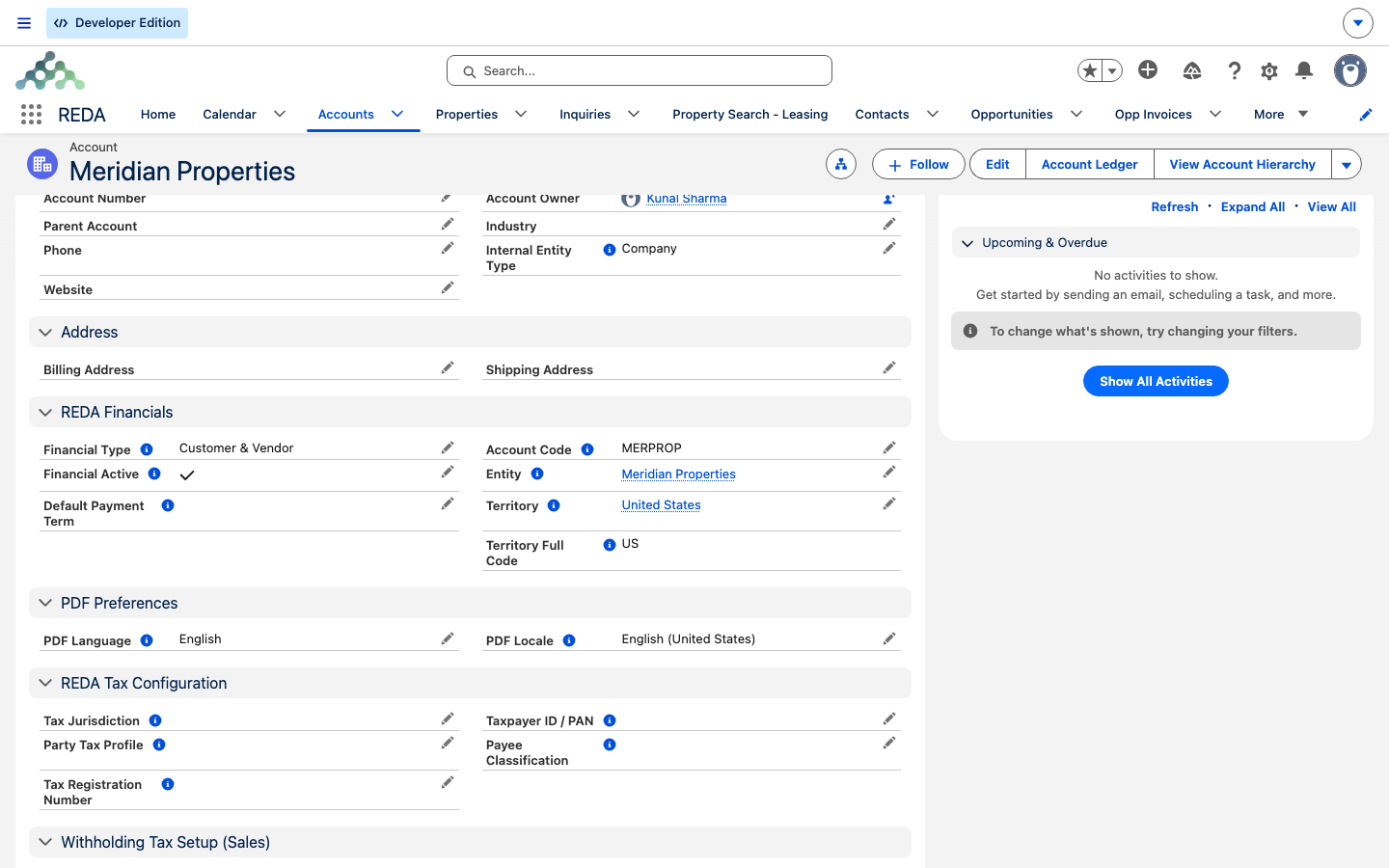
Two accounts, two entities — one for the managing firm, one for a landlord it serves. Both live in the Harbour District region and share one currency, so a fee run between them is allowed. (Give each a territory too — it's a required routing dimension; the exact territory you pick doesn't affect the currency.)
Reference: every Entity setting
One place to see both halves — the fields activation sets for you, and the fields you set afterward.
| Entity field | Set by | Drives / where it's used |
|---|---|---|
| Name | Activation (from the account) | Identifies the set of books everywhere |
| Entity Code | Activation (from the account's Account Code) | Short reference on documents and reports |
| Region | Activation (from the account) | Currency source; region-level reporting |
| Territory | Activation (from the account) | Routing dimension carried onto the Entity |
| Currency Code | Activation (from the region) | The Entity's currency; must match the Region |
| Accounting Basis | Activation (Accrual, fixed) | How the ledger recognises transactions |
| Fiscal Year Start Month | Activation (January, fixed) | The ledger's financial year |
| Active | Activation (Yes, fixed) | Whether the Entity is in use |
| Entity Account | Activation (back-link, system-managed) | How the billing bridge traces an invoice to its books |
| Operations Bank | You, after activation | Management fee settlement — where earned fee lands |
| Management Fee Settlement Bank | You, after activation | Management fee run — settles fee documents |
| Management Fee Revenue Product | You (PM firm Entity) | Fee run — your firm's revenue line |
| Management Fee Expense Product | You (landlord Entity) | Fee run — the landlord's expense line |
| Owner Draw Product | You (landlord Entity) | Owner draws — the payout line |
| Administration Property | You, after activation (optional) | Fee settlement — attributes settlement journal lines |
| Default Bank / Cash Account / Ledger | You, after activation | Recording tenant payments — defaults on the cash receipt |
The account carries more than the switch
While you have the account open, a few adjacent settings are worth setting in the same pass — they live on the account, not the Entity.
- Financial Type marks whether the account behaves as a Customer, a Vendor, or Customer & Vendor in accounting.
- Electronic-payment (EFT) payee details — the bank details REDA uses when it pays or collects electronically. See Bank EFT / NACHA Processing.
- Returned-payment (NSF) fee settings — whether, and how much, to re-bill when a payment bounces. See Recording Tenant Payments.
Where to go next
- How REDA Works with REDA Financials — the whole seam this activation sits inside.
- Payment & Balance Sync — why an un-activated receivable account is the top bridge failure.
- Recording Tenant Payments — where the Entity's bank, cash and ledger defaults are used.
- Management Fee Automation — where the fee products and settlement bank come into play.
- Owner Draws & Owner Statements — where the Owner Draw Product is used.
Frequently asked questions
Work through the four prerequisites. The accounting extension must be turned on for your workspace; the account must be record type Client (or Internal Entity set to Company); and it must have an Account Code, a Region, and a Territory. If any one is missing, checking the box quietly does nothing. Add the missing piece and save again.
No. Tenants are customers — they are named directly on their documents. Activation is only for accounts that keep their own books, which means your landlords and your own property-management firm.
The invoice's receivable account decides. Its linked Entity is the set of books that receives the sales invoice — which is why every receivable account used on invoices must be an activated Entity.
Because the new region's currency no longer matches the Entity's currency. REDA shows: "Entity Currency must match the Region Currency. Please ensure both currencies are aligned." Choose a region whose currency matches the Entity, or align the currencies, then save.
Almost always because that landlord's Entity is missing its fee settings — the Management Fee Settlement Bank or the Management Fee Expense Product — or because the landlord's Entity and your firm's Entity are in different currencies (a fee run cannot cross currencies). Fix the configuration and re-run. See Management Fee Automation.
REDA shows: "Default Cash Account is not defined for the entity." The payment resolves the entity through the property's owner account, and that Entity needs a Default Cash Account set. Add it on the landlord's Entity. See Recording Tenant Payments.
No. The Management Fee Revenue Product goes on your property-management firm's Entity — the firm earns the fee. The Management Fee Expense Product and the Owner Draw Product go on each landlord's Entity — the landlord pays the fee and receives the draws.
Was this article helpful?