
Property Dimensions in Financial Reports
"Which building made money last quarter?" is only answerable if the ledger knows which building each amount belongs to. "How did residential do against commercial?" needs every figure to know what kind of space it came from. REDA makes questions like these answerable by stamping five property attributes — the unit, its building, its portfolio, its type, and its region — onto every accounting record it creates. Because they ride on the records themselves, a single rent charge can be counted five ways at once, and you can pull a profit-and-loss view for one unit, a whole building, an owner's portfolio, or an entire region from the same tagged figures. This article explains what those five dimensions are and what each one answers, how one invoice or receipt physically carries them, how REDA fills them in automatically, what you as an administrator are responsible for, and how they roll up into property, portfolio, and region reports. No accounting background is assumed.
Access you'll need. Nothing to configure for the dimensions themselves — all five are registered with the accounting engine out of the box, so a standard install already carries them. Your one responsibility is data quality on your properties: keeping each property's portfolio, region, type, and parent building set. That's covered below.
The five dimensions
A dimension is simply an attribute you can group financial figures by — the way you might sort a spreadsheet by region or by product line. Instead of leaving that grouping to a spreadsheet after the fact, REDA attaches five property attributes to every accounting record at the moment it's created, so the grouping is already baked in. Here is what each one is, and — more usefully — the question each one lets you answer:
| Dimension | Answers | What it captures |
|---|---|---|
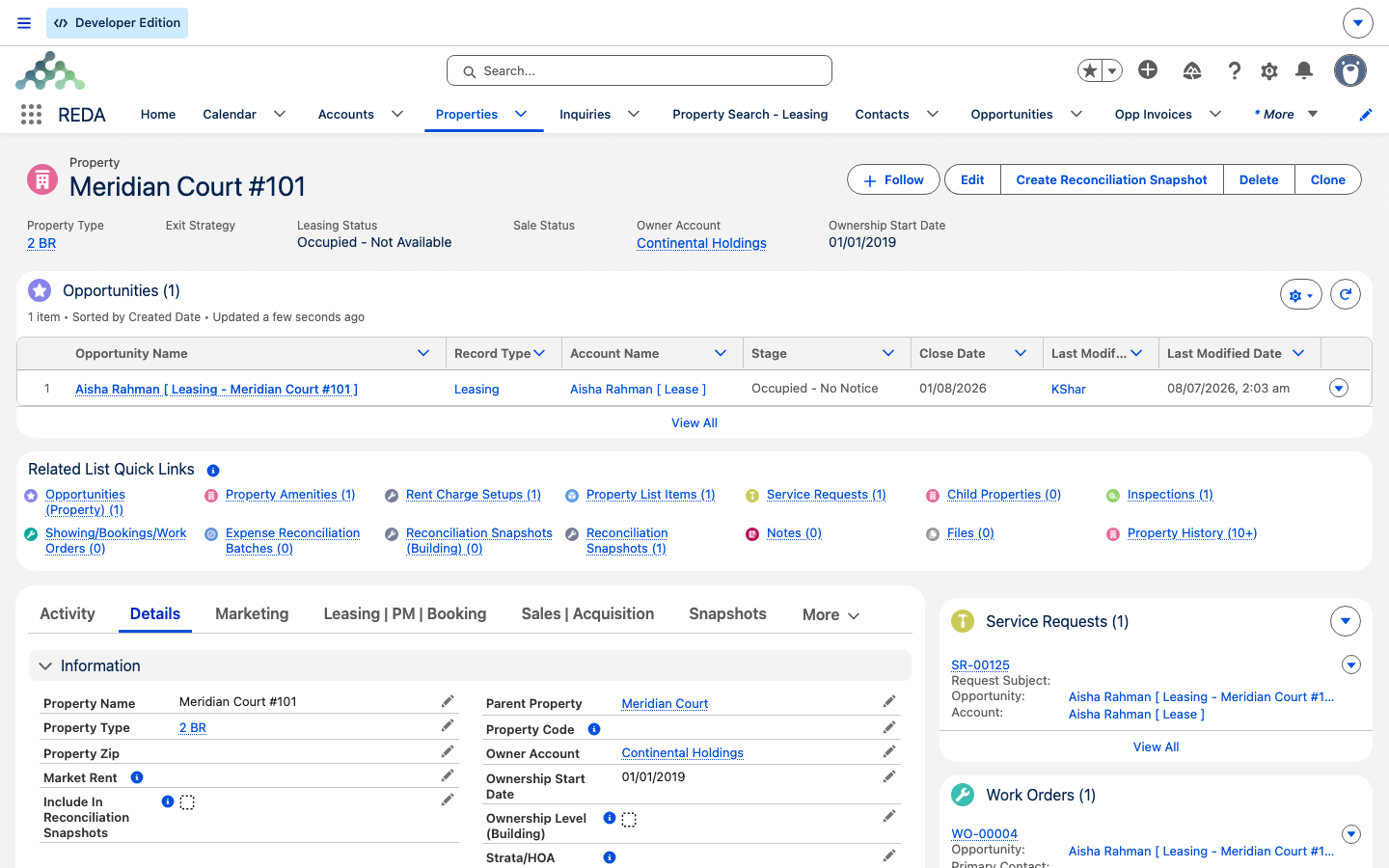
| Property | Which unit? | The specific unit the amount relates to — Meridian Court #101. This is the primary, most granular dimension. |
| Parent Property | Which building? | The building or development the unit sits under, so unit figures roll up to the building — Meridian Court. |
| Portfolio | Which portfolio class? | The broad investment class the property belongs to — one of Residential, Commercial, or Industrial — for portfolio-class analysis. |
| Property Type | What kind of space? | The finer sub-classification — apartment, office, warehouse — for comparing one kind of space against another. |
| Region | Which geography? | The geographic area or operational territory the property is in — the Harbour District. |
The value of carrying all five is range. The same posted rent figure answers "how did this unit do?", "how did the whole building do?", "how did the residential portfolio do?", "how did residential compare to commercial?", and "how did the Harbour District perform?" — five questions, one tag set, no reclassifying entries by hand. This is why the dimensions are worth understanding even though there's nothing to switch on: they're the reason a property-level report is possible at all, and the reason a portfolio or region report is just a different grouping of the very same records rather than a separate bookkeeping exercise.
How one invoice carries the dimensions
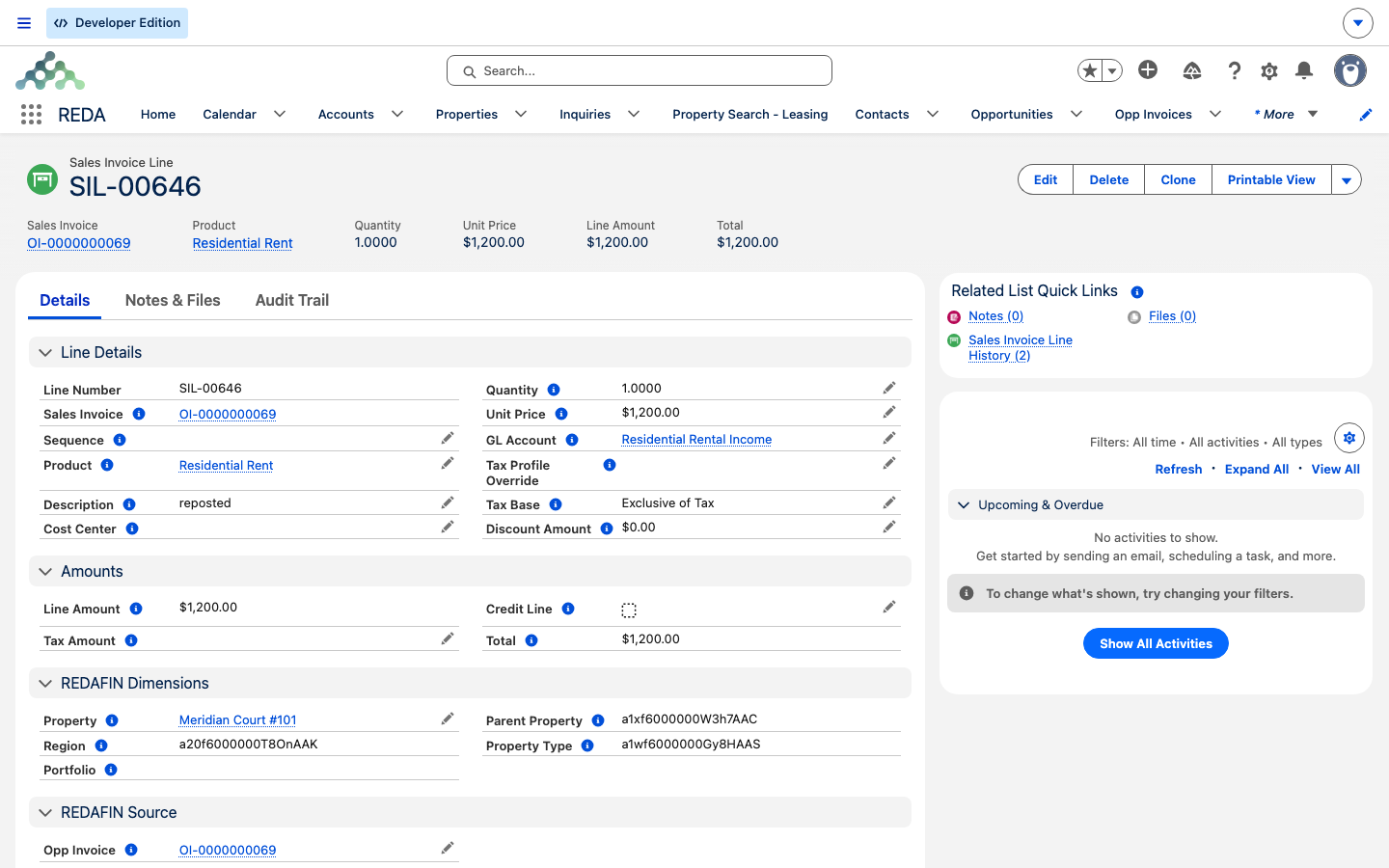
It's easiest to see this on a single document. Suppose a 1,200.00 July rent charge is raised for Meridian Court #101 and flows through to accounting. The accounting record it produces — a sales invoice line — carries the five dimensions like this:
| Dimension on the invoice line | Value for Meridian Court #101 | Stored as |
|---|---|---|
| Property | Meridian Court #101 | A live link back to the unit |
| Parent Property | Meridian Court | A captured snapshot |
| Portfolio | Residential | A captured snapshot |
| Property Type | Apartment | A captured snapshot |
| Region | Harbour District | A captured snapshot |
There's an important distinction in that last column. Property is a live link — the record points back to the unit record itself, so it always reflects the current unit. The other four are captured snapshots — REDA copies the building, portfolio, type, and region values onto the record at the moment it's created, and those copies stay fixed. That design is deliberate: your financial history shouldn't silently rewrite itself if a property is later reclassified. It also has a practical consequence you'll meet again below — correcting a property's portfolio or region after a record has posted does not reach back and change the snapshot already on that record.
A cash receipt works the same way, with two extra tags. When you record a tenant's payment, the receipt is stamped with the same five property dimensions plus the contact (who paid) and the lease it relates to. That's what lets you analyse collections by tenant as well as by property.
Which accounting records carry them
The five dimensions ride on every kind of accounting record REDA generates — not just invoices. The most important carrier is the accounting transaction: the posted, reportable figure where every path ultimately lands.
| Accounting record | Carries the five dimensions | Extra reporting tags |
|---|---|---|
| Sales invoice line | Yes | Links back to the source REDA invoice |
| Purchase invoice line | Yes | — |
| Journal entry line | Yes | — |
| Cash receipt | Yes | Also the contact and the lease, for payer-level analysis |
| Cash disbursement | Yes | — |
| Accounting transaction | Yes | The reporting grain — every path lands here |
The practical takeaway is the last row. Whether an amount starts life as an invoice line, a journal line, a receipt, or a disbursement, when it posts it flows through to an accounting transaction — and it carries its five property dimensions with it. Because reporting reads from the transactions, you never have to chase dimensions across half a dozen record types: whatever a record carries lands on the transaction, and the transaction is what your property, portfolio, and region reports are built on. That single convergence point is what makes "invoices and receipts and journal entries and disbursements" collapse into one clean reporting surface.
How REDA fills the dimensions in
Two things have to happen for a property-filtered report to work: the dimensions have to be stamped onto records, and they have to be registered so the accounting engine carries them all the way through to posted transactions. REDA does both for you.
Stamping happens as REDA creates each record. When a rent invoice bridges to accounting, its Property is set from the invoice's own unit — the live link straight back to Meridian Court #101. When you record a payment, the receipt is stamped with its property, its lease, and the contact who paid. From that Property, REDA then derives the other four values — the parent building, the portfolio, the type, and the region — and captures them onto the record as snapshots. So all five values are filled in at the moment the record is born, without anyone re-keying anything.
Registration is what makes those stamps count in reporting. A value on a record is just a label until the accounting engine is told to treat it as something to group by. REDA ships all five dimensions already registered with the accounting engine as reporting dimensions — an attribute the ledger is allowed to slice figures by. Because they're registered that way, every posted entry inherits the five values and carries them onto its accounting transactions. Nothing is configured at install time; the registrations ship with the extension and it simply works.
The two halves depend on each other. Stamping without registration would fill in the fields but leave them invisible to reports; registration without stamping would give you empty columns. Shipped together, they mean a rent charge raised against Meridian Court #101 arrives in the ledger already knowing its unit, building, portfolio, type, and region — and stays sliceable by all five.
What you set vs what's automatic
Almost all of this is automatic. The only place you supply information is on the property record — and you're setting the sources the dimensions are drawn from, not the dimensions themselves.
| You set this on the property | REDA does this automatically |
|---|---|
| The property's Portfolio (for example Residential, Commercial, or Industrial) | Links Property as a live link on every accounting record |
| The property's Region | Captures the building, portfolio, type, and region snapshots onto each record |
| The property's Property Type | Carries all five onto the posted accounting transaction |
| The property's Parent Property (its building or development) | Keeps all five registered as reporting dimensions — nothing to switch on |
In other words: you attribute the property once, and every invoice, receipt, journal entry, and disbursement that ever touches it inherits those attributes for the life of the ledger. There is no per-invoice tagging step and no report-time reclassification — the accuracy of every property report traces straight back to how completely the property was set up.
Worked example: one property, four P&L views
Meridian Court #101 is an Apartment in the building Meridian Court, classed in the Residential portfolio, in the Harbour District region. In July it sees three amounts, and every one is tagged with the same five dimensions the moment it posts:
Because all three amounts landed on transactions tagged five ways, the same records answer four different questions with nothing more than a change of grouping. A profit-and-loss view for the unit reads directly:
| Meridian Court #101 — July P&L | Amount |
|---|---|
| Rent income | 1,200.00 |
| Maintenance expense | (300.00) |
| Management fee | (128.00) |
| Net | 772.00 |
Now roll the grouping up. Because the same records also carry Parent Property, Portfolio, and Region, #101's 772.00 contributes — without being re-entered — to each of these:
| Group by this dimension | The report you get | #101's contribution |
|---|---|---|
| Property | Meridian Court #101 on its own | Net 772.00 |
| Parent Property | Meridian Court — #101 rolled up with its sibling units | 772.00 added into the building total |
| Portfolio | Residential — every residential-class property together | 772.00 added into the Residential portfolio total |
| Region | Harbour District — every property in the region | 772.00 added into the region total |
One set of records; four levels of P&L, each just a different grouping. That is what the dimensions buy you.
Now the failure case, because it's the single most common support question. Suppose #101's Portfolio was left blank when its July rent posted. The 1,200.00 still posts to the ledger and still shows up in the unit's own P&L (Property is a live link). But the portfolio snapshot on those records is empty — so they never join the Residential portfolio total, and any report grouped by portfolio comes up light. And because snapshots are frozen at stamp time, going back and setting the property's portfolio afterward doesn't restamp the records already posted. This is the classic "the numbers are in accounting but not on the portfolio view" symptom, and the property's portfolio value is the first thing to check.
The data-quality part — your job
The extension handles the plumbing; you supply clean source data. Every dimension traces back to something on the property record, so the accuracy of a property, portfolio, or region report is only as good as the property's own attributes. Keep these populated on every property before it starts billing:
| Dimension | What it answers | On the record it's a… | Comes from | Keep this populated |
|---|---|---|---|---|
| Property | Which unit? | Live link | The unit on the invoice or receipt | The lease's link to its unit |
| Parent Property | Which building? | Snapshot | The unit's parent building or development | The parent set on the unit |
| Portfolio | Which portfolio class? | Snapshot | The property's portfolio class (Residential / Commercial / Industrial) | The property's portfolio class |
| Property Type | What kind of space? | Snapshot | The property's type | The type set on the property |
| Region | Which geography? | Snapshot | The property's region | The region set on the property |
What this enables
Once the dimensions flow, the reporting they unlock includes:
Where to go next
- How REDA Works with REDA Financials — the accounting bridge these dimensions ride on.
- Owner Draws & Owner Statements — the portfolio statements that consume the dimensions.
- Management Fee Automation — another property-tagged accounting record.
- Portfolios — how properties are grouped into the portfolios reports slice by.
- Property Statuses Explained — keeping the source attributes clean before billing.
Frequently asked questions
No. All five are registered with the accounting engine when the extension is installed. Your responsibility is data quality — keeping each property's portfolio, region, type, and parent building set.
Property is the individual unit — Meridian Court #101. Parent Property is the building or development it sits under — Meridian Court. Carrying both is what lets unit figures roll up cleanly into a building-level total.
Its portfolio was almost certainly blank when those records posted. The four non-Property dimensions are captured as snapshots at the moment a record is created, so if the property's portfolio wasn't set then, the record carries no portfolio and never joins the portfolio total. Fixing the property afterward doesn't restamp records already posted.
No. The building, portfolio, type, and region are frozen snapshots taken when each record posted, so already-posted records keep their original values. Records created after the change carry the new value. Only the Property tag is a live link that always reflects the current unit.
Yes. Sales invoice lines, purchase invoice lines, journal entry lines, cash receipts, and cash disbursements all carry the five, and everything posts through to the accounting transaction — the single grain your property, portfolio, and region reports are built on.
Receipts carry the contact and the lease on top of the five property dimensions, so a payment can be analysed by who paid and against which lease, as well as by which property.
In REDA Financials, the accounting extension — you group the accounting transactions by the dimension you want. See the REDA Financials help center for the report-building steps. This article covers only how the records get tagged so those reports are possible.
The five property dimensions ship ready to use. Adding others belongs to the accounting side and is an implementation topic rather than something covered here.
Was this article helpful?