
Package & Parcel Desk
When a courier drops a parcel at the front desk, you need to log it against the right resident and, later, hand it over with proof it was collected. This article shows you both halves: receiving a package and completing a signature-captured handover. It also explains one thing worth knowing up front — a package in REDA is a ticket. It's the only ticket type that runs a simple two-step life of its own, Received then Handed Over, which makes the desk a fully auditable, numbered log with no separate paper book required.
Access you'll need. Creating and handing over package tickets requires the REDA - Property Leasing User or REDA - Property Management User permission set.
Packages are tickets
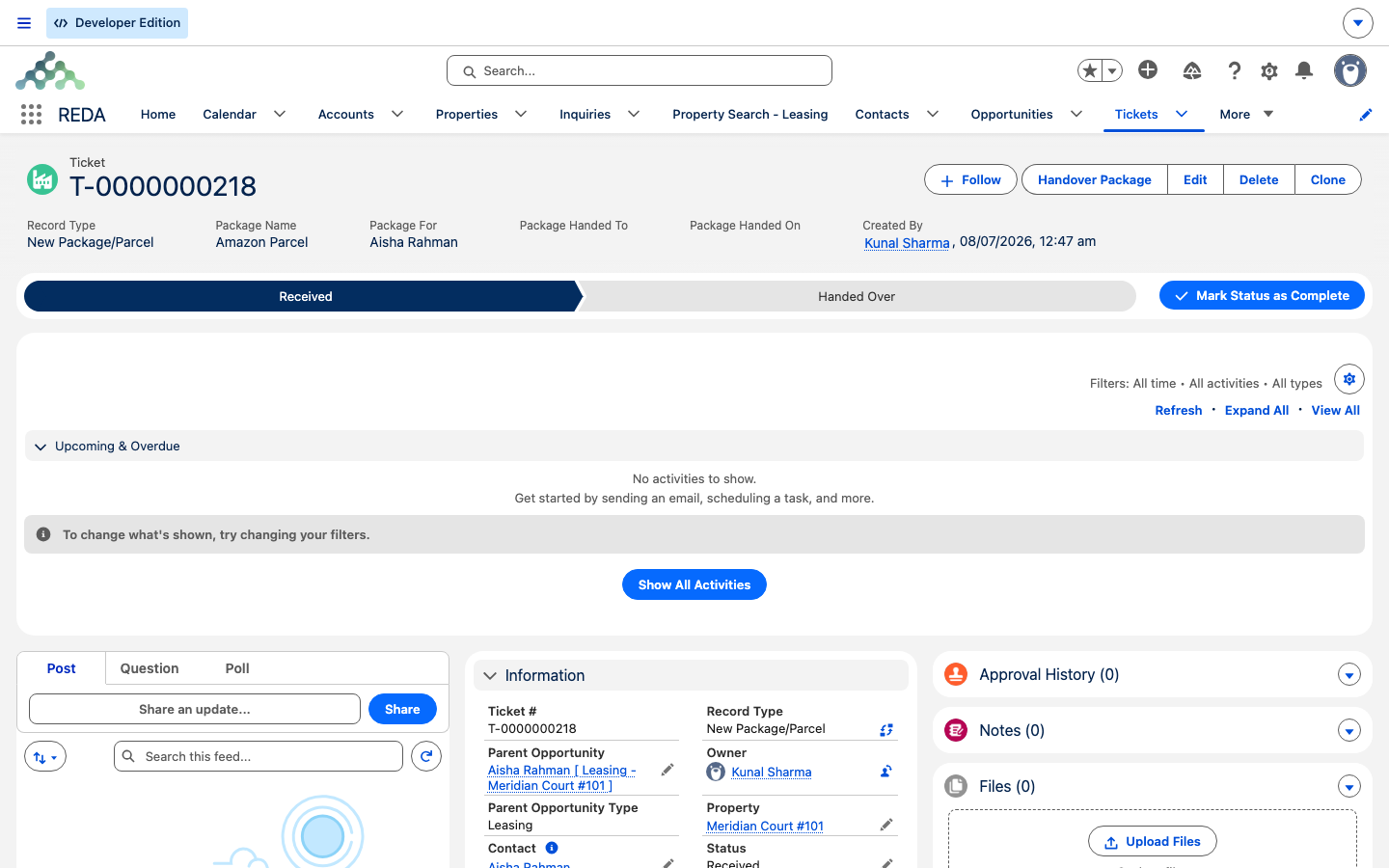
A ticket in REDA is a numbered, tracked record for one piece of work, with its own status path. Most ticket types move through New, In Process, and Closed. A package is the exception: its record type is New Package/Parcel, and it uses only two statuses — Received (the default when you log it) and Handed Over. There is no New, In Process, or Closed.
Because a package isn't tied to a deal, it behaves more simply than other tickets: it doesn't move any lease or sale forward, raises no invoices, and runs no approval ladder. Receiving and handing over are the entire process. Every ticket, packages included, gets an automatic number (T-0000000000), so the shelf label and the record always match.
Receiving a package
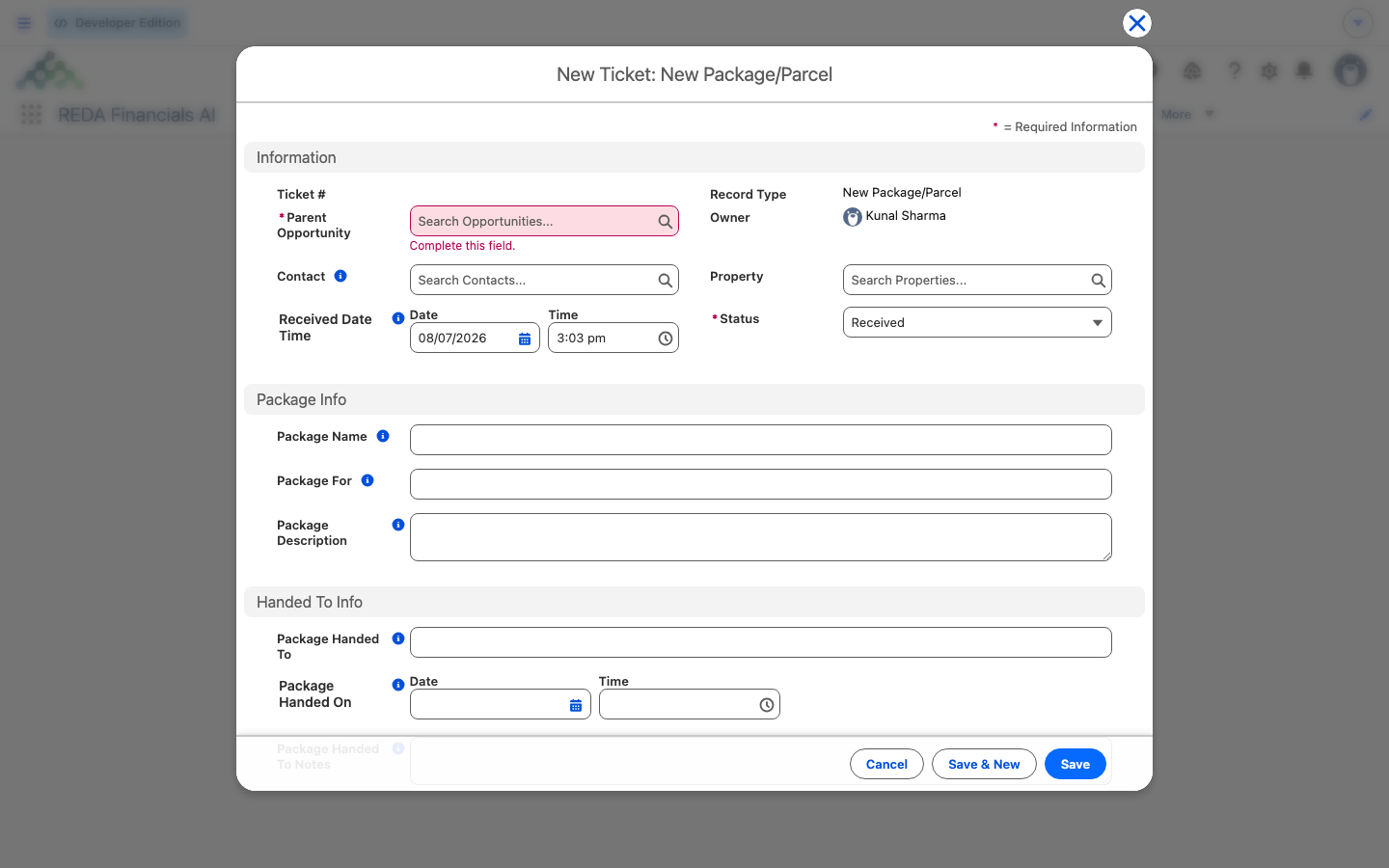
Log an incoming parcel through the New Package / Parcel global action. REDA opens a short intake screen:
The single-active-lease check is the same gate the visitor desk uses, and for the same reason: a parcel logged against the wrong lease is worse than a parcel not yet logged. If the intake screen refuses a unit — because it has no lease currently being billed, or more than one — the package can't be received through this screen against that unit. Set it aside on the shelf and check the unit's lease status with whoever manages leasing before trying again; the parcel isn't lost, just not yet logged.
Handing a package over
When the resident collects the parcel, open its ticket and click Handover Package. REDA prompts you:
Finding pending packages
The Tickets tab holds every kind of ticket, so to see just the parcels waiting to be collected, filter it to the package record type with Status = Received. Saving that as a list view gives you a standing "pending shelf" — the packages received but not yet handed over. Because Received Date Time defaults to now, that list is also a chronological intake log, so there's no need for a separate logbook.
Worked example: a courier drop-off
A courier delivers a parcel for the resident of Meridian Court #101. The front desk clicks New Package / Parcel and picks the property; REDA finds its one accounting-active lease and lets the intake continue. The clerk selects the resident contact, enters Package Name "1Z-999-AA-001" and Package For "A. Rahman", snaps a photo, and saves — ticket T-0000000042 is created with Status Received and a stamped Received Date Time.
Two days later the resident collects it. Staff open the ticket, click Handover Package, enter Package Handed On = now and Package Handed To = "A. Rahman", and capture the on-screen signature. The ticket moves to Handed Over and the signature image is saved on it.
Reference: package fields and statuses
A package ticket runs a two-status path: Received (on creation) → Handed Over.
| Field | What it holds | Required? |
|---|---|---|
| Package Name | The tracking number or label on the parcel | Yes |
| Package For | The name of the intended recipient | Yes |
| Package Description | What it is — carrier, size, notes | No |
| Contact | The resident, when they're a known contact | No |
| Received Date Time | When the desk logged it | Defaults to now |
| Package Handed On | Date and time of the handover | Yes, at Handed Over |
| Package Handed To | The person who collected it | Yes, at Handed Over |
| Package Handed To Notes | Handover notes (ID checked, left with a neighbor, and so on) | No |
| Status | Received → Handed Over | Received on creation |
REDA enforces those requirements with four checks, which double as the field-requirement documentation:
"Name of the intended recipient must be provided."
"Provide the date and time of the package handover."
"Please provide the name of the person to whom the package is handed to."
Each package is one ticket per parcel — REDA doesn't merge several parcels for the same resident, so log each tracking number separately.
Where to go next
- Visitor & Guest Access — the other front-desk registry (a visitor log, by contrast, is not a ticket).
- Understanding Tickets — the engine a package ticket belongs to.
- Ticket Status Reference — where Received / Handed Over sits among the status paths.
- The Lease Record — the accounting-active lease the intake screen checks for.
Frequently asked questions
A required field is blank. REDA shows "Package name must be provided." or "Name of the intended recipient must be provided." — fill in Package Name and Package For.
The handover details are missing. REDA shows "Provide the date and time of the package handover." and "Please provide the name of the person to whom the package is handed to." — enter Package Handed On and Package Handed To.
The intake screen needs exactly one accounting-active lease on the property. If the unit has none, or more than one, the flow stops so the parcel isn't logged against an ambiguous address.
REDA saves it as an image file on the ticket, under Notes & Files. Share it like any other record file if the recipient wants a copy.
New Package/Parcel is the only ticket type that uses the Received → Handed Over path — the two steps are the whole life of a package, so the general ticket statuses don't apply.
It's a file on the ticket. Open the ticket's Notes & Files and share it as you would any record file.
Was this article helpful?