
Changing Charges Mid-Lease
Once a lease is approved and occupied, its chargebook is locked — you can't just edit the rent line or type in a new fee. Every mid-lease money change goes through a ticket instead, and REDA gives you three: Add Lease Charge to start billing something new, Remove Lease Charge to stop billing an existing line, and New Charge/Memo to bill or credit a one-off directly. This article shows which ticket to use when, the fields each one needs, and exactly what REDA creates when you close it. No prior REDA experience is assumed.
Access you'll need. All three require the REDA - Property Leasing User permission set, which covers tickets, charges, and invoices.
Why a ticket, not an edit
Approving a lease locks its charges on purpose — an approved, contracted amount shouldn't be quietly changed. Try to edit a charge on an approved lease and REDA stops you:
Tickets are the auditable way through that lock. A charge created or changed through a ticket only goes live once the ticket itself is approved, so every mid-lease money change carries its own record of who did it and why. That's the whole point: the lock protects the contract, and the ticket documents the exception.
Which ticket do I need?
Pick by what you're trying to do:
| What you need | Ticket | What it creates on close |
|---|---|---|
| Start billing a new recurring or one-time item | Add Lease Charge | A new charge line on the lease, which then invoices normally |
| Stop an existing line from a date onward | Remove Lease Charge | Nothing new — it stamps a stop date on the line |
| Bill a one-off fee, or hand back a goodwill credit, right now | New Charge/Memo | An invoice — positive for a charge, negative for a credit memo |
Add Lease Charge
Use this to add a new line — recurring or one-time — to a live lease. The one field that shapes everything is Charge Type:
- Rent — a recurring rent-family line.
- Admin — a fee. When you pick Admin, you must also choose an Admin Charge setup, and only the setups belonging to this lease's Leasing Rule are offered.
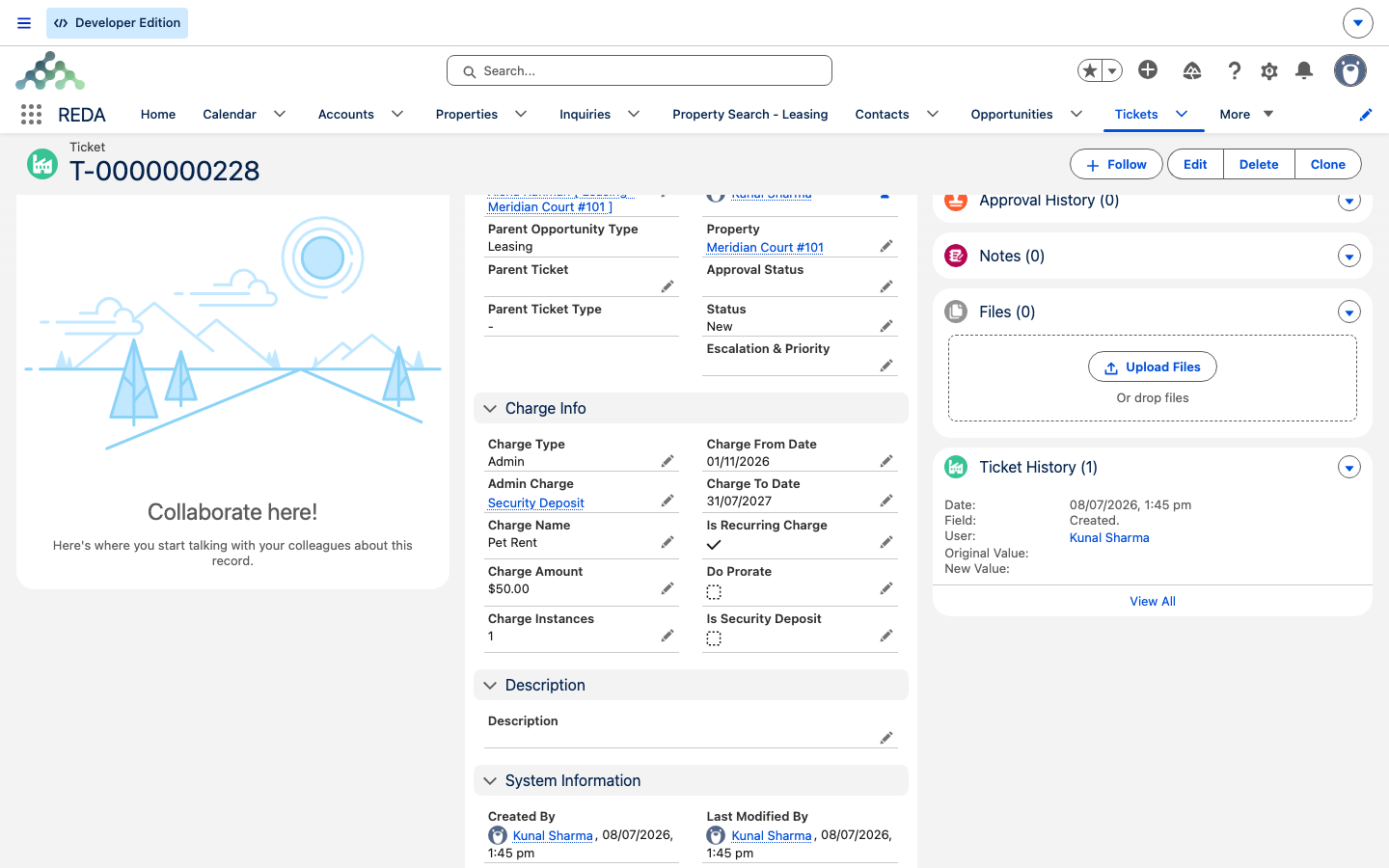
Fill in the charge details — Charge Code, Charge Amount, an optional Charge Name and Billing Comments (leave them blank to inherit the charge code's defaults), the From/To window for a recurring line, Instances, Is Recurring, and Do Prorate if it applies. Proration is only valid on recurring lines.
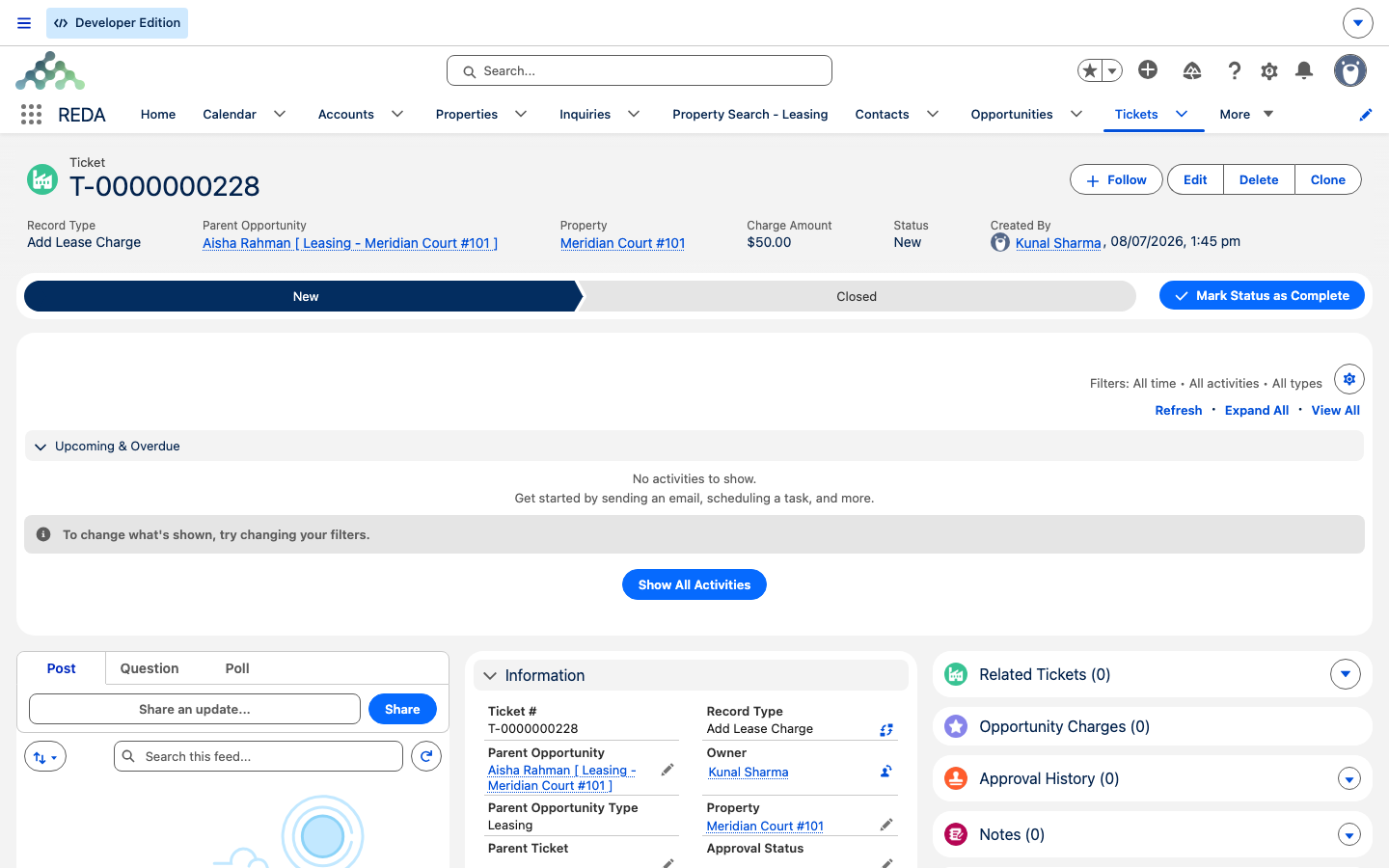
On close, REDA creates the charge line on the lease — a Rent line for Charge Type Rent, an Admin line for Charge Type Admin — copying the name, amount, dates, instances, recurrence, and proration you entered, and linking the ticket as the record of why the line exists. There's no stage change; the lease just gains a line, which then bills through the normal engine.
Remove Lease Charge
Use this to stop billing an existing line without deleting its history. Two fields matter:
- Lease Charge — the active line you want to retire.
- Charge Inactive Date — the date billing should stop.
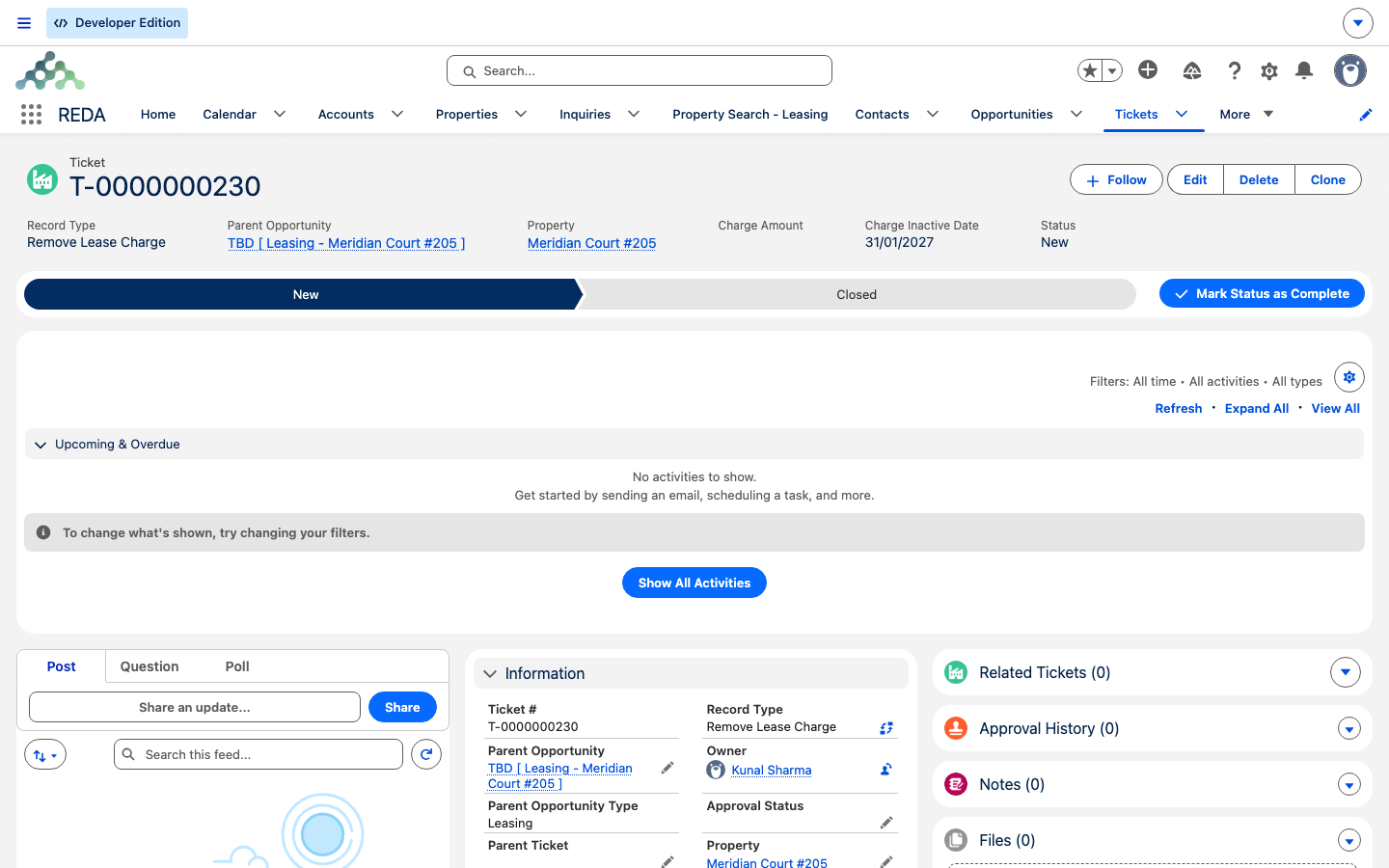
On close, REDA stamps that inactive date onto the chosen line. The line is never deleted — it stays on the lease for history, but billing stops from the inactive date onward. This is a soft switch-off, so the tenant's past invoices and the audit trail stay intact.
New Charge/Memo
Use this to bill or credit a one-off directly — it creates an invoice, not a charge line, so there's nothing recurring to maintain afterward. The key field is Charge/Memo:
- Charge — a one-off bill; the amount must be positive.
- Credit Memo — a one-off credit; the amount must be negative.
REDA enforces the sign against the type:
Set the Charge Amount, a Charge Code (which drives the billing comment, the receivable routing, and the due-date grace), the invoice and due dates (both default to today), an optional covered From/To period, and any billing comment. On close, REDA raises one invoice for that amount — a positive charge or a negative credit memo — with the dates and comment from the ticket. Because it's an invoice, it appears immediately under the lease's Accounting tab and moves the lease's outstanding balance — a positive charge raises what the tenant owes, a negative credit memo reduces it.
Worked examples
All three on Aisha Rahman's occupied lease at Meridian Court #101 (rent 1,200.00 per month):
Reference: fields per ticket
Add Lease Charge — statuses New, Closed:
| Field | Required? | Notes |
|---|---|---|
| Parent Opportunity / Property | Yes | The leasing deal; the property must match the lease's |
| Charge Type | Yes | Admin or Rent — decides the created line's type |
| Admin Charge | When Charge Type = Admin | Only setups under the lease's Leasing Rule are offered |
| Charge Code | In practice yes | Active codes only |
| Charge Amount / Name / Billing Comments | Amount yes | Name and comments blank → charge code defaults |
| From/To Date · Is Recurring · Do Prorate · Instances | Recurring lines need the window | Prorate is recurring-only |
| Is Security Deposit | Optional | Deposits can't recur |
Remove Lease Charge — statuses New, Closed:
| Field | Required? | Notes |
|---|---|---|
| Parent Opportunity / Property | Yes | The occupied lease |
| Lease Charge | Yes | The active line to retire |
| Charge Inactive Date | Yes | Billing stops from this date; the line is preserved |
New Charge/Memo — statuses New, In Process, Closed, Cancelled:
| Field | Required? | Notes |
|---|---|---|
| Charge/Memo | Yes | Charge = positive amount; Credit Memo = negative |
| Charge Amount | Yes | The sign must match the type |
| Charge Code | Yes | Drives the billing comment, receivable routing, and due-date grace |
| Charge Invoice Date / Due Date | Default today | The invoice's dates |
| From/To Date · Billing Comments | Optional | Covered period and comment shown on the invoice |
Where to go next
- Setting Up Lease Charges — the original chargebook and the approval lock.
- Invoices Explained — what the New Charge/Memo ticket creates.
- How Recurring Invoicing Works — how an added line bills going forward.
- Understanding Tickets — the process engine behind all three.
- The Tenant Ledger — where a memo lands in the tenant's balance.
Frequently asked questions
An approved lease is locked: "The record is locked for editing. Charges can not be created and updated if the opportunity or opportunity's parent opportunity or associated ticket is Approved." Use one of the three charge tickets instead.
An Admin-type charge needs its setup: "For Ticket type "Add Lease Charge" Admin Charge must be provided if Charge Type is Admin." Choose the setup from the lease's Leasing Rule.
The sign has to match the type: "Please provide positive amount for a "Charge" and negative amount for "Credit Memo"." Enter a negative amount for a credit memo, a positive one for a charge.
Proration only applies to recurring lines: "Only recurring charges can be prorated." Turn off Do Prorate for a one-time charge.
Removal is a soft switch-off, not a delete. The line stays on the lease for history; only future billing stops, from the Charge Inactive Date onward.
Those two tickets act only on Close — their path is simply New → Closed. The charge line is created, or the stop date stamped, when you close the ticket.
Was this article helpful?