
Email-to-Inquiry
A prospect who emails your leasing address is a lead — but only if someone turns that email into a record your team can work. Email-to-Inquiry does the turning for you. Point a public-facing mailbox at REDA, and every enquiry that arrives there becomes an Inquiry automatically: a brand-new one for a prospect you've never heard from, or an addition to the open inquiry you're already working if they've written before. The prospect's details are read straight from the email, the message is filed on the inquiry, and your team picks it up in REDA rather than in a shared inbox. This article explains how it works, what REDA writes onto the inquiry, and how to start routing an enquiry mailbox through it.
Access you'll need. Working the inquiries that arrive needs your normal access to the Inquiry record. Configuring an intake address is administrator work, covered in Email Services Setup.
What Email-to-Inquiry does
Think of an intake address as a doorway into your pipeline. Your administrator designates a public mailbox — a leasing address, a sales enquiry address — as an intake address for inquiries. From that point on, any email sent or forwarded to that mailbox is read by REDA and turned into an Inquiry, with the message itself filed on the record so nothing is lost in translation.
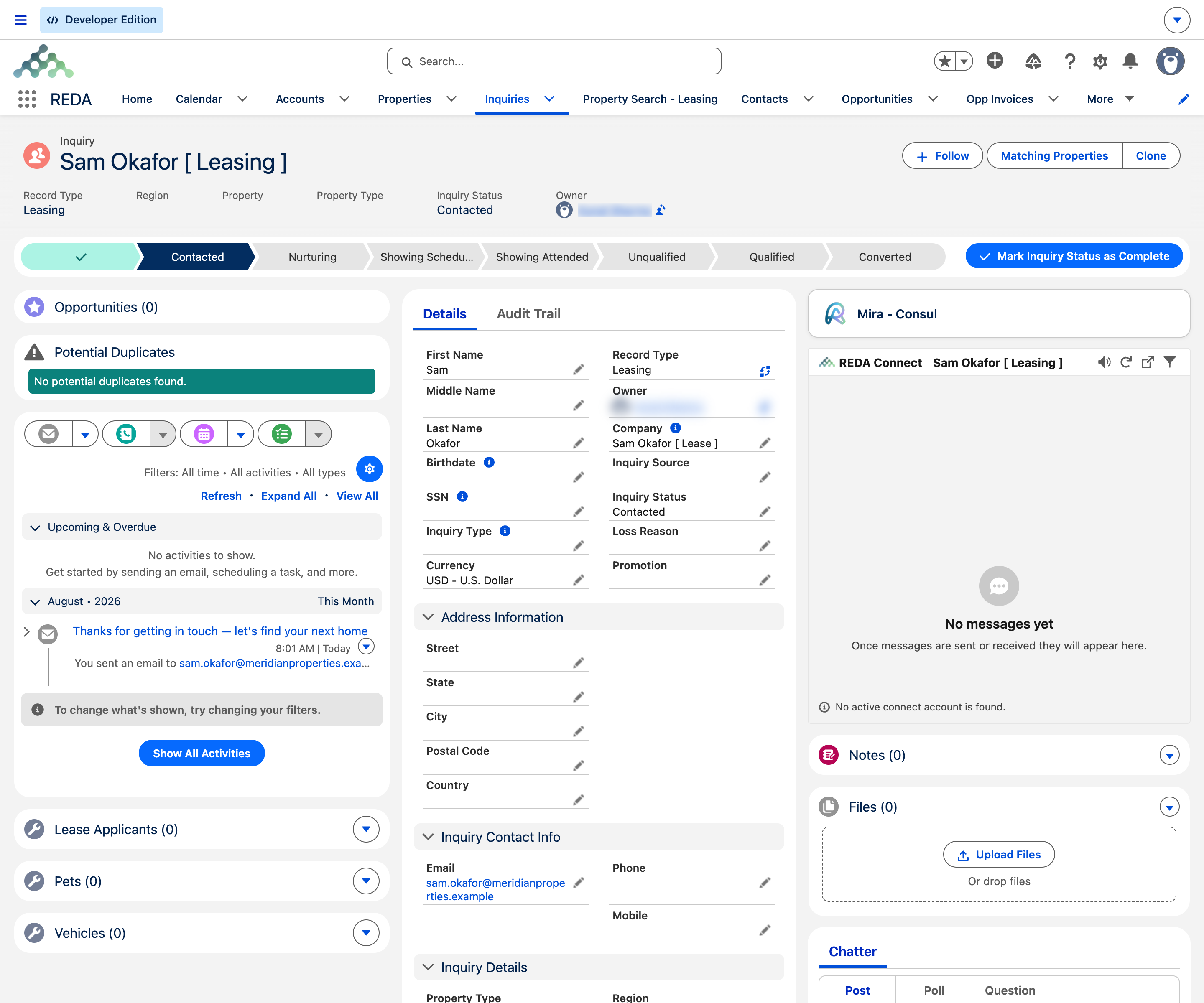
What makes this more than a simple "create a record" rule is that REDA is careful not to create duplicates. Before making a new inquiry, it checks whether the sender already has one open — and if so, it adds the email to that inquiry instead. So a prospect who emails three times over a week ends up with one inquiry carrying all three messages, not three separate records your team has to reconcile.
- New prospect, new inquiry. An email from someone REDA can't tie to an open inquiry creates a fresh one, populated from the email.
- Returning prospect, same inquiry. An email from someone who already has an open inquiry is added to that inquiry, keeping their history in one place.
- The email is always kept. Whether it creates or updates, the original message is filed on the inquiry, formatting and attachments intact.
- Nothing is dropped. If REDA can't create the inquiry for any reason, the email is held for review rather than discarded (see When an inquiry can't be created).
How REDA decides: create or update
Every email to an intake address runs through the same decision. Understanding it tells you why one message spawns a new inquiry and the next lands on an existing one.
The word "open" is doing important work here. Once an inquiry has reached a closed outcome — a prospect who has been qualified and converted, or set aside as unqualified — it no longer counts for this check, so a fresh email from that same person starts a new inquiry rather than reopening an old, resolved one. This keeps a re-engaging prospect from silently landing on a stale record.
What REDA writes onto the inquiry
When an email creates a new inquiry, REDA fills it in from the message so your team has a workable record from the first moment. The values it sets:
| On the inquiry | Where it comes from |
|---|---|
| First Name and Last Name | Read from the sender's name on the email and split into first and last, so the inquiry is named for the prospect. |
| The sender's email address, so future correspondence matches back to this inquiry and your team can reply. | |
| Inquiry Source | Set to Email, marking that this lead arrived by email so it's attributed correctly in your pipeline reports. |
| Record type and defaults | The intake address can be configured to give its inquiries a particular record type and a set of default values — so, for example, a leasing mailbox's inquiries all start life tagged and categorized the way your team expects. |
Alongside these, the email message itself is filed on the inquiry — visible on its Activity timeline and Emails related list — with any attachments saved to the inquiry's Files. From there the inquiry behaves like any other: your team qualifies it, works it, and eventually converts or closes it, with the founding email always attached as context.
What the end user does and sees
For the person working the pipeline, Email-to-Inquiry mostly means inquiries simply appear — but there are a couple of ways you'll interact with it:
- You watch the Inquiries list. Email-sourced inquiries show up in the Inquiries tab alongside those from your website and phone, distinguishable by their Inquiry Source of Email. Work them as you would any inquiry.
- You can forward enquiries in. If a prospect emails a personal mailbox by mistake, forwarding that message to the intake address turns it into an inquiry — a handy way to pull a stray enquiry into REDA.
- You read the founding email on the record. Open the inquiry and its originating message is on the activity timeline, so you have the prospect's own words and any attachment in front of you.
- You reply from the inquiry. Responding from within the inquiry keeps the conversation logged on it; see Emailing from REDA.
When an inquiry can't be created
Occasionally REDA can't turn an email into an inquiry — a message might be missing something it needs, or hit a rule that stops the record from being created. When that happens, the email isn't lost. It's held in the Unmatched Email queue with its full contents — subject, sender, body, and attachments — so an administrator can review it, correct whatever prevented creation, and create the inquiry by hand.
This is the same review queue that catches unmatched auto-synced mail, so your triage team has one place to watch. It's covered in The Unmatched Email Queue.
How to start using Email-to-Inquiry
Worked example: an enquiry becomes an inquiry
Aisha Rahman emails leasing at Meridian Properties asking about a two-bedroom unit. It's the first REDA has heard from her, so Email-to-Inquiry creates a new Inquiry named Aisha Rahman — her name split into first and last from the email, her address recorded on the inquiry, and Inquiry Source set to Email. Because Meridian's leasing intake is configured for their leasing record type, the inquiry starts life categorized the way the leasing team expects. Aisha's original message sits on the inquiry's timeline for the agent who picks it up.
Two days later, before anyone has closed her inquiry, Aisha emails again to ask about parking. REDA sees she already has an open inquiry and adds this second message to it rather than creating a duplicate — so the agent sees both enquiries on one record. Months later, after that inquiry has been converted, Aisha writes about a different unit; because her earlier inquiry is closed, this fresh enquiry correctly starts a brand-new inquiry.
Where to go next
- REDA Email Services Overview — how Email-to-Inquiry sits alongside Auto-Sync and Email-to-Service-Request.
- Email Auto-Sync — how the prospect's later emails and your replies file onto the inquiry.
- Email-to-Service-Request — the same pattern for service requests.
- Working with Inquiries — what to do with an inquiry once it lands in REDA.
- The Unmatched Email Queue — where an email that couldn't become an inquiry waits.
- Email Services Troubleshooting — what to check when enquiries aren't becoming inquiries.
Frequently asked questions
Auto-Sync files emails onto records that already exist. Email-to-Inquiry creates the record: an email to a configured intake mailbox becomes a new Inquiry, or updates the prospect's open one. They work together — once the inquiry exists, later emails sync onto it.
No. If the prospect already has an open inquiry, REDA adds the new email to that inquiry instead of creating a duplicate. A second inquiry is only created once the earlier one is closed.
An intake address your administrator configures — typically a public-facing mailbox like your leasing or sales address. Email sent or forwarded to it is what triggers inquiry creation. Ask your administrator for the address that's wired up in your org.
Yes. Forward the message to the intake address and REDA creates an inquiry from it — a simple way to pull an enquiry that reached the wrong mailbox into your pipeline.
If REDA couldn't create the inquiry from a message, the email is held in the Unmatched Email queue with its full contents, so an administrator can review it and create the record by hand. Nothing is discarded.
Was this article helpful?