
Tenant Referrals
REDA has a built-in refer-a-friend program. An existing tenant refers a prospect through a Tenant Referral ticket; closing the ticket creates the prospect's inquiry automatically; and when the referred person's lease actually goes live, REDA credits both tenants with their configured bonuses as credit-memo invoices. This article walks the whole loop — the ticket fields, why the bonus amounts must be negative, when the money really pays out, and the guard that stops a lease being credited twice. A ticket, in REDA, is a short tracked checklist for one step in a record's life. No prior REDA experience is assumed.
Access you'll need. Creating and working Tenant Referral tickets requires the REDA - Property Leasing User permission set.
How the program works
The whole program is three beats, and only the first is manual work:
Creating the referral ticket
Only an active tenant can make a referral — the referring lease has to be billing-active (moved in and being invoiced). Try it on a lease that isn't and REDA stops you:
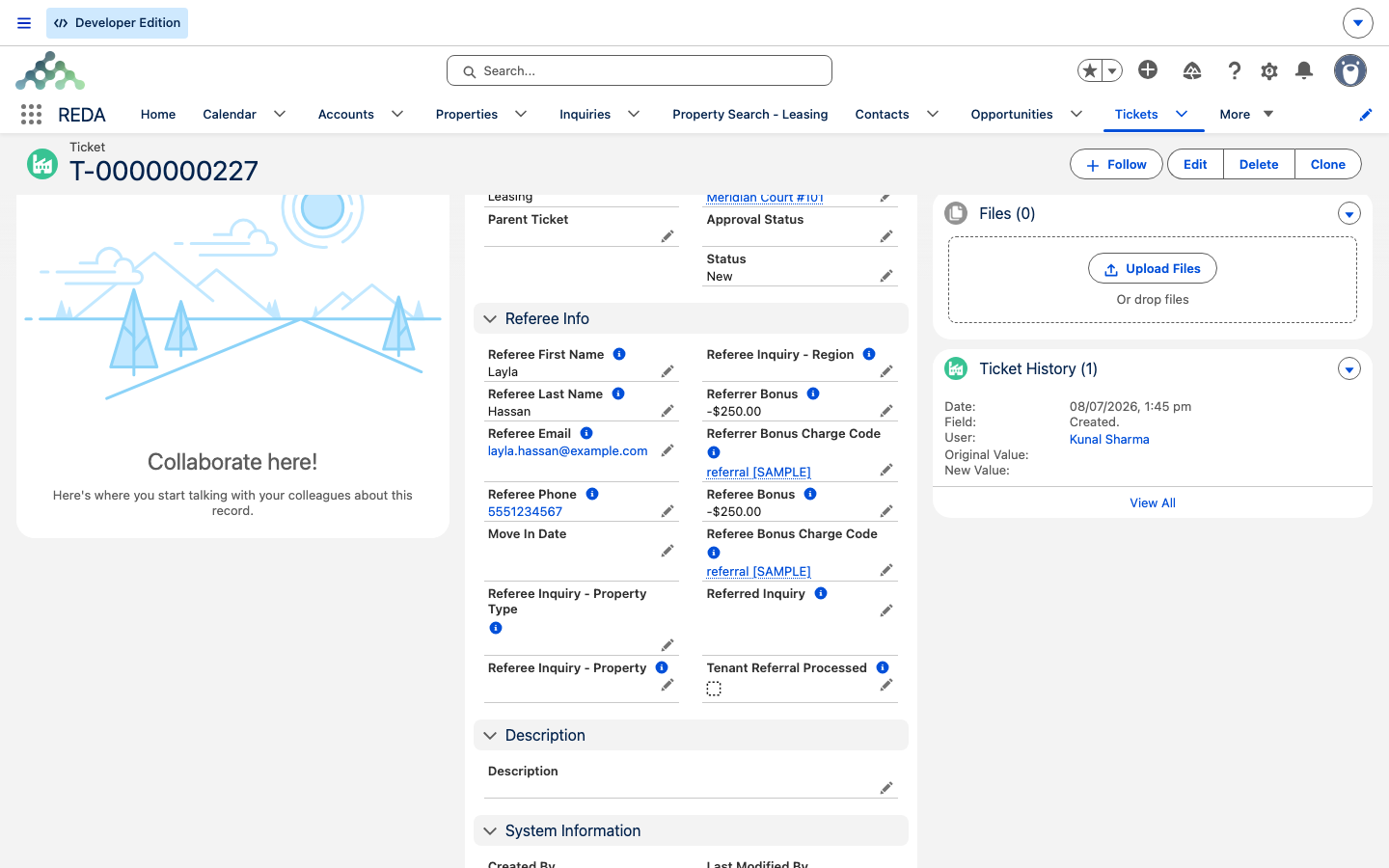
On the ticket you record the referred person's identity. First name, last name, and email are all required, each with its own check:
"Referee Last Name must be provided."
"Referee Email must be provided."
A phone number is optional. You can also record what the prospect is interested in — Referee Inquiry - Region, Referee Inquiry - Property, and Referee Inquiry - Property Type — which seed the inquiry REDA will create later.
Then there are the two bonuses: the Referee Bonus (the credit to the new tenant) and the Referrer Bonus (the credit to the existing tenant who referred them), each with its own charge code. On a fresh ticket, when all four are left blank, REDA fills them in from the property's Leasing Rule — the policy record that carries the program's default amounts — and you can override any of them per ticket.
Each bonus needs its charge code, too — the code that tells REDA where the credit is billed. Set a bonus amount without one and you'll see:
"If referrer bonus amount is provided, then referrer bonus charge code must be provided."
Closing the ticket: the referee's inquiry
The Tenant Referral ticket has just three statuses — New, In Process, and Closed. There is no Cancelled status on this ticket type: once created, it's meant to be worked to a close, and In Process is simply a working status for the team while they qualify the introduction. Nothing automatic happens until you close it.
Setting the ticket to Closed is the moment REDA acts. It creates a leasing inquiry for the referred person — copying the first and last name, email, phone, and the region, property, and property type from the ticket — as an individual inquiry. It links the ticket to that new inquiry and stamps the new inquiry back onto the ticket, so the two point at each other. That link is permanent and travels forward: when the referred person's inquiry is later converted into a lease, the lease carries the referral's provenance with it, which is how REDA knows, at payout time, who to credit.
When the bonuses pay out
Here is the part people most often get wrong: the bonuses do not pay when you close the ticket. Closing the ticket only creates the inquiry. The money is raised later — when the referred prospect's own lease becomes billing-active, that is, when it reaches Occupied - Pending Move In. At that point REDA creates up to two negative credit-memo invoices:
Each credit is billed against the correct entity automatically, resolved from its bonus charge code — so you don't route the money by hand. And once REDA has raised these invoices, it marks the referral as processed, which prevents the same lease from ever crediting twice.
Worked example: Aisha refers a friend
The program's rule defaults are a referee bonus of −300.00 and a referrer bonus of −200.00. Aisha Rahman, an active tenant at Meridian Court #101, refers her friend Fatima Noor:
| Step | You do | REDA does |
|---|---|---|
| 1. The referral | Create a Tenant Referral ticket on Aisha's lease with Fatima's name and email, and her region and property interest | Fills in the bonus fields from the rule: referee −300.00, referrer −200.00 |
| 2. Qualify | Move the ticket New → In Process while your team talks to Fatima | Nothing yet |
| 3. Accept | Set the ticket to Closed | Creates Fatima's leasing inquiry, linked to the ticket both ways |
| 4. Fatima's journey | Fatima's inquiry is qualified, converted, and her lease on Meridian Court #102 at 1,200.00 is signed | The lease carries the referral's provenance from the inquiry |
| 5. Payout | Fatima's lease reaches Occupied - Pending Move In | Raises two credit memos — −300.00 on Fatima's lease and −200.00 on Aisha's — and marks the referral processed |
Reference: ticket fields and the timeline
The fields on a Tenant Referral ticket:
| Field | Required? | Notes |
|---|---|---|
| Parent Opportunity | Yes | The referring tenant's lease — must be billing-active |
| Referee First Name / Last Name / Email | Yes | The referred person's identity |
| Referee Phone | Optional | — |
| Referee Inquiry Region / Property / Property Type | Optional | Seed the auto-created inquiry's interest |
| Referee Bonus / Referrer Bonus | Optional, must be negative | Default from the Leasing Rule when all four bonus fields are blank |
| Referee Bonus Charge Code / Referrer Bonus Charge Code | Required when its bonus is set | Where the credit is billed |
| Referred Inquiry | System-set | Stamped when the ticket closes |
| Tenant Referral Processed | System-set | The double-credit guard — never edit |
And the program timeline — who does what, and when:
| Step | Actor | Outcome |
|---|---|---|
| Tenant refers a friend | Agent creates the ticket on the tenant's lease | Ticket (New), bonuses defaulted from the rule |
| Team qualifies the intro | Agent: New → In Process | — |
| Referral accepted | Agent: → Closed | Leasing inquiry auto-created and linked both ways |
| Referee's journey | Standard funnel: qualify → convert → application → signing | The lease carries the referral's provenance |
| Referee's lease goes live | Automation, when billing turns on | Two credit-memo invoices raised; referral marked processed |
One thing to note: a Tenant Referral ticket never moves any lease stage. Its only outputs are the inquiry it creates on close and, later, the credit invoices the lease automation raises.
Where to go next
- Converting Inquiries — the journey the referred person's inquiry takes to a lease.
- From Application to Move-In — the point where the bonuses pay out.
- Leasing Rules: the Policy Engine — where the program's default bonuses live.
- Invoices Explained — how credit memos show on the tenant's balance.
- Understanding Tickets — the process engine behind the ticket.
- The Lease Record — the referral provenance the lease carries.
Frequently asked questions
The referring tenant's lease must be billing-active: "Only active tenants can make a referral." A lease that hasn't reached occupancy can't refer.
A bonus is a credit, so it's entered as a negative: "The referee bonus amount must be negative so as the system shall create a credit memo invoice as when the bonus will get due." The same applies to the referrer bonus.
Each bonus needs a charge code so REDA knows where to bill the credit: "If referee bonus amount is provided, then referee bonus charge code must be provided." (and the matching rule for the referrer bonus).
The referred person's name and email are required: "Referee First Name must be provided.", "Referee Last Name must be provided.", and "Referee Email must be provided."
Closing the ticket only creates the referred person's inquiry. The bonuses pay out later — when that person's own lease actually goes live and starts billing.
No. Once the credits are raised, the referral is flagged as processed and can't pay again. Only a full Reset Lease on the referred lease re-arms it.
Was this article helpful?