
Scenario: Managing an Owner's Building
This walkthrough follows third-party property management from end to end: winning a management deal, signing the Property Management Agreement, stamping the management relationship onto the property, running maintenance work orders, reconciling recoverable expenses, and producing the owner statement. It sequences the features and points to the article that owns each; it does not re-document them. We follow Meridian Properties managing a building owned by Continental Holdings, with tenant Aisha Rahman and vendor SwiftFix Maintenance. Two sequencing facts anchor the story: the PMA ticket requires the management deal to be Closed Won first, and the owner statements and draws are REDA Financials features.
Access you'll need. The management workflow needs the REDA - Property Management User permission set. Owner statements, owner draws, and management-fee billing use the REDA Financials extension.
The story at a glance
Meridian Properties is the manager and billing entity; Continental Holdings is the owner whose building is being managed; Aisha Rahman is a tenant in the building; SwiftFix Maintenance is the vendor who does the repairs. A management engagement is a Property Management opportunity, and it moves through a five-stage Path:
Prospecting → Contract Out → Under Contract → Closed Won (or Closed Lost)
The order of operations matters here more than in most workflows: you must win the deal before the agreement can be signed, and it is closing the agreement — not winning the deal — that stamps the management relationship onto the property.
The timeline
The whole engagement in one table — who acts, what REDA does in response, and which article owns each step.
| Step | Actor | What they do | What REDA does automatically | Owning article |
|---|---|---|---|---|
| 1 | Agent | Create / qualify a Property Management opportunity for the owner's building; advance it to Closed Won |
Opens at Prospecting; advances through the five-stage PM ladder |
Property Management Overview · Converting Inquiries |
| 2 | Agent | Create the PMA ticket on the closed-won deal; enter the fee terms (Management / Placement / Renewal fee types and amounts, PM Company / Entity, agreement dates); get it signed; close it | Contract Sent → deal Contract Out; Contract Signed → Under Contract; closing stamps the property with PM Agreement, PM Company / Entity (the billing entity), PM Opportunity, and PM Stage |
PM Agreements · Managing a PM Property |
| 3 | Tenant / agent | A tenant issue becomes a Service Request; a Work Order is raised under it and assigned to SwiftFix | The work order moves New → Scheduled → In Process → Completed | Service Requests · Work Orders |
| 4 | Agent | If the repair is tenant-chargeable, set Invoice to Tenant with a charge code, amount, and note, then complete the work order | On completion (once), REDA creates a tenant Opp Invoice (amount, billing comment = the note, billing and due dates) | Work Order Invoicing |
| 5 | Agent | Run an expense reconciliation batch for the recovery period (scope = building or property list; pool = total expense + tax; charge code) | Builds one line per occupancy / vacancy interval per unit; computes each unit's share by allocation % and nets it against what was already billed | Expense Reconciliation · Running a Reconciliation |
| 6 | Agent | Post the reconciliation batch | Creates one owner-recoverable Opp Invoice per qualifying occupancy line (net due > 0); vacancy lines never invoice — the owner absorbs vacancy cost; locks the batch until unposted | Posting a Reconciliation |
| 7 | REDA Financials | Produce the management fee, owner draw, and owner statement for the period | Fee = % of collected rent, billed to the owner and mirrored on the owner's books; the owner draw (gated on an active PM client) and the emailed owner statement are Financials features | Management Fees · Owner Draws & Statements |
Act 1 — Win the deal
The management engagement is a Property Management opportunity moving through its five-stage ladder (Prospecting → Contract Out → Under Contract → Closed Won → Closed Lost). The owner's contact on the deal defaults to the PM Client role — the person on Continental Holdings' side who signs off on the engagement. Take the deal to Closed Won. This matters because of the next act: the PMA ticket won't attach to a deal that isn't won yet. Detail: Property Management Overview.
Act 2 — Sign the PMA
Create the PMA (Property Management Agreement) ticket on the deal. The verified gate is explicit — the ticket's opportunity must be a closed-won Property Sale or Property Management deal:
The fee terms live on the ticket, as the agreement of record — not on the property. That includes the Management Fee Type (Fixed or Rent Percentage, with a min and max for the percentage model), the Placement and Renewal fee types, the Maintenance Escrow, the PM Company / Entity (which becomes the billing entity on generated invoices), and the agreement start and end dates.
Working the ticket moves the deal: Contract Sent takes it to Contract Out, and Contract Signed to Under Contract. A PMA can't jump straight to Closed:
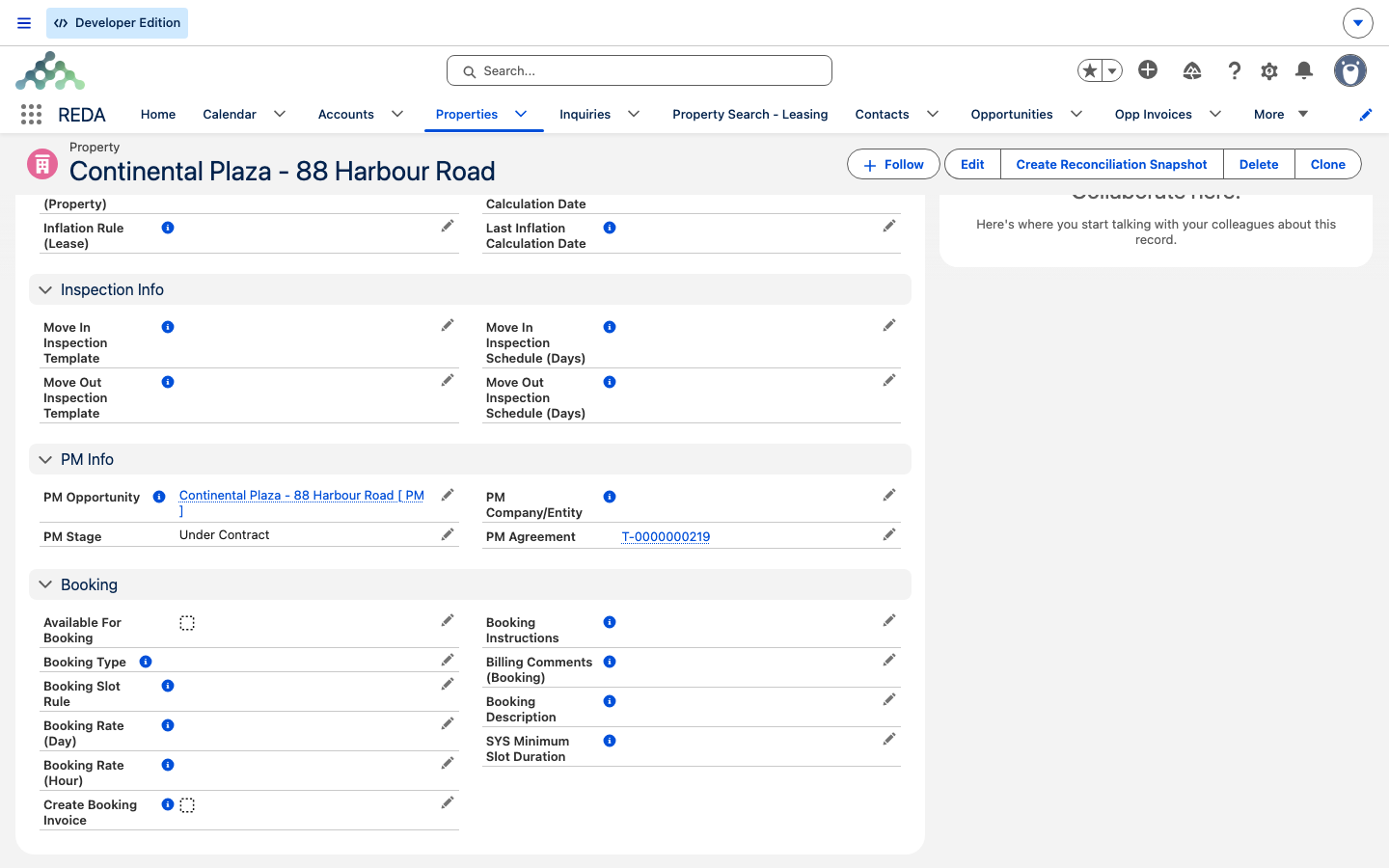
Closing the PMA is the pivotal moment: it stamps the property with the PM Agreement, the PM Company / Entity, the PM Opportunity, and the PM Stage — the point at which the building becomes a managed property. One caveat worth knowing: cancelling a PMA does not auto-unmanage the property; unmanaging is a manual step. Detail: PM Agreements and Managing a PM Property.
Act 3 — Maintenance
Day-to-day maintenance starts when a tenant issue becomes a Service Request. Work Orders attach to Service Requests — not to Tickets — and are assigned to the vendor, here SwiftFix Maintenance, moving New → Scheduled → In Process → Completed as the job progresses. Detail: Service Requests and Work Orders.
Act 4 — A tenant-chargeable repair
If a repair is billable to the tenant, set Invoice to Tenant with a charge code, an invoice amount, and an invoice note before completing the work order. All three are required — miss any and the matching gate fires verbatim:
"You must provide invoice amount if the work order is invoiced to the tenant."
"You must provide invoice note if the work order is invoiced to the tenant."
On the New→Completed transition (once), REDA creates a tenant Opp Invoice — the amount excluding tax, the billing comment set from the note, the billing date on the completion day, and the due date set to completion plus the charge code's grace days. Detail: Work Order Invoicing.
Act 5 — Expense reconciliation
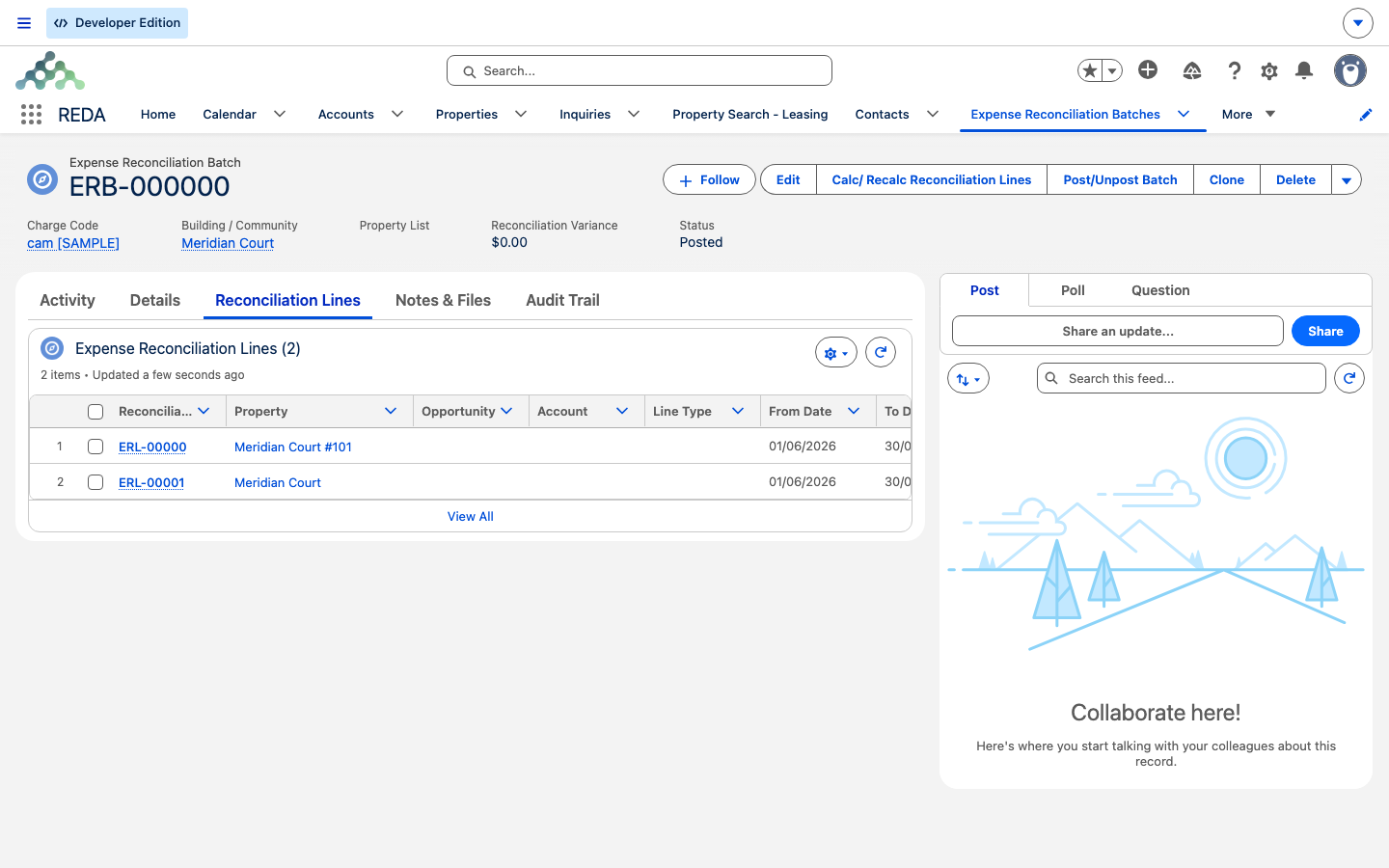
Recoverable building expenses (CAM-style) run as an expense-reconciliation batch. Pick exactly one scope — a building / property or a property list — a period, a total expense-plus-tax pool, and a charge code (which doubles as the "already billed" filter). REDA builds one line per occupancy or vacancy interval per unit, computes each unit's share by its allocation %, and nets it against what was already billed in the period.
Posting the batch creates one owner-recoverable Opp Invoice per qualifying occupancy line (where net due is greater than 0) and locks the batch — you unpost to change it, and unposting deletes the invoices it created. The rule to hold onto:
Detail: Expense Reconciliation, Running a Reconciliation, and Posting a Reconciliation.
Act 6 — Owner statement
The final act crosses into REDA Financials, where three things happen for Continental Holdings' building. First, the management fee is earned: for a Rent Percentage agreement it is a percentage of the collected rent — the money actually received on the property in the period — computed from the PMA fee terms, then billed to the owner and mirrored onto the owner's books as a cost, so the same fee appears as income for Meridian Properties and as an expense for Continental Holdings. Second, the owner's draw — the equity available to pay out to the owner after costs and any escrow reserve — is run for the period; an owner is only picked up in a draw when their account is flagged an active PM client, so an owner who was never activated is quietly skipped. Third, the periodic owner statement is emailed to the owner. All three are Financials features; in this scenario you hand off and let Financials produce them. Detail: Management Fees and Owner Draws & Statements.
Where to go next
- PM Agreements — the PMA ticket, its fee terms, and the property stamps.
- Managing a PM Property — what the PM stamps mean once the property is managed.
- Work Orders — maintenance under Service Requests.
- Expense Reconciliation — recoverable expenses and the vacancy rule.
- Owner Draws & Statements — the Financials side of the owner relationship.
- REDA Financials Overview — how the accounting extension fits in.
Frequently asked questions
The PMA ticket's opportunity "must of type closed won "Property Sale" or "Property Management"." — take the management deal to Closed Won first. See PM Agreements.
On the PMA ticket, as the agreement of record. The PM Company / Entity set there becomes the billing entity on generated invoices. See PM Agreements.
Work orders attach to Service Requests, not Tickets. See Work Orders.
Invoice to Tenant, plus a charge code, an invoice amount, and an invoice note, must all be set before completion — the three gates quoted in Act 4 fire if any is missing. See Work Order Invoicing.
By design — vacancy lines never invoice; the owner absorbs the cost of vacancy. See Expense Reconciliation.
No — a posted batch is locked. Unpost it to make changes, which deletes the invoices it created, then repost. See Posting a Reconciliation.
It's a REDA Financials feature — owner draws and the emailed statement live in the accounting extension. See Owner Draws & Statements.
An owner is only included in a draw when their account is flagged an active PM client. An owner who was never activated is skipped. See Owner Draws & Statements.
Was this article helpful?