
Regions
The Region is REDA's geographic backbone — the record that decides currency, defaults and visibility for everything inside it. This article is for administrators setting one up. After reading, you'll be able to create a region with the right code and currency, attach a default leasing rule, understand why the region's code shows up on records everywhere, know why currency is a choose-once decision, and recognise which save errors come from core REDA versus the website-listing add-on. No prior REDA experience is assumed.
Access you'll need. Setting up regions requires the REDA - Master Data - Admin permission set. REDA - Master Data - Read Only can view them but not change them.
What a Region does
A region is small but influential. It sets the currency for everything within it, it helps decide who can see which records, it can supply a default leasing rule for its properties, and it holds settings for the resident portal and showing calendar. Sitting at the top of the master-data tree, a region has neighbourhoods, property types, amenity codes, inflation rules, property lists and profit & holding rules all pointing up to it. Set the region up well and the rest of your master data has a solid foundation.
The region is also the first thing you set on a property, and for a practical reason: it filters the choices you get afterwards. Once a property's Region is set, its Neighbourhood and Leasing Rule pickers only offer records that belong to that same region — so picking the region up front is what makes the rest of the property fill in cleanly. This is why the path to putting a unit up for lease always starts with the region: no region, and the neighbourhood and rule you need aren't selectable yet. In short, the region is the gate every leasable property passes through first.
Creating a region
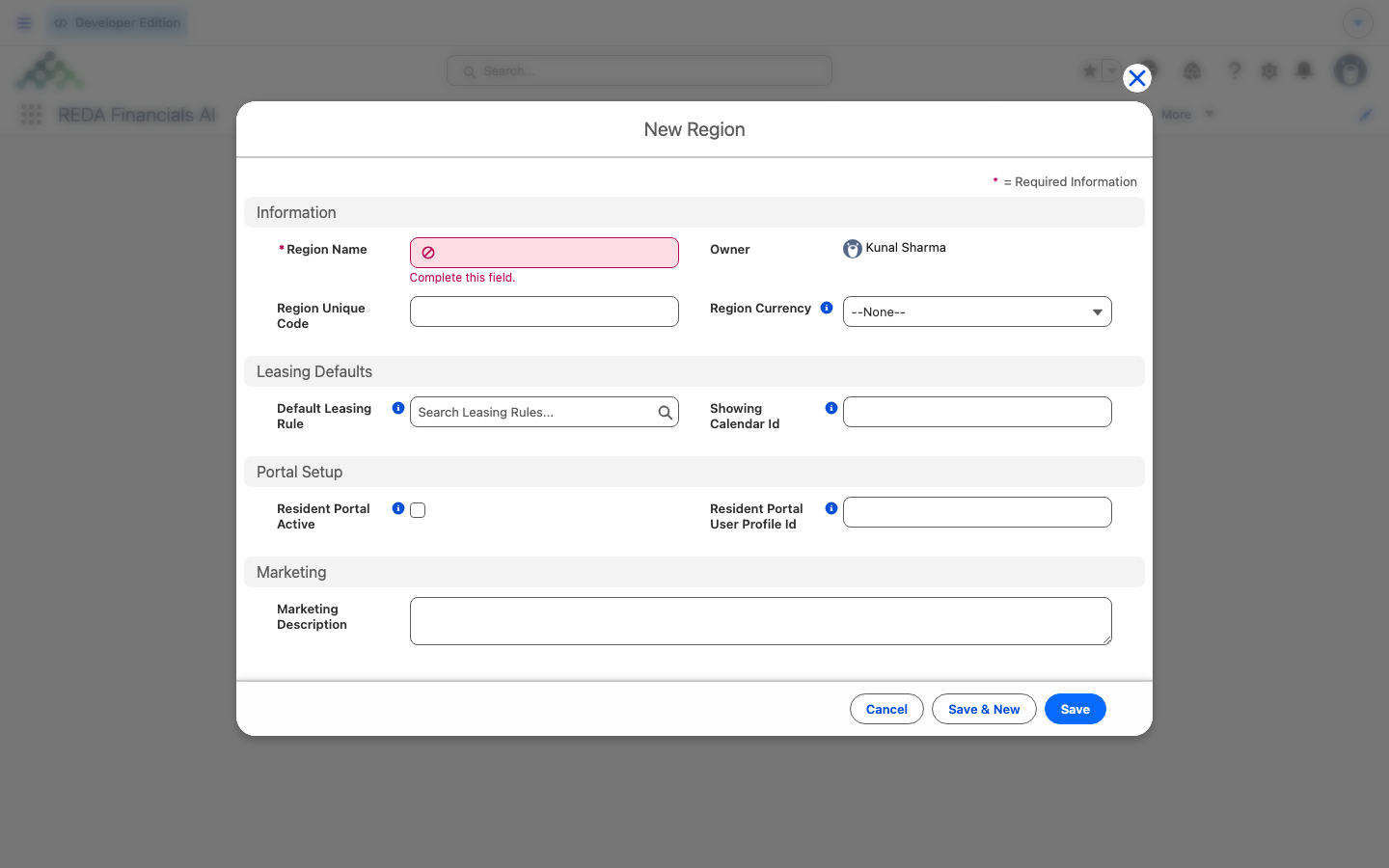
A region record has a short set of fields:
| Field | What it's for |
|---|---|
| Region Unique Code | A short, unique code — keep it brief. REDA copies it down onto records across the region as their Region Code. |
| Region Currency | The currency for the region's transactions. Choose carefully — see below. |
| Default Leasing Rule | The leasing rule used for a property in this region that has no rule of its own. |
| Marketing Description | Descriptive text for website and listing content. |
| Resident Portal Active + Resident Portal User Profile Id | Switch on the resident portal for the region, and the profile new portal users are created with. |
| Showing Calendar Id | The calendar used for showings booked through property search. |
The region code travels everywhere
There are two things called "code" here, and it's worth keeping them straight. The Region Unique Code is the short code you type on the region itself. The Region Code is what REDA stamps from it onto the records underneath — and that stamped copy is set automatically and read-only.
When you save a property (or many other records), REDA copies the region's code onto it automatically and keeps it in step. You'll see this Region Code across roughly a dozen record types throughout the app — properties, neighbourhoods, leasing rules, portfolio memberships and more. The important habit: these copies are maintained for you and shouldn't be edited by hand (the field is filled in for you and marked not to be edited). If a Region Code ever looks wrong on a record, don't touch the code — fix the Region lookup on that record and the code re-stamps itself to match.
Currency: choose once, carefully
The region's currency is the source for the currency shown across its records. Note that its full effect only comes into play when multi-currency is switched on for your org — an org-level setting. Where multi-currency is off, the currency you pick still matters for setup, but it isn't actively converting record values.
Default Leasing Rule
A Leasing Rule is the leasing and billing policy applied to a property. A region can name a Default Leasing Rule that any of its properties fall back on when they don't specify one of their own. There's one guardrail: the rule you choose must belong to this region. Pick a rule from a different region and REDA stops you: "Invalid leasing rule. The selected leasing rule can only be assigned to the region provided on leasing rule."
Resident portal & showing calendar
Two operational settings live on the region. Turning on Resident Portal Active switches on resident-portal provisioning for the region — but you must also supply a Resident Portal User Profile Id, or REDA blocks the save: "Resident Portal User Profile Id must be provided if the region has a active resident portal." The Showing Calendar Id points to the calendar used when a showing is booked from property search. The wider mechanics of portal provisioning are covered in the administration section.
If you see "publish the region to web" errors
Worked example: the Harbour District region
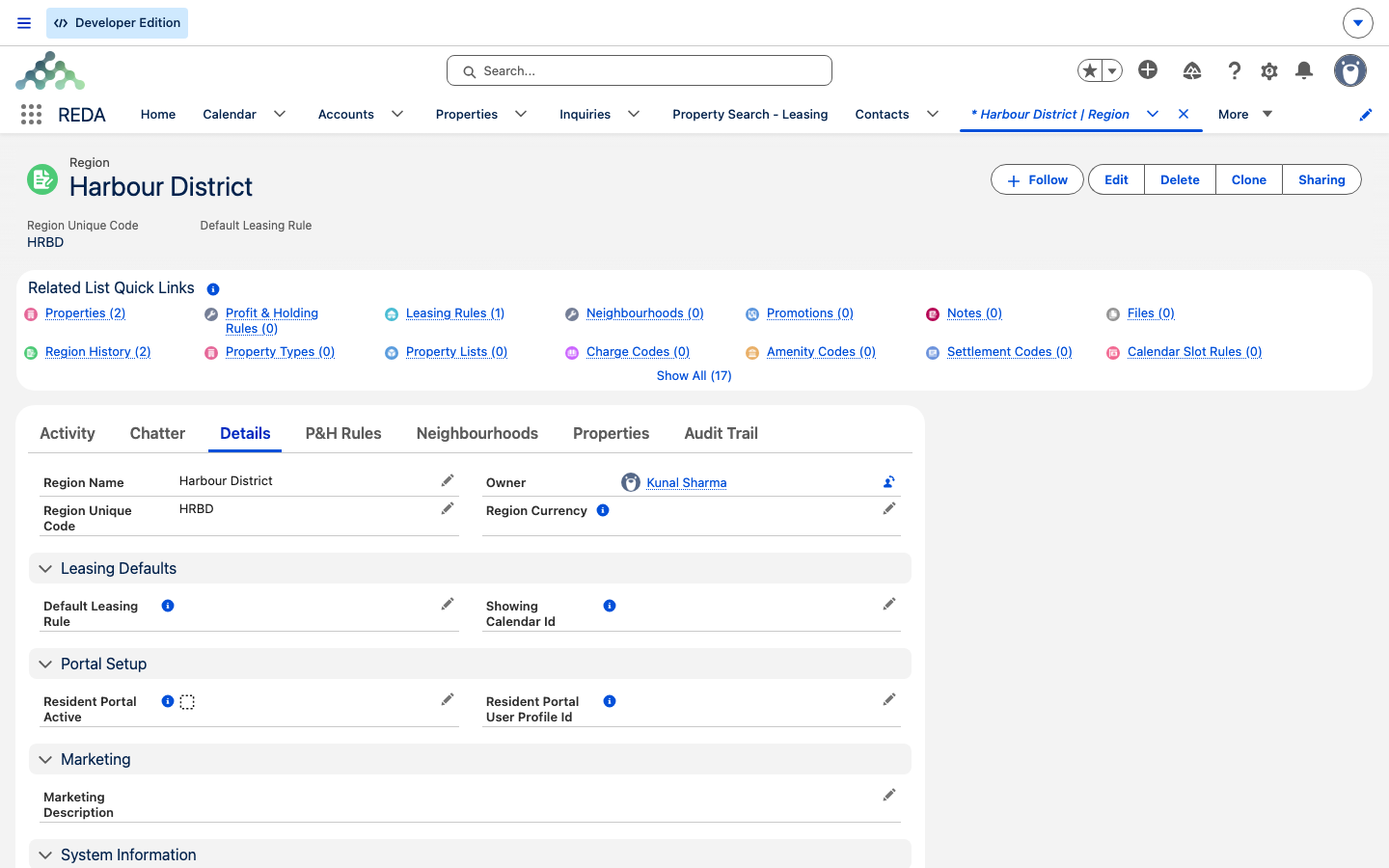
Meridian Properties sets up its primary region. They create Harbour District, give it the unique code HRBD and set its currency to USD. They attach the Default Leasing Rule "Harbour District Standard" — a rule that belongs to this region, so it's accepted.
Now, when they create the unit Meridian Court #101 in this region, REDA stamps its Region Code as HRBD automatically. Later, when someone tries to switch the region's currency to another value, REDA refuses — properties already depend on it, so the currency is locked in.
Reference: region fields at a glance
| Field | Drives |
|---|---|
| Region Unique Code | The Region Code stamped across the region's records |
| Region Currency | The region's currency (choose-once once records exist) |
| Default Leasing Rule | The fallback leasing rule for properties with none |
| Resident Portal Active + Profile Id | Resident-portal provisioning for the region |
| Showing Calendar Id | The calendar for showings booked from search |
| Marketing Description | Website / listing content |
Where to go next
- Property Types — the asset kinds that sit under your regions.
- Creating & Editing Properties — create properties in your new region.
- Making a Property Available for Leasing — where the region and its default rule come into play.
Frequently asked questions
The rule belongs to a different region. REDA shows: "Invalid leasing rule. The selected leasing rule can only be assigned to the region provided on leasing rule." Choose a rule assigned to this region.
When multi-currency is enabled, the region needs a currency: "Currency is required when Multi-Currency is enabled." Set the Region Currency to save.
Once the region has linked properties, neighbourhoods, leasing rules or profit & holding rules, REDA blocks a currency change. Currency is a choose-once decision — set it before building anything underneath the region.
It's from the website-listing add-on, not core REDA. Fill in the extension's web fields, or consult the extension's documentation. Orgs without the add-on never see it.
Turning on the portal also requires a profile for new portal users: "Resident Portal User Profile Id must be provided if the region has a active resident portal." Set the Resident Portal User Profile Id and save.
In orgs with multi-currency switched on, a property and the leasing rule you attach to it must belong to the same region: "Property Region must match Leasing Rule Region when Multi-Currency is enabled." Set the property's Region first, then attach a rule from that same region. Where multi-currency is off, this rule doesn't apply.
Was this article helpful?