
Billing a Tenant for a Work Order
When a repair is the tenant's responsibility, REDA can turn the completed Work Order straight into a tenant invoice — no separate billing screen, no re-keying. This article owns that one step in depth: how to switch billing on correctly, the three fields you must fill, exactly what makes the invoice appear (and why it sometimes doesn't), and every value that lands on the resulting invoice. Creating and scheduling the Work Order itself is covered separately in Work Orders; here we pick up at completion.
Access you'll need. Working with work orders requires the REDA - Work Order User or REDA - Property Leasing User permission set. The tenant invoice REDA creates lands on the lease's Accounting tab; viewing and managing it uses REDA - Invoice Management Admin or REDA - Property Leasing User (the read-only twin is REDA - Invoice Management Read Only). Ask your administrator to assign the set that matches your role.
When to bill the tenant
Not every repair is charged back to the tenant. Routine upkeep, warranty work, and owner-side improvements are absorbed by the owner; damage the tenant caused is usually chargeable. REDA settles this with a single switch on the work order: Invoice to Tenant.
- Leave Invoice to Tenant off, and completing the work order raises no invoice — the cost is owner-absorbed.
- Turn it on, fill the billing details, and completing the work order raises a tenant invoice automatically.
The invoice is raised against the work order's Opportunity (the lease to bill) and its Property. Both must be present, or no invoice is created — which is why it's worth confirming the lease link before you complete the job.
The three billing fields
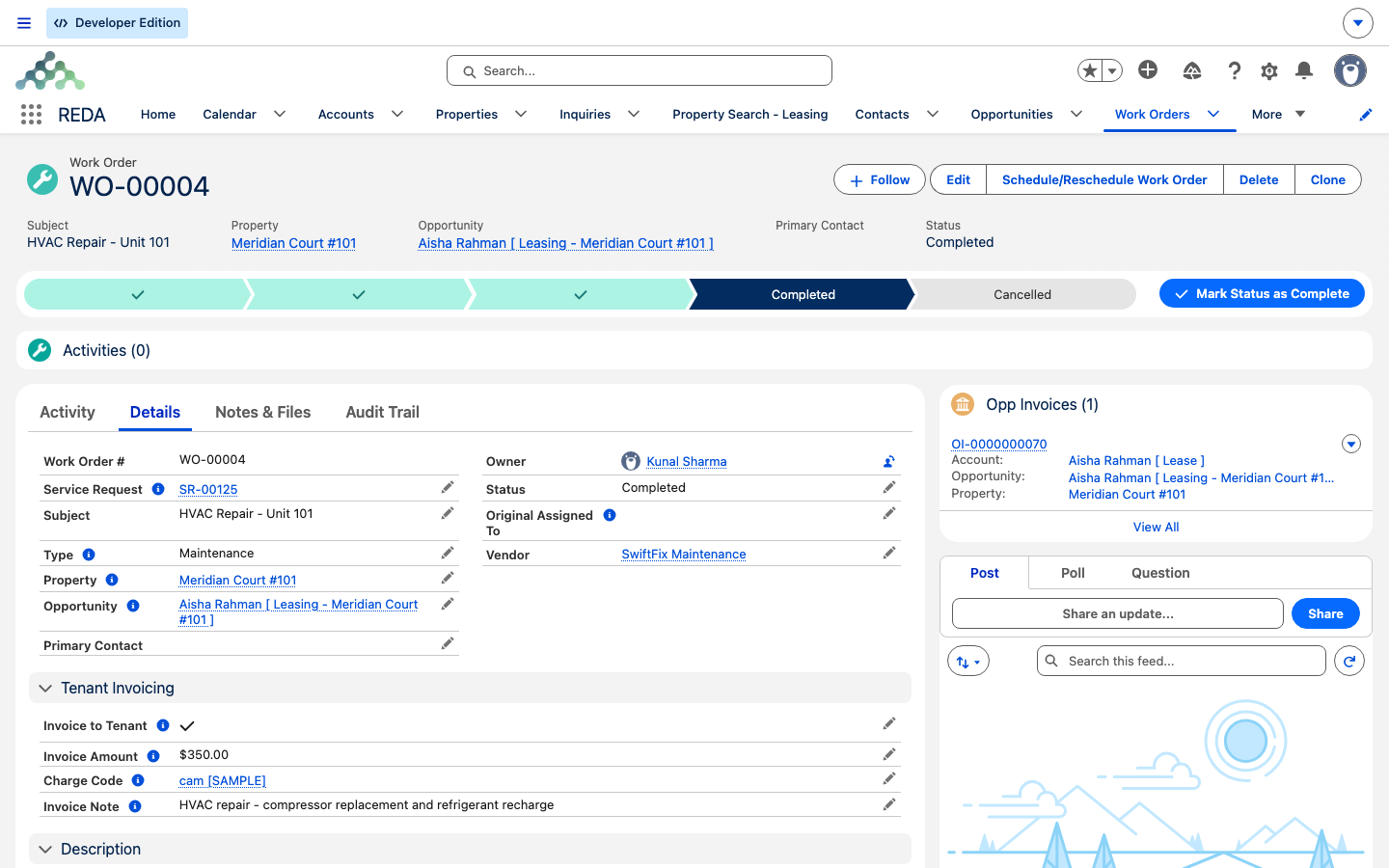
The moment you tick Invoice to Tenant, three fields become required. Each is enforced on save by its own check, so you can't complete a chargeable work order with a billing detail missing:
| Field | What it holds | REDA blocks the save with… |
|---|---|---|
| Charge Code | The billing category the charge posts under; it also sets the payment grace period used for the due date | "You must provide charge code if the work order is invoiced to the tenant." |
| Invoice Amount | The amount to bill the tenant, excluding tax | "You must provide invoice amount if the work order is invoiced to the tenant." |
| Invoice Note | A short line of text that appears on the tenant's ledger | "You must provide invoice note if the work order is invoiced to the tenant." |
These are the only three checks on the work order, and together they are the article's spine: the switch is on, so all three details must be there. That's the guarantee — completion can never quietly skip billing because one field was left blank.
What triggers the invoice
The invoice is created at one precise moment: the transition into Completed. That means the status has to actually change to Completed from something else. If the work order is already Completed and you save it again, nothing new happens — REDA does not re-invoice.
For the invoice to be raised, all of these must be true at that transition:
| Precondition | Must be true |
|---|---|
| Status transition | The work order moves into Completed (it wasn't Completed before) — fires once |
| Invoice to Tenant | Ticked |
| Lease and Property | Both present on the work order |
| Billing fields | Charge Code, Invoice Amount, and Invoice Note all present (the checks above guarantee this) |
Miss any one of these and no invoice appears — with no error, because nothing went wrong; the conditions for billing simply weren't met.
What lands on the tenant invoice
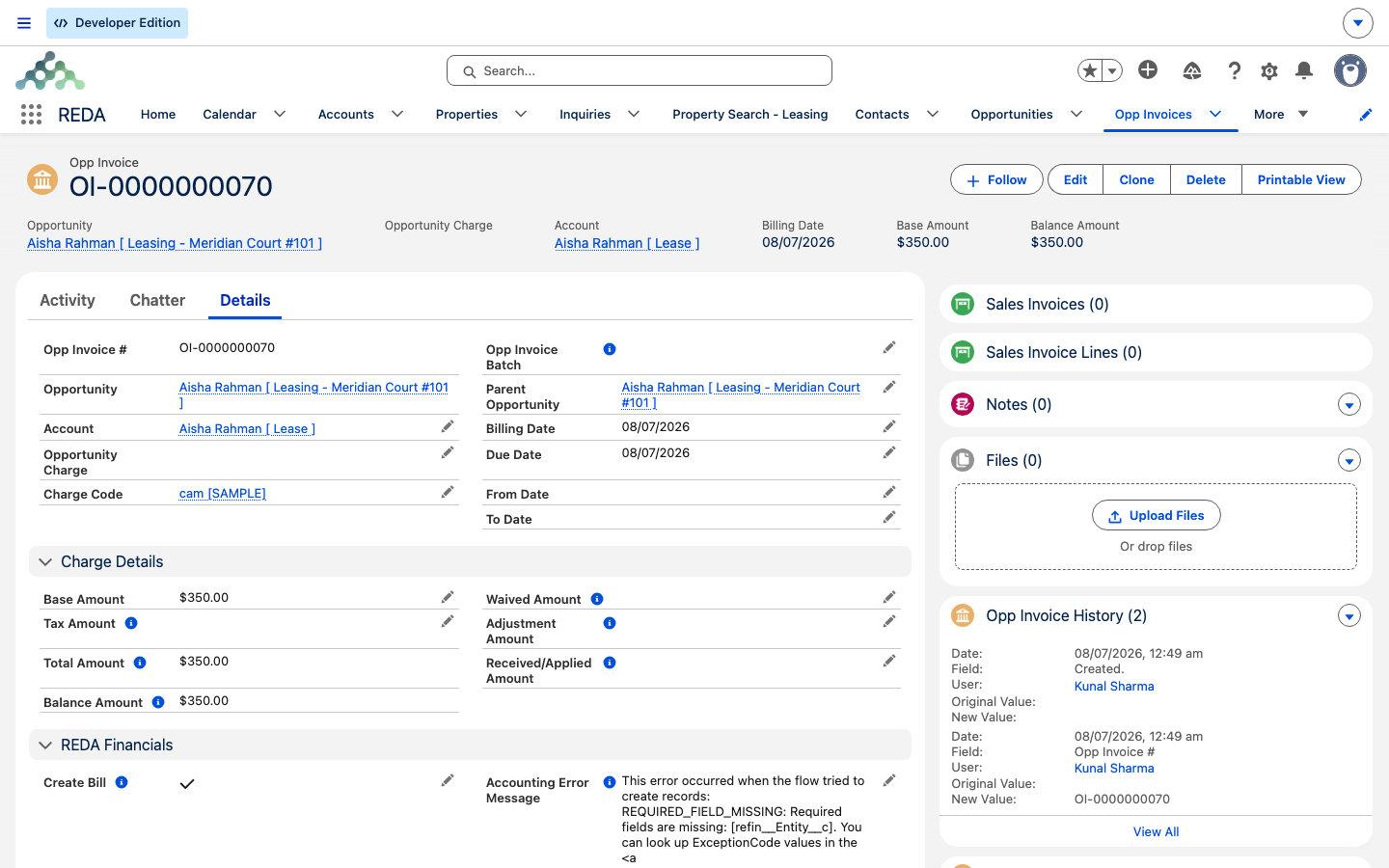
When the invoice is created, REDA fills it in from the work order:
| On the invoice | Comes from |
|---|---|
| Amount | The work order's Invoice Amount (excluding tax) |
| Billing Comment | The work order's Invoice Note — this is what shows on the tenant ledger |
| Billing Date | The day you completed the work order (today) |
| Due Date | Today plus the Charge Code's payment grace days (today, if the code has none) |
| Receivable account | The Charge Code's default |
| Work Order link | A back-reference to this work order, so the invoice and the job stay connected |
Reading the invoice on the lease
The created invoice is an Opp Invoice — an invoice raised against the lease — and it appears on the lease's Accounting tab, under Active. Open it to see the amount, the Billing Comment (your Invoice Note), and the billing and due dates. The tenant sees the Invoice Note on their ledger, so keep it clear and specific.
Troubleshooting
Worked example: the leaking faucet
Continuing the example from Work Orders: a tenant at a Meridian Properties unit reports a leaking faucet, and the repair by SwiftFix Maintenance is tenant-caused, so it's chargeable. The dispatcher, Tom Reyes, handles the billing.
On the work order Tom ticks Invoice to Tenant and fills the trio: Charge Code "Maintenance Charge" (15 grace days), Invoice Amount 150.00, Invoice Note "Faucet cartridge replacement - tenant damage". (Had any of the three been blank, REDA would have blocked the save with the matching message.)
When SwiftFix finishes, Tom sets Status to Completed. REDA raises the tenant invoice on the lease's Accounting tab: Amount 150.00, Billing Comment "Faucet cartridge replacement - tenant damage", Billing Date today, Due Date 15 days out. A worried later re-save of the same Completed status changes nothing — there's still just the one invoice.
Where to go next
- Work Orders — create and schedule the work order (the parent article to this one).
- Service Requests — the intake record every work order starts from.
- Charge Codes — grace days and the defaults the invoice inherits.
- Invoices Explained — what happens to the tenant invoice once it's raised.
- Understanding Tickets — why work orders are separate from tickets.
Frequently asked questions
One of the three billing fields is missing. REDA shows whichever it is: "You must provide charge code if the work order is invoiced to the tenant.", "You must provide invoice amount if the work order is invoiced to the tenant.", or "You must provide invoice note if the work order is invoiced to the tenant." Fill in all three and save.
The invoice fires only on the move into Completed, only when Invoice to Tenant is ticked, and only when the lease, property, and all three billing fields are present. Check the switch and the lease and property links, then complete the job.
No — the invoice fires on the transition into Completed only. Re-saving a work order that is already Completed creates nothing.
The billing date is the day you completed the work order; the due date is that day plus the Charge Code's payment grace days — the same day if the code has no grace period.
As an Opp Invoice on the lease's Accounting tab, under Active. Your Invoice Note appears as the Billing Comment and on the tenant's ledger.
Leave Invoice to Tenant off. Completing the work order then raises no tenant invoice, and the owner absorbs the cost.
Was this article helpful?