
Closed-loop Conversions & Conversion Target
Bringing leads in from Google and Meta is only half the story. The other half is telling those platforms which of those leads actually turned into business — a signed lease, a booked viewing, a real deal. That return signal is a closed-loop conversion, and it's what lets Google and Meta stop guessing and start optimizing: they learn which ads, audiences and forms produce leads that convert, and spend your budget on more of the same. This article explains what a closed-loop conversion is, how you point each ad account at the right destination with the Select Conversion Target button, which fields on the lead record hold the outcome, and exactly when a conversion fires. Where the behavior differs between REDA editions, that's called out as we go — no prior knowledge of the connector is assumed.
Access you'll need. Configuring an ad account and its conversion target is an administrator task — the same access used to connect the ad account. Everyone else simply works leads as usual; the conversion is reported automatically when a lead is marked converted.
What a closed-loop conversion is
When someone fills in one of your lead forms on Google or Meta, that platform hands the lead to REDA and remembers it made the introduction. If the lead later becomes a real deal in REDA, the platform has no way of knowing — unless you tell it. A closed-loop conversion is REDA telling it: a short message sent back to the platform that says "the lead you sent us converted." Google receives it through its Data Manager, and Meta through its Conversions API. You don't operate either of those directly — REDA sends the signal for you.
"Closed-loop" is the whole round trip: the ad brings in a lead, the lead becomes business inside REDA, and the outcome travels back to where the lead started. Closing that loop is what makes the platforms smarter. Instead of optimizing toward whoever fills in a form, they optimize toward the kind of person who fills in a form and becomes a customer — which is the outcome you actually care about. Over time that means lower cost per genuine lead, because the platform is steering your budget using your real results rather than raw form counts.
The Conversion Target, and how to set it
Before REDA can report a conversion, it needs to know where to report it. That destination is the Conversion Target, and it lives on each ad account. You set it once per ad account, and every conversion from that account is reported against it.
What the target is depends on the platform:
- Google — the target is a conversion action in your Google Ads account: the specific outcome you're counting, such as a qualified lead or a signed lease. Because REDA reports conversions from your Salesforce data rather than from a website tag, the action has to be one that accepts imported conversions.
- Meta — the target is a dataset (also shown as a pixel/dataset in your Meta setup): the container that receives conversion events for the account. Meta also requires a separate access token so REDA is allowed to write events into that dataset.
Setting the target for a Google ad account
For Google, the Select Conversion Target button does the work for you. Open the ad account and click it — REDA reads the eligible conversion actions straight from the connected Google account and lists them, so you pick the right one instead of copying an ID by hand.
Setting the target for a Meta ad account
For Meta, you enter the target yourself on the ad account record, because a Meta dataset needs two pieces of information REDA can't guess: the dataset itself and a token that authorizes writing to it.
The conversion fields on the lead record
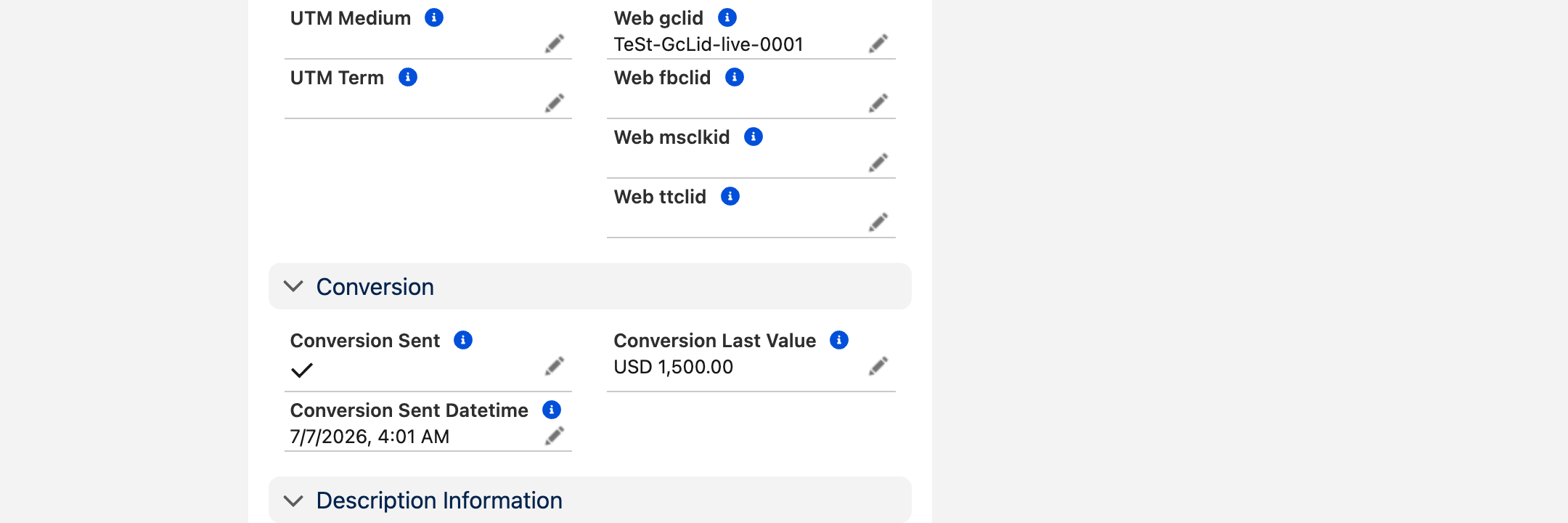
Every captured lead carries a small set of fields that track its conversion. They're maintained by REDA — you don't type into them — and reading them tells you at a glance whether a lead's outcome has been reported and when. There are four of them:
| Field | What it shows | When it populates |
|---|---|---|
| Is Converted | That the lead has been marked as converted — the trigger for reporting the conversion. | When you convert the lead. |
| Conversion Sent | That the conversion has been reported back to the platform. Acts as a "sent once" flag so the same conversion never goes out twice. | The moment REDA successfully reports the conversion. |
| Conversion Sent Datetime | The date and time the conversion was reported. | Alongside Conversion Sent. |
| Conversion Last Value | The value reported with the conversion, so the platform can optimize toward higher-value outcomes. | When the conversion is reported. |
Where the conversion lives: by edition
REDA ships in two editions, and they model a captured lead differently. That single difference decides where the conversion state sits and how a conversion fires.
If your leads are Inquiries
In this edition the captured lead is an Inquiry record — there's no separate lead object. So the whole loop lives on the Inquiry: its inbound attribution (which ad, which form) and its outbound conversion state sit on the same record. All four conversion fields above — Is Converted, Conversion Sent, Conversion Sent Datetime and Conversion Last Value — are on the Inquiry. When you mark the Inquiry converted, that's the signal, and the value REDA reports comes from the Inquiry's own conversion-value field.
If your leads become Opportunities
In this edition a captured lead comes in as a standard Lead, and it turns into a deal when you convert it into an Opportunity. Here the conversion state lives on the Opportunity: it carries Conversion Sent and Conversion Sent Datetime. Crucially, the value reported is the Opportunity's standard Amount — there's no separate conversion-value field to fill in. Whatever you enter as the deal's Amount is the value that travels back to the platform.
| Leads as Inquiries | Leads become Opportunities | |
|---|---|---|
| Conversion state lives on | The Inquiry | The Opportunity |
| What you do to fire it | Mark the Inquiry converted | Convert the Lead into an Opportunity |
| Value reported | The Inquiry's conversion-value field | The Opportunity's standard Amount |
| Sent-once flag & timestamp | On the Inquiry | On the Opportunity |
How a conversion fires
You never send a conversion by hand. It's reported automatically the moment you signal that a lead turned into business — and that signal is simply the normal act of converting the lead in your day-to-day work.
Worked example: Meridian Court, from click to conversion
Meridian Court runs a Google lead-form campaign for its two-bedroom units. A prospect, Aisha Rahman, clicks the ad and fills in the form. REDA captures her as a lead, stamping the ad account, the campaign, the form, and the original Google click that brought her in.
Ahead of the campaign, the administrator opened Meridian's Google ad account, clicked Select Conversion Target, and chose the account's Qualified Lead conversion action. So the destination is already set.
Aisha takes a viewing and signs. The leasing agent marks her lead as converted — on the Inquiry edition, by converting the Inquiry; on the Opportunity edition, by converting the Lead into an Opportunity and entering the deal Amount. That single action fires the conversion: REDA reports it to Meridian's Qualified Lead action, matched to Aisha's original click, and stamps Conversion Sent with the date and time. Google now knows that this ad, this form, this campaign produced a real signed lease — and it will lean toward finding Meridian more prospects like Aisha.
Where to go next
- Ads Connector Overview — how the whole connector fits together, inbound and outbound.
- Ads Connector Setup — the one-time admin setup, including access and layout fields.
- Google Lead Connector — getting Google leads into REDA in the first place.
- Meta Lead Connector — the same for Facebook and Instagram.
- Ads Connector: Testing & Troubleshooting — verify a conversion actually fired, and fix it when it doesn't.
Frequently asked questions
It's the outcome of a lead — the fact that it turned into real business — reported back to the ad platform that produced the lead. Google and Meta use it to learn which ads bring leads that actually convert, so they can show your ads to more people like the ones who did.
When you mark the captured lead as converted. In the edition where leads are Inquiry records, converting the Inquiry sends the conversion. In the edition where leads become Opportunities, converting the Lead into an Opportunity sends it. Either way it's the moment you signal the lead turned into business.
It depends on your edition. When leads are Inquiries, the value comes from the Inquiry's own conversion-value field (shown as Conversion Last Value once reported). When leads become Opportunities, the value is the Opportunity's standard Amount — there's no separate field to fill in.
No. Once a conversion is reported, the record is stamped as Conversion Sent with the date and time it went out, and REDA will not send the same conversion again.
Yes — the target is per ad account, so each account needs its own. For Google, use Select Conversion Target to pick a conversion action from the connected account. For Meta, enter the dataset and its token on the ad account record.
Was this article helpful?