
Rent Cards (Rent Charge Setups)
A rent card is how you price a property in REDA — a price for one lease term, or one price for all terms. This article shows you how to build term-specific and term-independent cards, set separate rents for new tenants and renewals, understand why the advertised total is higher than your base amount, control which card search suggests, and predict which card a lease will pick. No prior REDA experience is assumed.
Access you'll need. Rent cards live on the property you're editing, so you'll need permission to work that property's leasing setup. If you can open the property and edit its leasing details, you can manage its rent cards; if the table is read-only for you, ask your administrator which permission set grants rent-card editing in your org.
What a rent card is
Each rent card sets a base rent for a property, either for a specific lease term or for any term. A property can carry several cards — say a 12-month price, a 6-month price, and a catch-all — and REDA uses them to advertise the property and to price its leases. Every card belongs to a property; you can't have one without.
Term-specific vs term-independent
A card is one of two kinds, and never both:
| Kind | How to set it | Use it for |
|---|---|---|
| Term-specific | Enter Term (Months); leave Term Independent unticked. | A price for one particular lease length — a 12-month rate. |
| Term-independent | Tick Term Independent; leave Term (Months) blank. | A fallback price that applies to any term you don't have a specific card for. |
That's the message you'll see if you fill in a term and tick the box, or leave both empty — pick one kind per card.
New-lease rent vs renewal rent
Each card holds two base amounts: New Lease Base Amount for a brand-new tenant, and Renew Lease Base Amount for a renewing one. Setting both on a card lets REDA price a new lease and a renewal from the same card without you juggling separate records. The two are independent — set the renewal below the new-lease rate to reward a tenant who stays, or above it to step the rent up on renewal; whichever suits your policy.
The advertised total
The rent a prospect sees isn't just the base amount — REDA adds the property's amenity additions on top. So the advertised total is:
The renewal total works the same way off the renewal base. If the base amount is blank, there's no total to show. The amenity addition is a property-level figure, not part of the card — a property with no amenity additions advertises at exactly its base amount. For example, a base of 1,200.00 on a unit that carries 50.00 of amenity additions advertises at 1,250.00, while the same base on a unit with none advertises at 1,200.00.
Which card does search suggest?
When a property has more than one card, search needs to know which price to lead with — that's the Best Leasing Term. REDA picks it whenever the cards change: any card flagged Is Best Term wins; if none is flagged, the card with the lowest New Lease Base Amount wins. A per-card indicator shows which card currently holds the crown. Search advertises that card's pricing by default — so to feature a particular price, pin its card as the best term.
Which card does a lease pick?
When REDA prices a lease for a requested term, it narrows the property's cards to those that fit — cards matching that exact term, plus any term-independent card — then chooses between them by two simple rules:
The new-lease or renewal amount is used depending on whether it's a new lease or a renewal.
Keeping cards current
Two things to keep in mind about cards over time. First, the Rent Charge Period (per month, week or day) lives on the property, not on the card — the card carries the amount, the property carries the period (see Making a Property Available for Leasing). Second, when your administrator has scheduled rent adjustments, property-level inflation updates the card base amounts automatically — the cards move without anyone editing them, and the property's last and next calculation dates tell you when.
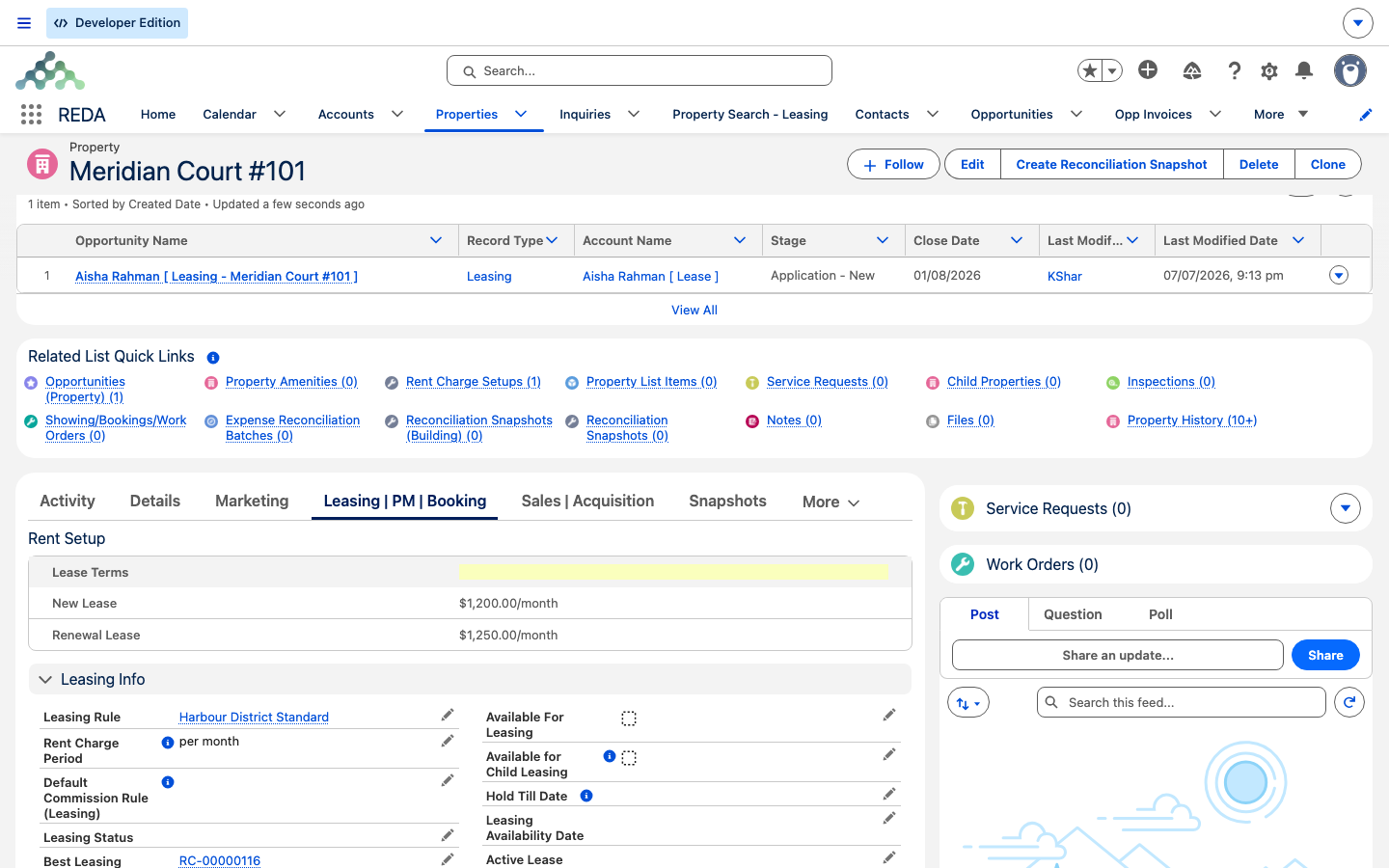
Worked example: pricing Meridian Court #101
Meridian Properties prices the unit with a single term-independent card — the simplest setup, and enough to take the unit to market:
| Card | New Lease | Renewal |
|---|---|---|
| Term Independent | 1,200.00 | 1,250.00 |
Being the only card, it's automatically the Best Leasing Term, so search advertises the new-lease price of 1,200.00. Every lease drawn on the unit — of any length down to the 12-month minimum — prices new tenants at 1,200.00 and renewals at 1,250.00. (Here the renewal sits a little above the new-lease rate; the two amounts are yours to set, in either direction.)
Adding term-specific cards. Suppose Meridian later wants a keener price for longer commitments. It adds a 24-month term-specific card at 1,150.00 new. Now the unit has two candidates:
| Card | New Lease | Renewal |
|---|---|---|
| Term Independent (min 12 months) | 1,200.00 | 1,250.00 |
| Term 24 months | 1,150.00 | 1,150.00 |
With nothing pinned, the Best Leasing Term becomes the 24-month card — the lowest new-lease amount — so search now leads with 1,150.00. Pin the term-independent card as Is Best Term and search switches back to 1,200.00. For an actual lease: a 24-month lease prices at 1,150.00 (its exact-term card beats the independent one); an 18-month lease has no exact card, so it falls to the term-independent card at 1,200.00.
Reference: card fields at a glance
| Field | What it does |
|---|---|
| Term (Months) / Term Independent | The card's kind — mutually exclusive |
| New Lease Base Amount | Base rent for a new tenant |
| Renew Lease Base Amount | Base rent for a renewal |
| Is Best Term | Pins this card as the one search advertises |
Where to go next
- Making a Property Available for Leasing — the full chain, including the Rent Charge Period.
- Finding Properties: Leasing Search — where the suggested price shows up.
- Understanding Properties — where rent cards sit on the record.
Frequently asked questions
A card is either term-specific or term-independent, not both. REDA shows: "Rent Charge Setup can either be Term Independent OR Term specific. For Term Independent setup do not provide Term (Months) and vice versa." Enter a term or tick Term Independent — never both.
Search suggests the Best Leasing Term: a pinned card first, otherwise the lowest new-lease amount. Pin the card you want featured.
The advertised total adds the property's amenity additions on top of the base amount. A base of 1,200.00 with 50.00 of additions advertises at 1,250.00.
The exact-term card beats a term-independent one. If two candidates still remain, the most recently modified card wins.
Property-level inflation adjustments update card base amounts on the schedule your administrator set. Check the property's inflation calculation dates to see when.
Was this article helpful?