
Property Creation and Funding an Acquisition
This article explains REDA's two headline acquisition automations and how you finance the purchase. When an acquisition goes active — the moment it reaches Under Contract — REDA creates the Property record for you and a placeholder loan for that property. You then fund the purchase with a loan whose draws roll up to the acquisition. If records you didn't create have just appeared on your deal, this is where you learn what they are, what they inherited, and how to complete the financing correctly. No prior REDA experience is assumed.
Access you'll need. Acquisition work requires the REDA - Property Acquisition User permission set; loan servicing — the Lending deal and its disbursements — requires REDA - Property Lending User. Deleting a Property is reserved for REDA - Master Data - Admin. You'll also need Account access, granted separately by your administrator.
The moment it goes active
The trigger for both automations is a single event: the acquisition deal first becoming active, which happens when it reaches Under Contract (and stays active through Clear to Close and Closed Won). You reach Under Contract by signing the purchase agreement ticket — see The Acquisition Purchase Agreement Ticket.
Two conditions shape what happens next. If no Property is linked yet, REDA creates one. If a Property was already linked, REDA does not create a duplicate — it refreshes the existing property's references to the active deal instead.
Automation 1: REDA creates the Property
When the deal goes active without a linked property, REDA builds the Property record from the deal, copying roughly twenty details across. The ones worth knowing by name:
| On the new Property | From |
|---|---|
| Owner Account | The deal's Buying Account (your purchasing entity) |
| Purchase Price | The deal's Sale / Purchase Price |
| Leasing Rule | The Profit & Holding Rule's leasing rule, or the region default when the rule names none |
| Beds / Baths / Built & Gross Area / Parking | The deal's property-fact snapshot |
| Link back to the acquisition deal | The deal |
| …and other property details | The deal |
Because the Owner Account arrives set to your buying entity, the property records that your entity now owns it. When your org keeps an ownership history, changes to a property's Owner Account are logged on an ownership trail so you can see who has held the asset over time; if you record when your entity took ownership, note that setting an ownership start date on a property requires an Owner Account to be present — "The Owner Account must be provided if the Ownership Start Date is specified."
Automation 2: the placeholder loan
Right after the property is born, REDA also creates a placeholder loan — a Lending deal — for it. This is a financing slot, created so the money side of the purchase has somewhere to live from the start.
| On the new placeholder loan | Value |
|---|---|
| Stage | Prospecting |
| Borrower Account | The acquisition's Buying Account |
| Acquisition link | The acquisition deal |
It's named for the buying entity, the same way every loan is — you'll see it listed as your buying account followed by [ Lending ] — so look for that in the property's Opportunities related list rather than a record called "new loan." Don't be surprised by it: it's a slot, not an obligation. You complete it with real loan terms, or close it out if the purchase is cash (see Cash purchases below). The full mechanics of loans live in the lending section.
Funding the purchase
To finance the acquisition, complete the Lending deal with the loan amount, type, rate, and dates. Loan amounts allotted to the acquisition roll up onto the acquisition deal automatically (active loans only), so the deal always reflects its committed financing.
Two consistency rules keep a loan tied to the right acquisition. If the loan's borrower or property don't match the acquisition, REDA blocks the save:
"Property must be same as on Acquisition Opportunity."
Recording draws (Loan Disbursement)
As funds are released against the loan, record each draw with a Loan Disbursement ticket. When the ticket closes, the disbursed amount rolls up to the Property, the Lending deal, and the acquisition deal. Two rules apply:
"You must provide Acquisition Opportunity on Loan Disbursement if disbursement is done against acquisition."
The first means the loan must actually be funded (at Closed Won) before you can draw against it; the second means an acquisition draw must name the acquisition deal. Each draw carries a disbursement type so the money is categorized as it's released — the available types are Acquisition (the purchase itself), Renovation and Construction (rehab and build work), and Property Turn (getting the unit ready between uses). Recording each draw against the right type keeps the property's loan-disbursement total accurate and lets you see where the borrowed money went.
Cash purchases
No financing? The placeholder loan is just a slot, so close it as lost (or leave it at Prospecting, per your process) — there's no obligation to fund it. The purchase proceeds on cash all the same.
The walkthrough
Under Contract — see The Acquisition Purchase Agreement Ticket.Clear to Close → Closed Won.Worked example: funding Meridian Court
Meridian Properties signs the purchase agreement on "Meridian Court [ Acquisition ]", and the deal goes Under Contract. Because it's now active with no property linked, REDA creates the Property "Meridian Court": Owner Account = Meridian Capital (Meridian's buying entity), Purchase Price = the agreed 280,000, property facts and the leasing rule carried from the deal's Profit & Holding Rule, plus a link back to the acquisition. REDA also creates a placeholder loan (at Prospecting, borrower = Meridian Capital).
Meridian funds the purchase with a 750,000 rehab loan on that Lending deal — the borrower and property must match the acquisition, or the validations block it. Funds are released through Loan Disbursement tickets (types Acquisition, then Renovation) that roll up to the acquisition. Meridian then moves the deal Clear to Close → Closed Won.
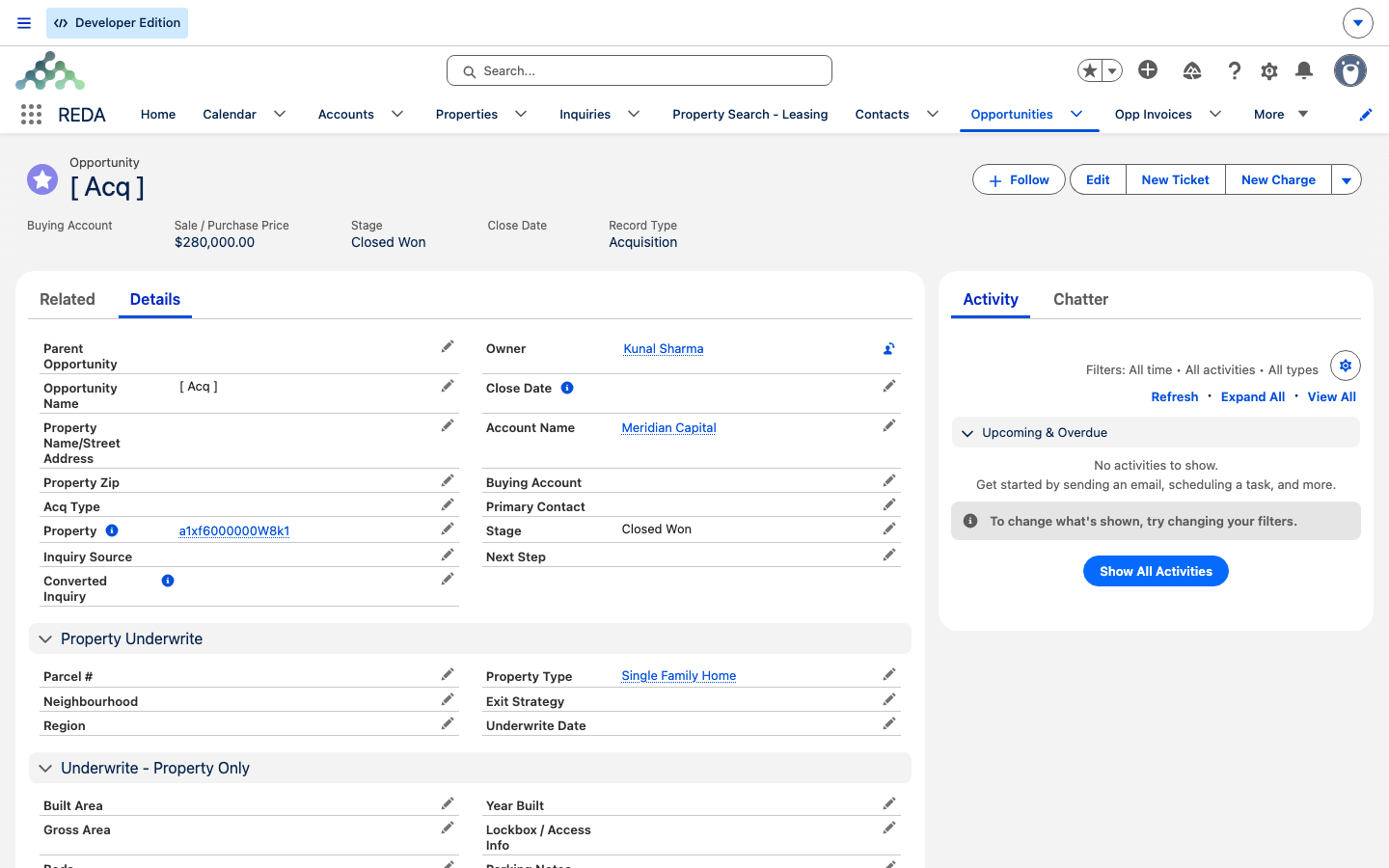
Closed Won), with the Property lookup now filled by the record REDA created — the acquisition and its new property are joined from this point on.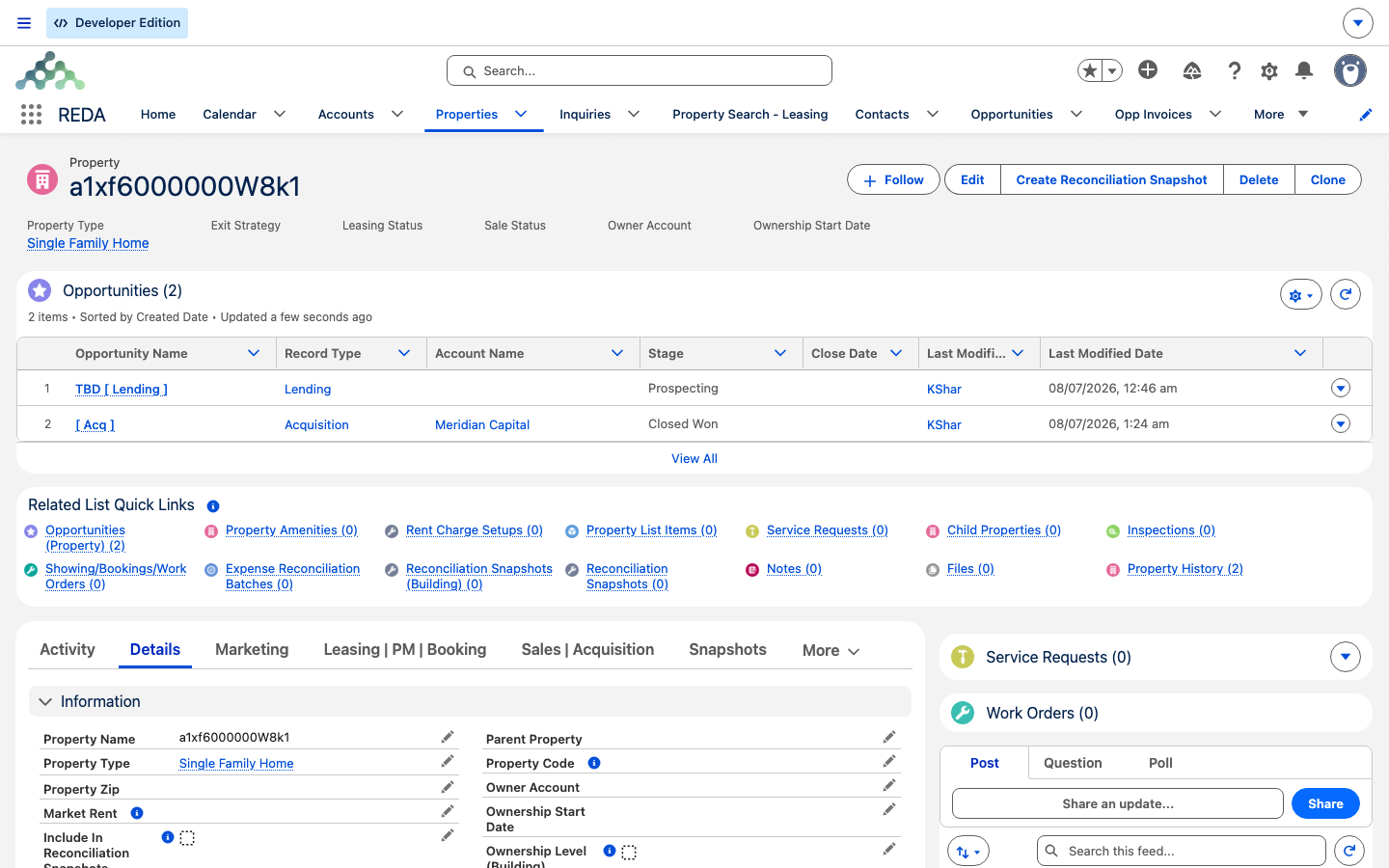
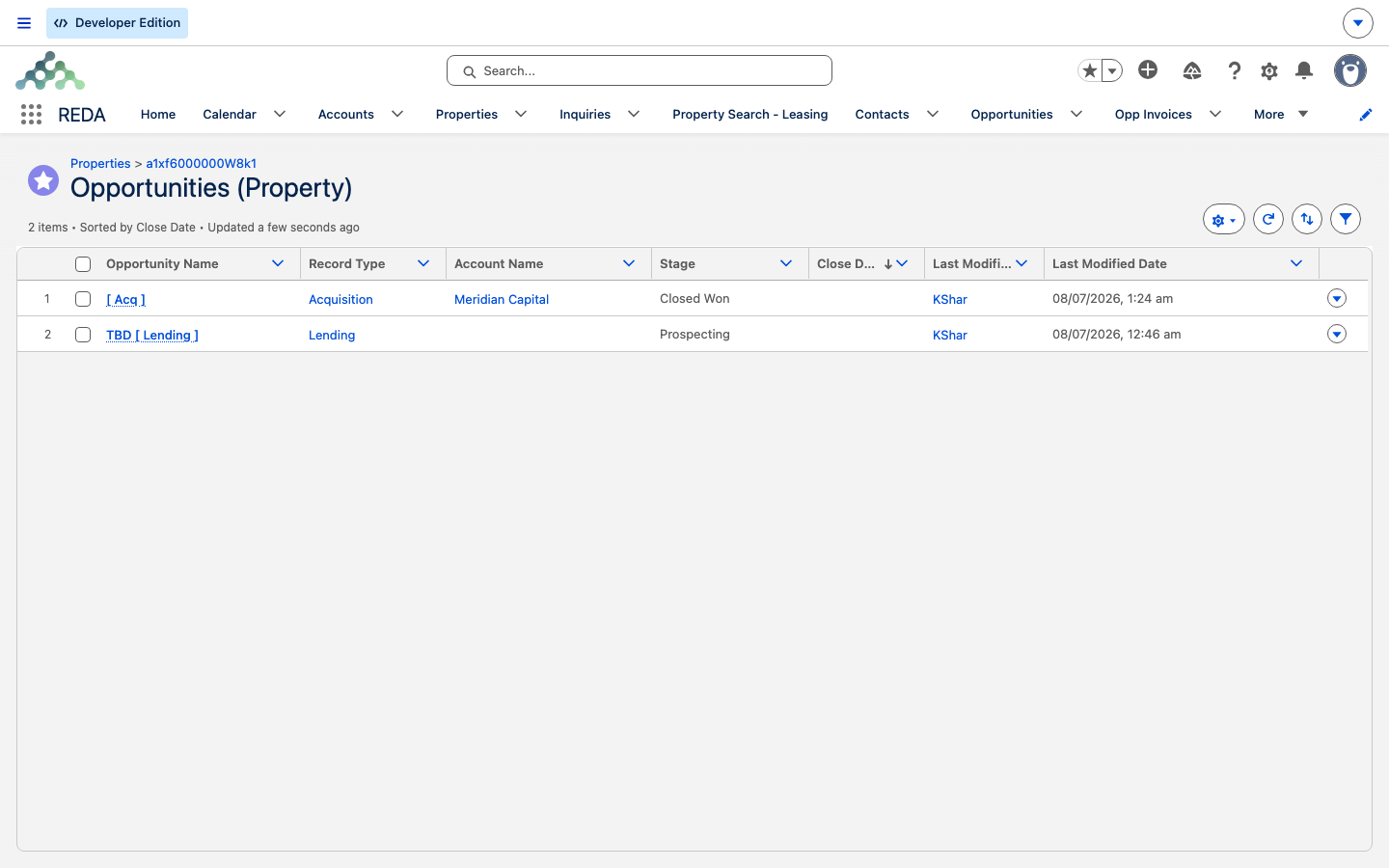
Prospecting alongside the parent Acquisition at Closed Won.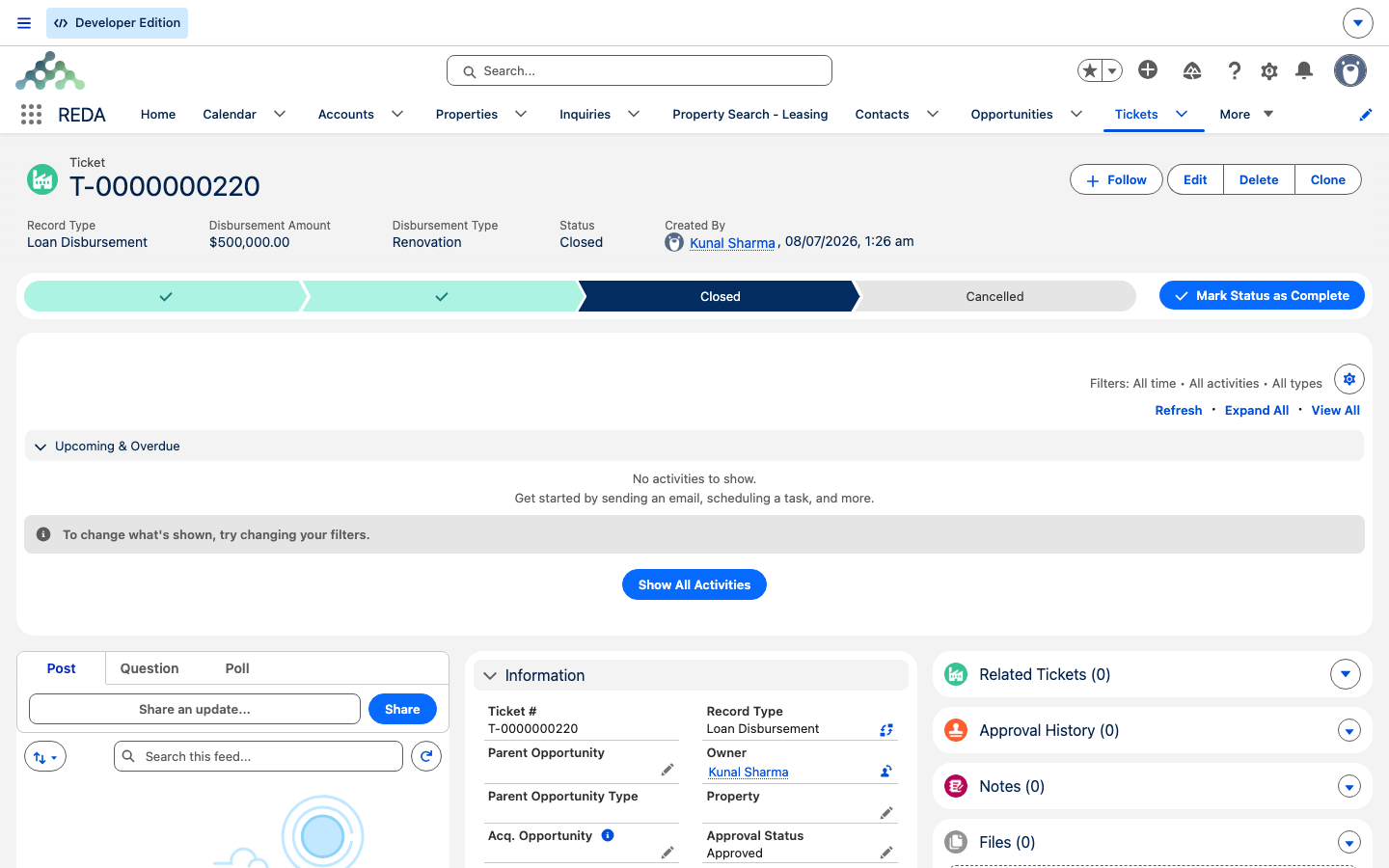
Where to go next
- The Acquisition Purchase Agreement Ticket — the signing that triggers all of this.
- Profit Holding Rules — the source of the property's default leasing rule.
- Running an Acquisition Deal — Binder to Contract — how the deal reached this point.
- How Acquisitions Work in REDA — the whole pipeline map.
Frequently asked questions
REDA creates it when the acquisition goes active (Under Contract) with no property linked. It copies the deal's details and sets the Owner Account to your Buying Account.
It's the auto-created financing slot for every acquisition-born property. Complete it with real loan terms, or close it lost if the purchase is cash.
They must match the acquisition: "Borrower Account must be same as Buying Account on Acquisition Opportunity." and "Property must be same as on Acquisition Opportunity."
The loan must be funded (at Closed Won) — "Only Closed Won Lending Opportunity can be selected." — and an acquisition draw must name the acquisition deal — "You must provide Acquisition Opportunity on Loan Disbursement if disbursement is done against acquisition."
No — it's just a slot. Close it lost if the purchase is cash.
Yes — the property's Purchase Price copies from the deal's Sale / Purchase Price.
Was this article helpful?