
The Loan Repayment Schedule
If you've come here looking for where REDA generates your amortization schedule, here's the honest answer up front: it doesn't. REDA does not build a repayment schedule from a loan's terms. Instead, a loan's schedule is the set of Loan Payment "Payment Due" rows you create — each a planned instalment with its own due date and the principal-and-interest split you calculate — and each counts only once you mark it completed. This article shows you how to lay a schedule out that way, how to read it, and why the balance only moves on completion. The mechanics and every validation for an individual payment are in the companion article Recording Loan Payments; here we take the schedule-level view. No prior REDA experience is assumed.
Access you'll need. Recording and completing loan payments requires the REDA - Property Lending User permission set.
There is no auto-generated schedule
This is the core teaching, so we'll be direct. Entering an Interest Rate, an Amortize method, a Frequency, and an Interest Accrual Type on a loan does not cause REDA to lay out a schedule of instalments. There is no amortization engine in REDA. The only automation on a loan is system bookkeeping — flags, the auto-generated name, keeping the property in step, and rolling up totals.
So the schedule is something you build: a series of Loan Payment rows, each with the type Payment Due, ordered by Due Date. You compute each instalment; REDA records it. That's the model.
Building the schedule
Each instalment is one Loan Payment row of type Payment Due. From the loan's Loan Payments related list, click New, and:
Leave out the interest or the due date, and REDA names what's missing:
"Due Date must be provided for Loan Payment."
The funding receipt versus the instalments
The schedule of repayments is one side of the loan; the money the lender puts in is the other. Record the funding as a single Principal Received row — Principal Amount equal to the sum received, Interest Amount left blank (interest has no place on incoming principal), and a Payment Date entered up front. Everything after that — the repayments — are the Payment Due rows of your schedule.
Once completed, a Principal Received row raises the loan's Received Principal Amount (capped at the Loan Amount), while completed Payment Due rows raise Paid Principal Amount and Paid Interest Amount.
Reading the schedule
The Loan Payments related list, ordered by Due Date, is the schedule. Reading it comes down to one distinction: a row that is not completed is just a plan — a due date and some amounts — and moves no balance; a completed row has actually happened and counts. Here's what each column tells you:
| Column | What it means |
|---|---|
| Payment Type | Payment Due (a repayment) or Principal Received (funding in) |
| Due Date | The planned instalment date — the schedule's running order |
| Principal Amount / Interest Amount | The split you computed |
| Total Amount | Principal + Interest (computed) |
| Is Completed | Whether the instalment has actually happened — the gate |
| Payment Date / Payment Reference | The actual date and reference, required to complete |
Completing an instalment counts it
An instalment moves the loan's balances only when you check Is Completed on its row — and that requires a Payment Date and a Payment Reference. So the schedule is a living thing: you build it as a plan, then tick each row off as instalments are paid. Miss a requirement and completion is blocked:
"Please provide Payment Date to complete the payment."
"The Payment Date must be provided to complete the loan payment for the lending."
Before ticking Is Completed, check: the Payment Date is in, the Payment Reference is in, the Due Date and Interest Amount are already present (0 if interest-free), and any funding receipt stays within the Loan Amount cap. On save, the completed row rolls up to the loan's Paid Interest, Paid Principal, or Received Principal, and the computed Loan Principal Balance and Running Escrow move — as detailed in Escrow & Principal Balances and Property & Acquisition Loan Rollups.
Worked example: an interest-only schedule
Take the 500,000.00 loan on Harbour Tower — Interest Rate 9.000%, Frequency Monthly, Amortize Interest Only. The monthly interest is 500,000.00 × 9% ÷ 12 = 3,750.00 — a figure you calculate, because REDA computes none.
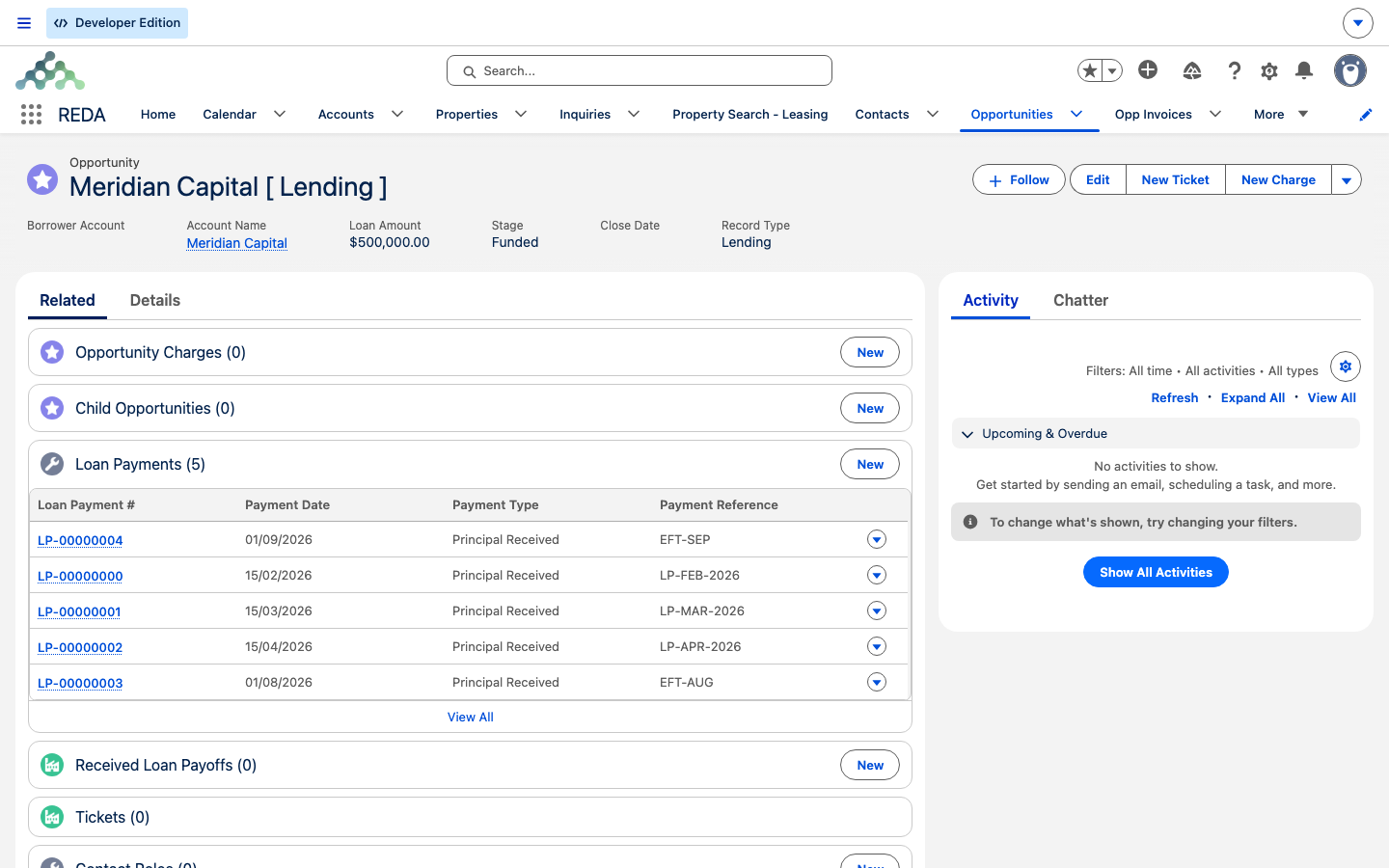
Funded) — each row carries its Loan Payment #, Payment Date, Payment Type and Payment Reference, building up the schedule of activity against the loan.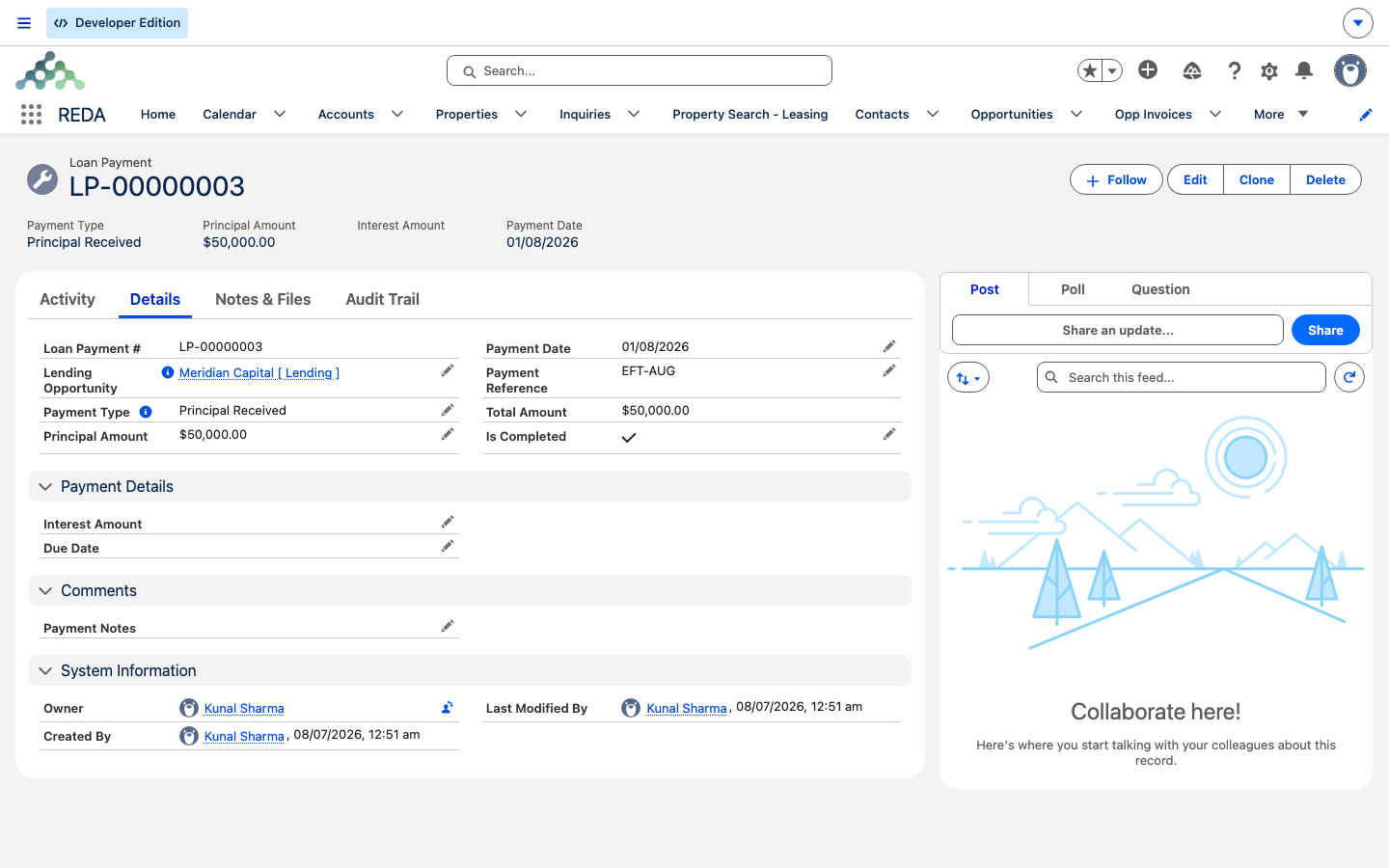
Principal Received row — Principal Amount 50,000.00, a Payment Date and Payment Reference, and Is Completed ticked — the state that lets its amount roll up to the loan's balances.Reference: rows and rules
The two payment types side by side:
| Payment Due (a repayment) | Principal Received (funding in) | |
|---|---|---|
| Direction | A repayment going out | Principal the lender sends in |
| Principal Amount | Required (0 allowed) | Required |
| Interest Amount | Required (enter 0 explicitly) | Must stay blank |
| Due Date | Required | Optional |
| Payment Date | Required to complete | Required up front |
| Counts toward | Paid Principal + Paid Interest (once completed) | Received Principal (once completed) |
The checks you may meet while building or completing the schedule, quoted exactly:
| When | Message |
|---|---|
| Payment Due without an interest amount | "Interest Amount must be provided for Loan Payment." |
| Payment Due without a due date | "Due Date must be provided for Loan Payment." |
| Completing without a reference | "Please provide Payment Reference." |
| Completing without a payment date | "Please provide Payment Date to complete the payment." |
| Completing a Payment Due without a payment date | "The Payment Date must be provided to complete the loan payment for the lending." |
Where to go next
- Recording Loan Payments — the mechanics of a single payment, with all seven validations.
- Loan Terms & Allocation — the terms this schedule reflects.
- Escrow & Principal Balances — how completed rows move the loan's balances.
- Property & Acquisition Loan Rollups — where completed rows surface on the property.
- Disbursements & Payoffs — payoffs (retiring a loan) versus payments.
Frequently asked questions
REDA doesn't generate one. You build the schedule yourself as Payment Due rows — one per instalment, each with a Due Date and the principal-and-interest split you compute. The terms fields document the agreement; they don't drive a calculator.
No. Payment Schedules belong to property sales — they're generated from a sale's payment plan and parented to the sale deal. Loans don't generate them; your loan's schedule is its Loan Payment rows.
They aren't completed. A saved-but-not-completed row is only a plan. Tick Is Completed — which needs a Payment Date and a Payment Reference — to make an instalment count.
A Payment Due row requires the interest field, so a principal-only instalment still needs a value there — enter 0. Blank is rejected: "Interest Amount must be provided for Loan Payment."
With a Principal Received row: the amount in Principal Amount, Interest Amount left blank, and a Payment Date entered up front. See Recording Loan Payments.
No. You calculate each instalment's interest and enter it. REDA records what you enter and rolls it up; it does no interest math itself.
Was this article helpful?