
How REDA Works with REDA Financials
REDA runs your properties, leases and billing. When you also run the accounting extension — REDA Financials — a second product sits alongside REDA and takes over the money side: tax, receipts, cash application and the general ledger. The two are wired together so tightly that a rent invoice raised in REDA becomes a posted accounting document in REDA Financials on its own, with no export, no overnight sync and no middleware. This article maps that seam: what each product owns, the switch that turns the connection on, and how a single invoice travels from a lease charge to a posted document and back again. It stays at the surface — where REDA hands off — and points you to the REDA Financials help center for what happens once the accounting side takes over.
Access you'll need. Viewing invoices requires the REDA - Invoice Management Read Only permission set; creating and editing them requires REDA - Invoice Management Admin or REDA - Property Leasing User. The accounting records this article refers to — Sales Invoices, receipts, the ledger — live in the REDA Financials app and are covered by the REDA Financials help center.
Two products, one flow of records
Think of a rent invoice as a baton in a relay. REDA runs the first leg: it holds the lease, works out the charges, and raises the invoice the tenant owes. At a clean line — the receivable — it hands the baton to REDA Financials, which runs the second leg: it turns that invoice into a posted accounting document, applies tax, records the receipt when the tenant pays, and files everything in the ledger. REDA's billing engine deliberately stops at that boundary; the accounting extension owns tax, cash application and the general ledger.
The handoff happens the moment the invoice is ready — it is event-driven and lives entirely inside your single workspace. There is no nightly job, no file transfer and no external connection for this seam. That's why an invoice you raise in REDA shows up in accounting within moments, not overnight.
What each product owns
The cleanest way to hold the two products in your head is by the records each one is responsible for. REDA owns everything up to and including the invoice; REDA Financials owns everything the invoice turns into.
| REDA owns | REDA Financials owns |
|---|---|
| Properties, units and leases | The chart of accounts and the general ledger |
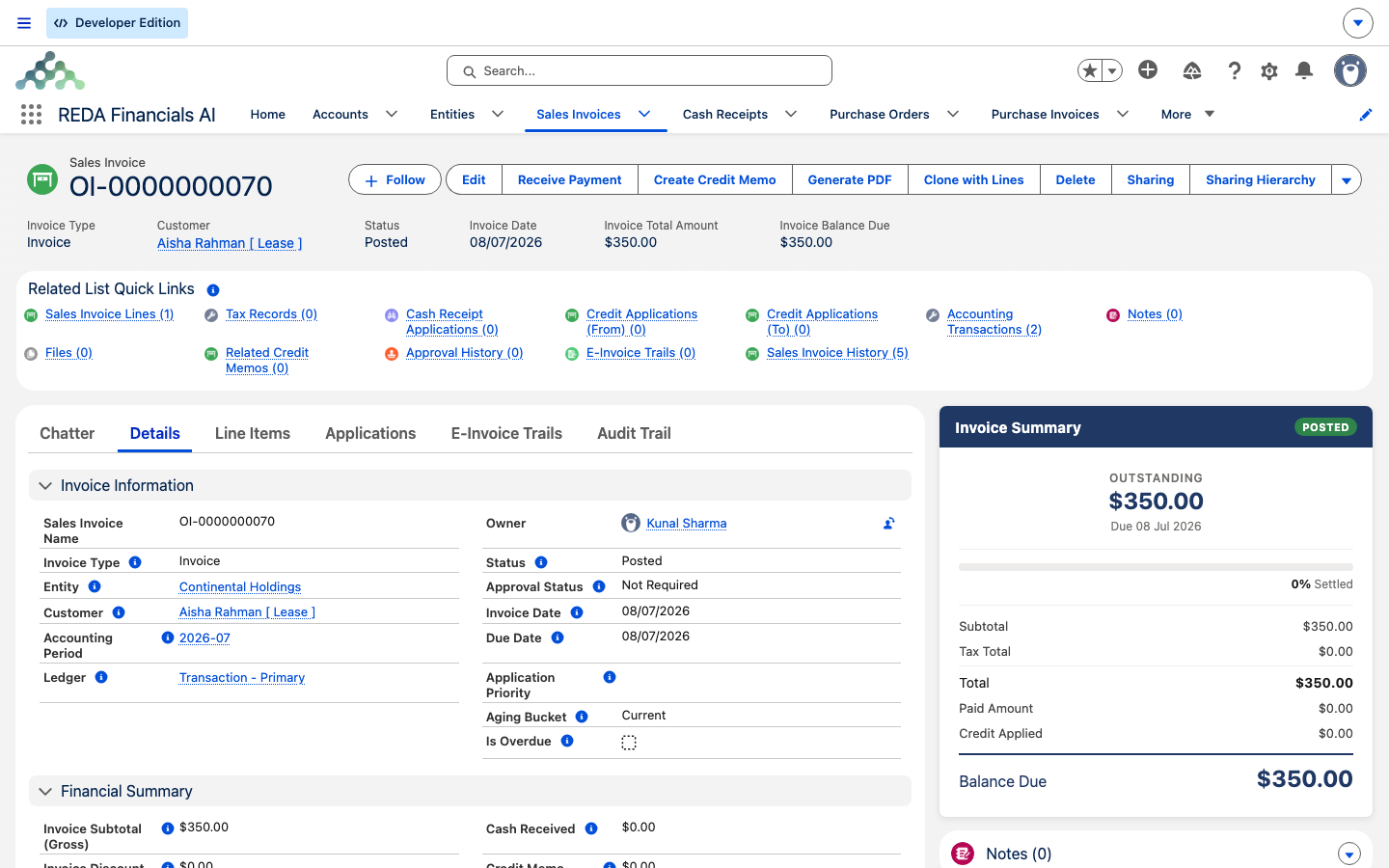
| Charges and how they're grouped | Sales Invoices (the posted accounting document) |
| Invoices the tenant owes (Opp Invoices) | Tax calculation on those invoices |
| The balance shown on each invoice | Cash receipts and cash application |
| Which client's ledger an invoice belongs to | Journal entries and financial statements |
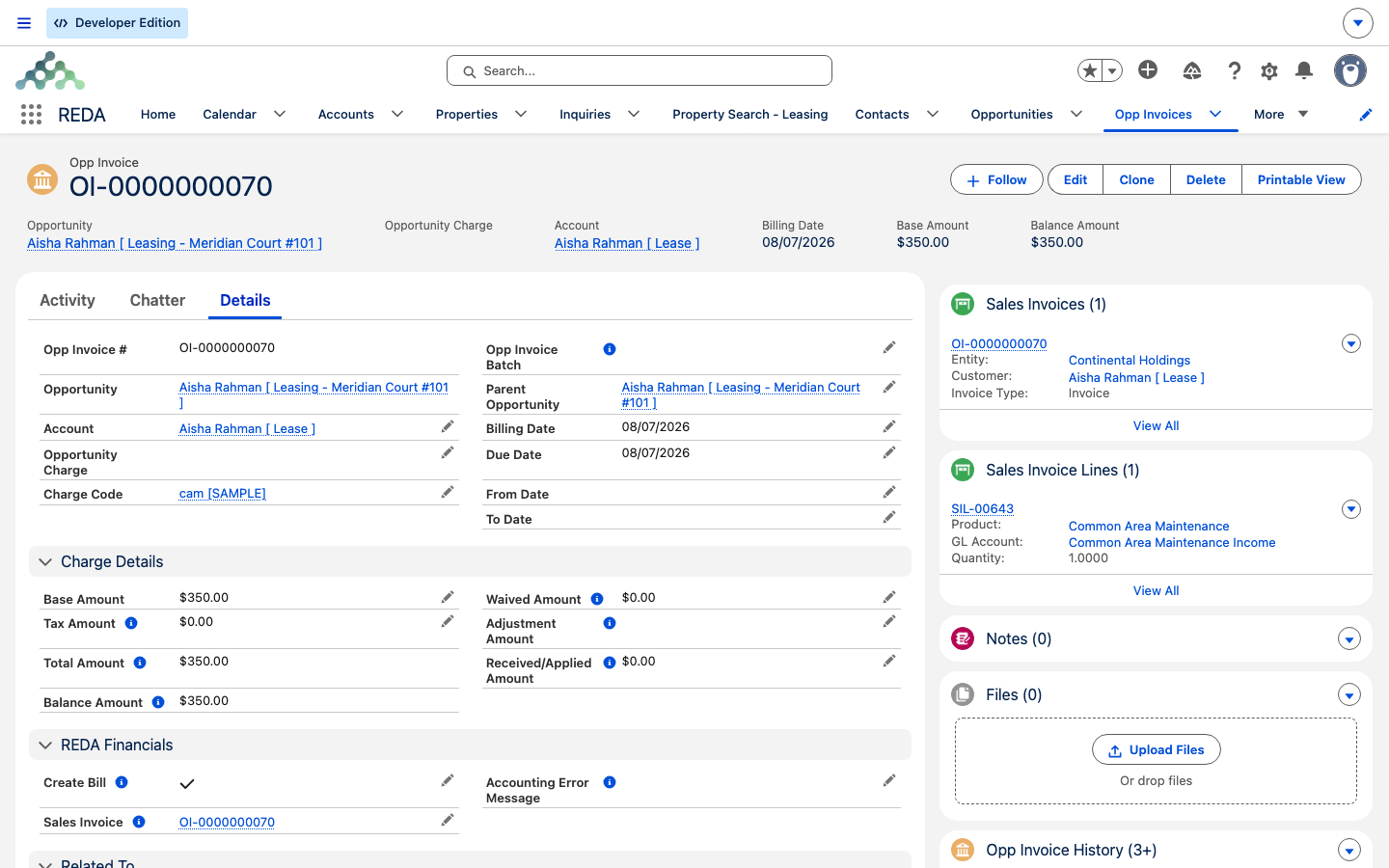
You'll notice REDA displays money it doesn't calculate. A REDA invoice shows a Tax Amount, a Received Amount, a Waived Amount and an Adjustment Amount — but REDA never writes those itself. The accounting extension supplies them, and REDA folds them into the invoice's balance and total. So if an invoice shows an amount received that you never keyed in, that's expected: it flowed back from the posted receipt (see How payments come back).
The switch that turns it on
The whole integration hangs on one setting. Your administrator registers exactly one accounting extension for the workspace; on an organization running REDA Financials, that's the REDA Financials extension. Until it's registered, every integration behavior described here stays dormant — invoices are raised in REDA and simply never travel anywhere.
You don't toggle this per invoice or per lease; it's a one-time, workspace-wide registration your administrator makes during setup. When it's on, the connection is live for every eligible invoice from that point forward. When it's off — which is the default for a fresh workspace — REDA runs on its own and none of the accounting records in this article are created.
How an invoice becomes an accounting document
This is the core of the seam, and it's worth walking slowly because it explains almost everything you'll see on a bridged invoice. When REDA raises a single invoice, the following happens on its own:
If any check fails — most often a receivable account that hasn't been activated as an entity — REDA writes the reason onto the invoice's accounting-error field instead of creating the document, and simply doesn't try again until the error is cleared. That's the safety net that stops a broken invoice from bridging over and over.
What carries over to the accounting document
When you open the resulting Sales Invoice and wonder where a value came from, this is the map. Everything on it is copied from the REDA invoice at the moment of the handoff.
| On the accounting document | Comes from the REDA invoice |
|---|---|
| Name | The invoice's name |
| Customer | The lease's account |
| Entity (whose ledger) | The Default Receivable Account's linked Entity |
| Invoice Date / Due Date | Billing Date / Due Date |
| Type | Invoice when the amount is positive, Credit Memo when it's negative |
| Description | The billing comment |
| The single line | Amount, plus GL account, product, tax profile and cost center from the Charge Code |
| Back-links | The source invoice, lease, contact and property |
How payments come back
The relay runs in both directions. Once the tenant pays and REDA Financials posts the receipt, the money finds its way back onto the REDA invoice. When a Sales Invoice is Posted, its paid, tax and credit amounts are copied back to the REDA invoice's Received, Tax and Waived amounts — which is why those fields fill in without you touching them. If the accounting document is later moved to Draft or voided, the amounts clear again. For a consolidated batch, the received amounts are spread proportionally across the child invoices.
That's the summary; the full round trip — recording a tenant payment, how credits and refunds reflect — lives in Payment & Balance Sync.
Worked example: one month's rent, round trip
Aisha Rahman rents Meridian Court #101 for 1,200.00 a month. Her July rent invoice has a Billing Date of July 1 and is due July 5. Here's the whole trip:
| What happens | Where |
|---|---|
| REDA's recurring billing run raises the 1,200.00 rent invoice and flags it for accounting | REDA |
| A Sales Invoice appears — customer Aisha Rahman, type Invoice, 1,200.00, dated July 1 / due July 5 — and posts | REDA Financials |
| The Sales Invoice link is stamped back onto the REDA invoice | REDA |
| Aisha pays 1,200.00; the receipt posts | REDA Financials |
| The REDA invoice's Received Amount shows 1,200.00 and its balance drops to 0.00 | REDA |
The seam at a glance
The billing bridge is the busiest touchpoint, but it isn't the only one. Each place the two products meet has its own article — start here, then follow the one you need.
| Touchpoint | What connects | Deep-dive article |
|---|---|---|
| Billing bridge | REDA invoice → posted Sales Invoice | This article, plus Payment & Balance Sync |
| Charge routing | Accounting defaults on each Charge Code | Charge Code Accounting Setup |
| Balance sync-back | Received / Tax / Waived onto the invoice | Payment & Balance Sync |
| Entity activation | A client account becomes a ledger | Activating a Client Account as a Financial Entity |
| Tenant payments | Recording a payment against a lease | Recording Tenant Payments |
| Management fees | The fee the PM company earns, booked both sides | Management Fee Automation |
| Owner draws & statements | Paying owners and reporting to them | Owner Draws & Owner Statements |
| Bank EFT | Electronic payment files for the bank | Bank EFT / NACHA Processing |
Where to go next
- Charge Code Accounting Setup — the defaults every invoice line depends on; set these first.
- Activating a Client Account as a Financial Entity — the ledger an invoice posts into.
- Payment & Balance Sync — how received amounts flow back onto the invoice.
- Recording Tenant Payments — logging a payment against a lease.
- From Application to Move-In — when a lease turns billable in the first place.
Frequently asked questions
Check four things, in order: the accounting extension is registered for your workspace; the invoice has a Default Receivable Account; that account is activated as a financial Entity; and the invoice's accounting-error field is empty. A leftover error blocks the bridge until it's cleared. See Payment & Balance Sync for clearing an error and re-triggering.
REDA never writes that field. It's synced back from the posted Sales Invoice on the accounting side once the tenant's receipt is recorded.
No. With no accounting extension registered — the default for a new workspace — none of the integration behavior runs. Invoices are raised in REDA and stay there.
Neither. The handoff happens inside your single workspace the moment the invoice is flagged — no file, no overnight job, no external connection.
One. A batch becomes a single Sales Invoice with one line per child invoice, each line carrying its own charge-code accounting.
Was this article helpful?