
REDA Email Services: Overview
REDA Email Services is the inbound side of email in REDA. Where other parts of REDA send email out, Email Services brings email in — automatically filing customer messages onto the right records, and turning certain inbound emails into new work items. It does three related jobs: it auto-syncs customer emails onto the Contacts and deals they belong to, it turns emails sent to a leasing-style address into new Inquiries, and it turns emails sent to a support-style address into new Service Requests. Anything it can't confidently place is held safely in one queue for a person to sort out, rather than lost. This article explains what each capability does, how they fit together, and where to go to set each one up.
Why REDA has its own email intake
Platform-license orgs don't have the standard Sales-Cloud pieces some teams lean on for inbound email — there's no Lead or Case object, and no built-in activity-capture engine to auto-log messages against records. REDA Email Services fills exactly that gap, on REDA's own terms: it logs inbound email as native Email Message and activity records against the REDA objects you actually work in — Contacts, Inquiries, and Service Requests — and it creates new Inquiries and Service Requests directly, without needing Leads or Cases in between.
Everything happens inside your Salesforce org. Email Services doesn't reach out to Gmail or Microsoft 365 on its own; instead, your mail system sends a copy of incoming mail to a Salesforce address that REDA watches, and REDA does the filing. The setup that connects those two ends is covered in Email Services: Setup & Enablement.
The three capabilities
Email Services is really one intake channel with three outcomes. A single behind-the-scenes handler reads every inbound message and decides what to do with it — file it onto an existing record, create a new Inquiry, create a new Service Request, or hold it for review. Here's what each outcome means for you.
| Capability | What it does | Learn more |
|---|---|---|
| Auto-Sync | Customer emails to a monitored mailbox are filed automatically onto the matching Contact, Inquiry, or Service Request — as a native Email Message plus a logged activity — so the whole conversation lives on the record. | Email Auto-Sync |
| Email-to-Inquiry | An email to a configured intake address (for example, a leasing address) with no existing record creates a brand-new Inquiry, with the sender's name and email captured and the message logged on it. | Email-to-Inquiry |
| Email-to-Service-Request | An email to a support-style intake address creates a new Service Request, taking its subject and description from the email and linking the sender's Contact when known. | Email-to-Service-Request |
Auto-Sync: conversations that file themselves
Auto-Sync is the everyday workhorse. When a customer emails one of your monitored mailboxes, REDA files that message as a native Email Message on the record it belongs to and logs a matching activity, so it appears on the record's Activity Timeline and Emails related list. Replies thread back onto the same record, and attachments are saved to the record's Files. Matching runs in a sensible order — REDA looks for a reply to an existing thread first, then a known Contact, then an open Inquiry — and only when it finds nothing does the email go to the review queue.
Email-to-Inquiry: turning interest into a record
Point a prospect-facing address — say, your leasing inbox — at REDA, and an email from someone you don't yet have a record for becomes a new Inquiry. REDA parses the sender's name into first and last name, captures their email, applies the Inquiry record type and any default values you've configured for that address, and logs the original message on the new Inquiry. If the same prospect writes again while they still have an open Inquiry, REDA reuses it rather than creating a duplicate. See Email-to-Inquiry for the full behavior.
Email-to-Service-Request: turning issues into work
Point a support-facing address at REDA, and an inbound email becomes a new Service Request, with the email's subject and body carried onto the request. If REDA recognizes the sender as an existing Contact, it links them; if not, the Service Request is still created so nothing falls through. Each qualifying email creates its own Service Request, and replies thread back onto it. See Email-to-Service-Request.
The Unmatched Email queue: nothing gets dropped
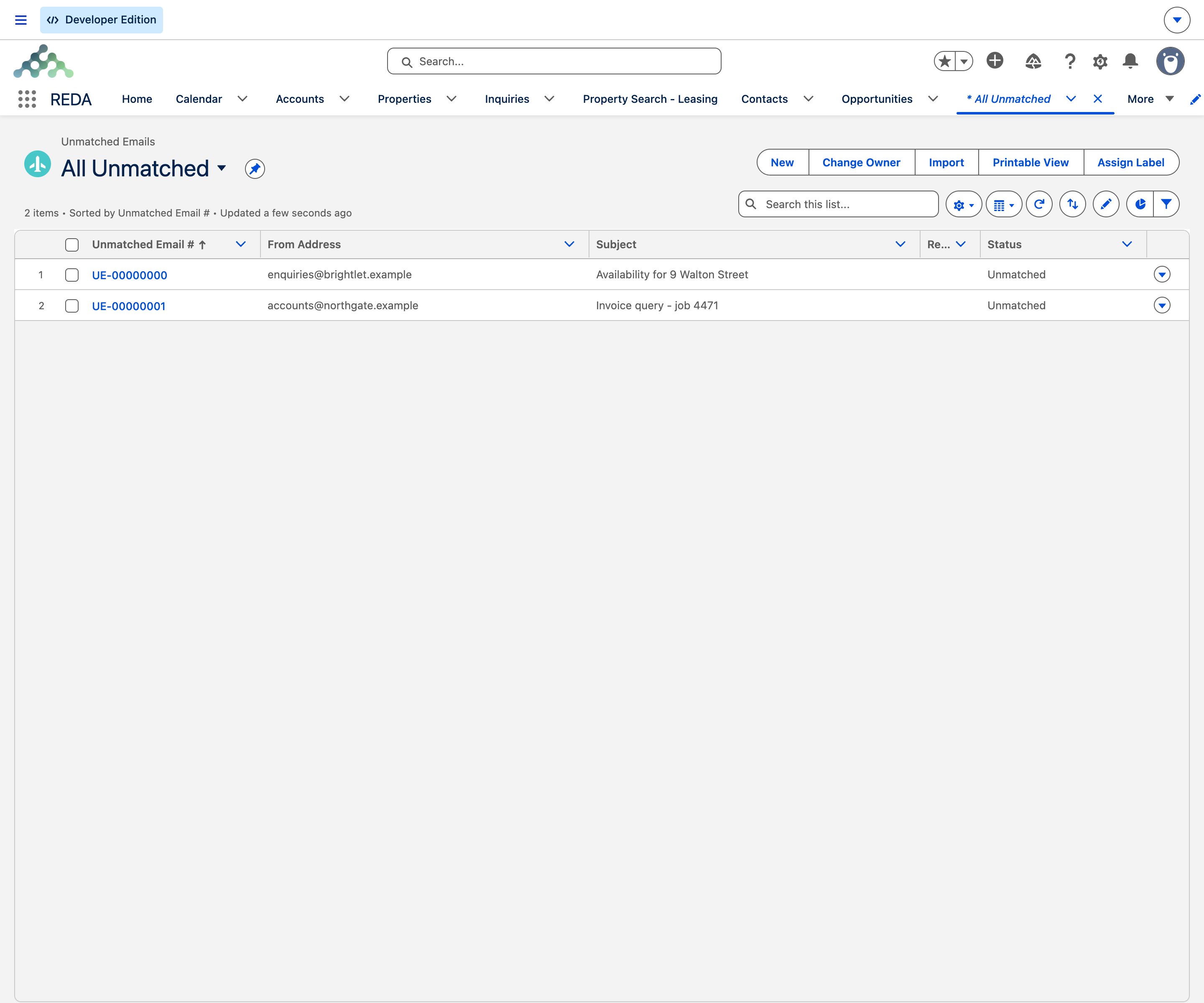
The safety net under all three capabilities is the Unmatched Email object and its queue. Two kinds of message land here: an auto-sync email that matched no record, and an intake email that was meant to create an Inquiry or Service Request but couldn't. In every case the full email is preserved — its formatting kept intact and any attachments staged — so no information is lost while it waits.
From the Unmatched Email tab, a triage admin opens a held email and uses the built-in Match-to-Record panel to pick the right Contact and related record. Doing so files the email just as auto-sync would have and marks the entry Matched. If a message doesn't belong anywhere — spam, a bounce, an out-of-scope note — the admin marks it Ignored. Either way, a person made the call; REDA never silently discards a customer's email. The queue and its triage workflow are covered in Triage: the Unmatched Email Queue.
How it all fits together
Put the pieces in a line and the shape is simple. Your mail system copies inbound email to a Salesforce address REDA watches. REDA's inbound handler reads each message and routes it:
Which address decides which outcome? Auto-sync mailboxes file onto existing records; dedicated intake addresses — configured one per address — create Inquiries or Service Requests. There is a single email service and a single handler behind all of this; the difference in behavior comes entirely from configuration, not from separate machinery. Setting up those addresses and the configuration is the job of Email Services: Setup & Enablement.
Access: one permission set
Access to Email Services runs through a single permission set, REDA - Email Integration (API name REDA_Email_Integration). It grants what a triage admin needs: the ability to see and work the Unmatched Email tab and records, and edit access to the two fields that steer where Inquiry-email activities are logged. Assign it to the behind-the-scenes user that runs the intake, and to every person who triages the queue. Who gets it, and the rest of enablement, is detailed in the setup article.
Where to go next
- Email Services: Setup & Enablement — the admin runbook to switch it all on.
- Email Auto-Sync — how customer emails file themselves onto records.
- Email-to-Inquiry — turning inbound email into new Inquiries.
- Email-to-Service-Request — turning inbound email into new Service Requests.
- Triage: the Unmatched Email Queue — placing the messages REDA held for review.
- Sending Email from REDA — the outbound counterpart.
Frequently asked questions
No. Email Services is the inbound side — it brings customer emails into your records. Sending email from a record is a separate, outbound capability covered in Sending Email from REDA.
It's an OEM-edition capability, built for Platform-license orgs. It isn't part of the Sales-Cloud variant of REDA.
No. Auto-Sync is a dedicated inbound email service that files each copied message onto the right record. It isn't Einstein Activity Capture, a scheduled job, or a background flow.
It's a staging queue. Any inbound email that couldn't be matched to a record — or an intake that couldn't create one — lands there with its full content preserved, so an admin can place it by hand. Nothing is silently dropped. See Triage: the Unmatched Email Queue.
Your administrator activates the inbound email service, obtains its generated address, points your mail flow at it, and assigns the permission set. The full runbook is in Email Services: Setup & Enablement.
Was this article helpful?