
Recording Loan Payments
A loan's balances don't move on their own — they move because you record the money. This article shows you how: how to log an instalment you pay out, how to log principal the lender sends you, and — the point people most often miss — how marking a payment completed is the switch that makes it count in every total. By the end you'll create both kinds of payment, satisfy each requirement REDA checks (all quoted exactly), and be able to trace a completed payment into the loan's and the property's figures. No prior REDA experience is assumed.
Access you'll need. Recording loan payments requires the REDA - Property Lending User permission set.
The two kinds of payment
Every loan payment is one of two types, and choosing the right one is the first decision on the form. The Payment Type field has exactly two values:
- Payment Due — money going out: an instalment, carrying a principal portion and an interest portion.
- Principal Received — money coming in: principal the lender sends you, principal only, no interest.
You create one row per event — one instalment, one draw of principal received. The rows are simple records; nothing about the loan terms fills them in for you, and nothing is automated except REDA's own bookkeeping when you save. That last point is worth holding on to: REDA never creates these rows from the loan's terms, because it doesn't build a schedule at all (see Loans in REDA for the full explanation). Every row is one you enter.
| Payment Due | Principal Received | |
|---|---|---|
| Direction | Money you pay (an instalment) | Principal the lender sends you |
| Principal Amount | Required (0 is allowed, for interest-only) | Required |
| Interest Amount | Required (enter 0 explicitly) | Must stay blank |
| Due Date | Required | Optional |
| Payment Date | Required to complete | Required up front |
| Counts toward | Paid Principal + Paid Interest (once completed) | Received Principal (once completed) |
Recording an instalment (Payment Due)
Use a Payment Due row for a repayment you make on the loan. From the loan's Loan Payments related list, click New, and:
Miss the interest or the due date and REDA tells you exactly which is missing:
"Due Date must be provided for Loan Payment."
Recording principal received
Use a Principal Received row when the lender funds the loan — the money coming to you. Again from the loan's Loan Payments related list, click New, and:
Put interest on a receipt, or omit the payment date, and you'll see:
"Payment Date must be provided for receiving the Payment."
Completing a payment
Here is the concept the whole article turns on. A payment row you've saved is only a plan until you mark it done. The checkbox that does this is labeled Is Completed. Nothing counts toward any balance until Is Completed is checked.
To complete a row, REDA requires two things — a Payment Date and a Payment Reference (the wire, cheque, or ACH reference). Miss either and completion is blocked:
"Please provide Payment Date to complete the payment."
"The Payment Date must be provided to complete the loan payment for the lending."
So before you tick Is Completed, run this quick check:
Where the money shows up
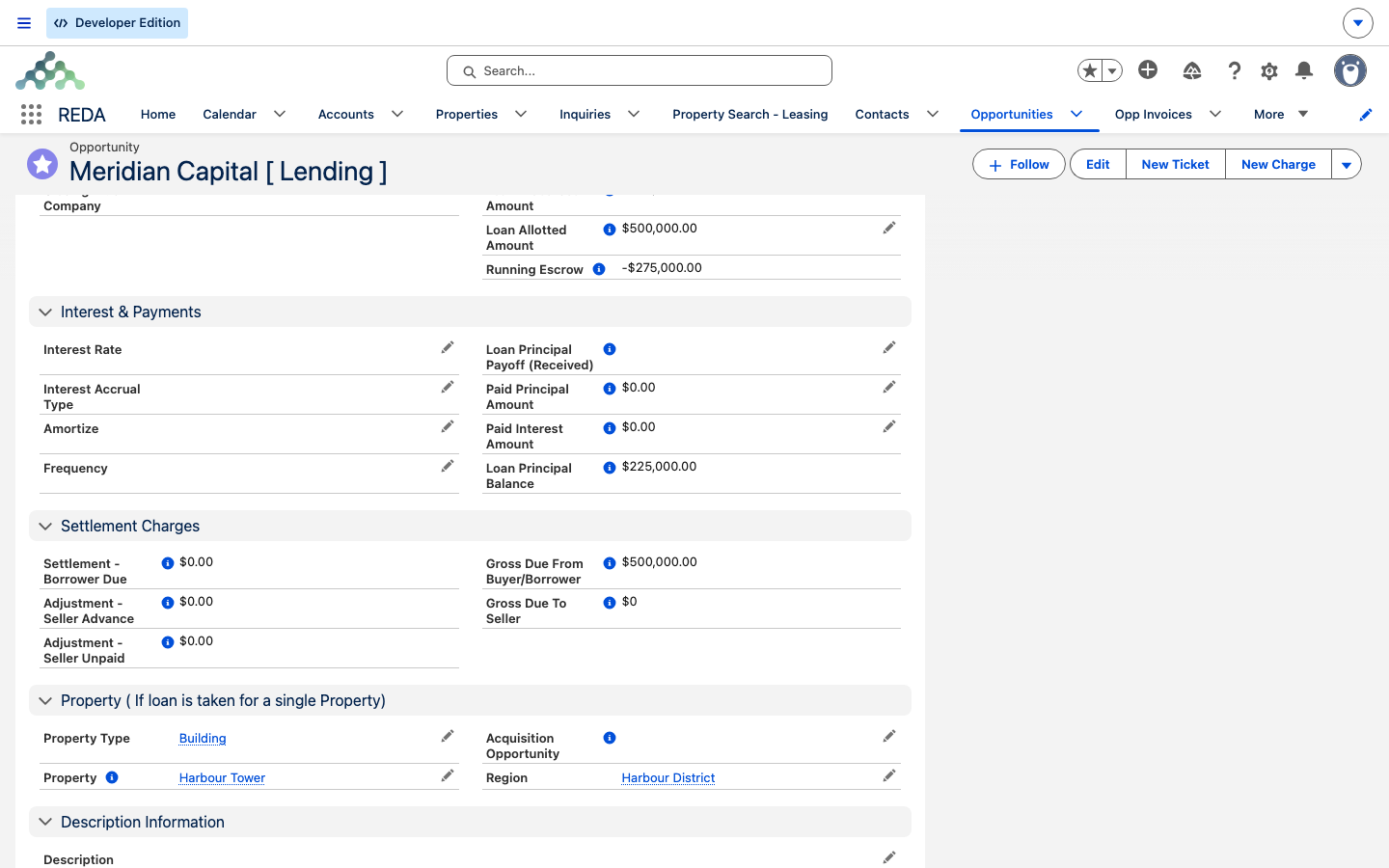
The moment a payment is completed, REDA recalculates the loan's totals. Completed Payment Due rows add to Paid Principal Amount and Paid Interest Amount; completed Principal Received rows add to Received Principal Amount. Deleting or restoring a payment recalculates the same totals, so the loan always reflects the rows that currently exist.
You can't receive more principal than the loan is for. If a receipt would push the total past the Loan Amount, REDA stops it:
From those totals, the loan's computed figures move: the Loan Principal Balance rises as principal is received and falls as principal is paid, and the Running Escrow shifts with receipts and disbursements. Those figures, and how they cascade to the property's Total Loan Principal Paid and other rollups, are spelled out in Escrow & Principal Balances and Property & Acquisition Loan Rollups.
Worked example: servicing the Harbour Tower loan
Take the 500,000.00 interest-only loan on Harbour Tower from Loans in REDA — 9.000% annual interest, monthly. The monthly interest is 500,000.00 × 9% ÷ 12 = 3,750.00. That figure is one you calculate; REDA does not compute it. Here's the loan being serviced:
| You do | REDA does |
|---|---|
Record the lender funding: Principal Received, Principal 500,000.00, Payment Date on funding day, complete it with reference WIRE-4471 | Received Principal 500,000.00; Loan Principal Balance 500,000.00; Running Escrow 500,000.00 |
| Enter the first instalment: Payment Due, Principal 0, Interest 3,750.00, Due Date 1 Sep — save without completing | The row shows as a plan; balances unchanged |
On 1 Sep, complete it: Is Completed, Payment Date 1 Sep, reference ACH-0901 | Paid Interest 3,750.00; principal balance unchanged (interest-only) |
| Later, a curtailment: Payment Due, Principal 50,000.00, Interest 0 (enter the zero), completed | Paid Principal 50,000.00; Loan Principal Balance 450,000.00 |
Along the way you'll meet the guards if you slip — leaving the interest blank on that curtailment row triggers "Interest Amount must be provided for Loan Payment.", and completing without a reference triggers "Please provide Payment Reference."
Reference: fields and rules
The fields on a loan payment:
| Field | What it's for |
|---|---|
| Lending Opportunity | The loan — required, and set for you when you create the row from the loan |
| Payment Type | Payment Due or Principal Received — required, with no default |
| Principal Amount / Interest Amount | The split — you calculate it (REDA does no interest math) |
| Total Amount | Computed: Principal + Interest |
| Due Date / Payment Date | The planned date and the actual date |
| Is Completed | The gate — nothing counts until it's checked |
| Payment Reference | The wire / cheque / ACH reference — required to complete |
| Payment Notes | Free text |
And the checks, grouped by the moment they fire:
| Moment | Message |
|---|---|
| Saving a new Payment Due | "Interest Amount must be provided for Loan Payment." "Due Date must be provided for Loan Payment." |
| Saving a new Principal Received | "Interest Amount must be blank for "Principal Received"." "Payment Date must be provided for receiving the Payment." |
| Ticking Is Completed | "Please provide Payment Reference." "Please provide Payment Date to complete the payment." "The Payment Date must be provided to complete the loan payment for the lending." |
| A receipt exceeding the loan | "Received Principal Amount must be less or equal to Loan Amount." |
Where to go next
- The Loan Repayment Schedule — lay out a whole schedule of Payment Due rows and read it at a glance.
- Loans in REDA — the loan record these payments belong to, and why there's no amortization engine.
- Escrow & Principal Balances — how completed payments move the loan's balances, formula by formula.
- Property & Acquisition Loan Rollups — where a completed payment surfaces on the property.
- Disbursements & Payoffs — moving money via tickets, and paying a loan off (different from a payment).
Frequently asked questions
The row isn't completed. A saved-but-not-completed payment is only a plan. Check Is Completed — which needs a Payment Date and a Payment Reference. If either is missing you'll see "Please provide Payment Reference." or "Please provide Payment Date to complete the payment."
On a Payment Due row the interest field is required, so a principal-only instalment still needs a value there — enter 0. A blank field is rejected: "Interest Amount must be provided for Loan Payment." Zero is a value; blank is not.
Incoming principal has no interest component, so REDA requires the field to be empty: "Interest Amount must be blank for "Principal Received"." Record interest on the Payment Due instalments instead.
You can't receive more principal than the loan is for: "Received Principal Amount must be less or equal to Loan Amount." If the loan was genuinely upsized, raise the Loan Amount first.
No. REDA has no amortization engine — it does not generate payment rows or compute interest from the terms. Every row is one you create by hand. See Loans in REDA for the full picture.
A payment is a row on the loan — an instalment out or principal in. Paying a loan off — retiring it through a refinance or settlement — is a Loan Payoff ticket, not a payment row. See Disbursements & Payoffs.
Was this article helpful?