
REDA Ads Connector: Overview
The REDA Ads Connector links your Google and Meta lead advertising to REDA. When someone fills in one of your Google or Meta lead forms, the connector brings that lead straight into REDA — already tagged with the campaign it came from — so your team works it like any other inquiry, with no copy-and-paste from an ad dashboard. And when that lead turns into real business, the connector reports the result back to Google or Meta, so the ad platforms learn which ads actually produce customers. That round trip — lead in, outcome back — is what the connector is built to do.
What the connector does
The connector works in two directions, and it's worth keeping them separate in your head:
| Direction | What happens |
|---|---|
| Lead capture (inbound) | A prospect submits one of your Google or Meta (Facebook & Instagram) lead forms. The connector receives that submission and creates a lead record in REDA, stamped with the campaign, form, and ad-click details it arrived with. |
| Closed-loop conversions (outbound) | When you mark that lead as won, the connector sends a conversion signal back to Google or Meta, matched to the original click. The ad platform then knows that ad produced a real outcome and can optimize future spend toward it. |
The second direction is what people mean by closed-loop conversion: the loop that starts with an ad click and closes when the outcome is reported back to the platform that served the ad. Without it, an ad platform only knows it produced a form fill; with it, the platform learns whether that form fill became a customer.
The Ad Account record
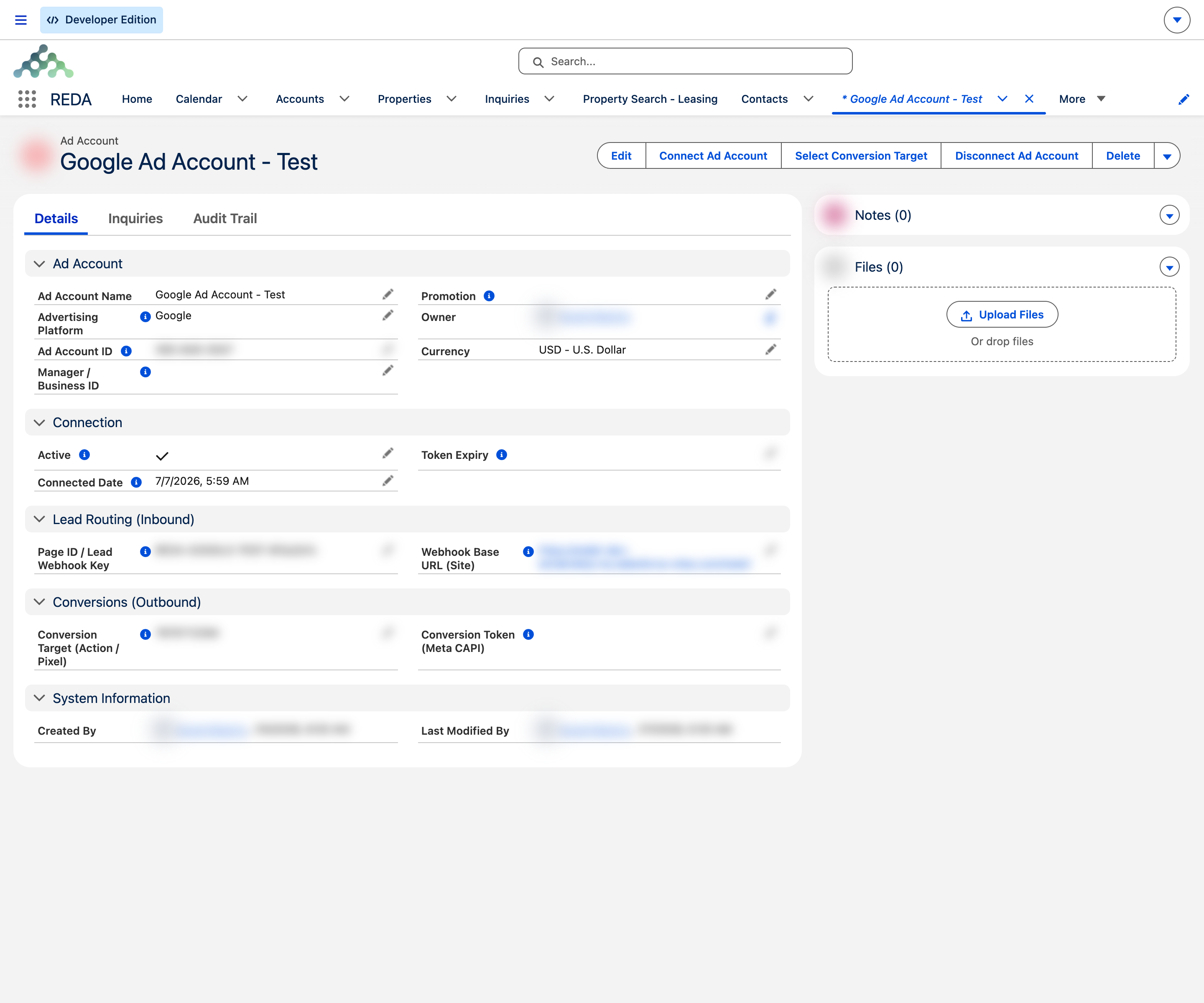
Everything the connector needs for one advertising account lives on a single Ad Account record. You create one record per Meta Page or per Google customer account, set its Advertising Platform to Google or Meta, and connect it. The record then holds the connection state, the campaign it attributes leads to, and the conversion target it reports back to.
Each Ad Account carries three buttons that drive the whole lifecycle:
| Button | What it does |
|---|---|
| Connect Ad Account | Opens the advertising platform's sign-in in a new window so you can authorize the connection. The same button is used for both Google and Meta. When it finishes, the Ad Account is marked Active and its Connected Date is set. |
| Select Conversion Target | Chooses where conversions are reported. For Google, it lists the account's eligible conversion actions and stamps your choice onto the record. For Meta, you set the conversion target (your dataset/pixel) on the record directly. |
| Disconnect Ad Account | Ends the connection: it releases the link on REDA's side, clears the stored connection, and marks the account inactive. For Meta, disconnecting also releases the Page so it can be connected to a different org later. |
Where your leads land
Captured leads arrive as normal lead records in REDA — the same records your team already works — but with a set of attribution fields filled in automatically. Those fields tell you exactly where the lead came from:
- Ad Platform — Google or Meta (and, for Meta, whether it came from Facebook or Instagram).
- Ad Account, Ad Campaign Id, and Ad Form Id — the account, campaign, and lead form behind the lead.
- Web gclid / Web fbclid — the ad-click identifier, which is what lets the later conversion be matched back to the original click.
- Ext Lead Id — the platform's own id for the submission, used to make sure the same lead is never imported twice.
- Ad Unmapped Answers — any custom lead-form questions that don't have a dedicated field, kept so nothing the prospect told you is lost.
On top of that, each lead is tied to the campaign the Ad Account is set to attribute to, so your reporting rolls up cleanly by campaign. Because the attribution is captured on the lead itself, it stays with the record for the life of the deal.
Editions: how it looks in your org
REDA ships in two editions, and the connector behaves the same in both — it just lands on differently named records. The table below is the only difference most admins and users need to keep in mind.
| Concept | REDA One (OEM) | REDA on Sales Cloud (ISV) |
|---|---|---|
| Captured lead lands on | Inquiry | Standard Lead |
| Campaign attribution uses | Promotion (stamped onto the Inquiry) | Campaign (the lead is added as a Campaign Member) |
| Conversion is reported when you | Mark the Inquiry as converted | Convert the Lead and win the Opportunity |
| Conversion value comes from | The Conversion Last Value recorded on the Inquiry | The Opportunity Amount |
How it works, at a glance
You don't need to know the plumbing to use the connector, but a simple mental model helps:
A record-triggered automation handles that final report for you; there's no manual step to send a conversion. Your administrator controls the whole thing centrally, including a master switch per platform, so lead capture can be turned on or off for Google and Meta independently.
Where to go next
- Ads Connector: Setup & Enablement — the one-time admin steps to install and turn the connector on.
- Google Lead Connector — getting Google lead-form submissions into REDA.
- Meta Lead Connector — getting Facebook and Instagram leads into REDA.
- Closed-loop Conversions & Conversion Target — reporting won leads back to Google and Meta.
- Ads Connector: Troubleshooting — what to check when a lead or conversion doesn't arrive.
- Web Attribution — how REDA records where your leads came from.
Frequently asked questions
Google and Meta. On Meta, that covers both Facebook and Instagram lead forms.
No. There is a single Connect Ad Account button. Which platform it connects to is determined by the Advertising Platform set on the Ad Account record.
No. Once a lead is marked won, an automation reports the conversion back to Google or Meta for you, matched to the original ad click.
As normal lead records — Inquiries on REDA One (OEM) or standard Leads on REDA on Sales Cloud (ISV) — with attribution fields filled in automatically.
Was this article helpful?