
Leasing Rules: the Policy Engine
A Leasing Rule is where you set leasing and billing policy once — the charge codes, the invoice cadence, proration, late fees, month-to-month fees, multi-year step-ups, renewals, referral bonuses, and straight-line recognition — and REDA applies it to every property and every lease under the rule. This article is for administrators. By the end you can build a complete rule, you'll know which rule values are copied onto leases versus read live at billing time, and you'll understand the one behavior that surprises most teams: the rule quietly re-copies its late-fee and month-to-month policy onto active leases, so per-lease tweaks to those fields don't survive.
Access you'll need. Creating and editing Leasing Rules requires the REDA - Master Data - Admin permission set. The REDA - Master Data - Read Only and REDA - Property Leasing User sets can view rules but not change them.
One rule, many leases
REDA describes the object plainly: a Leasing Rule defines the leasing and billing policy applied to a group of properties. Typically you keep one rule per region and property class — for example "UAE Residential" or "US Commercial". You don't write a policy per lease; you write a few rules and point properties at them.
The rule attaches in several places at once. Each Property points to a rule; each lease links to a rule; generated charges are stamped with it; a set of Admin Charge Setups beneath the rule defines the application, move-in and deposit charges a lease can carry; and promotions, tickets, and profit & holding rules reference it. As a safety net, each Region also carries a Default Leasing Rule.
How a lease picks its rule
When a lease is created, REDA fills its Leasing Rule from the property's rule if the property has one; otherwise it falls back to the region's Default Leasing Rule. REDA only fills the field when it is blank, so an explicitly chosen rule is respected. This is why setting a rule on every property (or at least a default on every region) is part of making a property leasable.
In practice a region carries one everyday rule that most of its properties share — in the Harbour District that rule is Harbour District Standard, set as the region's Default Leasing Rule — and you add extra rules only when a group of properties genuinely needs a different policy. Because a rule is scoped to a single region, REDA won't let you set a region's default to a rule built for a different region: "Invalid leasing rule. The selected leasing rule can only be assigned to the region provided on leasing rule."
The policy areas
A rule is a long form organized into policy groups. Here is what each group controls.
Charge-code routing
Six lookups decide which billing category each kind of charge lands in (all restricted to active charge codes): Rent Charge Code routes the rent line on every lease under the rule; Late Fee Charge Code and MTM Fee Charge Code route late-fee and month-to-month invoices; Booking Charge Code routes booking invoices (a property can't be made available for booking without it); and Referee Bonus Charge Code / Referrer Bonus Charge Code are the defaults for tenant-referral credits, overridable per referral.
Invoice cadence
Recurring Invoice Process Day - M is the day of the month (1–28) that monthly invoices generate — it is the only required field on the whole object. Recurring Invoice Process Day - W sets the weekly generation day (1 = Sunday … 7 = Saturday). The two Next Recurring Invoice Threshold Day fields (- M and - W) handle mid-period move-ins: a lease that starts on or after the threshold is billed the current and next period together, which avoids a tiny stub invoice and is the by-design source of the "double invoice in the first cycle". Monthly Charge Start Day and Monthly Charge End Day let you run a non-calendar billing window (for example the 8th through the 7th); they must be set together.
Proration
Do Prorate Rent turns on proration of partial first and last periods; it is inherited as each rent charge's own Do Prorate flag and can be overridden per charge. 30 days month sets the day-count convention: ticked, every month counts as 30 days; unticked, REDA counts the actual calendar days (28–31). The two conventions produce different partial-period amounts — the worked contrast lives in Proration.
Late fees
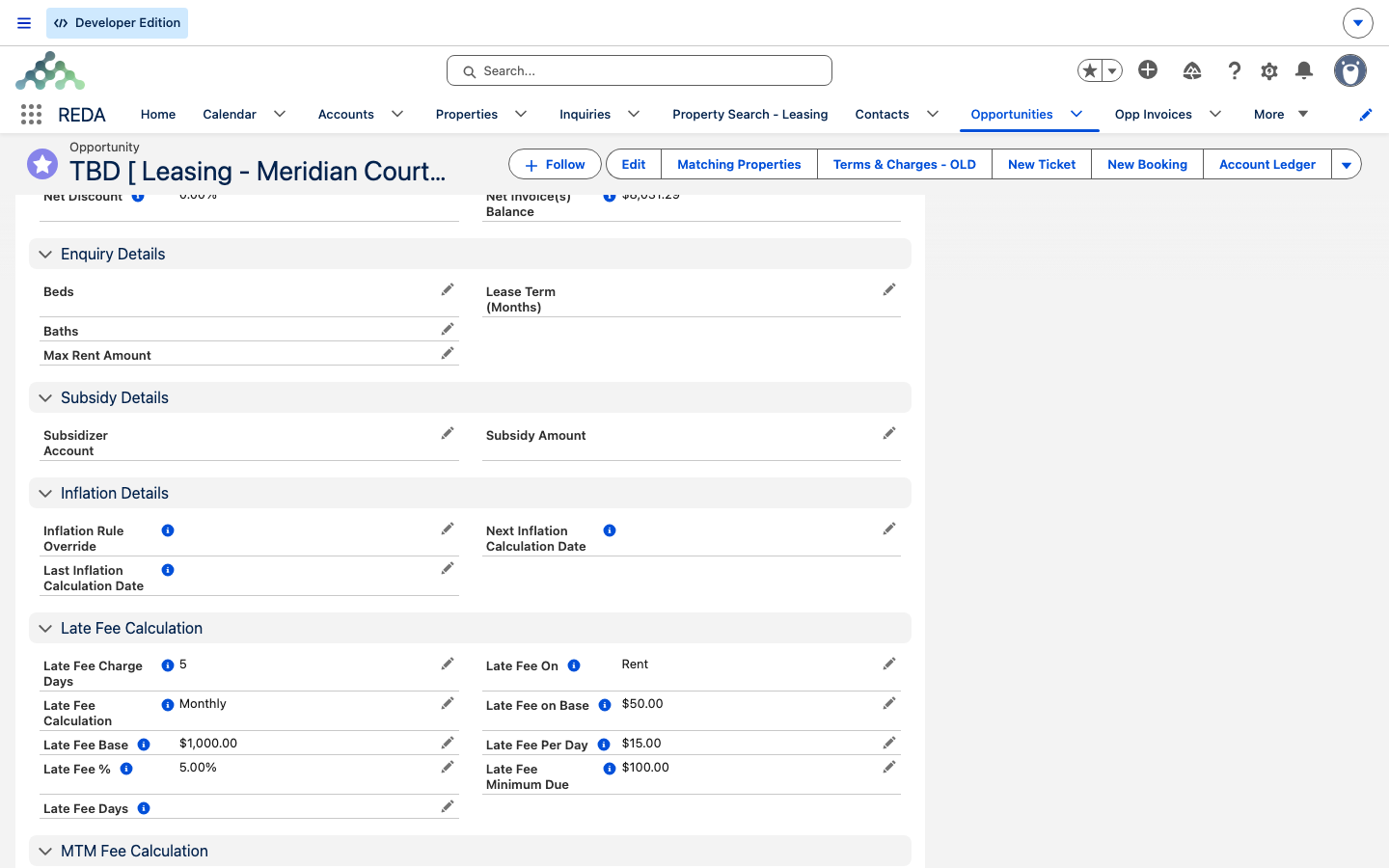
Late Fee Calculation is the master switch: Per Day, Monthly, or Monthly and Per Day. Each mode has required companion fields (REDA enforces them — see the reference table). Late Fee On chooses the base: Rent (the original billed rent, regardless of any partial payment) or Debt (the outstanding balance). For the monthly tier, Late Fee Base, Late Fee on Base, and Late Fee % combine — the field help gives the worked shape: with a base of 500, a flat fee of 50, and a rate of 5%, a 2,000 overdue balance yields 50 plus 5% of 1,500. Late Fee Per Day, Late Fee Days (a cap on billed days per invoice), Late Fee Charge Days (the grace period, which must be 1–28), and Late Fee Minimum Due (a de-minimis floor) complete the group.
Month-to-month fees
These govern holdover — a tenant staying past expiration. MTM Fee Type is Per Day or Monthly; MTM Fee is the fixed amount. For the Monthly type only, three options refine it: MTM Fee Equals Monthly Rent (the holdover tenant simply keeps paying rent), Do Prorate MTM Fee, and Add Rent Variance to MTM Fee (which adds the market-minus-lease gap for below-market holdovers).
Multi-year step-ups
Enable Multi Year Rule is the master gate. Multi Year Breakup (Months) is the step interval (default 12). Rent Step Up Rule chooses the math: Y1BR (a percentage of Year 1 base rent), PYBR (a percentage of the previous year's base rent, compounding), or F (a fixed amount). You then supply Rent Step Up % or Rent Step Up Fixed. Follow EOM (End of Month) aligns step-up periods to month-end. Worked numbers live in Multi-Year Leases & Step-Ups.
Straight-line recognition
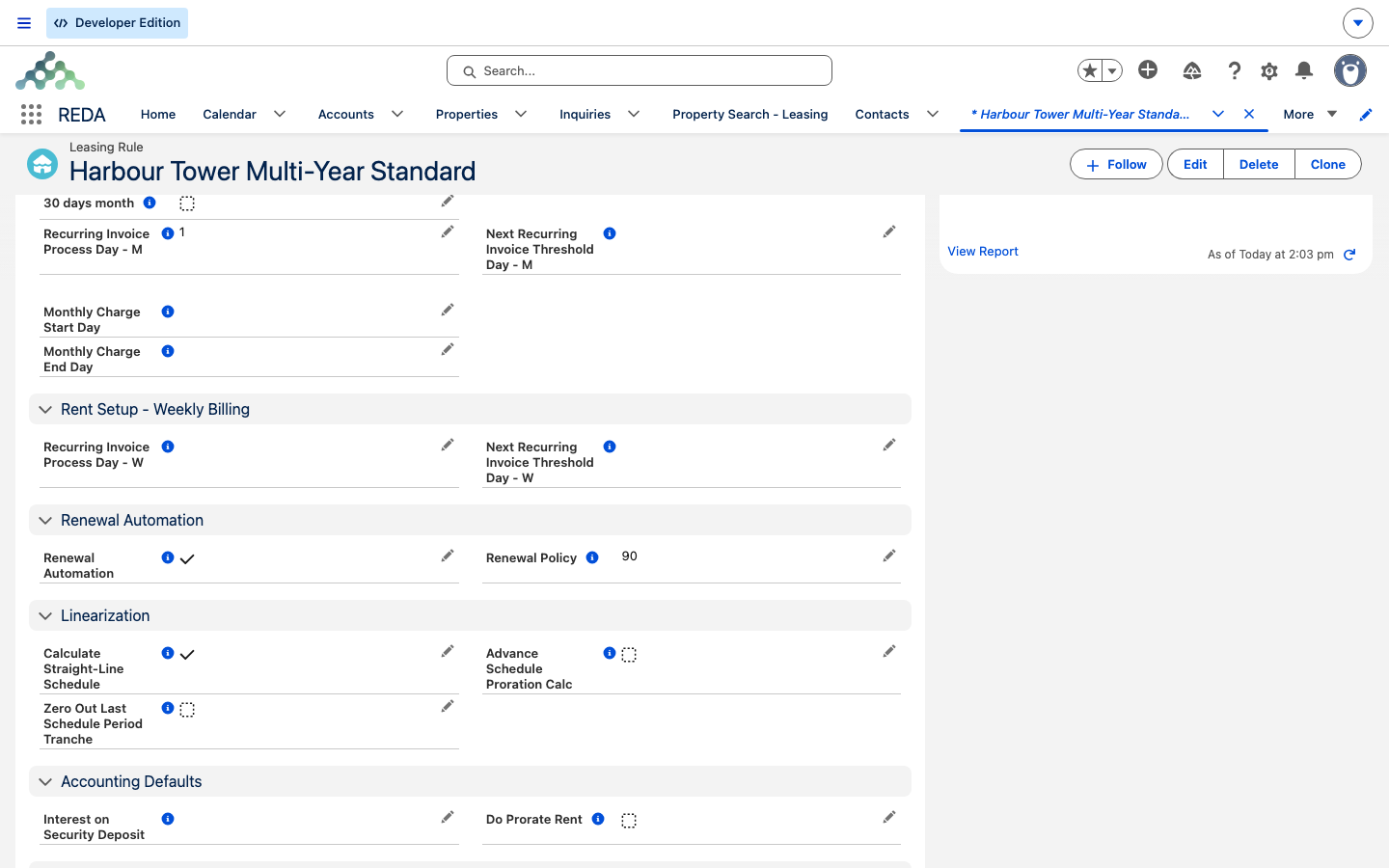
Calculate Straight-Line Schedule is the master flag for IFRS 16 / ASC 842 straight-line rent recognition. Advance Schedule Proration Calc switches on exact day-based proration (the field help calls it recommended for IFRS 16 / ASC 842 compliance), and Zero Out Last Schedule Period Tranche tidies the final period.
Availability, turnover & renewals
Default Make Ready Days is added to a move-out date to compute the property's next availability date (a property-level override exists). New Application Hold Period (Days) takes a unit off-market while an application processes. Renewal Automation switches on the automatic creation of Renewal tickets, and Renewal Policy is the number of days before lease end that the Renewal ticket is raised — despite the name, it holds a days value, not a text policy.
Referral bonuses & deposits
Referee Bonus and Referrer Bonus are default referral credits and must be negative, because REDA raises them as credit-memo invoices; each requires its paired charge code. Interest on Security Deposit exists as a field but has no automation behind it today — treat it as informational only. The rule holds no deposit amounts; deposits live on charges and their setups.
Region & currency
Region drives currency and record sharing and is required when multi-currency is enabled. Region Code and SYS Currency are system-managed. Note that a rule's Region cannot be changed once related properties, leases, setups, or tickets exist.
Admin Charge Setups: application, move-in & deposit charges
Rent is only one line on a lease. Every other charge a lease can carry — the application fee, the admin or approval fee, move-in charges, and the security deposit — is defined by an Admin Charge Setup, a child record that lives beneath the rule in its Admin Charge Setups related list. When someone opens Terms & Charges on a lease, REDA reads these setups to build the lease's admin and one-time lines; add a Lease Charge - Admin line with no setup behind it and REDA stops you: "You must provide Admin Charge Setup for Lease Admin Charge." So the setups you build here are the menu of non-rent charges every lease under the rule can draw from.
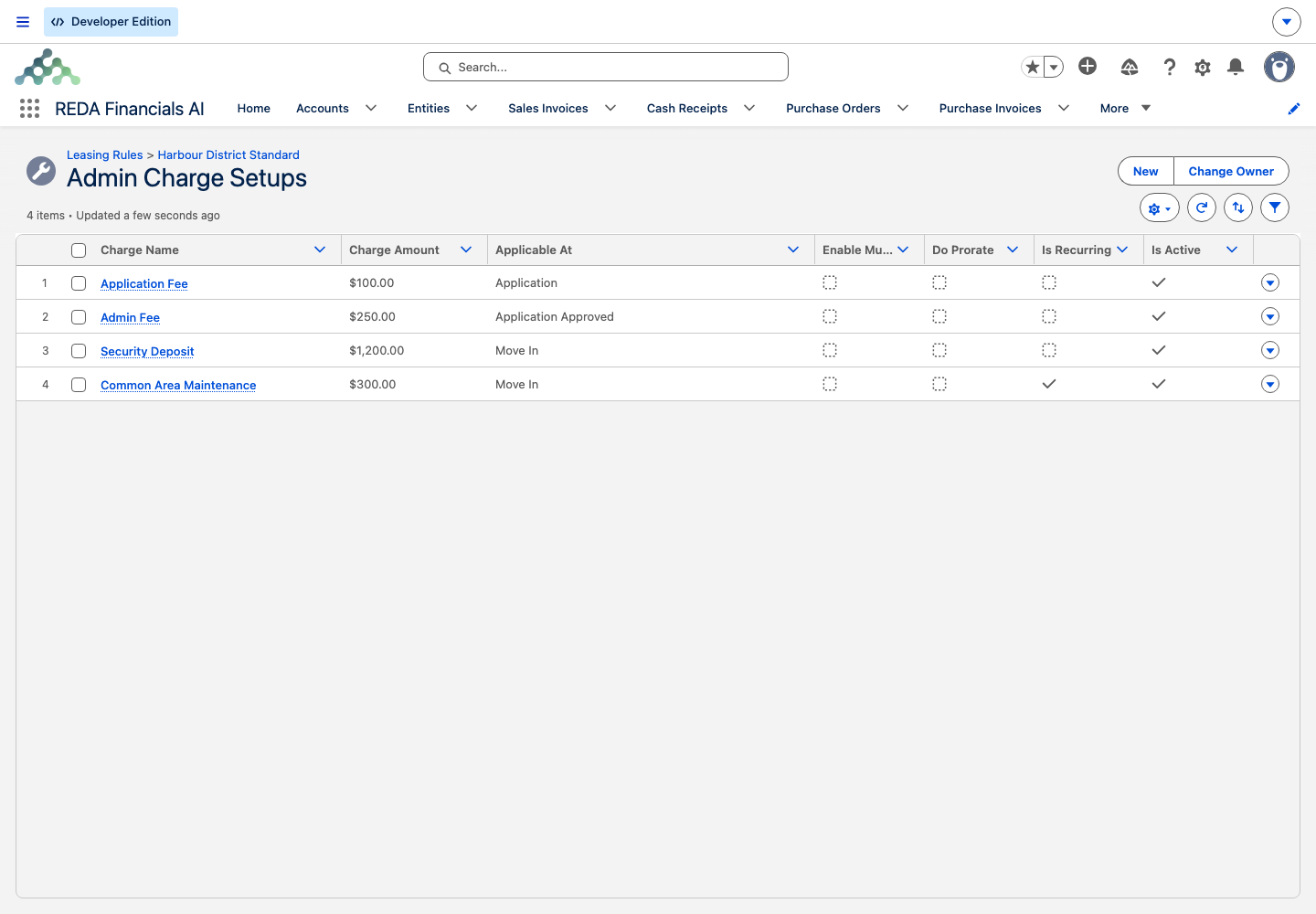
Each setup carries its own money and timing:
- Charge Amount and Charge Code — the figure, and the billing category it routes to (as with every charge, the code must be active).
- Applicable At — Application, Application Approved, or Move In. This ties the charge to a stage gate: its invoicing switches on only when the lease reaches that stage — an application fee at
Application - Completed, an admin fee atApplication - Approved, a deposit or move-in fee atOccupied - Pending Move In. - Applicable On Renewal — whether the charge is offered again when the lease renews. Left off, it's a new-lease-only fee; turned on, it reappears in the Renewal Terms & Charges editor.
- Applicable for Booking — whether the charge also applies to booking deals, not just leases.
- Is Optional — an optional setup is offered in the editor for the tenant to opt into, rather than applied to every lease automatically.
- Is Recurring with Charge Period (month, week, or day) — most admin charges are one-time, but a setup can be made to recur on a cycle. Do Prorate is available only when it recurs.
- Is Security Deposit — flags the setup as a refundable deposit. A deposit is one-time by nature, and REDA enforces it: "Security Deposit cannot be recurring."
- Instance Based — bills the amount times a count you enter on the lease line, for a charge levied per unit (say per additional key or parking space).
- Enable Multi Year Rule with Charge Step Up Rule (Y1BR, PYBR, or F) and Charge Step Up % / Charge Step Up Fixed — admin fees can step up across a multi-year term the same way rent does; the mechanics are in Multi-Year Leases & Step-Ups.
- Sort Order sets the order the setups appear in the editor, and Is Active keeps an old setup on the rule without offering it on new leases.
How rule edits hit live leases (the cascade)
This is the behavior to internalize before you edit a rule that is already in use.
The practical takeaway: to give one lease a different late-fee or month-to-month policy, put it under a different rule — editing the fields on the lease itself won't hold. The same completeness checks that guard these fields on the rule also exist on the lease, so the copied values stay internally valid.
Not everything cascades. Charge generation reads the rule live at generation time (proration, multi-year settings, admin setups), and billing cadence and make-ready days are always read live. This table is worth keeping in front of you:
| Rule area | Copied to the lease? | When it's read |
|---|---|---|
| Late-fee & MTM policy (the 15 fields) | Copied — and re-copied on every save of an active lease | From the lease's own copies at billing time |
| Billing cadence (process / threshold days, custom window) | Never copied | Live from the rule at every billing run |
| Proration (Do Prorate Rent, 30 days month) | Do Prorate inherited per generated charge; the 30-day switch read live | At charge generation and proration math |
| Multi-year step-up settings | Never copied | Live at charge generation |
| Make Ready Days / Hold Period / Renewal days | Never copied | Live when notice stages, applications, or renewals fire |
| Straight-line flags | Never copied | Live when the schedule engine runs |
Worked example: building a rule
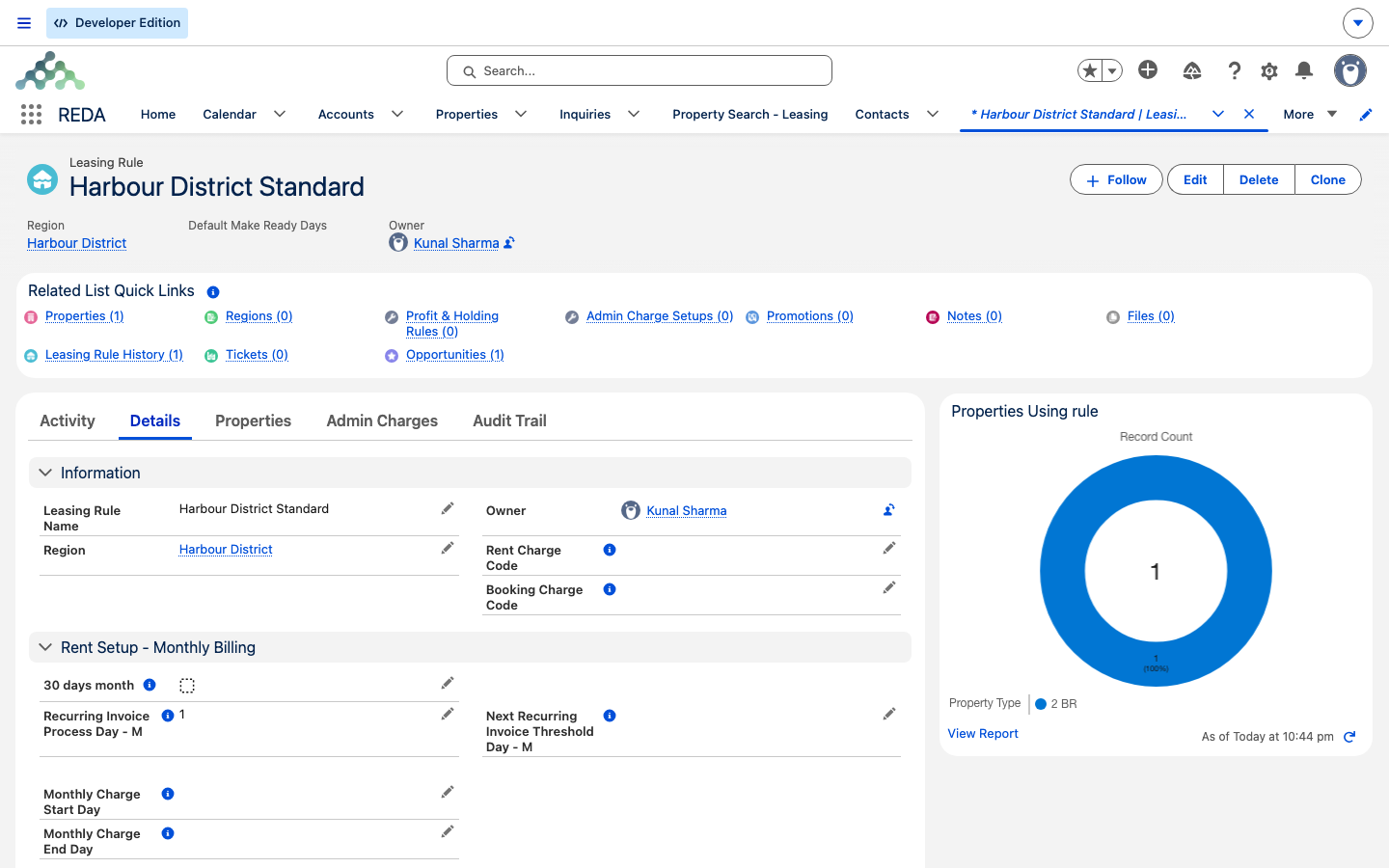
Suppose you're setting policy for Meridian Properties in the Harbour District region, and this region already has its everyday rule, Harbour District Standard. Here you'll build a fresh rule for a residential, monthly-billed portfolio. The name is yours to choose — we'll call it "Harbour District Residential" for this walkthrough — and the values below are illustrative, not defaults:
Now watch the cascade. Aisha Rahman's lease on Meridian Court #101, once active under this rule, shows the same late-fee values on its Details tab. If you later change the rule's Late Fee %, the next save of that active lease re-copies the new value onto it.
Reference: every validation rule
REDA enforces these completeness checks when you save a rule. The messages are quoted exactly as they appear.
| When it fires | Message |
|---|---|
| Late Fee Charge Days out of range | "Late Fee Charge Day - must be a number between 1 to 28." |
| Late Fee Calculation = Per Day, companions missing | "If "Late Fee Calculation" basis is "Per Day", then values for following fields must be provided. 1. Late Fee Days 2. Late Fee On 3. Late Fee Per Day 4. Late Fee Minimum Due 5. Late Fee Charge Day" |
| Late Fee Calculation = Monthly, companions missing | "If "Late Fee Calculation" basis is "Monthly", then values for below fields must be provided. 1. Late Fee Base 2. Late Fee On Base 3. Late Fee % 4. Late Fee On 5. Late Fee Minimum Due 6. Late Fee Charge Day" |
| Late Fee Calculation = Monthly and Per Day, companions missing | "If "Late Fee Calculation" basis is "Monthly and Per Day", then provide values for : 1. Late Fee Base 2. Late Fee On Base 3. Late Fee % 4. Late Fee On 5. Late Fee Minimum Due 6. Late Fee Charge Day 7. Late Fee Days 8. Late Fee Per Day" |
| MTM Fee Type = Monthly, fee missing | "If "MTM Fee Type" is "Monthly", then "MTM Fee" must be provided if "MTM Fee" not equal to Monthly Rent." |
| MTM Fee Type = Per Day, conflicting options ticked | "If "MTM Fee Type" is "Per Day", then values for below fields must be provided. 1. MTM Fee 2. MTM Fee Equals Monthly Rent must NOT be checked 3. Do Prorate MTM Fee must NOT be checked 4. "Add Rent Variance to MTM Fee" must NOT be checked" |
| Only one of the custom monthly days set | "If the monthly charge start day is provided then you must provide value for the monthly charge end day, and vice versa." |
| Multi Year enabled, settings incomplete | "Please provide Multi Year Breakup Months AND Rent Step Up Rule if Multi Year Rule is enabled." |
| Step-up amount missing for the chosen rule | "Please provide "Rent Step Up %" if Rent Step Up Rule is based on "Rent %" OR provide "Rent Step Up Fixed" amount if "Rent Step Up Rule" is Fixed." |
| Monthly process day out of range | "Recurring Invoice Process Day - must be a number between 1 to 28." |
| Weekly process day out of range | "Allowed values are between 1 to 7. Sunday is 1 and Saturday is 7." |
| Referee bonus not negative | "The referee bonus amount must be negative so as the system shall create a credit memo invoice as when the bonus will get due." |
| Referee bonus without its charge code | "If referee bonus amount is provided, then referee bonus charge code must be provided." |
| Referrer bonus not negative | "The referrer bonus amount must be negative so as the system shall create a credit memo invoice as when the bonus will get due." |
| Referrer bonus without its charge code | "If referrer bonus amount is provided, then referrer bonus charge code must be provided." |
| Region missing under multi-currency | "Please provide Region if Multi Currency is enabled." |
Where to go next
- Rent Charge Setups — where the rent numbers a lease uses actually come from.
- Setting Up Lease Charges — the admin setups under the rule become chargebook lines.
- Multi-Year Leases & Step-Ups — the worked math behind the step-up settings.
- How Recurring Invoicing Works — the cadence fields in action.
- Tenant Referrals — the referral bonuses set here, applied.
- The Lease Record — where the copied policy shows up on a lease.
Frequently asked questions
The fifteen late-fee and MTM fields are re-copied from the rule every time an active lease is saved, so a manual change on the lease is overwritten on the next save. To vary the policy for a single lease, put it under a different rule.
Multi-year needs the interval and the rule chosen first: "Please provide Multi Year Breakup Months AND Rent Step Up Rule if Multi Year Rule is enabled." — and then the matching amount: "Please provide "Rent Step Up %" if Rent Step Up Rule is based on "Rent %" OR provide "Rent Step Up Fixed" amount if "Rent Step Up Rule" is Fixed."
The monthly process day is capped so it exists in every month: "Recurring Invoice Process Day - must be a number between 1 to 28." Pick a day from 1 to 28.
REDA raises the bonus as a credit-memo invoice, so the amount is entered as a negative: "The referee bonus amount must be negative so as the system shall create a credit memo invoice as when the bonus will get due."
Once properties, leases, setups, or tickets are related to the rule, its region is locked so currency and sharing stay consistent. Create a new rule for the other region instead.
Cadence is never copied onto leases; it is read live from the rule at each billing run. The new process day simply applies from the next run, on every lease under the rule.
Was this article helpful?