
Multi-Year Leases & Step-Ups
A three-year lease is not one rent number — it's usually a rent that rises each year. REDA handles that with step-ups: when a lease runs longer than the step-up window (typically a year), REDA splits the rent into dated yearly periods and escalates each one by a rule you choose. This article shows the exact math, with worked numbers, for all three escalation rules — Year 1 Base Rent %, Previous Year Base Rent %, and Fixed — how the dated charge rows look on the lease, the settings that drive them, and how admin fees can step up too. No prior REDA experience is assumed; every term is defined as we reach it.
Access you'll need. Changing the rule requires the REDA - Master Data - Admin permission set; generating a lease's charges requires REDA - Property Leasing User.
What a step-up is
Consider a 36-month commercial lease on Harbour Tower Suite 300, starting at 2,000.00 a month. Left as a single figure, REDA would bill 2,000.00 for three straight years. But most multi-year contracts raise the rent annually, so REDA instead lays out one dated rent row per year — a first-year row, a second-year row, a third-year row — each with its own escalated amount and its own date window. The tenant is billed from whichever row's window covers the invoice date, so the increase happens on its own at each anniversary.
A Leasing Rule is the policy record a lease follows for its rent, fees, and escalation behavior; every lease inherits one from its property or region. The step-up settings live there, so a rule that turns step-ups on applies them to every long lease under it.
Turning it on
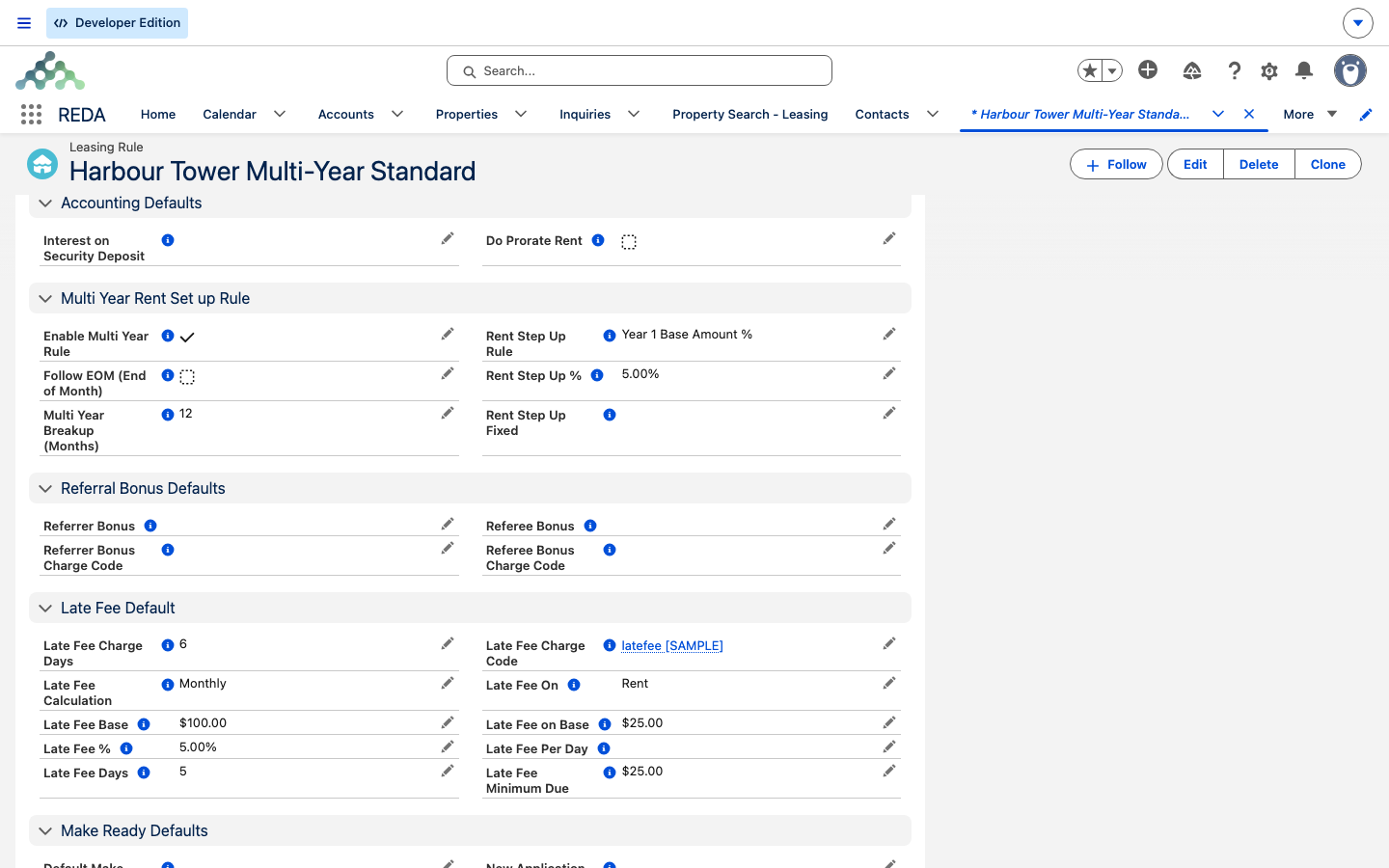
Five settings on the Leasing Rule control step-ups:
| Field | What it does |
|---|---|
| Enable Multi Year Rule | The master switch for step-ups on this rule. |
| Multi Year Breakup (Months) | The length of each period — the step-up window. Defaults to 12 months (one year). |
| Rent Step Up Rule | Which escalation rule to use: Year 1 Base Rent %, Previous Year Base Rent %, or Fixed. |
| Rent Step Up % / Rent Step Up Fixed | The size of the increase — a percentage for the two percent rules, a flat amount for Fixed. |
| Follow EOM (End of Month) | Optionally aligns each period to month-end instead of the exact anniversary date. |
REDA gates the setup so a half-configured rule can't save. Turn on multi-year without picking the window and rule and you'll see:
Pick a rule but leave its amount blank and REDA points you at the matching field:
The three step-up rules, with numbers
All three rules start from the same first-year rent — the base — and differ only in how each later year is calculated. Take a base of 2,000.00, a 5% increase (or a Fixed increase of 150.00), and read across:
| Rule | How each year is figured | Year 1 / Year 2 / Year 3 |
|---|---|---|
| Year 1 Base Rent % | Each year adds the percentage of the first year's rent — a level increase every year. | 2,000.00 / 2,100.00 / 2,200.00 |
| Previous Year Base Rent % | Each year adds the percentage of the previous year's rent — so the increases compound. | 2,000.00 / 2,100.00 / 2,205.00 |
| Fixed | Each year adds the same flat amount. | 2,000.00 / 2,150.00 / 2,300.00 |
Amounts are rounded to two decimals. Without multi-year enabled, a single charge covers the whole term at the base amount.
What REDA generates on the lease
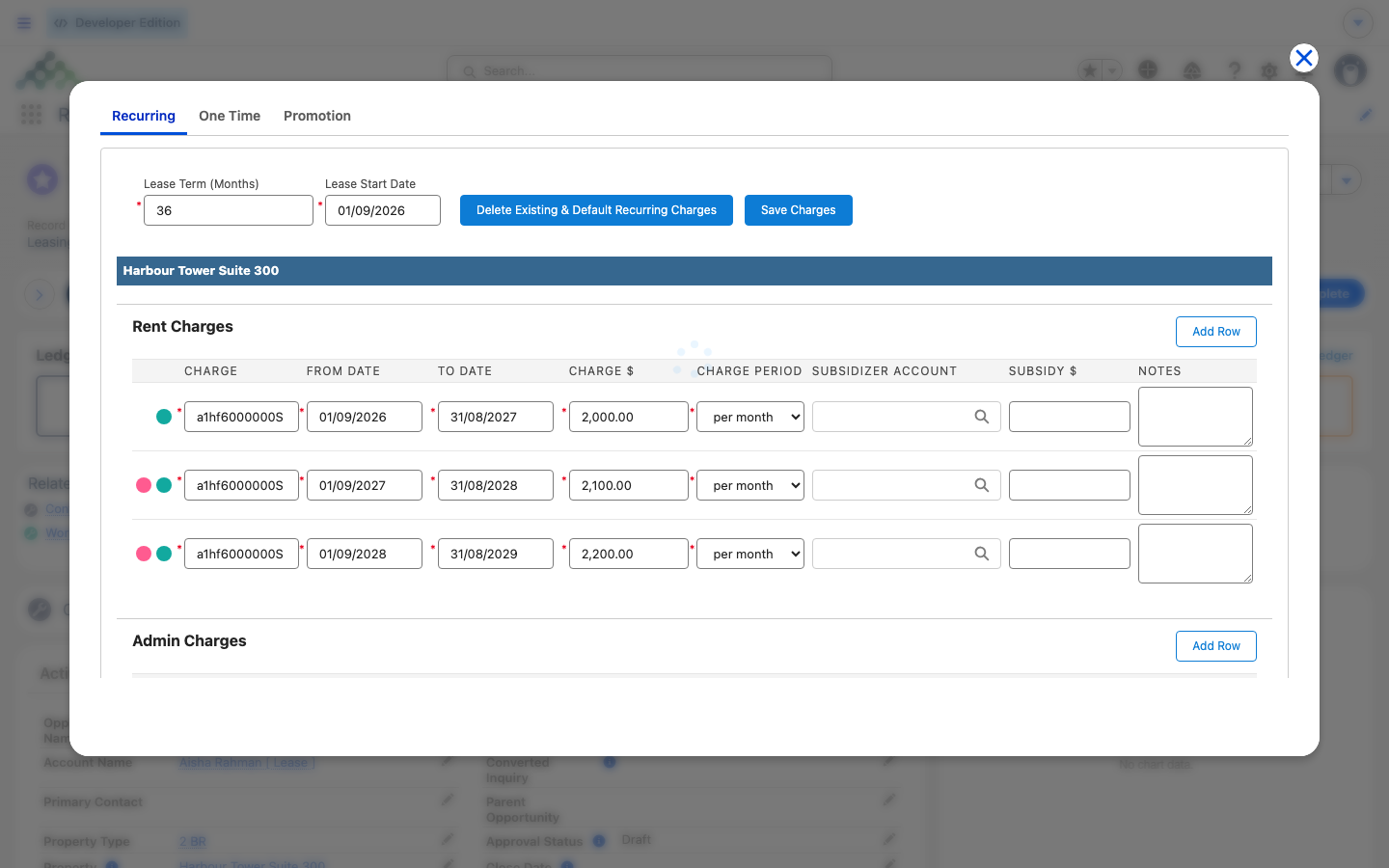
When you build the chargebook with Terms & Charges, REDA turns the rule's settings into real charge rows:
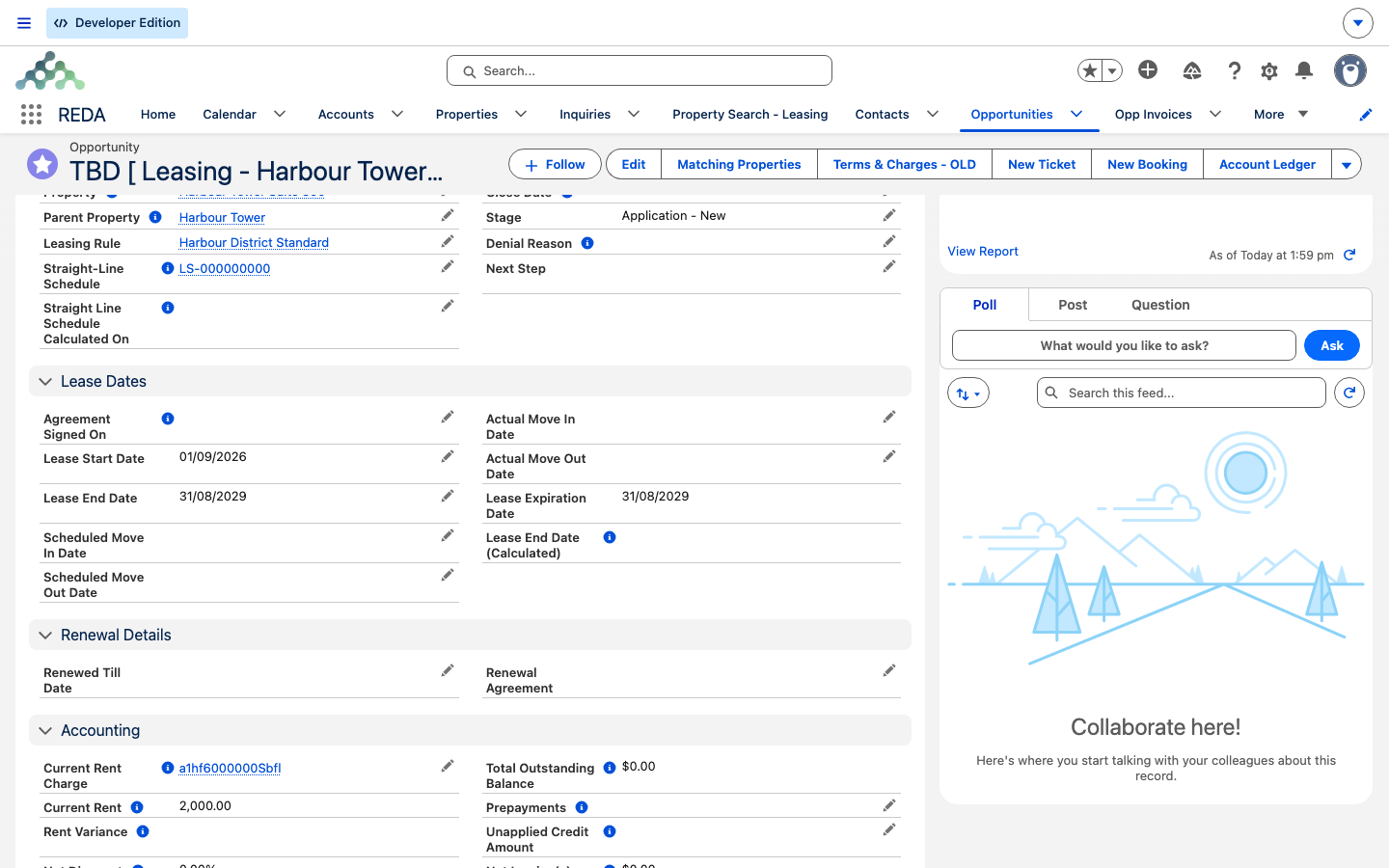
From there, invoicing simply follows each row's date window — no special billing setup is needed beyond the normal recurring cadence. The lease's Current Rent Charge — the pointer REDA uses to show one headline "today's rent" figure — moves to the period in force at each anniversary, so the displayed Current Rent always reflects the year the lease is actually in.
Admin fees can step up too
Escalation isn't only for rent. A recurring administrative charge — a facility fee, say — can carry its own step-up on its charge setup, using the same three rules. The setup has an Enable Multi Year Rule switch, a Charge Step Up Rule, and a percentage or fixed amount, and REDA runs the identical math on it. So a 100.00/month facility fee under a Year 1 Base rule at 10% steps to 110.00 in Year 2 and 120.00 in Year 3, right alongside the rent.
The setup is gated the same way. A fee that isn't recurring, or a rule where lease-level multi-year isn't on, can't enable step-ups:
And, as with rent, the increase amount is required once a rule is chosen:
Property amenity charges escalate on the same engine, so a stepped rent, a stepped facility fee, and a stepped amenity all rise together across the term.
Renewals and step-ups
Step-ups apply to renewals just as they do to new leases. When you set up a renewal's charges, REDA runs the same generation over the renewed term — using the renewal (rather than new-lease) base amounts and the same escalation rules. A renewed multi-year term is split, dated, and stepped exactly like the original. The renewal cycle itself is covered in Renewing a Lease.
Worked example: the Harbour Tower step-up
Harbour Tower Suite 300 is a 36-month commercial lease at a base rent of 2,000.00 a month, running 1 Aug 2026 to 31 Jul 2029. Its rule has multi-year enabled, a 12-month breakup window, and the Year 1 Base Rent % rule at 5%. When you run Terms & Charges, REDA generates three dated rent rows:
| Period | Dates | Monthly rent |
|---|---|---|
| Year 1 | 1 Aug 2026 – 31 Jul 2027 | 2,000.00 |
| Year 2 | 1 Aug 2027 – 31 Jul 2028 | 2,100.00 |
| Year 3 | 1 Aug 2028 – 31 Jul 2029 | 2,200.00 |
Under Previous Year Base Rent % at 5%, the same lease compounds — the Year 3 row reads 2,205.00 instead of 2,200.00:
| Period | Dates | Monthly rent |
|---|---|---|
| Year 1 | 1 Aug 2026 – 31 Jul 2027 | 2,000.00 |
| Year 2 | 1 Aug 2027 – 31 Jul 2028 | 2,100.00 |
| Year 3 | 1 Aug 2028 – 31 Jul 2029 | 2,205.00 |
And under Fixed at 150.00, each year simply adds the flat amount:
| Period | Dates | Monthly rent |
|---|---|---|
| Year 1 | 1 Aug 2026 – 31 Jul 2027 | 2,000.00 |
| Year 2 | 1 Aug 2027 – 31 Jul 2028 | 2,150.00 |
| Year 3 | 1 Aug 2028 – 31 Jul 2029 | 2,300.00 |
If Harbour Tower's term were 30 months instead of 36 under the same 12-month window, REDA would still produce three rows — the count rounds up — with the third clamped to the lease's end. Add a stepped facility fee alongside the rent (100.00 under a Year 1 Base rule at 10%) and it climbs 100.00 / 110.00 / 120.00 across the same three periods.
Reference: settings to math
The rule in one line each, and how the generation works:
| Rule | Year-N rent | Behavior |
|---|---|---|
| Year 1 Base Rent % | base + (base × %) × (N−1) | Linear — same increase every year |
| Previous Year Base Rent % | previous year + previous year × % | Compounding — the increase grows |
| Fixed | base + fixed × (N−1) | Linear — same flat step every year |
Generation, in words. Periods = term ÷ breakup months, rounded up. Dates chain (each period's end = its start + breakup window − 1 day, extended to month-end when Follow EOM is on). The last period is clamped to the lease end date, and every amount is rounded to two decimals.
Where to go next
- Setting Up Lease Charges — the Terms & Charges editor that generates the rows.
- Leasing Rules: the Policy Engine — where the step-up settings live, among the rest of the rule.
- Renewing a Lease — step-ups on renewal generation.
- Straight-Line Rent Recognition — recognizing stepped rent evenly.
- Rent Charge Setups — where the base amount per term comes from.
- Inflation Adjustments — index-driven escalation, a different mechanism from step-ups.
Frequently asked questions
The window and the rule are required: "Please provide Multi Year Breakup Months AND Rent Step Up Rule if Multi Year Rule is enabled." Set both, then save.
It depends on the rule you picked: "Please provide "Rent Step Up %" if Rent Step Up Rule is based on "Rent %" OR provide "Rent Step Up Fixed" amount if "Rent Step Up Rule" is Fixed." Percentage for the two percent rules, a flat amount for Fixed.
The fee has to be recurring, and the lease's rule has to have multi-year on, with a step-up rule set: "Multi Year Rule can only be enabled for recurring charges and if Multi Year is enabled for Leasing Rule and Charge Step Up Rule must be defined."
Year 1 Base Rent % always adds the percentage of the first year's rent, so the increases stay level. Previous Year Base Rent % adds the percentage of the prior year, so they compound — 2,200.00 versus 2,205.00 by Year 3 in the standard example.
Step-ups only engage when the term is longer than the breakup window. A one-year lease under a 12-month window is a single rent row by design.
The final row is clamped to the lease's end date so it never bills past the lease. On a term that isn't a whole number of windows, the last period is deliberately shorter than the rest.
Was this article helpful?