
Proration
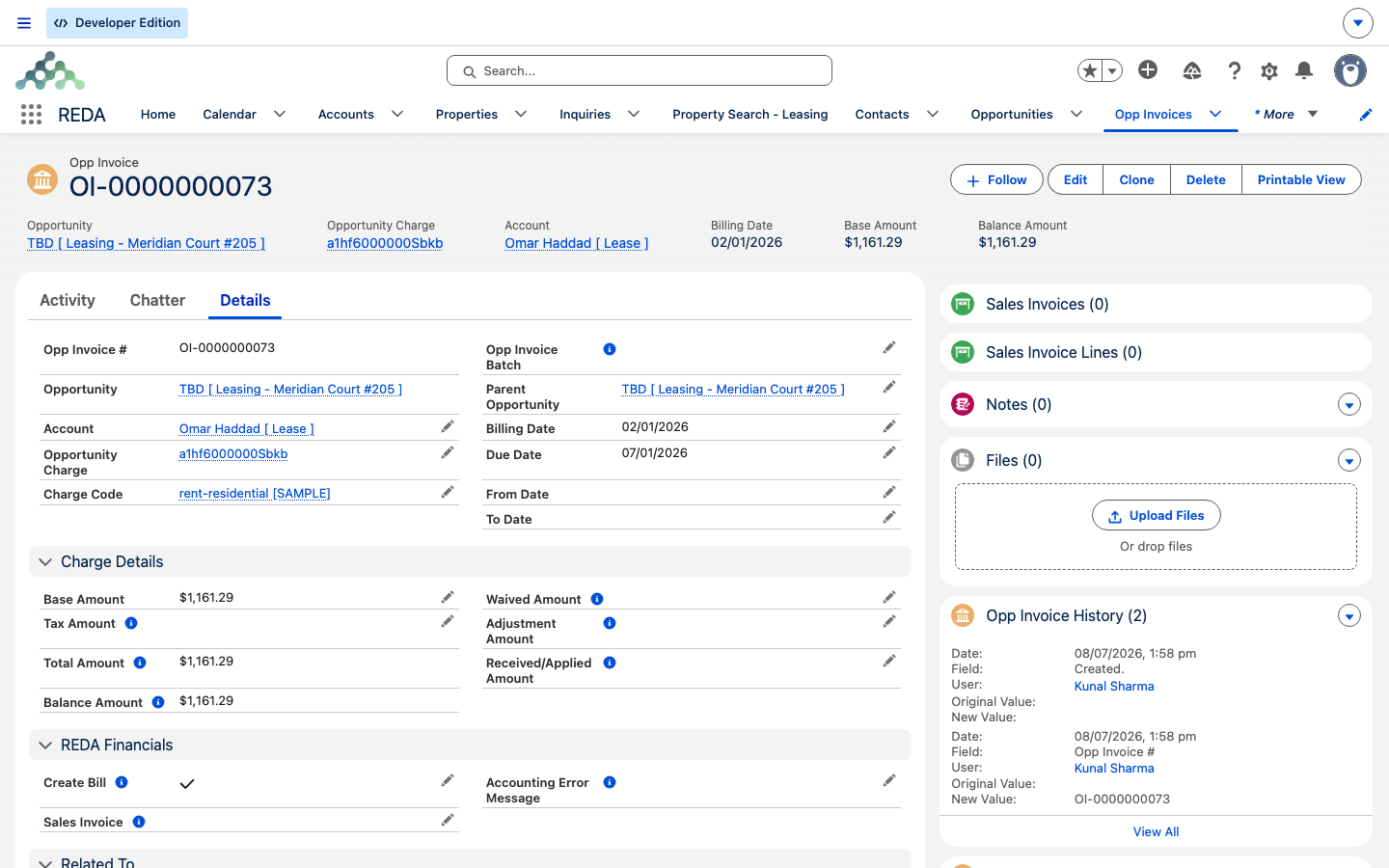
A tenant moves in halfway through the month, and their first invoice isn't a round month's rent. That's proration — REDA charging only for the days the tenant actually occupies a partial period. This article shows you exactly how REDA works out a prorated amount, so you can reproduce any move-in or move-out figure by hand and answer the classic front-desk question: "why is my first invoice 1,161.29 and not a full month?" There are two calculation conventions, a full-month safeguard, and a couple of preview fields that show the numbers before any invoice exists. No accounting background is assumed.
Access you'll need. Editing charges requires the REDA - Property Leasing User permission set (or REDA - Master Data - Admin); changing a Leasing Rule requires REDA - Master Data - Admin. Leasing agents can read the rule but not change it.
When REDA prorates
Proration kicks in on recurring charges — rent and other repeating charges — that have Do Prorate switched on, and only for a partial period. A partial period is one where the tenant doesn't have the whole billing window: the first period when a lease starts mid-month, or the last period when it ends mid-month. Full months in between are billed in full.
Proration applies to recurring charges only. If you try to switch it on for a one-time charge, REDA stops you:
The same rule holds on the fee templates that generate charges (admin charge setups), where the message reads:
The same calculation engine also runs in a few other places — month-to-month holdover fees, straight-line schedules, and inflation catch-up invoices — so the two conventions below govern those too.
One subtlety worth naming: REDA prorates the period the tenant actually holds, which it clamps to the lease. A billing window never starts before the charge's from date or the lease start, and never runs past the charge's to date or the lease end. That's precisely why a month you'd call "full" can still prorate — if the lease started or ended inside it, only part of the month falls within the clamped window.
The 30-day-month switch
There are two philosophies for turning a monthly rent into a daily rate, and your Leasing Rule picks one for the whole lease:
| Convention | How a daily rate is found |
|---|---|
| 30-day month | Every month is treated as 30 days, so the daily rate is the monthly rent ÷ 30 — regardless of how many days the actual month has |
| Actual calendar days | The daily rate is the monthly rent ÷ the real number of days in that month (28, 30, 31…) |
Neither is "more correct" — they're policy choices. The 30-day convention makes every day worth the same across the year; the actual-days convention ties each day to its own month. You set the convention once per Leasing Rule, and it applies to every partial period that lease bills.
The math, worked both ways
Here's the calculation, using the demo lease throughout: Aisha Rahman at Meridian Court #101, monthly rent 1,200.00, Do Prorate on. She moves in on 2 January, so the first period covers 2–31 January — 30 days of a 31-day month.
Always do it in two steps: find the daily rate, then multiply by the days occupied.
| Convention | Daily rate | × 30 days | First invoice |
|---|---|---|---|
| 30-day month | 1,200.00 ÷ 30 = 40.00 | 40.00 × 30 | 1,200.00 |
| Actual calendar days | 1,200.00 ÷ 31 = 38.7097 | 38.7097 × 30 | 1,161.29 |
So the very same 30-day stay produces 1,200.00 under the 30-day convention and 1,161.29 under actual days — because January's daily rate is smaller when spread over 31 real days.
Full months are never shortchanged
The 30-day convention raises an obvious worry: if every month is "30 days," does February — which has 28 — get billed for only 28/30ths? No. A full month always bills the full amount. The 30-day divisor only ever applies to a partial period; a complete month bills its complete rent.
So in Aisha's lease, February bills 1,200.00 flat under either convention. The divisor only touches the stub periods at the start and end of the lease.
Weekly and daily charges
Not everything is monthly. The same logic scales to other charge periods:
| Charge period | Partial-period rule | Illustration |
|---|---|---|
| Per week | Amount ÷ 7 × days occupied | A 700.00 weekly charge, 3-day stub: 700.00 ÷ 7 × 3 = 300.00 |
| Per day | The amount per day — no proration needed | A 50.00 daily charge simply bills 50.00 for each day billed |
Previewing the stub on the charge
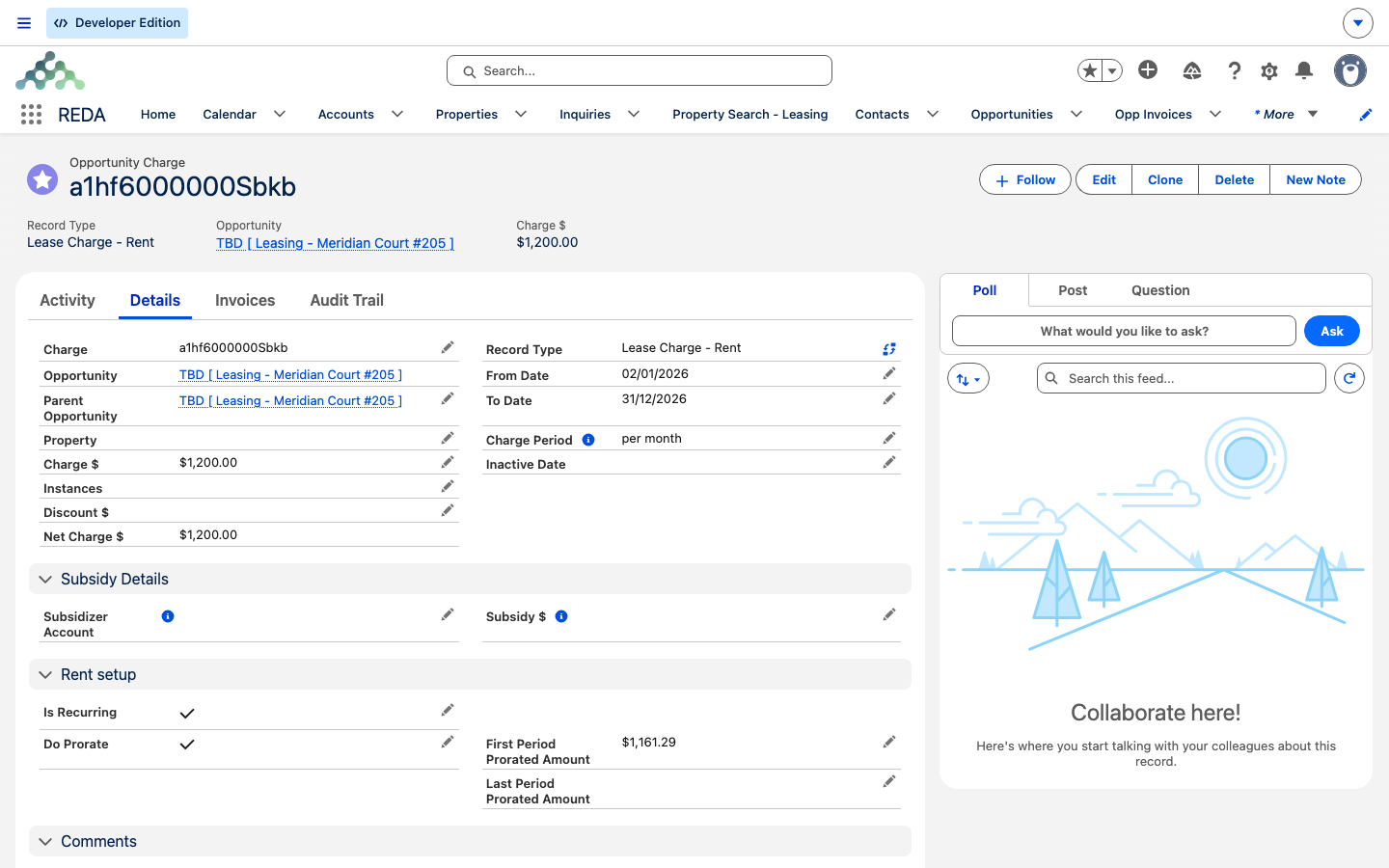
You don't have to wait for an invoice to see the prorated figures. When you save a prorating charge, REDA computes and displays two preview fields on the charge itself:
- First Period Prorated Amount — what the opening stub period will bill.
- Last Period Prorated Amount — what the closing stub will bill when the lease ends.
These let you confirm the move-in and move-out amounts up front, before any invoice is generated.
Where the same math reappears
Proration isn't only a move-in story. The same daily-rate calculation, honoring the same 30-day-month switch, runs anywhere REDA has to bill a partial slice of a period:
| Feature | What prorates |
|---|---|
| Recurring invoicing | The partial first and last windows of a lease |
| Month-to-month fees | The stub window in the month a lease expires into holdover |
| Straight-line schedules | Each month's cash rent inside an averaged schedule |
| Inflation adjustments | The already-billed portion re-rated by a catch-up invoice |
Because they all share one engine, the amount you compute by hand for a move-in stub is the same amount those features would produce for their equivalent partial period — the convention you set on the Leasing Rule carries through every one of them.
Worked example: Aisha's first month, both ways
Putting it together for Aisha Rahman — Meridian Court #101, rent 1,200.00/month, move-in 2 January, first period 2–31 January (30 days):
| Period | 30-day month | Actual calendar days |
|---|---|---|
| January stub (2–31 Jan, 30 days) | 1,200.00 (40.00 × 30) | 1,161.29 (38.7097 × 30) |
| February (full month) | 1,200.00 | 1,200.00 |
The Last Period Prorated Amount works the same way from the other end: if Aisha gives notice and moves out part-way through a month, that closing stub prorates by the identical formula.
Where to go next
- How Recurring Invoicing Works — where the prorated first and last invoices actually appear.
- Invoices Explained — reading the prorated invoice, field by field.
- Month-to-Month Fees — where the same proration runs on holdover fees.
- Straight-Line Rent — proration inside averaged rent schedules.
- Inflation Adjustments — catch-up invoices that prorate the difference.
Frequently asked questions
Your lease bills actual calendar days, and January has 31. For a 30-day stub the sum is 1,200.00 ÷ 31 × 30 = 1,161.29. Under the 30-day-month convention the same stub would be 1,200.00.
No. A full month always bills the full amount. The 30-day divisor applies only to partial periods — the stub at the start or end of a lease — never to a complete month.
Proration only applies to recurring charges: "Only recurring charges can be prorated." Make the charge recurring, or leave the one-time charge at its full amount.
The same rule applies to fee templates: "Proration is only applicable for recurring charges." Only recurring fee setups can carry proration.
On the charge itself — the First Period Prorated Amount field shows the opening stub, and Last Period Prorated Amount shows the closing one.
No. Invoices that have already generated keep their amounts. The convention affects future generation only.
Was this article helpful?